
1. Introduction
This instruction manual provides detailed guidance for the installation and maintenance of the Pssopp Replacement Kit for Mi Robot Vacuum Mop 2 Lite 2 Pro MJSTL MJST1S. Regular replacement of these components is essential for maintaining the optimal performance and longevity of your robot vacuum mop, ensuring efficient cleaning and effective air filtration.
The kit includes main brushes, filters, side brushes, and mop pads, all designed to be compatible with the specified Mi Robot models. Please refer to the following sections for proper usage and care.
2. Product Components
The Pssopp Replacement Kit includes the following items:
- 2 x Main Brushes: Designed for deep cleaning and debris collection.
- 4 x Filters: High-efficiency particulate air (HEPA) filters to capture fine dust and allergens.
- 4 x Side Brushes: Sweeps debris from edges and corners into the main cleaning path.
- 4 x Mop Pads (Rags): Microfiber pads for effective wet mopping.
- 1 x Cleaning Brush: A small brush for cleaning the main brush and other components.
- 1 x Thread Brush (Cutting Tool): A tool with a blade to cut tangled hair and threads from brushes.

Image 2.1: Overview of the Pssopp Replacement Kit components.
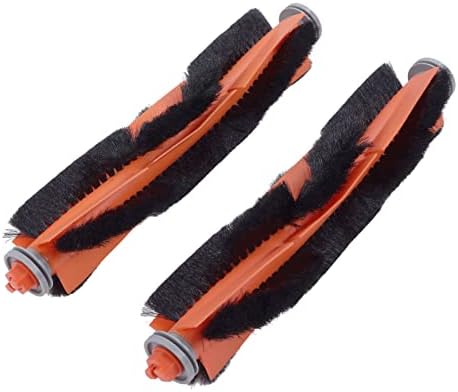
Image 2.2: Detailed view of the main brushes.

Image 2.3: Detailed view of the side brushes.

Image 2.4: Cleaning brush and thread cutting tool.
3. Installation and Replacement
Follow these steps to replace the components of your Mi Robot Vacuum Mop. Ensure the robot is powered off before beginning any maintenance.
3.1 Replacing the Main Brush
- Turn the robot vacuum over to access the underside.
- Locate the main brush cover and unlatch it.
- Remove the old main brush.
- Clean any debris from the brush compartment.
- Insert the new main brush, ensuring it clicks into place.
- Close and latch the main brush cover.

Image 3.1: Underside view of the robot vacuum, highlighting the main brush area.
3.2 Replacing the Side Brushes
- Turn the robot vacuum over.
- Use a screwdriver (not included) to remove the screw holding the side brush in place.
- Remove the old side brush.
- Align the new side brush and secure it with the screw.
3.3 Replacing the Filters
- Open the top cover of the robot vacuum.
- Remove the dustbin.
- Open the dustbin cover and remove the old filter.
- Clean the dustbin if necessary.
- Insert the new filter into the dustbin, ensuring a snug fit.
- Close the dustbin cover and reinsert the dustbin into the robot.
3.4 Replacing the Mop Pads
- Detach the mop pad holder from the robot vacuum.
- Remove the used mop pad from the holder (it's usually attached with hook-and-loop fasteners).
- Attach a new mop pad to the holder, ensuring it is securely fastened.
- Reattach the mop pad holder to the robot vacuum.
Video 3.2: Demonstrates the replacement process for main brushes, side brushes, filters, and mop pads on a compatible robot vacuum.
Video 3.3: Shows the features and replacement of accessories specifically for Xiaomi Mi Robot Vacuum Mop 2 Lite/Mop 2 Pro.
4. Maintenance
Regular maintenance of your robot vacuum's components is crucial for optimal cleaning performance and air quality. The filters are designed to catch fine particles and dust, preventing them from circulating in the air. The brushes ensure effective debris collection.
- Main Brush: Inspect weekly for tangled hair or debris. Use the provided thread brush/cutting tool to remove any obstructions.
- Side Brushes: Check regularly for wear and tear. Replace if bristles are bent or damaged to ensure effective edge cleaning.
- Filters: Tap out dust from the filters weekly. Replace filters every 2-3 months, or more frequently if the robot is used often or in dusty environments.
- Mop Pads: Wash mop pads after each use. Replace them when they show signs of wear or reduced cleaning effectiveness.
5. Troubleshooting
If you encounter issues after replacing components, consider the following:
- Parts do not fit: Double-check the model compatibility. This kit is specifically designed for Mi Robot Vacuum Mop 2 Lite 2 Pro MJSTL MJST1S.
- Reduced cleaning performance: Ensure all new components are installed correctly and securely. Check for any remaining debris in the brush compartments or dustbin.
- Unusual noises: Verify that brushes are free from obstructions and properly seated.
6. Specifications
| Feature | Detail |
|---|---|
| Brand | Pssopp |
| Compatible Models | Mi Robot Vacuum Mop 2 Lite, Mi Robot Vacuum Mop 2 Pro, MJSTL, MJST1S |
| Material | ABS, Cotton, High-Efficiency Particulate Air (HEPA) material |
| Included Components | 2 x Main Brush, 4 x Filter, 1 x Cleaning Brush, 1 x Thread Brush, 4 x Side Brush, 4 x Mop Pad |
| Item Weight | 13.1 ounces |
| Package Dimensions | 8.39 x 5.94 x 3.11 inches |
7. Warranty and Support
For any questions regarding the Pssopp Replacement Kit, please contact your retailer or the manufacturer's customer support. Keep your purchase receipt for warranty purposes. Specific warranty details may vary by region and retailer.