
Introduction
Thank you for choosing the THOMSON D528 Computer Speakers. This manual provides essential information for the proper setup, operation, and maintenance of your new soundbar. Featuring Bluetooth 5.0 connectivity, 10W stereo sound, dynamic RGB lighting, and versatile 3.5mm Aux-in and USB power options, these speakers are designed to enhance your audio experience for PC, desktop monitors, laptops, and tablets.
Please read this manual thoroughly before using the product to ensure optimal performance and safety.
What's in the Box
- THOMSON D528 Computer Speakers
- User Manual

Setup
Follow these steps to set up your THOMSON D528 Computer Speakers:
- Placement: Position the soundbar on a stable, flat surface, such as your desktop, beneath your monitor. Ensure adequate space for cable connections.
- Power Connection: Connect the USB cable from the speaker to a USB port on your computer, laptop, or a USB power adapter (not included). The speakers are USB powered.
- Audio Connection: Choose one of the following methods:
- 3.5mm Aux-in: Connect the 3.5mm audio cable from the speaker to the audio output jack on your device (PC, laptop, tablet, etc.).
- Bluetooth 5.0: Ensure the speaker is powered on. Activate Bluetooth on your device and search for "THOMSON D528" in the list of available devices. Select it to pair.
- Initial Power On: Long press the multi-function knob to turn on the speakers.


Operating Instructions
The THOMSON D528 speakers feature a multi-function knob for easy control:
- Power On/Off: Long press the knob to turn the speakers on or off.
- Volume Adjustment: Rotate the knob clockwise to increase volume and counter-clockwise to decrease volume.
- Switch Light Modes: Short press the knob once to cycle through the dynamic RGB lighting modes.
- Switch Bluetooth/AUX Mode: Short press the knob twice to switch between Bluetooth and 3.5mm Aux-in audio input modes.

Dynamic RGB Lighting
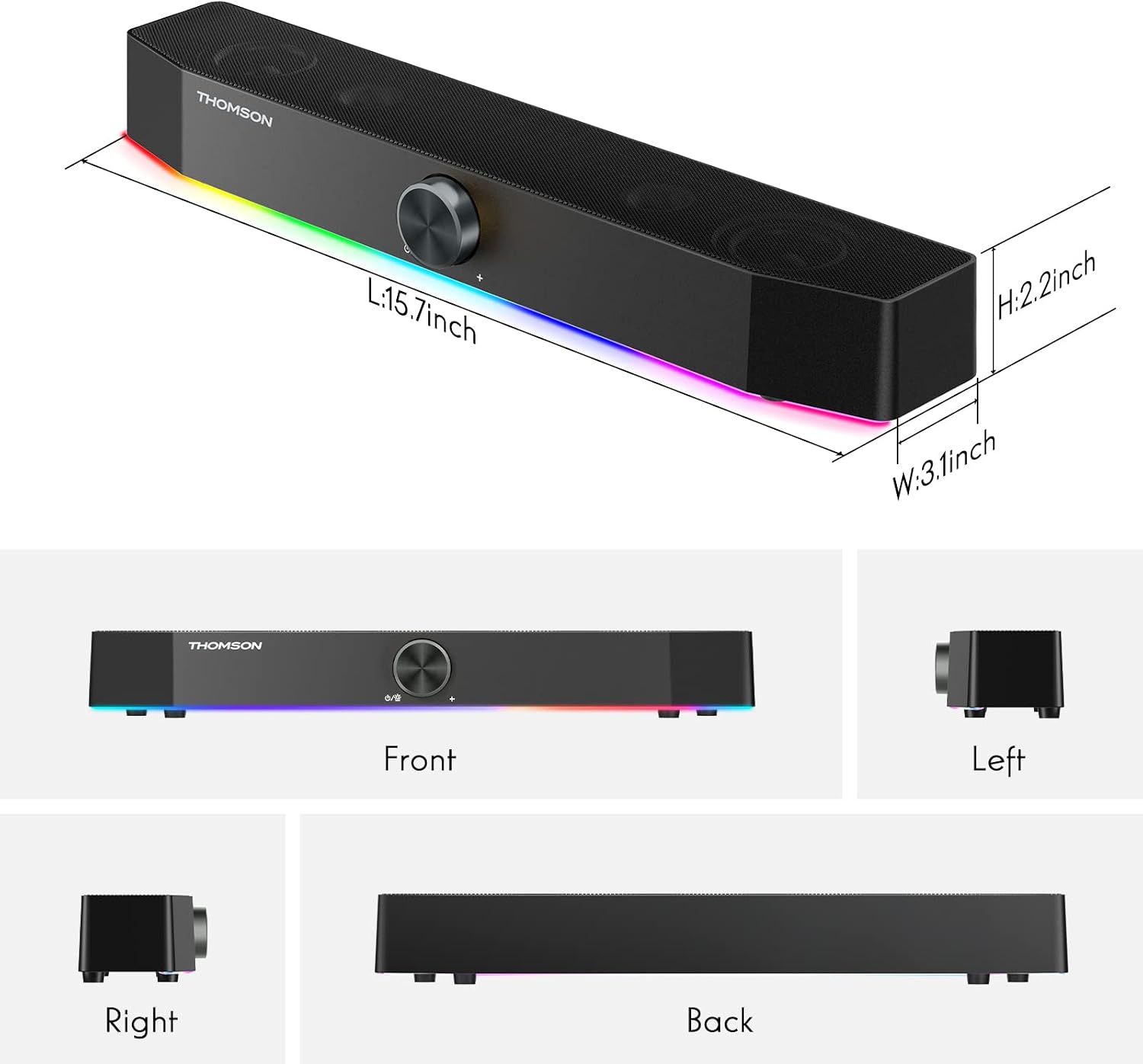
The THOMSON D528 speakers are equipped with dynamic RGB lighting effects to enhance your listening, gaming, or movie-watching experience. The light strip at the bottom of the soundbar can display multiple colors and modes.
- Changing Light Modes: Short press the multi-function knob once to cycle through the available light modes and colors.
- Turning Lights Off: Continue pressing the knob until the lights turn off, or select a static color if preferred.

Connectivity
The THOMSON D528 offers flexible connectivity options:
- Bluetooth 5.0: Provides wide compatibility and a stable wireless connection for devices like smartphones, tablets, and laptops. The Bluetooth range is up to 60 meters.
- 3.5mm Aux-in: For wired connections to any device with a standard 3.5mm audio jack, including PCs, desktop monitors, laptops, and MP3 players.
- USB Powered: The speakers draw power directly from a USB port, eliminating the need for an external power adapter.

Maintenance
To ensure the longevity and optimal performance of your speakers, follow these maintenance guidelines:
- Cleaning: Use a soft, dry cloth to wipe the exterior of the speakers. Do not use liquid cleaners or abrasive materials.
- Storage: When not in use for extended periods, store the speakers in a cool, dry place away from direct sunlight and extreme temperatures.
- Handling: Avoid dropping the speakers or subjecting them to strong impacts.
- Cable Care: Do not pull on the cables forcefully. Always grasp the plug when disconnecting.

Troubleshooting
If you encounter any issues with your THOMSON D528 speakers, refer to the following common problems and solutions:
- No Sound:
- Ensure the speakers are powered on and the volume is turned up.
- Check that the audio cable (3.5mm Aux-in) is securely connected to both the speaker and your device, or that Bluetooth is successfully paired.
- Verify that your device's audio output is set to the correct source (e.g., external speakers, Bluetooth).
- Bluetooth Disconnection:
- Ensure the speakers are within the 60-meter Bluetooth range of your device.
- Try unpairing and re-pairing the speakers with your device.
- Restart both the speakers and your Bluetooth device.
- RGB Lights Not Working:
- Short press the multi-function knob to cycle through light modes; ensure it's not set to the 'off' mode.
- Verify the speakers are receiving power via USB.
- Sound Distortion:
- Reduce the volume on both the speakers and your connected device.
- Ensure the audio cable is not damaged and is fully inserted.
- Move the speakers away from other electronic devices that might cause interference.
Specifications
| Feature | Specification |
|---|---|
| Model Name | Computer Speakers |
| Speaker Type | Soundbar |
| Connectivity Technology | Auxiliary, Bluetooth, USB |
| Wireless Communication Technology | Bluetooth 5.0 |
| Bluetooth Range | 60 Meters |
| Audio Output Mode | Stereo |
| Speaker Maximum Output Power | 10 Watts |
| Special Feature | USB Port, Dynamic RGB Lighting |
| Control Method | Knob |
| Product Dimensions | 3.07"D x 15.62"W x 2.01"H |
| Item Weight | 1.74 pounds |
| Compatible Devices | Smartphone, Tablet, MP3 Player, Desktop, Television, Projector, Laptop |

Warranty and Support
The THOMSON D528 Computer Speakers come with a 12-month worry-free warranty. For any product-related inquiries, technical assistance, or warranty claims, please contact THOMSON customer service. Our team is committed to providing lifetime friendly customer service.
For further assistance, please refer to the contact information provided on the product packaging or the official THOMSON website.
Official Product Videos
Video: A customer demonstrates the THOMSON D528 speaker in use, showcasing its features and sound quality in a real-world setting. This video is provided by NUOWEI STORE.
Video: A short demonstration of the THOMSON D528 Computer Speakers, highlighting their design and RGB lighting effects. This video is provided by NUOWEI STORE.
