
1. Important Safety Instructions
Please read this manual carefully before operating your Monzana MZKA2000 portable air conditioner. Keep it for future reference. Failure to follow these instructions may result in electric shock, fire, or injury.
- This appliance is for indoor use only.
- Ensure the power supply matches the voltage specified on the rating label.
- Do not operate the unit with a damaged cord or plug.
- Always place the unit on a flat, stable surface.
- Maintain a minimum distance of 30 cm (12 inches) from walls and other objects to ensure proper airflow.
- Do not block air inlets or outlets.
- Do not insert objects into the air outlets.
- Unplug the unit before cleaning or maintenance.
- The appliance contains R290 refrigerant. Do not puncture or damage the refrigerant circuit.
- Keep the unit away from heat sources and open flames.
- This appliance is not intended for use by persons (including children) with reduced physical, sensory or mental capabilities, or lack of experience and knowledge, unless they have been given supervision or instruction concerning use of the appliance by a person responsible for their safety.
2. Product Overview
The Monzana MZKA2000 is a 3-in-1 portable air conditioner offering cooling, dehumidification, and fan functions. It is designed for ease of use and portability.
Package Contents
- Monzana MZKA2000 Portable Air Conditioner Unit
- Remote Control
- Exhaust Hose
- Window Sealing Kit (for roller shutters)
- Drain Hose

Figure 2.1: Included accessories for the Monzana MZKA2000.
Unit Components
- Control Panel: Located on the top of the unit, featuring a rotary knob, LED display, and touch buttons.
- Air Outlet: Front grille for cooled air discharge.
- Air Inlets: Located on the sides/rear for air intake.
- Casters: Four wheels at the base for easy mobility.
- Side Handles: For lifting and moving the unit.
- Exhaust Air Outlet: Connection point for the exhaust hose at the rear.
- Drainage Port: For water removal.
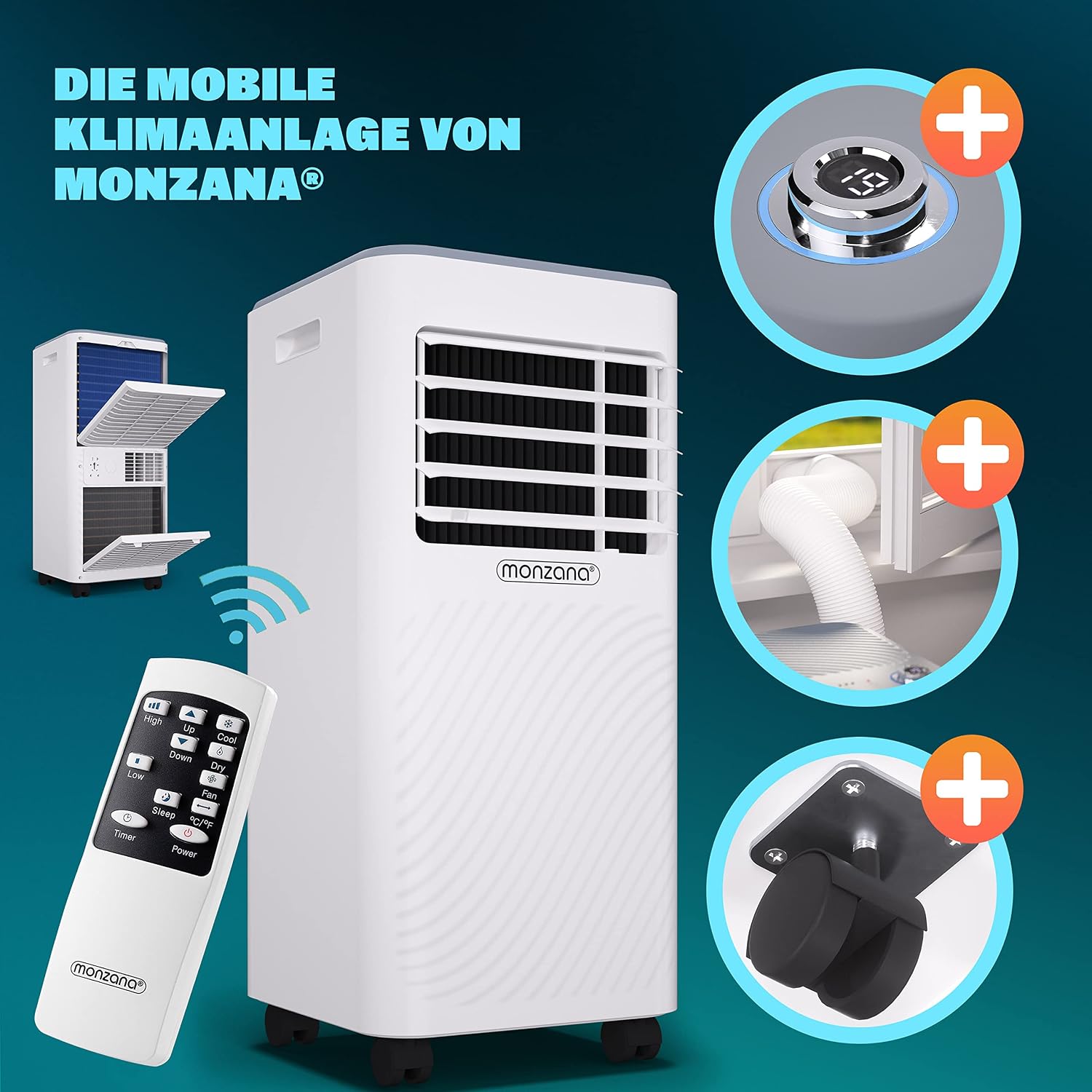
Figure 2.2: Key components of the Monzana MZKA2000.
3. Setup
Proper setup is essential for the efficient operation of your air conditioner.
Placement
- Place the unit on a firm, level surface in the desired room.
- Ensure there is at least 30 cm (12 inches) of clear space around the unit for adequate air circulation.
- Position the unit near a window or door for exhaust hose installation.
Exhaust Hose Installation
- Attach one end of the exhaust hose to the exhaust air outlet on the rear of the air conditioner unit. Twist clockwise until secure.
- Extend the exhaust hose to the nearest window or door. Avoid bending or kinking the hose, as this can reduce efficiency.
- Install the window sealing kit (if applicable) into the window opening.
- Connect the other end of the exhaust hose to the window kit adapter and secure it in the window opening to expel hot air outside.

Figure 3.1: Exhaust hose and window kit installation.
4. Operating Instructions
The Monzana MZKA2000 can be controlled via its integrated control panel or the included remote control.

Figure 4.1: Control panel and remote control.
Control Panel Functions
- Power Button: Turns the unit ON or OFF.
- Mode Button: Cycles through operating modes: Cool, Dehumidify, Fan.
- Rotary Knob / Temperature Buttons: Adjusts the desired temperature (16-32°C) or sets the timer. The LED display shows the current room temperature or set temperature.
- Fan Speed Button: Selects between two fan speeds (High/Low).
- Timer Button: Sets the 24-hour timer for automatic power on/off.
- Sleep Mode Button: Activates sleep mode for quieter operation and gradual temperature adjustment during the night.
Remote Control
The remote control provides convenient access to all functions from a distance. Ensure the remote control is pointed towards the unit's receiver.
Operating Modes
- Cool Mode: Provides powerful cooling. Set your desired temperature and fan speed.
- Dehumidify Mode: Reduces humidity in the room. The fan speed is typically fixed in this mode.
- Fan Mode: Circulates air without cooling. Select your preferred fan speed.
5. Maintenance
Regular maintenance ensures optimal performance and extends the lifespan of your air conditioner.
Cleaning the Air Filter
The air filter should be cleaned every two weeks or more frequently depending on usage and air quality.
- Unplug the air conditioner from the power outlet.
- Locate the air filter panel at the rear of the unit.
- Gently open the panel and remove the filter.
- Clean the filter with a vacuum cleaner or wash it with warm water and a mild detergent.
- Rinse thoroughly and allow the filter to air dry completely before reinserting.
- Close the filter panel securely.
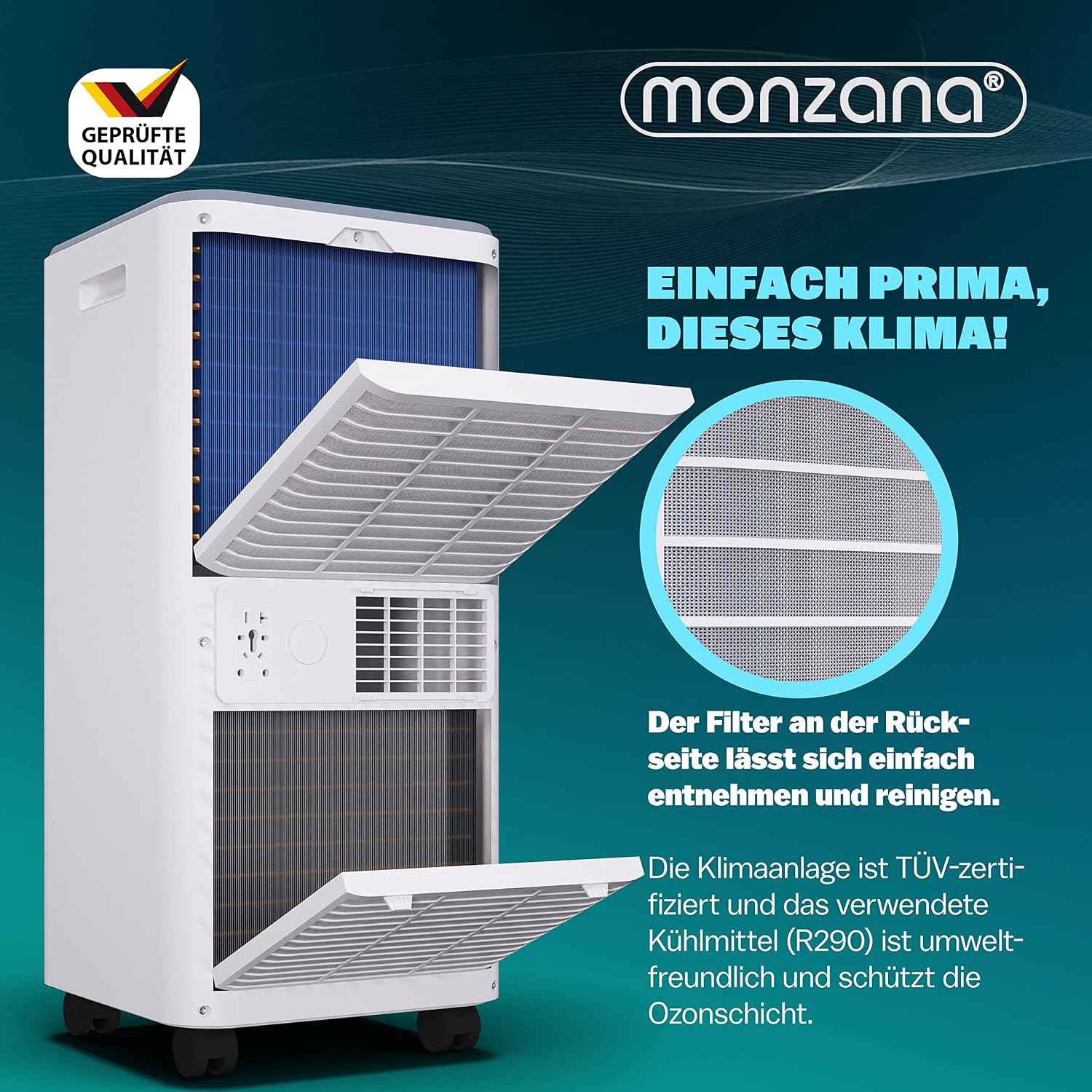
Figure 5.1: Rear filter access for cleaning.
Water Drainage
The unit collects condensed water during operation. It has a self-evaporating system, but in high humidity conditions, manual drainage may be required.
- Continuous Drainage: Connect the provided drain hose to the continuous drainage port at the rear of the unit. Place the other end of the hose into a suitable container or floor drain.
- Manual Drainage: When the internal water tank is full, the unit will stop operating and display an error code. Unplug the unit, place a shallow pan under the drainage port, and remove the drain plug to empty the water. Reinsert the plug firmly after draining.
Storage
Before storing the unit for an extended period:
- Drain all condensed water from the unit.
- Clean the air filter.
- Run the unit in fan-only mode for a few hours to dry the interior.
- Unplug the power cord and coil it neatly.
- Store the unit in a dry, cool place, preferably in its original packaging.
6. Troubleshooting
Refer to this section for common issues and their solutions.
| Problem | Possible Cause | Solution |
|---|---|---|
| Unit does not turn on | No power supply Power cord not plugged in Internal water tank full | Check power outlet Ensure power cord is securely plugged in Drain water from the unit |
| Unit does not cool effectively | Air filter dirty Exhaust hose blocked or improperly installed Room too large Doors/windows open Temperature setting too high | Clean air filter Check and clear exhaust hose, ensure proper sealing Ensure room size is within recommended range Close all doors and windows Lower the set temperature |
| Loud noise during operation | Unit not on a level surface Obstruction in fan/air path | Place unit on a flat, stable surface Check for and remove any obstructions |
| Water leakage | Drain plug loose Drain hose improperly connected | Ensure drain plug is firmly inserted Check drain hose connection and ensure it is not kinked |
7. Specifications
Technical data for the Monzana MZKA2000 portable air conditioner.
| Feature | Specification |
|---|---|
| Model Number | MZKA2000 |
| Cooling Capacity | 7000 BTU |
| Power Consumption | 780 W |
| Voltage | 240 V |
| Frequency | 50 Hz |
| Temperature Range | 16 - 32°C |
| Refrigerant | R-290 |
| Dehumidification Capacity | 19.2 Liters/day |
| Air Circulation | 290 m³/h |
| Noise Level | 64 dB |
| Dimensions (L x W x H) | 31 x 31 x 70 cm |
| Weight | 131.54 kg |
| Applicable Room Area | Up to 25 m² |
| Energy Efficiency Class | A |
| SEER | 14 |
| Operating Modes | Cool, Fan, Dehumidify |
| Fan Speeds | 2 |
| Control Methods | Remote control, Button control, Touch control |
| Filter Type | Washable |

Figure 7.1: Monzana MZKA2000 dimensions.
