
1. Introduction
The Retekess T130 Wireless Tour Guide System is designed for efficient voice audio transmission in various settings such as tours, conferences, and simultaneous interpretation. This system ensures clear communication between the speaker (transmitter) and listeners (receivers), minimizing distractions for others. It utilizes Phase-Locked Loop (PLL) technology for stable signal transmission and offers up to 99 channels for multiple groups to operate simultaneously without interference.
2. What's in the Box
Your Retekess T130 Wireless Tour Guide System package includes the following components:
- 2 x Wireless T130 Transmitters
- 30 x Wireless T131 Receivers
- 2 x Lavalier Microphones
- 30 x Single Earphones
- 32 x Lanyards
- 32 x USB Charging Cables
- 1 x English Manual
- 1 x Retekess TT018 60-Slot Storage Package

Image: All components included in the Retekess T130 Wireless Tour Guide System package, neatly arranged within the 60-slot storage case.
3. Product Overview
3.1. Transmitter (T130)

Image: The Retekess T130 Transmitter, a black rectangular device with a display screen and control buttons, shown with its lavalier microphone.
The T130 transmitter is used by the speaker to broadcast audio. It features a clear display and intuitive controls.
- Display Screen: Shows channel ID, battery status, and signal strength.
- Control Buttons: Includes 'M' (Menu/Mode), 'Previous', and 'Next' buttons for navigation and channel selection.
- MIC Interface: 3.5mm jack for connecting the lavalier microphone.
- USB Charging Port: For recharging the internal battery.
3.2. Receiver (T131)

Image: The Retekess T131 Receiver, a compact white and black device with a display screen and circular control pad, shown with its single earphone.
The T131 receiver is for listeners to receive audio from the transmitter. It is compact and lightweight for portability.
- Display Screen: Shows channel ID, battery status, and signal strength.
- Control Buttons: Circular control pad for power, volume, and channel selection.
- Earphone Interface: 3.5mm jack for connecting the single earphone.
- USB Charging Port: For recharging the internal battery.
- Lanyard Hole: For attaching a lanyard for easy carrying.
3.3. Dimensions

Image: A visual representation of the dimensions for both the T130 Transmitter (99mm/3.9in height, 56mm/2.2in width, 14mm/0.5in depth) and the T131 Receiver (72mm/2.8in height, 42mm/1.6in width, 12mm/0.5in depth).
4. Setup
4.1. Charging the Devices
Before first use, fully charge all transmitters and receivers. Use the provided USB charging cables. The battery indicator on the screen will show charging status.
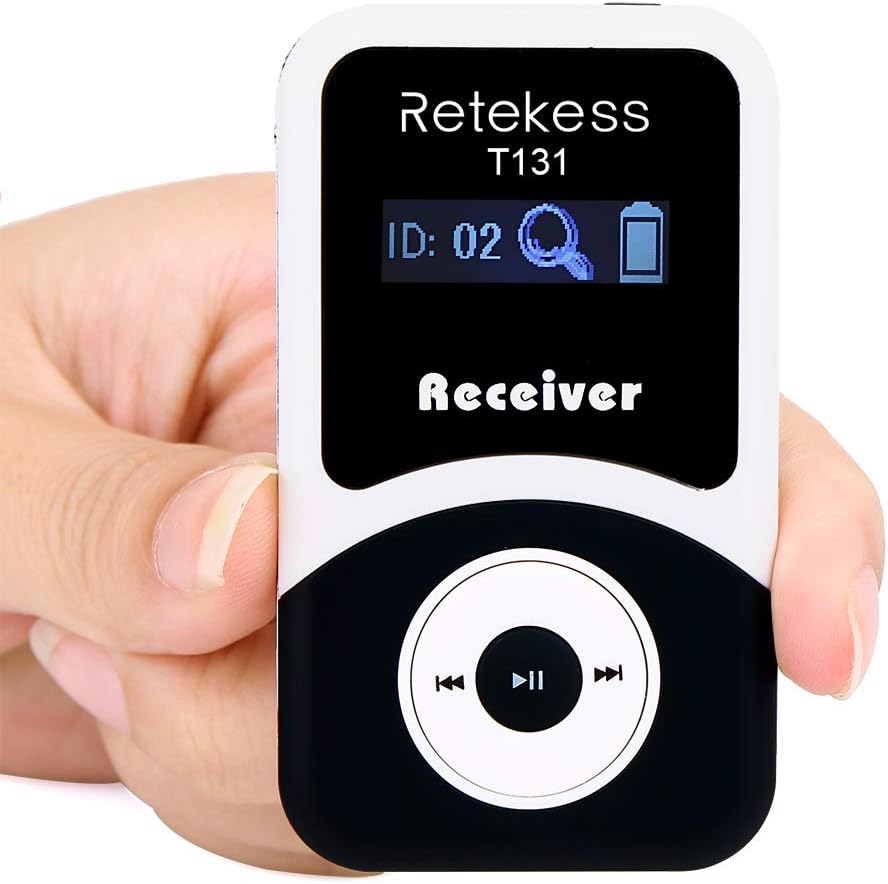
Image: The T130 Transmitter being charged via a USB cable connected to a wall adapter.
4.2. Automatic Pairing
The T130 system supports automatic pairing for convenience. Follow these steps:
- Ensure both the transmitter and receiver are powered off.
- Press and hold the 'M' button on the transmitter and the 'Play/Pause' button on the receiver simultaneously.
- Power on both devices while holding the buttons.
- The devices will automatically search for and pair with each other. The receiver's display will show the transmitter's channel ID once paired.
Video: Demonstrates how the Retekess T130 tour guide system automatically pairs the transmitter and receiver units.
4.3. Manual Pairing
If automatic pairing is not desired or fails, you can manually set the channel for both the transmitter and receiver.
- On the Transmitter: Press the 'M' button to enter channel setting mode. Use the 'Previous' and 'Next' buttons to select your desired channel ID (e.g., ID 10). Press 'M' again to confirm.
- On the Receiver: Press the 'M' button to enter channel setting mode. Use the 'Previous' and 'Next' buttons to select the same channel ID as the transmitter (e.g., ID 10). Press 'M' again to confirm.
- Once both devices are set to the same channel, they will connect.
Video: Illustrates the simple manual pairing method for the Retekess T130 tour guide system, showing how to set the same channel on both transmitter and receiver.
5. Operating Instructions
5.1. Power On/Off
- Transmitter (T130): Press and hold the power button (often integrated with the 'M' button or a dedicated side button) until the screen illuminates. To power off, press and hold the same button until the screen turns off.
- Receiver (T131): Press and hold the 'Play/Pause' button until the screen illuminates. To power off, press and hold the same button until the screen turns off.
5.2. Channel Selection
After pairing, ensure both devices are on the correct channel. If you need to change channels during operation:
- Transmitter: Briefly press the 'M' button to enter channel selection mode. Use the 'Previous' or 'Next' buttons to cycle through the 99 available channels. Press 'M' again to confirm your selection.
- Receiver: Briefly press the 'M' button to enter channel selection mode. Use the 'Previous' or 'Next' buttons to match the transmitter's channel. Press 'M' again to confirm.
5.3. Volume Adjustment (Receiver)
Listeners can adjust the volume on their T131 receiver:
- Use the '+' and '-' buttons on the circular control pad to increase or decrease the volume to a comfortable listening level.
5.4. Using the Microphone and Earphone
- Microphone: Plug the lavalier microphone into the MIC interface on the T130 transmitter. Position the microphone close to your mouth for clear audio transmission.
- Earphone: Plug the single earphone into the earphone interface on the T131 receiver. Place the earphone comfortably in your ear.

Image: A person demonstrating the use of the Retekess T130 transmitter with a lavalier microphone and a T131 receiver with an earphone, worn around the neck with a lanyard.
6. Maintenance
6.1. Battery Care
The devices are equipped with Lithium Ion batteries. To prolong battery life:
- Avoid fully discharging the batteries regularly.
- Charge the devices using only the provided USB cables.
- If storing for extended periods, charge the batteries to about 50% and recharge every 3-6 months.
6.2. Cleaning
- Wipe the devices with a soft, dry cloth.
- Do not use harsh chemicals or abrasive cleaners.
- Ensure devices are powered off and disconnected from charging before cleaning.
6.3. Storage
Store the system components in the provided 60-slot storage case to protect them from dust, moisture, and physical damage. The case is designed for neat organization and protection.
7. Troubleshooting
| Problem | Possible Cause | Solution |
|---|---|---|
| No audio from receiver | Receiver not powered on; Low battery; Incorrect channel; Earphone not connected; Transmitter not powered on or out of range. | Ensure receiver is on; Charge battery; Verify receiver channel matches transmitter; Connect earphone securely; Check transmitter power and proximity. |
| Poor audio quality/Interference | Interference from other wireless devices; Weak signal due to distance or obstacles; Low battery. | Change to a different channel; Reduce distance between transmitter and receiver; Charge batteries. |
| Transmitter/Receiver not pairing | Incorrect pairing procedure; Devices too far apart; Channel mismatch. | Repeat automatic or manual pairing steps carefully; Ensure devices are close during pairing; Confirm both are on the same channel. |
| Short transmission distance | Environmental obstacles (walls, metal structures); Low battery; External interference. | Minimize obstacles; Ensure batteries are fully charged; Change channel to avoid interference. |
8. Specifications
| Feature | Detail |
|---|---|
| Item Weight | 10 pounds (total package) |
| Product Dimensions | 15.74 x 14.56 x 5.47 inches (package) |
| Item Model Number | T130 |
| Batteries | 32 Lithium Ion batteries required (included) |
| Color Name | Black (Transmitter), White/Black (Receiver) |
| Compatible Devices | Headset |
| Connector Type | USB |
| Size | Large (system kit) |
| Battery Type | Lithium Ion |
| Power Source | Battery Powered |
9. Warranty and Support
9.1. Warranty Information
Retekess offers a three-year service for this product, ensuring peace of mind and support for any manufacturing defects or operational issues within this period. Please retain your proof of purchase for warranty claims.
9.2. Customer Support
For further assistance, technical support, or inquiries, please contact Retekess customer service or visit the official Retekess Store on Amazon.


