
Introduction
Thank you for choosing the Mesqool LED Camping Lantern. This manual provides detailed instructions for the safe and efficient operation of both the Collapsible and Vintage models. These versatile lanterns are designed for various outdoor and emergency situations, offering multiple charging options and reliable illumination.
Safety Information
- Do not disassemble or modify the lantern. Unauthorized modifications can lead to malfunction or injury.
- Keep the lantern away from water and excessive moisture. This product is not water resistant.
- Avoid direct eye exposure to the LED light, as it can be very bright.
- Use only recommended charging cables and power adapters (5V/2A adapter not included).
- Store the lantern in a cool, dry place when not in use.
- Keep out of reach of children.
Package Contents
- Mesqool LED Camping Lantern (Collapsible or Vintage model)
- USB Type-C Charging Cable (for Vintage model)
- Micro USB Charging Cable (for Collapsible model)
- User Manual
Product Overview
Vintage Lantern
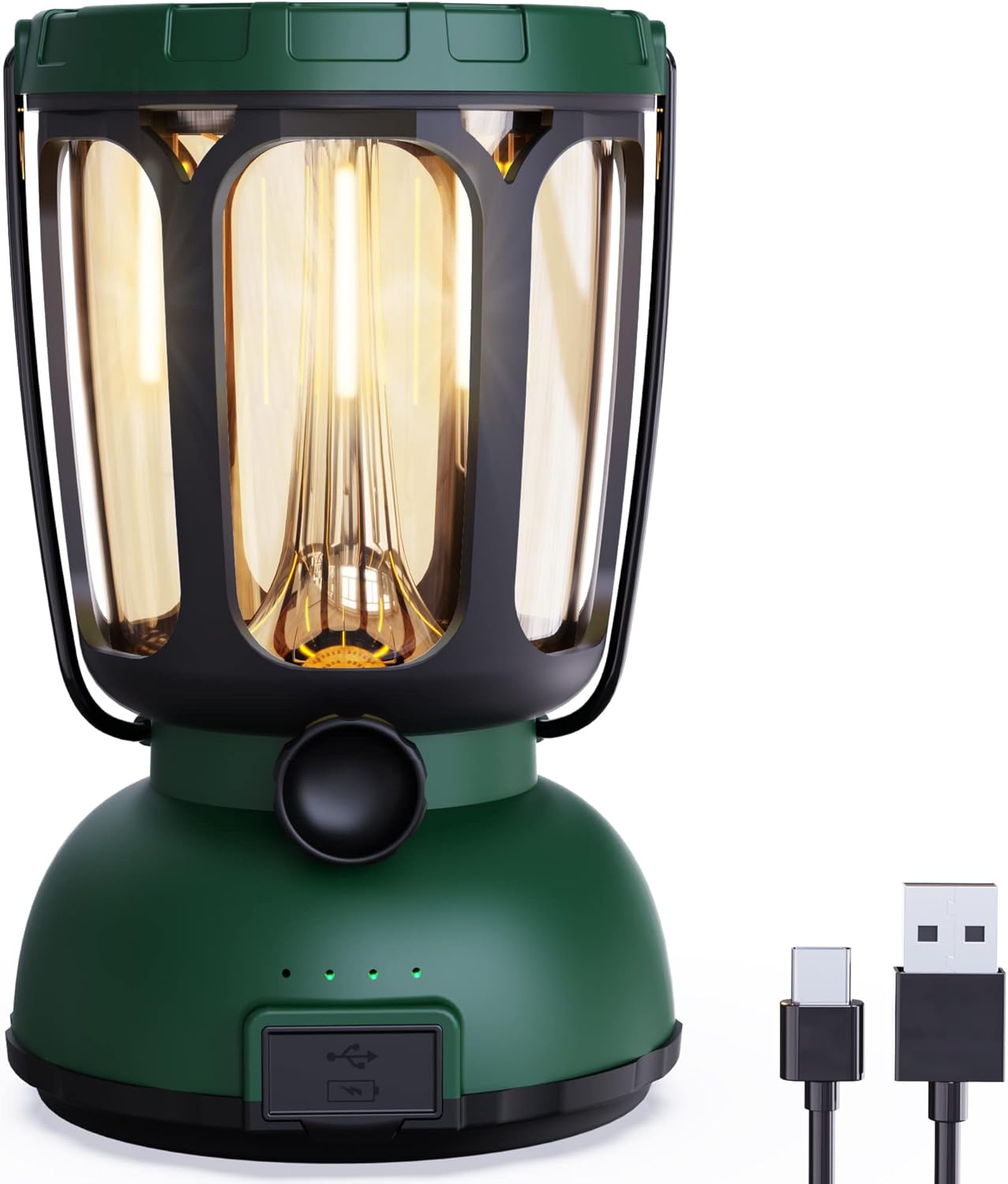
Image: The Mesqool Vintage LED Camping Lantern, showcasing its classic design and included USB Type-C charging cable.
The Vintage Lantern features a retro design with a dimmable warm white to bright white light. It includes a rotary knob for stepless dimming, a Type-C input port, a solar panel on top, and a hand-crank mechanism for emergency power generation. It also functions as a power bank.
Collapsible Lantern

Image: The Mesqool Collapsible LED Camping Lantern, showing its compact form and integrated hand-crank.
The Collapsible Lantern offers a compact design that can be extended for use and collapsed for storage. It features a bright LED light, a separate flashlight, a Micro USB input port, a solar panel, and a hand-crank for charging. It also has a USB output for charging other devices.
Setup
Initial Charging
Before first use, fully charge your lantern using one of the available methods. A full charge ensures optimal performance and battery longevity.
Charging Methods
Vintage Lantern Charging

Image: Illustration of the three charging methods for the Vintage Lantern.
- Type-C USB Input: Connect the included Type-C cable to the lantern's input port and a 5V/2A USB power adapter (not included). Full charge takes approximately 7 hours.
- Solar Panel: Place the lantern with the solar panel facing direct sunlight. This method is ideal for maintaining charge or slow charging in emergencies.
- Hand Crank: Rotate the hand crank clockwise or counter-clockwise to generate power. This is an emergency backup option for critical power needs.
Collapsible Lantern Charging

Image: Illustration of the three charging methods for the Collapsible Lantern.
- Micro USB Input: Connect the included Micro USB cable to the lantern's input port and a 5V/2A USB power adapter (not included).
- Solar Panel: Expose the solar panel to direct sunlight for charging.
- Hand Crank: Rotate the hand crank to generate power for emergency use.
Operating Instructions
Vintage Lantern Operation

Image: The Vintage Lantern showing its stepless dimming capability, from low to brightest settings.
- Power On/Off & Dimming: Rotate the knob on the front of the lantern. Turn clockwise to power on and increase brightness. Turn counter-clockwise to decrease brightness and power off.
- Light Modes: The lantern offers a stepless dimming function, transitioning from warm white (50-350LM, 2700K) to bright white (350-650LM, 10000-15000K). Adjust the knob to select your desired brightness and color temperature.
- Power Bank Function: The Vintage Lantern can charge external devices. Connect your device's USB cable to the lantern's USB output port (5V 1A).

Image: The Vintage Lantern acting as a 6000mAh emergency power bank, charging a smartphone.
Collapsible Lantern Operation

Image: The Collapsible Lantern illuminated in a room, highlighting its 200 lumen output and long runtime.
- Extend/Collapse: Gently pull the top and bottom sections apart to extend the lantern for use. Push them together to collapse for storage.
- Lantern Light: Press the power button to turn on the main lantern light. Press again to cycle through brightness modes (Strong/Low) or turn off.
- Flashlight: The lantern includes a separate flashlight function. Locate the flashlight on the side of the unit and press its dedicated button to activate.
- Power Bank Function: Connect your device's USB cable to the lantern's USB output port to charge external devices.
Maintenance
- Cleaning: Wipe the lantern with a soft, dry cloth. Do not use abrasive cleaners or immerse in water.
- Storage: Store the lantern in a cool, dry place away from direct sunlight when not in use. For prolonged storage, charge the battery every 3-6 months to maintain battery health.
- Battery Replacement (Vintage Model): The Vintage Lantern features a replaceable 6000mAh Li-ion battery. Refer to the product packaging or contact customer support for guidance on safe battery replacement.
Troubleshooting
- Lantern not turning on: Ensure the battery is charged. Connect to a power source and charge for at least 30 minutes before attempting to turn on.
- Light is dim: The battery level may be low. Recharge the lantern.
- Charging not working: Check that the charging cable is securely connected to both the lantern and the power source. Try a different cable or power adapter. Ensure the solar panel is exposed to direct sunlight or the hand crank is being rotated consistently.
- External device not charging from lantern: Ensure the lantern has sufficient battery charge. Check the connection between the device and the lantern's USB output port.
Specifications
| Feature | Collapsible Lantern | Vintage Lantern |
|---|---|---|
| Battery Capacity | 3000mAh Li-ion | 6000mAh Li-ion (Replaceable) |
| Lantern Light Output | Strong Light: 4 hrs Low Light: 35 hrs | Warm White: 50-350LM, 2700K, 35-200 hrs Bright White: 350-650LM, 10000-15000K, 10-20 hrs |
| Flashlight Output | 3W, 350LM Strong Light: 8 hrs Low Light: 30 hrs | N/A |
| Charging Methods | Micro USB, Solar, Hand Crank | Type-C USB (approx. 7 hrs), Solar, Hand Crank |
| Power Bank Output | Yes | 5V 1A |
| Water Resistance Level | Not Water Resistant | Not Water Resistant |
| Dimensions (Vintage) | N/A | Height: 6.42 in (16.3 cm) Width: 4.09 in (10.4 cm) |
| Weight (Vintage) | N/A | 0.83 lb (0.38 kg) |
Warranty and Support
Mesqool products are manufactured with quality and reliability in mind. For any questions, concerns, or technical support regarding your LED Camping Lantern, please refer to the contact information provided with your purchase or visit the official Mesqool website. Please retain your proof of purchase for warranty claims.
