
Introduction
Thank you for choosing the NEO CHAIR Ergonomic Executive Office Chair. This manual provides essential information for the safe assembly, operation, and maintenance of your new chair. Please read these instructions carefully before beginning assembly and retain them for future reference.
Safety Information
- Do not exceed the maximum weight capacity of 300 lbs (136 kg).
- Ensure all bolts and screws are securely tightened before using the chair. Periodically check and re-tighten all fasteners every six months.
- Use caution when adjusting the chair's height or tilt to prevent injury.
- Keep hands and fingers clear of moving parts during adjustments.
- Do not stand on the chair.
- Use the chair on a flat, stable surface.
Parts List
Please ensure all components are present before beginning assembly. If any parts are missing or damaged, contact customer support.
- Backrest
- Seat Cushion
- Armrests (Left & Right)
- Control Mechanism
- Gas Lift Cylinder
- Base (5-star)
- Casters (5 pieces)
- Hardware Kit (bolts, washers, Allen key)
Assembly Instructions
For a visual guide, please refer to the assembly videos below. It is recommended to use the packaging box as a stable surface during assembly.
Video: HPAC - Assembly Guide by NEO Direct
This video provides a step-by-step visual guide for assembling your NEO CHAIR, demonstrating how to connect each component securely.
Video: NEO Chair How to Assemble by Trendy Treasure Hunter
Another helpful video demonstrating the assembly process, including tips for aligning parts and tightening bolts.
- Assemble the Base:
Attach the five base legs to the central hub of the chair base using the provided bolts. Under-tighten all bolts initially. Once all legs are in place, fully tighten them with the included Allen key. - Install Casters:
Push the five casters vertically into the holes at the end of each base leg until they click securely into place. - Insert Gas Lift:
Place the gas lift cylinder into the center hole of the assembled base. - Attach Armrests to Seat:
Place the seat cushion upside down on a stable surface (e.g., the packaging box). Align the armrests with the pre-drilled holes on the sides of the seat. Secure them with the appropriate bolts, under-tightening first, then fully tightening. - Attach Backrest to Armrests:
Align the backrest with the armrests. Secure the backrest to the armrests using the remaining bolts, under-tightening first, then fully tightening. - Mount Control Mechanism:
Align the control mechanism with the bolt holes on the underside of the seat cushion. Ensure the 'FRONT' label on the mechanism faces the front of the seat. Secure with bolts, under-tightening in a diagonal order first, then fully tightening. - Connect Seat to Base:
Carefully place the assembled seat (with armrests and control mechanism) onto the gas lift cylinder, ensuring the hole in the control mechanism aligns with the top of the gas lift. Press down firmly to secure.

Image: Upgraded Sturdy Components
This image displays the robust components of the chair's base, including the sturdy steel base, smooth and durable wheels, and a long-lasting gas lift, highlighting the quality of materials used in construction.
Operating Instructions
Your NEO CHAIR is designed with several adjustable features to enhance your comfort and support.
- Adjustable Seat Height:
To raise the seat, lift the lever on the right side of the chair while taking your weight off the seat. To lower the seat, lift the lever while seated. Release the lever at the desired height. - Tilt Tension Control:
The round knob located under the seat allows you to adjust the tension of the chair's recline. Turn clockwise to increase tension (making it harder to recline) and counter-clockwise to decrease tension (making it easier to recline). - Tilt Lock/Unlock:
Pull the same lever used for height adjustment outwards to unlock the tilt function, allowing the chair to recline. Push the lever inwards to lock the chair in an upright position. - Flip-up Armrests:
The armrests can be flipped up to allow the chair to be pushed closer to a desk or for more freedom of movement. Simply lift the armrests upwards until they lock into the vertical position. To lower, pull them down.

Image: Flip-up Armrest Feature
This image illustrates the chair's flip-up armrests, showing them in both the lowered and raised positions, allowing for versatile use and space-saving storage under a desk.

Image: Adjustable Features
This image demonstrates the adjustable features of the chair, including the recline function (from 90° to 130°) and close-up views of the tilt tension control and height adjustment levers for personalized comfort.
Maintenance
- Cleaning: Wipe clean with a damp cloth. For PU leather, use a mild leather cleaner if necessary. Avoid harsh chemicals that may damage the material.
- Tightening Bolts: For optimal safety and stability, check and tighten all assembly bolts every six months.
Troubleshooting
If you encounter any issues with your chair, please refer to the following common solutions:
- Chair feels wobbly: Ensure all bolts are securely tightened. Re-tighten any loose fasteners.
- Chair does not adjust height: Check that the gas lift lever is fully engaged and that there are no obstructions. If the issue persists, the gas lift cylinder may need replacement.
- Difficulty reclining: Adjust the tilt tension knob located under the seat. Turn counter-clockwise to loosen the tension.
- Armrests do not stay up/down: Ensure the armrests are fully clicked into their locked position when flipping them up or down.
Specifications
| Feature | Detail |
|---|---|
| Brand | NEO CHAIR |
| Model Name | Executive Chair |
| Color | White |
| Material | Polyurethane (PU Leather), Foam |
| Product Dimensions | 25"D x 27"W x 46"H |
| Maximum Weight Recommendation | 300 Pounds |
| Special Features | Adjustable Height, Flip-Up Arm Rest, Ergonomic, High Back, Rolling, Swivel, Tilting |
| Back Style | Cushion Back |
| Assembly Required | Yes (Refer to Installation Manual for Instructions) |
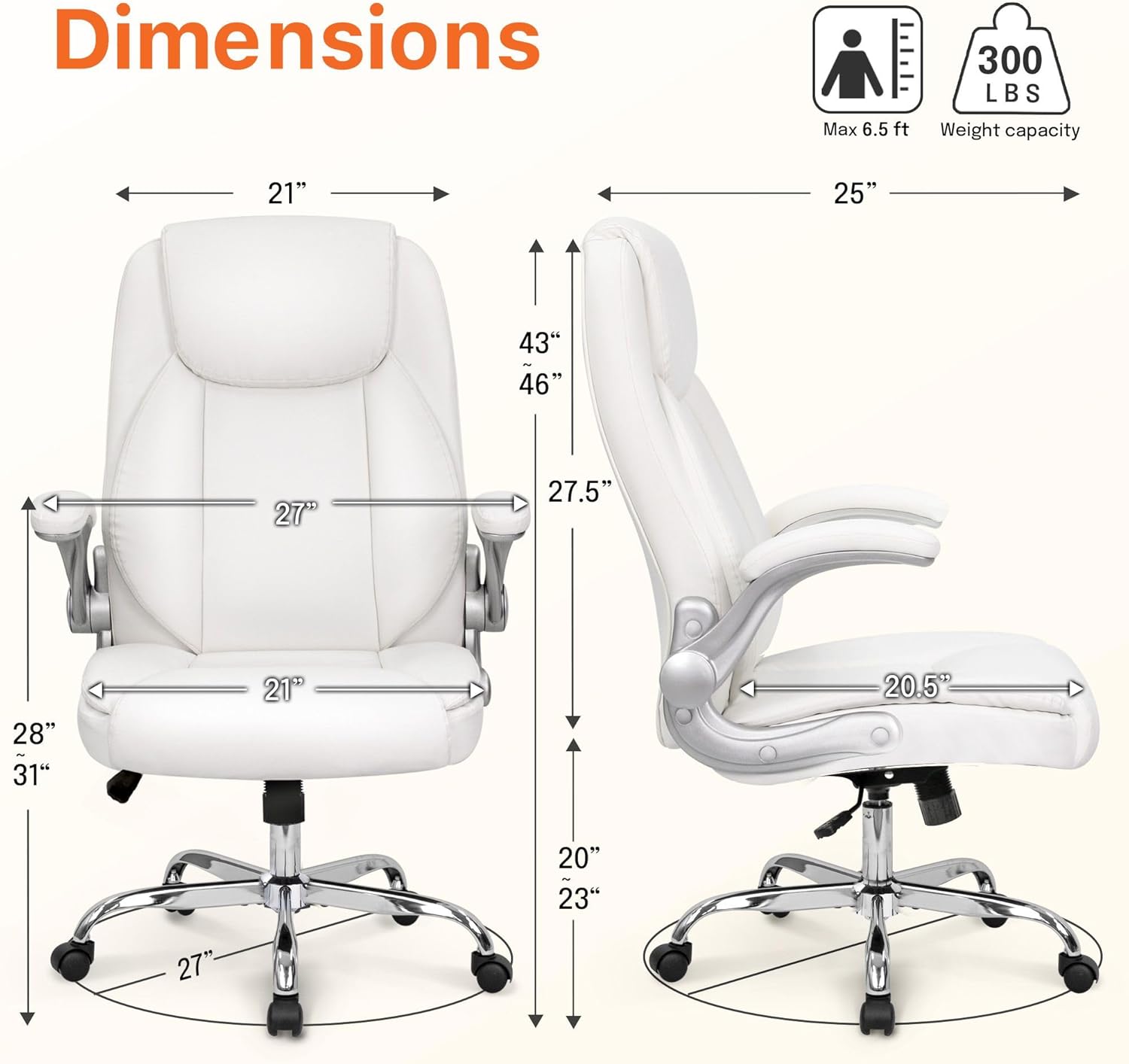
Image: Product Dimensions
This diagram provides detailed measurements of the chair, including height, width, and depth, to help users understand its size and fit within their space.

Image: Ergonomic Comfort Features
This image highlights the ergonomic design of the chair, detailing the head and neck support, back support, and lumbar support for enhanced comfort during prolonged use.
Warranty & Support
For warranty information, technical support, or to order replacement parts, please contact NEO CHAIR customer service. Refer to your purchase documentation for specific warranty terms and contact details.


