

Introduction
The Taylor Glass Digital Bathroom Scale (Model 5283426) is designed to provide accurate body weight measurements with enhanced convenience. It features motion and light sensors for automatic illumination in dark environments and a clear LED display. This manual provides instructions for setup, operation, maintenance, and troubleshooting to ensure optimal performance of your scale.
Key Features:
- Motion Detection Technology: Sensors activate LED lights for 30 seconds when movement is detected in dark conditions, providing temporary illumination.
- Two-Mode Convenience: A switch on the base allows you to enable or disable the motion and light sensors to prolong battery life.
- Innovative Design: Features a large 12.2" x 12.2" durable tempered glass platform with brushed stainless steel accents, designed to fit various decor styles.
- High Capacity: Measures up to 440 lb (200 kg or 31 st 6 lb) in 0.2 lb (0.1 kg) increments.
- Bright LED Display: 1.3" blue LED digits provide easy readability from any angle.
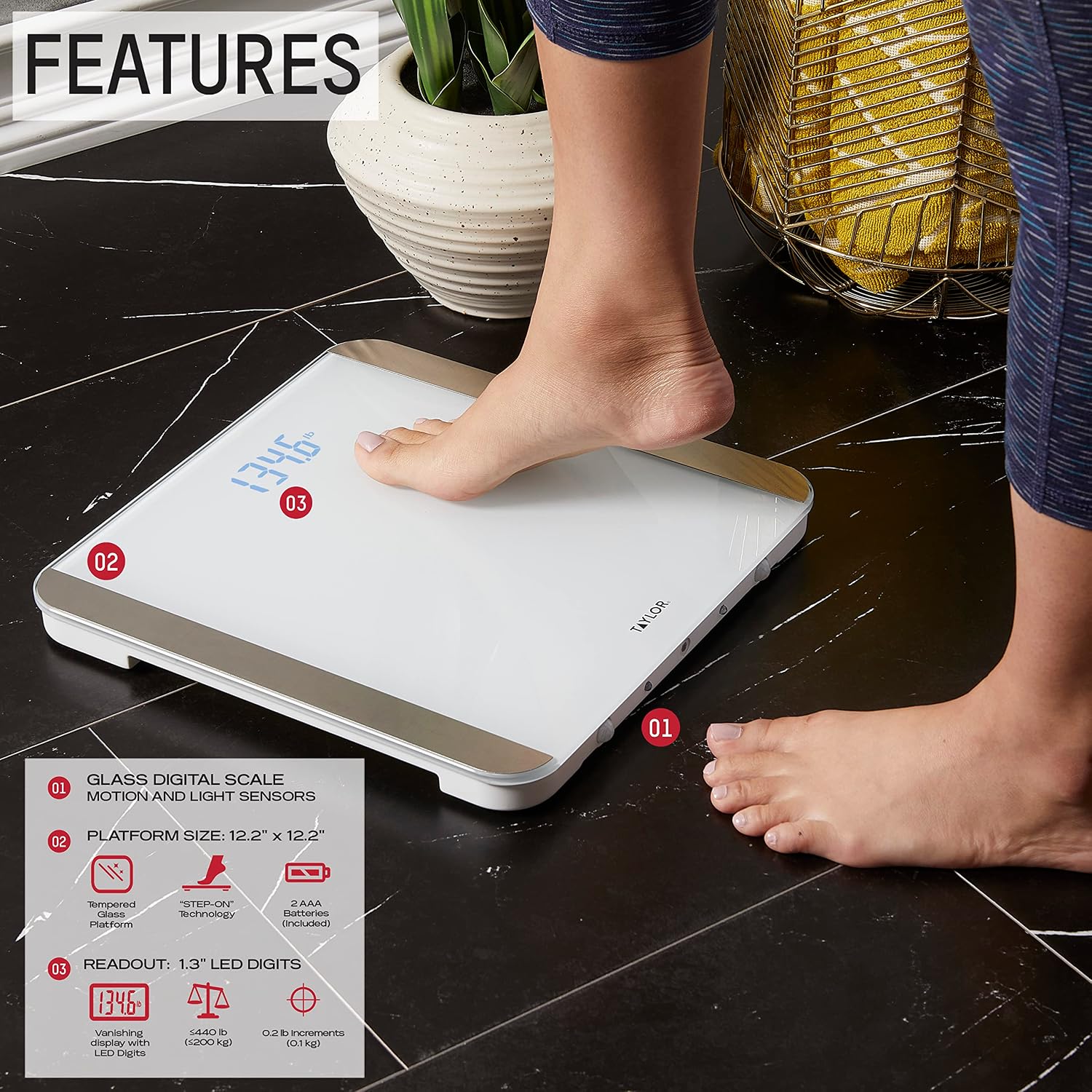
Image: Diagram highlighting key features of the scale, including glass platform, motion/light sensors, 12.2" x 12.2" size, and 1.3" LED readout.
Setup
Battery Installation
Your Taylor Digital Bathroom Scale requires 3 AAA batteries, which are included. To install or replace batteries:
- Locate the battery compartment on the underside of the scale.
- Open the battery compartment cover.
- Insert the 3 AAA batteries, ensuring correct polarity (+/-) as indicated inside the compartment.
- Close the battery compartment cover securely.

Image: The underside of the scale, showing the battery compartment and sensor switch.
Initial Placement
For accurate readings, place the scale on a hard, flat surface. Avoid carpets or uneven flooring, as this can affect measurement precision.
Operating Instructions
Taking a Measurement
This scale features 'Step On' technology, eliminating the need to tap or activate it manually. Simply step directly onto the scale to obtain your weight reading.
- Place the scale on a firm, flat surface.
- Step onto the scale with bare feet, centering your weight.
- Stand still until your weight reading is displayed and stabilizes on the LED screen.
- The scale will automatically turn off after a few seconds of inactivity.

Image: A person stepping onto the scale, demonstrating the 'Step On' feature.
Motion and Light Sensors
The scale is equipped with motion and light sensors that provide temporary illumination in dark environments. When the ambient light is low and movement is detected within a 120° range and 6.5 feet, the LED lights on the scale will turn on for 30 seconds.

Image: The scale's motion sensors detecting movement and activating the LED lights in a dark room.
Disabling Sensors for Battery Life
To conserve battery life, especially if the scale is in a high-traffic area or a consistently dark room, you can disable the motion and light sensors. Locate the switch on the base of the scale and slide it to the 'OFF' position. This will prevent the lights from activating with motion.

Image: A finger pointing to the ON/OFF switch located on the base of the scale, used to control the motion and light sensors.
Unit Conversion
The scale can display weight in pounds (lb), kilograms (kg), or stones (st). To change the unit of measurement, locate the unit conversion button on the underside of the scale, usually near the battery compartment. Press this button to cycle through the available units until your desired unit is displayed.
Maintenance
Cleaning
To clean your Taylor Glass Digital Bathroom Scale, use a soft, damp cloth. Avoid abrasive cleaners or harsh chemicals, as these can damage the glass surface or electronic components. Wipe the scale gently and dry it thoroughly after cleaning.
Storage
Store the scale in a dry place at room temperature. Avoid extreme temperatures or high humidity, which can affect the scale's performance and lifespan. Do not store heavy objects on the scale when not in use.
Troubleshooting
- Inconsistent Readings: If the scale provides different weight readings consecutively, ensure it is placed on a completely hard, flat, and level surface. Uneven surfaces or carpets can cause inaccuracies. Also, ensure you are standing still and centered on the scale during measurement.
- Lights Not Activating: Check if the motion/light sensor switch on the base of the scale is in the 'ON' position. Ensure there are no obstructions blocking the sensors. The lights only activate in low-light conditions when motion is detected.
- No Display/Low Battery Indicator: If the display is blank or shows a low battery indicator, replace the 3 AAA batteries.
- Display Hard to Read in Bright Light: The blue LED display is optimized for various lighting conditions, but in very bright natural light, it may appear less vibrant. This is normal operation.
- Scale Turns On Randomly: If the scale activates without anyone stepping on it, the motion sensor might be overly sensitive or triggered by movement nearby. Consider disabling the motion sensor using the switch on the base if this becomes an issue.
Specifications
| Product Dimensions | 13.75 x 2 x 13.75 inches |
| Item Weight | 4.2 Pounds |
| Model Number | 5283426 |
| Batteries | 3 AAA batteries (included) |
| Manufacturer | Lifetime Brands Inc. |
| Country of Origin | China |
| Color | White |
| Recommended Uses | Adults |
| Special Features | Large Display, High Weight Capacity, Auto Shut Off, Motion and Light Sensors |
| Display Type | LED |

Image: Side profile of the Taylor Glass Digital Bathroom Scale, showing its slim design.
Official Product Videos
Motion Sensor Scale Demonstration
Video: This video demonstrates the motion sensor functionality of the Taylor Glass Digital Bathroom Scale, showing how the LED lights illuminate when movement is detected in a dark environment.
Taylor - Life Measured
Video: An overview video from Taylor, showcasing various measurement products and emphasizing the brand's commitment to precision and quality.
Warranty & Support
Taylor products are designed and engineered in the USA, reflecting a commitment to high quality and performance standards. For detailed warranty information, customer service contacts, and product support, please refer to the official Taylor website or the documentation included with your product packaging.
Manufacturer: Lifetime Brands Inc.


