
1. Introduction
Thank you for choosing the VRURC Portable Charger 20000mAh. This power bank is designed to provide reliable and fast charging for a wide range of electronic devices, featuring built-in cables for ultimate convenience. Please read this manual carefully before use to ensure optimal performance and safety.
2. Product Overview
2.1 Package Contents
- VRURC Portable Charger 20000mAh (Model: T2047Q) x 1
- User Manual x 1
2.2 Product Diagram & Components
The VRURC Portable Charger features a compact design with integrated charging solutions.
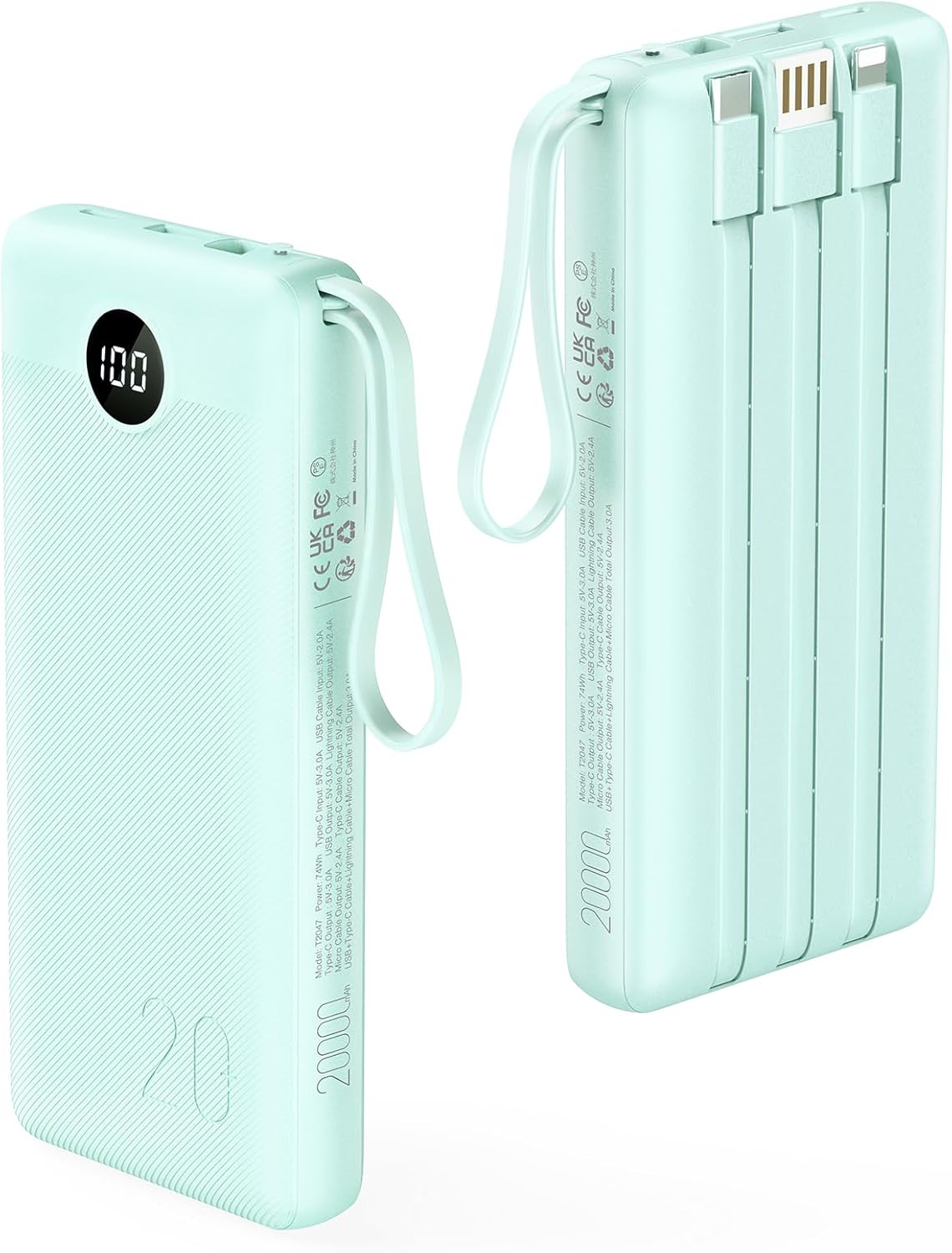
Image: Front and side view of the VRURC Portable Charger, highlighting the LED display and integrated cables.
Key components include:
- LED Digital Display: Shows remaining battery percentage.
- Built-in Cables: Includes 18W for iPhone cable, 18W Type-C cable, 12W Micro cable, and 10W USB-A cable (for input).
- USB-C Output Port: Additional port for device charging.
- USB-A Output Port: Additional port for device charging.
- Lanyard: Integrated for easy carrying.
2.3 Key Features
- High Capacity: 20000mAh battery provides multiple charges for various devices.
- Integrated Cables: Equipped with built-in Lightning, USB-C, Micro-USB, and USB-A (input) cables for universal compatibility and convenience.
- Fast Charging: Supports up to 22.5W fast charging output via USB-A port and 18W fast charging via built-in USB-C and Lightning cables.
- Multi-Device Charging: Capable of charging up to 4 devices simultaneously.
- Dual Input Options: Recharge the power bank via the built-in USB-A cable or the 18W USB-C input port.
- LED Display: Clear digital display shows precise battery percentage.
- Safety Protections: Built-in smart chip protects against short-circuit, over-current, over-voltage, and over-heat.

Image: Illustration of the 20000mAh capacity providing multiple charges for different devices.
3. Setup
Before first use, it is recommended to fully charge the VRURC Portable Charger.
- Initial Charge: Connect the power bank to a power source using either the built-in USB-A cable or a USB-C cable (not included) plugged into the USB-C input port.
- Monitor Charge: The LED digital display will show the charging progress. The power bank is fully charged when the display shows "100".
4. Operating Instructions
4.1 Checking Battery Level
Simply press the power button once to activate the LED digital display, which will show the current battery percentage.

Image: A hand holding the power bank, demonstrating the clear LED display showing battery percentage.
4.2 Charging Your Devices
The power bank offers multiple ways to charge your devices:
- Using Built-in Cables: Pull out the appropriate built-in cable (Lightning, Type-C, or Micro-USB) and connect it directly to your device.
- Using USB Output Ports: Connect your device's charging cable to either the USB-A or USB-C output port on the power bank.
The power bank will automatically begin charging your device. You can charge up to 4 devices simultaneously using a combination of built-in cables and output ports.

Image: The power bank connected to and charging four different devices simultaneously.
5. Recharging the Power Bank
The VRURC Portable Charger can be recharged using two convenient methods:
5.1 Via Built-in USB-A Cable
Connect the built-in USB-A cable to a standard USB wall adapter (5V/2A recommended) or a computer USB port. This method typically takes approximately 11 hours for a full recharge.
5.2 Via USB-C Input Port
For faster recharging, connect a USB-C to USB-C cable (not included) to the power bank's USB-C input port and an 18W (or higher) PD compatible wall adapter. This method can fully recharge the power bank in approximately 6 hours.

Image: Visual representation of recharging the power bank using either the built-in USB-A cable or the USB-C input port.
6. Maintenance & Safety
6.1 Care and Storage
- Keep the power bank away from extreme temperatures (hot or cold), direct sunlight, and humid environments.
- Do not expose the device to water or other liquids.
- Clean the power bank with a dry, soft cloth. Avoid using harsh chemicals or abrasive materials.
- Store in a cool, dry place when not in use. For long-term storage, charge the power bank to about 50% every three months to maintain battery health.
6.2 Safety Precautions
- Do not disassemble, modify, or repair the device yourself. Refer to qualified service personnel.
- Avoid dropping, hitting, or subjecting the power bank to strong impacts.
- Do not use the power bank if it is damaged, swollen, or leaking.
- Keep out of reach of children.
- Dispose of the power bank according to local regulations for lithium-ion batteries.
7. Troubleshooting
| Problem | Possible Cause | Solution |
|---|---|---|
| Power bank not charging | Charging cable or adapter faulty; Power bank fully discharged; Input port issue. | Try a different charging cable and wall adapter. Ensure the power bank is connected securely. Allow a few minutes for a deeply discharged unit to respond. |
| Device not charging from power bank | Device cable faulty; Power bank low on charge; Device incompatible; Connection issue. | Ensure the power bank has sufficient charge. Try a different cable or output port. Verify device compatibility. Ensure connections are secure. |
| Slow charging | Using a low-power adapter/cable; Multiple devices charging simultaneously; Device's charging protocol. | Use an 18W or higher PD adapter for faster power bank recharge. For device charging, ensure your device supports fast charging and use appropriate cables. Charging multiple devices will distribute power. |
| LED display not working | Power bank is off; Malfunction. | Press the power button to activate the display. If it remains off, try charging the power bank. If the issue persists, contact customer support. |
8. Specifications
| Feature | Detail |
|---|---|
| Model Number | T2047Q |
| Battery Capacity | 20000mAh |
| Battery Type | Lithium Polymer |
| Product Dimensions | 6.14 x 2.75 x 1.08 inches |
| Item Weight | 14 ounces |
| Input (USB-C) | 18W (PD) |
| Input (Built-in USB-A) | 10W (5V/2A) |
| Output (USB-A Port) | Up to 22.5W |
| Output (Built-in Lightning Cable) | 18W |
| Output (Built-in Type-C Cable) | 18W |
| Output (Built-in Micro Cable) | 12W |
| Special Features | 22.5W Fast Charging, Lanyard, Built-in 4 Cables, LED Display |
9. Warranty and Support
VRURC provides replacement and sales service for its products. For any issues or inquiries regarding your VRURC Portable Charger, please refer to the contact information provided with your purchase or visit the official VRURC store on Amazon for support and warranty details.
VRURC Store Link: VRURC Official Store


