Introduction
The 1Mii Bluetooth Transmitter Receiver is a versatile 2-in-1 audio adapter designed to bring wireless audio capabilities to a wide range of devices. Whether you want to stream audio from a non-Bluetooth source to your wireless headphones or add Bluetooth receiving functionality to your traditional stereo system, the ML300 offers a seamless and high-quality audio experience. It supports advanced Bluetooth 5.3 technology with aptX Adaptive/Low Latency/HD Audio for efficient, stable connections and superior sound.
What's in the Box

Image: All components included in the 1Mii Bluetooth Transmitter Receiver package.
- 1 x 1Mii 2-in-1 Bluetooth Transceiver (ML300)
- 1 x USB Type-C Charging Cable
- 1 x 3.5mm Audio Cable
- 1 x 2RCA to 3.5mm AUX Audio Cable
- 1 x User Manual
Product Overview

Image: Detailed diagram of the ML300 device with labeled components.
- TX/RX Switch: Toggles between Transmitter (TX) and Receiver (RX) modes.
- Headphone 1 Button: Used for pairing the first Bluetooth headphone/earbud.
- Headphone 2 Button: Used for pairing the second Bluetooth headphone/earbud.
- 3.5mm AUX Audio Out/In Port: Connects to audio sources (in TX mode) or audio output devices (in RX mode).
- Type-C Charging Port: For charging the device.
Setup
Initial Charging
Before first use, fully charge the 1Mii ML300. Connect the provided USB Type-C charging cable to the device's Type-C port and plug the other end into a USB power adapter (not included) or a computer's USB port. A full charge takes approximately 2 hours. The device offers up to 12 hours of playtime in Transmitter mode and up to 15 hours in Receiver mode.

Image: The ML300 connected to a power source for charging.
Operating Modes
Transmitter Mode (TX)
In Transmitter (TX) mode, the 1Mii ML300 allows you to wirelessly stream audio from non-Bluetooth devices (like TVs, PCs, or gym equipment) to your Bluetooth headphones or earbuds.

Image: Visual representation of the ML300 in Transmitter mode.
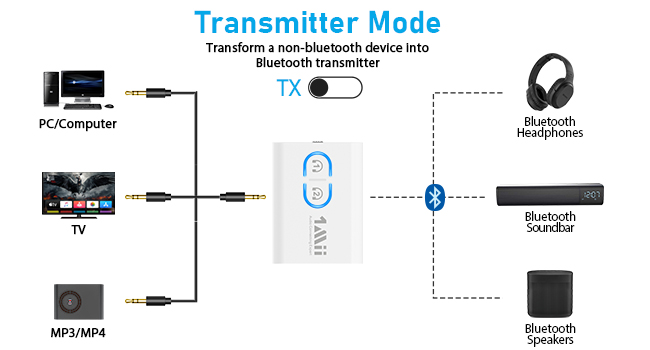
Image: Connection diagram for Transmitter Mode.
- Slide the TX/RX switch to the TX position.
- Connect the 1Mii ML300 to your audio source (e.g., TV, PC, airplane entertainment system) using the 3.5mm audio cable or the 2RCA to 3.5mm AUX audio cable.
- Put your Bluetooth headphones/earbuds into pairing mode.
- Press and hold the Headphone 1 button on the ML300 for about 2 seconds until the LED flashes red and blue alternately. This indicates it's in pairing mode.
- Once successfully paired, the LED will stop flashing and remain solid blue.
Dual Link Functionality (Connect Two Headphones)
The ML300 supports connecting two wireless headphones simultaneously, allowing two people to enjoy audio from the same source.

Image: Two users enjoying audio simultaneously via dual connection.
- After the first Bluetooth headphone is successfully paired, put your second Bluetooth headphone into pairing mode.
- Press and hold the Headphone 2 button on the ML300 for about 2 seconds until the LED flashes red and blue alternately.
- Once successfully paired, the LED will stop flashing and both headphone icons will be solid blue.
Video: Demonstrates how to pair the ML300 with a second Bluetooth headphone for dual audio streaming.
Receiver Mode (RX)
In Receiver (RX) mode, the 1Mii ML300 allows you to add Bluetooth functionality to your non-Bluetooth speakers, car stereo, or home stereo systems, enabling them to receive audio wirelessly from your smartphone or tablet.
Image: Visual representation of the ML300 in Receiver mode.

Image: Connection diagram for Receiver Mode.
- Slide the TX/RX switch to the RX position.
- Connect the 1Mii ML300 to your non-Bluetooth audio output device (e.g., wired speaker, car stereo) using the 3.5mm audio cable or the 2RCA to 3.5mm AUX audio cable.
- Enable Bluetooth on your smartphone or tablet and search for "ML300" in the list of available devices.
- Select "ML300" to pair. Once successfully paired, the LED will remain solid blue.
Compatibility
The 1Mii ML300 features advanced Bluetooth 5.3 technology, ensuring a more efficient, stable connection, faster transmission, and wider signal range. It is backward compatible with older Bluetooth versions (5.2/5.0/4.2/4.0/3.0/2.0).
It supports various audio codecs including:
- aptX Low Latency: Minimizes audio delay for synchronized sound with video, ideal for watching movies or gaming.
- aptX HD: Provides high-definition audio quality for a richer listening experience.
- aptX Adaptive: Dynamically adjusts audio quality and latency based on content and environment.
- SBC: Standard Bluetooth codec.
Note: To utilize aptX Low Latency, HD, or Adaptive codecs, your connected Bluetooth headphones/speakers must also support the specific encoding format.
Maintenance
To ensure the longevity and optimal performance of your 1Mii ML300, please follow these maintenance guidelines:
- Keep the device dry. Do not expose it to moisture or extreme temperatures.
- Clean the device with a soft, dry cloth. Avoid using harsh chemicals or abrasive materials.
- Store the device in a cool, dry place when not in use.
- Avoid dropping or subjecting the device to strong impacts.
Troubleshooting
Device Not Pairing
- Ensure the ML300 is in the correct mode (TX for transmitting, RX for receiving).
- Make sure your headphones/speakers are in pairing mode and are not connected to another device.
- Bring the ML300 and your audio device closer together.
- Restart both the ML300 and your audio device.
No Sound or Poor Audio Quality
- Check all cable connections to ensure they are secure and correctly inserted into the audio ports.
- Verify the volume levels on both the ML300 and your connected audio device.
- Ensure the audio source (TV, PC, phone) is outputting sound through the correct audio jack.
- If using aptX codecs, confirm that both the ML300 and your connected device support the specific aptX version (LL/HD/Adaptive). If not, they will default to SBC.
- Avoid interference from other wireless devices or obstacles.
Latency Issues (Audio Delay)
- Ensure both the ML300 and your connected headphones/speakers support aptX Low Latency. This codec is designed to minimize audio delay.
- Double-check that the aptX Low Latency codec is active (refer to your headphone/speaker manual for confirmation).
Specifications
| Feature | Detail |
|---|---|
| Brand | 1Mii |
| Model | ML300 |
| Connectivity Technology | Bluetooth 5.3 |
| Power Source | Battery Powered (1 Lithium Polymer battery included) |
| Item Weight | 3.17 ounces (0.09 Kilograms) |
| Package Dimensions | 5.71 x 4.65 x 0.75 inches |
| Special Features | Dual Link, Low Latency, aptX Adaptive/HD |
| Date First Available | June 14, 2023 |
| Manufacturer | 1Mii |
| Country of Origin | China |
Safety Information
For safe use, do not use this device for live music, musical instruments, karaoke, or electronic pianos or guitars requiring 2.4G transmission for audio synchronization. Handle the battery with care, ensuring it is charged for the recommended time and not used if it shows signs of damage.
Warranty & Support
For warranty information and technical support, please refer to the official 1Mii website or contact their customer service directly. Keep your purchase receipt for warranty claims.


