
1. Overview
The KMISE MI3653 Loop Pedal & Drum Machine is a versatile 2-in-1 stereo guitar effects unit designed for musicians. It combines a high-quality looper with a comprehensive drum machine, offering extensive creative possibilities. This device features a crisp color screen for intuitive operation, ample storage capacity, and USB connectivity for advanced loop management.
- High-Quality Audio: 44.1kHz / 24bit audio resolution for clear loops and drum sounds.
- Integrated Looper & Drum Machine: Seamlessly combine looping with 100 drum grooves from 10 unique music styles and 10 metronome settings.
- Intuitive Color Screen: Displays current loop mode, recording time progress, and accurate timing.
- Large Storage: 40 memory slots, each capable of storing up to 4 minutes of audio, totaling 160 minutes of recording capacity. Recorded files are automatically saved even after power-off.
- USB Connectivity: Supports import and export of recordings via USB using dedicated editor software.
- External Control: EXT CTRL function allows connection of an external footswitch (sold separately) for enhanced control.
2. Setup
Follow these steps to set up your KMISE MI3653 Loop Pedal & Drum Machine:
- Power Connection: Connect a DC 9V/300mA power adapter (not included) to the DC 9V input jack on the pedal. Ensure the adapter's polarity matches the pedal's requirements.
- Instrument Input: Connect your guitar or other instrument to the INPUT-L (MONO) jack using a standard 1/4-inch instrument cable. For stereo input, use both INPUT-L and INPUT-R jacks.
- Audio Output: Connect the OUTPUT-L (MONO) jack to your amplifier or audio interface. For stereo output, use both OUTPUT-L and OUTPUT-R jacks.
- External Control (Optional): If using an external footswitch, connect it to the EXT CTRL jack.
- USB Connection (for Software): Connect the pedal to your computer via the USB port for managing loops and updating firmware using the editor software.

Figure 2.1: Side view of the KMISE MI3653 pedal, illustrating the input, output, external control, USB, and power connections.

Figure 2.2: Connection diagram for the KMISE MI3653 pedal, showing guitar input, amplifier output, and power adapter connection.
3. Operating Instructions
The KMISE MI3653 pedal offers intuitive controls for both looping and drum machine functions.

Figure 3.1: Front view of the KMISE MI3653 pedal with labeled controls.
3.1 Looper Functions
- REC/DUB TAP Footswitch:
- Press once to start recording a new loop.
- Press again to overdub (add layers) to the current loop.
- STOP/PLAY/CLEAR Footswitch:
- Press once to stop playback.
- Press again to resume playback.
- Hold to clear the current loop.
- LOOPER Knob: Adjusts the volume level of the looper playback.
- Color Screen: Displays the current loop mode (REC, DUB, PLAY), recording time progress, and accurate timing information.
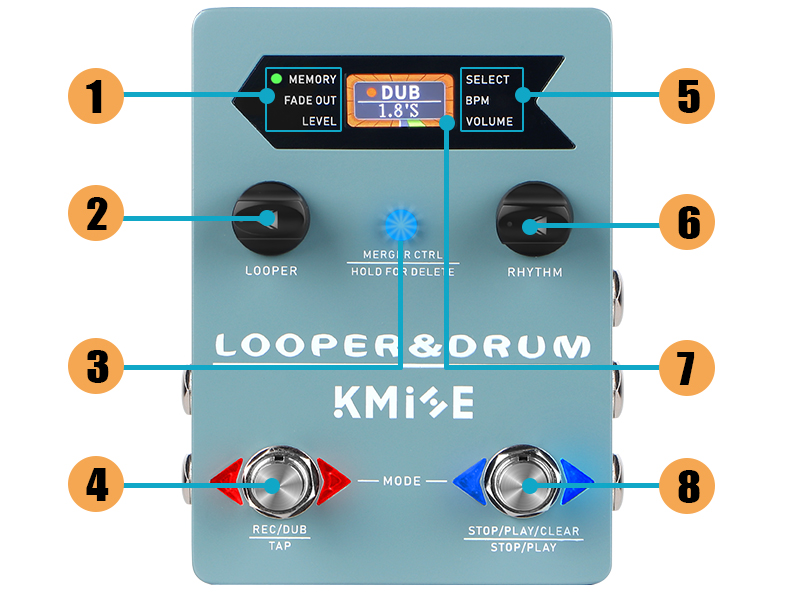
Figure 3.2: The color screen provides real-time feedback on loop status and timing.
3.2 Drum Machine Functions
- RHYTHM Knob: Adjusts the volume level of the drum machine.
- Drum Grooves: Access 100 drum grooves from 10 unique music styles and 10 metronome settings. Refer to the full user manual for detailed navigation of drum styles and metronomes.
3.3 Loop Management & Merger Control
- Memory Slots: The pedal has 40 memory slots. Each slot can store up to 4 minutes of recorded audio, for a total of 160 minutes. Recordings are automatically saved.
- Import/Export: Connect the pedal to your computer via USB and use the dedicated editor software to import or export recorded loops.
- MERGER CTRL Button:
- Press to toggle the looper and drum machine to work independently or simultaneously.
- Hold to delete tracks.

Figure 3.3: The editor software allows for comprehensive loop management, including import and export functionalities.

Figure 3.4: The Merger CTRL button allows flexible operation of the looper and drum machine.
3.4 Official Product Video
Video 3.1: An official product video demonstrating the KMISE Loop Pedal & Drum Machine 2-In-1 in action, showcasing its features and sound capabilities.
4. Maintenance
To ensure the longevity and optimal performance of your KMISE MI3653 pedal, follow these maintenance guidelines:
- Cleaning: Use a soft, dry cloth to clean the pedal's surface. Avoid using abrasive cleaners, solvents, or waxes, as these can damage the finish or internal components.
- Storage: Store the pedal in a cool, dry place away from direct sunlight, extreme temperatures, and high humidity. When not in use for extended periods, disconnect the power adapter.
- Handling: Handle the pedal with care. Avoid dropping it or subjecting it to strong impacts, which can cause internal damage.
- Power Supply: Always use a compatible DC 9V/300mA power adapter to prevent damage to the unit.
5. Troubleshooting
If you encounter issues with your KMISE MI3653 pedal, refer to the following common troubleshooting steps:
- No Sound:
- Check all cable connections (instrument input, amplifier output, power adapter).
- Ensure the power adapter is correctly connected and supplying power.
- Verify that the LOOPER and RHYTHM knobs are not set to minimum volume.
- Test with different cables and instruments to rule out faulty equipment.
- Recording Issues:
- Ensure the input signal is strong enough.
- Check if memory slots are full. Clear old loops if necessary.
- Verify correct operation of the REC/DUB TAP footswitch.
- USB Connectivity Problems:
- Ensure the USB cable is securely connected to both the pedal and the computer.
- Try a different USB port or cable.
- Restart the editor software and your computer.
- Check for updated drivers or software versions on the manufacturer's website.
- Pedal Not Responding:
- Disconnect and reconnect the power adapter.
- Perform a factory reset if the issue persists (refer to the full user manual for instructions).
6. Specifications
| Feature | Specification |
|---|---|
| Model Number | MI3653 |
| Item Weight | 1.06 pounds (0.48 Kilograms) |
| Product Dimensions | 4.9 x 3.4 x 1.3 inches |
| Material Type | Aluminum |
| Power Source | Corded Electric |
| Voltage | 9 Volts (DC) |
| Connector Type | USB |
| Hardware Interface | USB, USB Type C |
| Signal Format | Digital |
| Recording Capacity | 40 slots, 4 minutes/slot, 160 minutes total |
| Audio Quality | 44.1kHz / 24bit |
7. Warranty and Support
For warranty information and technical support, please refer to the documentation included with your product or visit the official KMISE website. Keep your purchase receipt as proof of purchase for any warranty claims.