
Introduction
Thank you for choosing the Fdceligoo Rechargeable Smart Barking Collar. This device is designed to assist in training your dog to reduce excessive barking through humane and adjustable corrective modes. Please read this manual thoroughly before using the collar to ensure proper operation, safety, and optimal results for your pet.
Important Safety Information
- Not for Aggressive Dogs: Do not use this product on aggressive dogs. If your dog is aggressive, consult a professional dog trainer.
- Age and Health: This collar is suitable for healthy dogs over 6 months old. Do not use on puppies, sick, or pregnant dogs.
- Supervision: Always supervise your dog during the initial training phases.
- Collar Fit: Ensure the collar fits snugly but not too tightly. You should be able to fit two fingers between the collar and your dog's neck. Improper fit can cause skin irritation or reduce effectiveness.
- Wearing Duration: Do not leave the collar on your dog for more than 12 hours per day. Prolonged wear can lead to pressure necrosis (bed sores).
- Skin Inspection: Regularly check your dog's neck for any signs of irritation, redness, or sores. If irritation occurs, discontinue use and consult a veterinarian.
- Contact Points: Ensure the contact points are appropriate for your dog's coat length. Long-haired dogs may require longer contact points for proper skin contact.
- Water Exposure: While the collar is IP67 waterproof, prolonged submersion or exposure to saltwater should be avoided. Always ensure the charging port cover is securely closed.
Package Contents
Upon opening your Fdceligoo Smart Barking Collar package, please verify that all components are present:
- 1 x Bark Collar Device
- 1 x Adjustable Nylon Collar Strap
- 2 x Short Contact Points (pre-installed or separate)
- 2 x Long Contact Points (for long-haired dogs)
- 1 x USB Type-C Charging Cable
- 1 x Test Light Tool (for shock function verification)
- 1 x User Manual

Image: The Fdceligoo Smart Barking Collar device, adjustable nylon strap, and various accessories including contact points and charging cable.
Product Features
- 4 Training Modes: Offers Beep, Vibration, Beep + Vibration, and Beep + Vibration + Shock modes for versatile training.
- 8 Adjustable Sensitivity Levels: Allows customization to your dog's barking intensity and environment.
- Intelligent Anti-Interference: Advanced chip design to accurately detect your dog's bark and minimize false triggers from other dogs or noises.
- IP67 Waterproof Rating: Ensures the collar can be used in various weather conditions, including rain and swimming.
- Rechargeable Battery: Built-in battery with Type-C charging, providing up to 20 days of working time on a 2-hour charge.
- Digital Display: Clear color screen shows sensitivity level, mode, battery status, and channel.
- Adjustable Strap: Suitable for dogs weighing 8-150 lbs with a 25-inch adjustable nylon strap.
Setup Guide
- Charge the Device: Before first use, fully charge the bark collar. Connect the Type-C charging cable to the collar's charging port and a USB power source. The battery indicator on the screen will show charging status. A full charge typically takes 2 hours.

Image: Close-up of the Type-C charging port on the Fdceligoo bark collar, showing connection to a charging cable.
- Attach Contact Points: Select the appropriate contact points (short for short-haired dogs, long for long-haired dogs) and screw them firmly onto the device. Ensure they are secure.

Image: Diagram illustrating the components of the Fdceligoo bark collar, including the contact points and digital display.
- Assemble the Collar Strap: Thread the adjustable nylon strap through the loops on the bark collar device.
- Fit the Collar on Your Dog:
- Place the collar around your dog's neck, positioning the device centrally under their chin or on the side of the neck.
- Adjust the strap so it is snug. The contact points must touch your dog's skin.
- Check the fit: You should be able to slide two fingers comfortably between the collar and your dog's neck. If it's too loose, the contact points won't work effectively, and if it's too tight, it can cause discomfort or skin irritation.
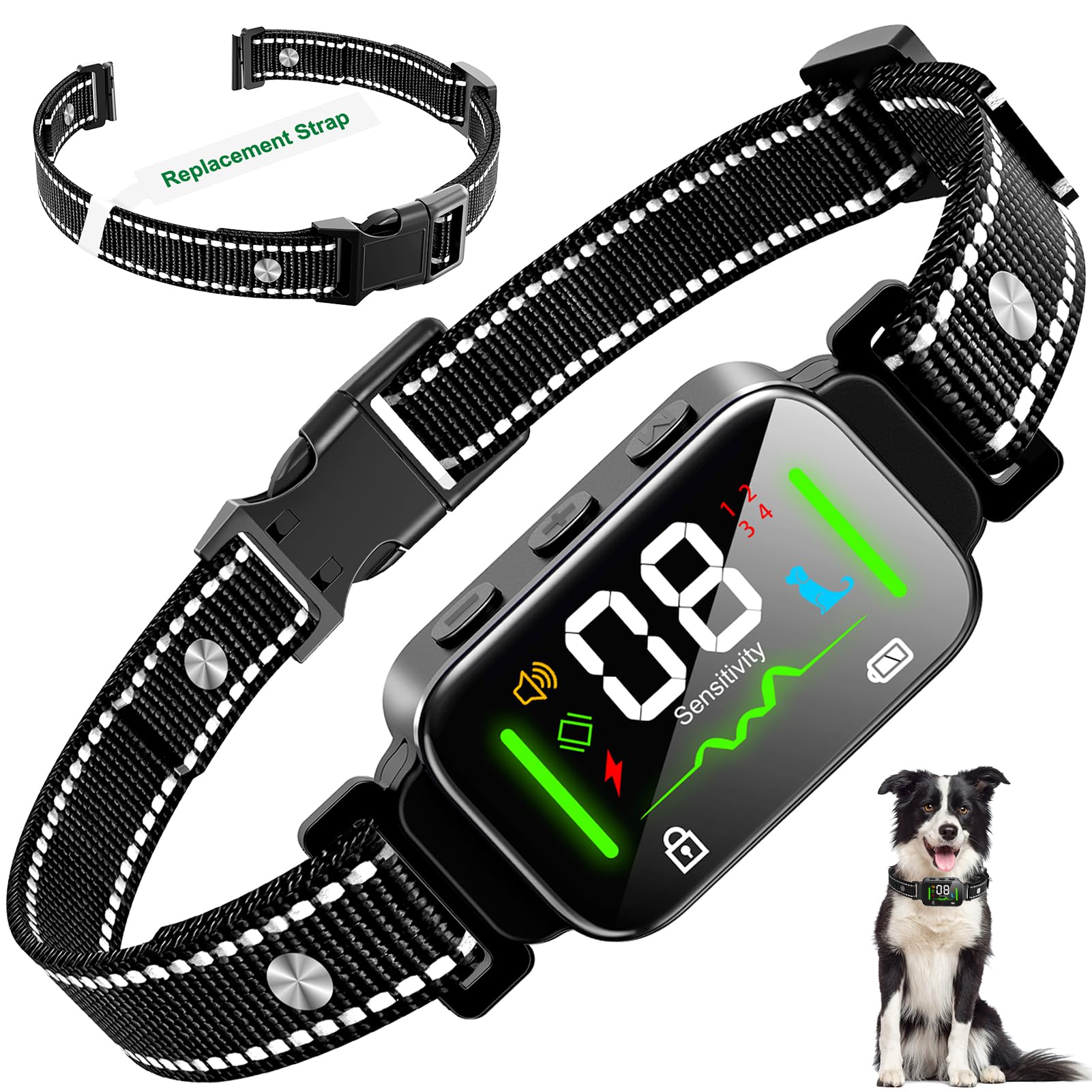
Image: A dog wearing the Fdceligoo bark collar, demonstrating the adjustable strap and proper placement for various dog sizes.
Operating Instructions
- Power On/Off: Press and hold the On/Off button (often labeled 'M' or a power icon) for 2-3 seconds to turn the collar on or off. The screen will illuminate when powered on.
- Change Modes: Press the 'M' button briefly to cycle through the 4 available training modes. The icon on the digital display will change to indicate the current mode.

Image: The Fdceligoo bark collar's digital display illustrating the four distinct training modes: Beep, Vibration, Beep + Vibration, and Beep + Vibration + Shock.
- Adjust Sensitivity: Use the '+' and '-' buttons to adjust the sensitivity level from 1 to 8. A higher number indicates higher sensitivity, meaning the collar will activate with less intense barking. Start with a lower sensitivity and increase as needed.
- Lock/Unlock Settings: Some models feature a lock function to prevent accidental changes to settings. Refer to the display for a lock icon. Press and hold specific buttons (e.g., '+' and '-' simultaneously) to lock or unlock.
Training Modes and Sensitivity
Training Modes:
The Fdceligoo bark collar offers four distinct training modes to suit various dog temperaments and training needs:
- Beep Mode: Emits an audible tone when barking is detected. This is the mildest correction and often effective for sensitive dogs.
- Vibration Mode: Delivers a gentle vibration when barking is detected. This provides a physical sensation without discomfort.
- Beep + Vibration Mode: Combines an audible beep with vibration for a more noticeable correction.
- Beep + Vibration + Shock Mode: Provides a beep, followed by vibration, and then a static shock if barking continues. The static shock level is adjustable. Use this mode with caution and only if other modes are ineffective.
Sensitivity Levels:
The collar features 8 adjustable sensitivity levels (1-8). Level 1 is the least sensitive, requiring louder or more frequent barking to activate. Level 8 is the most sensitive, activating with softer barks. It is recommended to start at a lower sensitivity level and gradually increase it until the collar effectively responds to your dog's barking without false triggers.

Image: Illustration of the collar's intelligent anti-interference technology, showing it accurately identifies dog barks while ignoring other noises or dog head shaking.
Charging the Collar
The Fdceligoo Smart Barking Collar is equipped with a rechargeable battery. To charge:
- Locate the Type-C charging port on the side of the collar device.
- Ensure the rubber cover over the charging port is open.
- Connect the provided Type-C USB cable to the collar and the other end to a standard USB power adapter (e.g., phone charger, computer USB port, power bank, car charger).
- The battery icon on the display will indicate charging status.
- A full charge takes approximately 2 hours and provides up to 20 days of use, depending on usage frequency.
- Once fully charged, disconnect the cable and securely close the rubber cover to maintain the IP67 waterproof rating.
Image: The Fdceligoo bark collar connected to a Type-C charging cable, illustrating the charging process and compatible power sources like USB adapters, power banks, laptops, and car chargers.
Maintenance
- Cleaning: Regularly clean the collar device and strap with a damp cloth. Avoid harsh chemicals or abrasive cleaners.
- Contact Points: Periodically check the contact points for dirt or corrosion. Clean them gently if necessary. Ensure they are securely fastened.
- Strap Inspection: Inspect the nylon strap for wear and tear. Replace if damaged to ensure proper fit and safety.
- Storage: When not in use for extended periods, store the collar in a dry, cool place. Ensure it is fully charged before storing to prolong battery life.
- Waterproof Seal: Always ensure the rubber cover for the charging port is tightly sealed when not charging to maintain the IP67 waterproof integrity.

Image: A Golden Retriever playing in water while wearing the Fdceligoo bark collar, demonstrating its IP67 waterproof capability for activities like bathing, swimming, and use in rain.
Troubleshooting
| Problem | Possible Cause | Solution |
|---|---|---|
| Collar not turning on. | Low battery or device is off. | Charge the collar fully. Press and hold the On/Off button for 2-3 seconds. |
| Collar not activating when dog barks. |
|
|
| Collar activating without dog barking (false triggers). |
|
|
| Shock function not working. |
|
|
| Skin irritation on dog's neck. |
|
|
Specifications
| Feature | Detail |
|---|---|
| Model | B0C6LKL91B |
| Brand | Fdceligoo |
| Training Modes | Beep, Vibration, Beep + Vibration, Beep + Vibration + Shock |
| Sensitivity Levels | 8 adjustable levels |
| Waterproof Rating | IP67 |
| Battery Type | Rechargeable (Type-C charging) |
| Charging Time | Approx. 2 hours |
| Working Time | Up to 20 days (per charge) |
| Adjustable Strap Length | Up to 25 inches |
| Recommended Dog Weight | 8-150 lbs |
| Material | Nylon (strap) |
| Package Dimensions | 6.57 x 4.41 x 2.05 inches |
| Item Weight | 8.15 ounces |
Product Demonstration Video
Video: An unboxing and demonstration of the Fdceligoo Smart Barking Collar, showing its components and basic operation. This video is provided by a seller-affiliated influencer.
Warranty and Customer Support
Fdceligoo products are designed for quality and reliability. For any questions, concerns, or warranty claims regarding your Smart Barking Collar, please contact Fdceligoo customer support through the retailer's platform or the official brand website. Please retain your proof of purchase for warranty purposes.
For further assistance, you may visit the Fdceligoo Store on Amazon.