
BIGTREETECH BIGTREETECH Manta E3EZ
BIGTREETECH Manta E3EZ + CB1 V2.2 + EZ2209*5 Kit User Manual
Model: BIGTREETECH Manta E3EZ | Brand: BIGTREETECH
1. Introduction
This user manual provides detailed instructions for the installation, operation, and maintenance of the BIGTREETECH Manta E3EZ + CB1 V2.2 + EZ2209*5 Kit. This kit is designed to upgrade and enhance the performance of various 3D printers, including Ender-3, Ender-3 V2, Ender-3 Pro, and BIQU B1 models. It features a powerful control board, a core control board, and five high-performance stepper motor drivers, offering advanced capabilities for your 3D printing needs.

Figure 1.1: Overview of the BIGTREETECH Manta E3EZ Kit components.
2. Key Features
- This kit includes BIGTREETECH Manta E3EZ silent control board, CB1 V2.2 core control board, and 5PCS EZ2209 stepper motor drivers.
- Manta E3EZ adopts ARM Cortex-M0+series STM32G0B1RE master chip with 32-bit main frequency of 64MHz; The maximum power supply of the motor is 56V.
- The BIGTREETECH Manta E3 EZ main control board and core board use BTB connection, which can be perfectly paired with the BIGTREETECH CB1 core board.
- BIGTREETECH CB1 is equipped with quad core 64 bit ARM Cortex-A53 @ 1.5GHz processor, 1GB DDR3 memory chip; Onboard 100M Ethernet interface and supports WIFI transmission.
- BIGTREETECH EZ2209 using a new customized heat sink, while enhancing the heat dissipation capacity, it protects the driver chip from external damage; The newly developed board frame is used to match the new connector to improve the user experience.
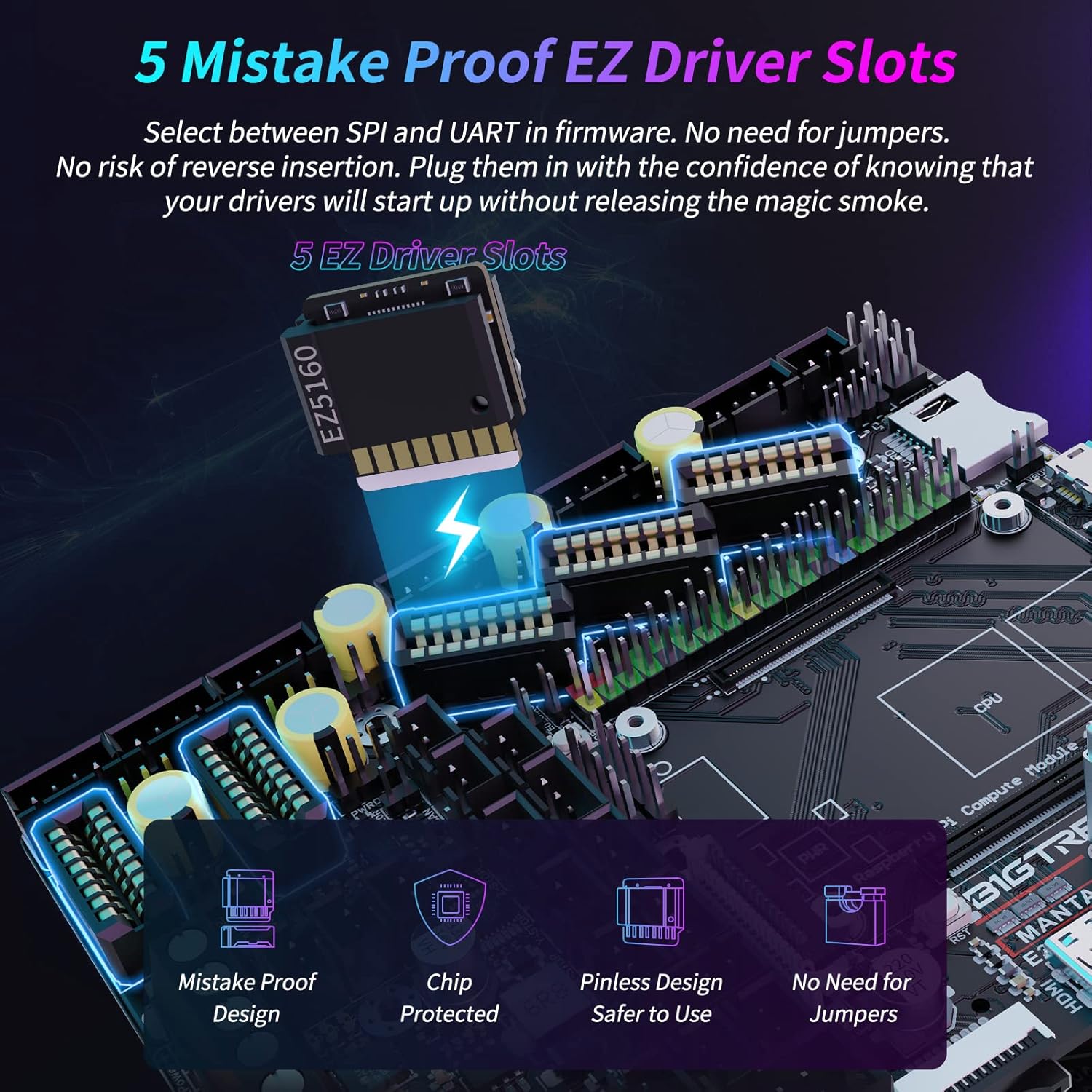
Figure 2.1: The EZ driver slots are designed for easy and secure installation of stepper motor drivers.

Figure 2.2: The Manta E3EZ board offers rich connectivity options for various peripherals.

Figure 2.3: The STM32G0B1RE master chip provides high performance and reliability.

Figure 2.4: The BIGTREETECH CB1 core board, a powerful companion for the Manta E3EZ.

Figure 2.5: The CB1 offers HDMI output, 100M Ethernet, and WiFi for comprehensive connectivity.

Figure 2.6: The EZ2209 drivers feature an innovative 2-in-1 design for efficient heat dissipation.

Figure 2.7: The board is built with 4 layers of PCB for enhanced durability and performance.
3. Setup and Installation
3.1 Safety Precautions
- Always disconnect the 3D printer from the power source before beginning any installation or maintenance.
- Ensure proper grounding to prevent electrostatic discharge (ESD) damage to electronic components.
- Handle components with care, avoiding excessive force.
3.2 Physical Installation
- Prepare the Printer: Power off your 3D printer and disconnect all cables. Remove the existing mainboard from its enclosure.
- Mount the Manta E3EZ Board: Install the Manta E3EZ board into the printer's mainboard enclosure. It is designed as a drop-in replacement for Ender series printers. Secure it using appropriate screws.
- Install EZ2209 Drivers: Carefully insert each EZ2209 stepper motor driver into its corresponding EZ socket on the Manta E3EZ board. Ensure correct orientation to avoid damage.
- Connect CB1 Core Board: Connect the CB1 V2.2 core board to the Manta E3EZ main control board via the BTB connection. This ensures seamless communication and power delivery.
- Wire Components: Connect all necessary components to the Manta E3EZ board:
- Stepper Motors (X, Y, Z, E0, E1)
- Heaters (Hotend, Heated Bed)
- Thermistors
- Endstops (X-STOP, Y-STOP, Z-STOP)
- Fans (Part Cooling, Hotend Cooling, Case Fans)
- BLTouch/Probe (if applicable)
- LCD Screen (EXP1, EXP2)
- Power Supply (DC_IN)
- Double-Check Connections: Before powering on, meticulously verify all connections for correct polarity and secure seating. Incorrect wiring can cause damage to the board or other components.

Figure 3.1: Detailed interface diagram of the BIGTREETECH Manta E3EZ board, showing all connection points.
4. Operating Instructions
4.1 Firmware Installation and Configuration
The BIGTREETECH Manta E3EZ supports both Klipper and Marlin firmware. The CB1 core board is ideal for running Klipper, providing advanced control and features.
- For Klipper: The CB1 acts as the host for Klipper. You will need to flash the Klipper firmware to the Manta E3EZ MCU and configure Klipper on the CB1. Refer to the official Klipper documentation and BIGTREETECH's specific guides for detailed steps on setting up Klipper with the CB1 and Manta E3EZ. This typically involves flashing a Klipper firmware binary to the mainboard's MCU and then configuring the printer.cfg file on the CB1.
- For Marlin: If you prefer Marlin, you can compile and flash a Marlin firmware tailored for the Manta E3EZ. This process usually involves using Visual Studio Code with PlatformIO.
4.2 Initial Power-Up and Testing
- Connect the power supply to the printer.
- Power on the printer. Observe the indicator lights on the Manta E3EZ board.
- If using Klipper, access the Klipper interface (e.g., Mainsail or Fluidd) via a web browser on a connected computer.
- Perform initial tests:
- Verify motor movement in all axes.
- Check thermistor readings for hotend and heated bed.
- Test endstop functionality.
- Verify fan operation.
Video 4.1: Official product video demonstrating the BIGTREETECH Manta E3EZ MotherBoard supporting Klipper with CB1.
5. Maintenance
- Regular Cleaning: Periodically clean the mainboard and drivers with compressed air to remove dust and debris, which can affect performance and cooling.
- Firmware Updates: Keep your firmware updated to the latest stable version to benefit from bug fixes, new features, and performance improvements. Always back up your configuration before updating.
- Driver Inspection: Ensure the EZ2209 drivers are securely seated in their sockets and that their heatsinks are free from obstructions.
6. Troubleshooting
| Problem | Possible Cause | Solution |
|---|---|---|
| Board does not power on. | Incorrect power connection, faulty power supply, short circuit. | Check power supply voltage and connections. Ensure no short circuits. |
| Motors not moving or moving erratically. | Incorrect driver installation, wrong motor wiring, incorrect firmware configuration, faulty motor. | Verify driver orientation and seating. Check motor wiring. Review firmware motor configuration. |
| Temperature sensor errors. | Incorrect thermistor wiring, faulty thermistor, wrong thermistor type in firmware. | Check thermistor connections and ensure they are secure. Verify thermistor type in firmware matches your hardware. |
| CB1 not connecting to network. | Incorrect network settings, faulty WiFi/Ethernet module, network interference. | Verify network configuration on CB1. Check WiFi signal strength or Ethernet cable. Restart network devices. |
7. Specifications
| Feature | Detail |
|---|---|
| Manufacturer | BIGTREETECH |
| Item Model Number | BIGTREETECH Manta E3EZ |
| Compatible Devices | Printer (Ender-3, Ender-3 V2, Ender-3 Pro, BIQU B1) |
| Main Chip (Manta E3EZ) | ARM Cortex-M0+ series STM32G0B1RE (32-bit, 64MHz) |
| Max Motor Power Supply | 56V |
| CB1 Processor | Quad core 64 bit ARM Cortex-A53 @ 1.5GHz |
| CB1 Memory | 1GB DDR3 |
| CB1 Network Interface | 100M Ethernet, WiFi |
| Number of Ports | 7 (various I/O) |
| Driver Sockets | 5 (EZ2209 included) |
| PCB Layers | 4 layers |
8. Warranty and Support
BIGTREETECH products typically come with a manufacturer's warranty. For specific warranty terms and conditions, please refer to the documentation included with your product or visit the official BIGTREETECH website. For technical support, firmware downloads, and community forums, please visit the BIGTREETECH official support channels. Keep your purchase receipt as proof of purchase for warranty claims.
Official BIGTREETECH Store: BIGTREETECH Amazon Store
Related documentsBIGTREETECH Manta E3EZ


Ask a question about this manual
Ask about setup, troubleshooting, compatibility, parts, safety, or missing instructions. Manuals+ will review the question and use this page’s manual context to help answer it.