
1. Introduction and Overview
The CHAUVET DJ Cosmos HP is a high-powered LED effect light designed to generate crisp, dynamic beams that cover an entire room. This unit is engineered for astonishing aerial effects, featuring narrow, razor-sharp RGBW light beams. Its independently controlled motors spin continuously in both directions, creating captivating swirling patterns. The Cosmos HP includes built-in, eye-catching auto programs with zone control, allowing for easy generation of complex lighting looks. Its energetic, multicolored beams are effective for various events, performing well with or without the use of fog.
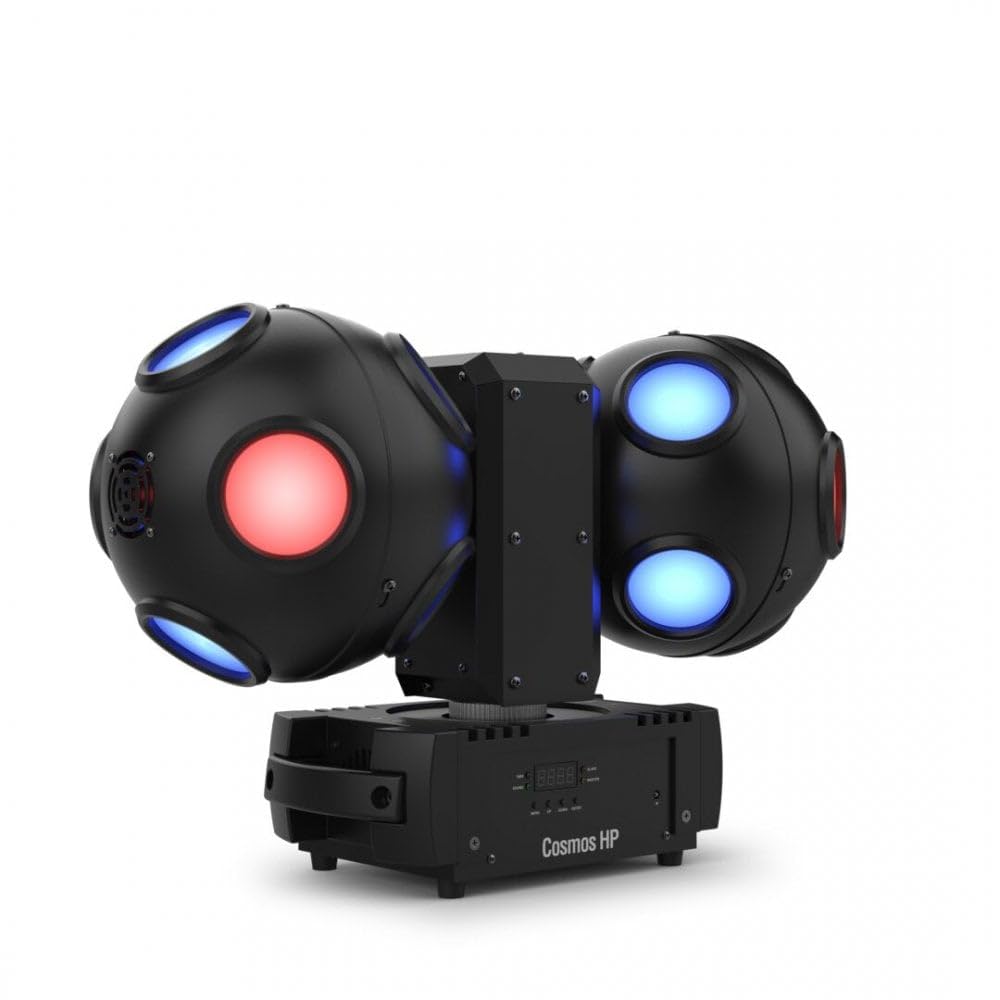
Image 1.1: The CHAUVET DJ Cosmos HP projecting vibrant red, green, blue, and white light beams.
2. Safety Information
Before operating the CHAUVET DJ Cosmos HP, please read and understand all safety instructions. Retain this manual for future reference.
- Electrical Safety: Always connect the unit to a grounded power outlet. Ensure the power source matches the unit's voltage requirements (240V AC). Disconnect power before cleaning or servicing.
- Ventilation: Ensure adequate airflow around the unit. Do not block ventilation openings. Maintain a minimum distance of 6 inches (15 cm) from walls or other objects.
- Indoor Use Only: This product is designed for indoor use. Do not expose to rain, moisture, or extreme temperatures.
- Eye Safety: Avoid direct eye exposure to the light source. Do not stare into the light beams.
- Mounting: If mounting overhead, use appropriate, certified hardware and ensure the structure can support the unit's weight (17.8 lbs). Always use a safety cable.
- Maintenance: Refer to the maintenance section for proper cleaning and care. Do not attempt to repair the unit yourself; contact qualified service personnel.
3. Setup
Follow these steps to set up your CHAUVET DJ Cosmos HP:
- Unpacking: Carefully remove the Cosmos HP from its packaging. Inspect the unit for any signs of damage during transit. Report any damage to your dealer immediately.
- Placement: Place the unit on a stable, level surface, or mount it securely using a clamp and safety cable to a truss or suitable structure. Ensure the mounting location allows for proper ventilation and beam projection.
- Power Connection: Connect the included power cord to the power input on the rear of the unit. Plug the other end into a compatible 240V AC grounded power outlet.
- DMX Connection (Optional): If using DMX control, connect a DMX cable from your DMX controller to the DMX IN port on the Cosmos HP. For daisy-chaining multiple units, connect from the DMX OUT of the first unit to the DMX IN of the next.

Image 3.1: Rear panel of the Cosmos HP, highlighting power and DMX input/output ports.
4. Operating Instructions
The CHAUVET DJ Cosmos HP offers various operating modes to suit your event needs.
- Power On: Once connected to power, the unit will automatically power on and initiate a self-test. The display on the rear panel will illuminate.
- Control Panel Navigation: Use the buttons adjacent to the display screen to navigate through the menu options. Typically, there are buttons for 'Menu', 'Up', 'Down', and 'Enter'.
- Auto Programs: Select an 'Auto' mode from the menu. The unit will cycle through its pre-programmed light shows, utilizing its independent motors and RGBW beams for dynamic effects.
- Sound-Activated Mode: Choose 'Sound' or 'Sound Active' mode. The Cosmos HP will then react to ambient sound or music, synchronizing its light patterns with the beat. Adjust microphone sensitivity if available.
- DMX Control: If connected to a DMX controller, set the unit's DMX address via the menu. Your DMX controller can then be used to precisely control individual features such as color, rotation speed, and pattern selection. Refer to the DMX protocol chart in the full product manual for detailed channel assignments.

Image 4.1: The control panel and display on the rear of the Cosmos HP for mode selection and settings.
5. Maintenance
Regular maintenance ensures the longevity and optimal performance of your CHAUVET DJ Cosmos HP.
- Cleaning: Disconnect the unit from power before cleaning. Use a soft, lint-free cloth to wipe the exterior casing. For lenses, use a specialized lens cleaning solution and a soft cloth to avoid scratches. Ensure all ventilation openings are clear of dust and debris.
- Storage: When not in use, store the Cosmos HP in its original packaging or a suitable protective case. Keep it in a cool, dry environment, away from direct sunlight, dust, and extreme temperatures.
- Inspection: Periodically inspect power cables, DMX cables, and mounting hardware for any signs of wear or damage. Replace damaged components immediately.
6. Troubleshooting
If you encounter issues with your CHAUVET DJ Cosmos HP, refer to the following common troubleshooting steps:
- No Power:
- Check that the power cord is securely connected to both the unit and a functional power outlet.
- Verify the power outlet is supplying power (test with another device).
- Ensure the voltage of the power source matches the unit's requirements.
- No Light Output:
- Confirm the unit is powered on and the display is active.
- Check the selected operating mode (e.g., ensure it's not in a 'blackout' or 'standby' state).
- If using DMX, verify DMX signal integrity and correct addressing.
- Erratic Behavior / Unresponsive:
- Disconnect power for a few minutes, then reconnect to perform a hard reset.
- Ensure the unit is not overheating; check ventilation.
- If using DMX, check for DMX signal interference or incorrect DMX settings.
- Motors Not Spinning:
- Verify the selected program or DMX command includes motor movement.
- Check for any physical obstructions preventing movement.
If these steps do not resolve the issue, please contact CHAUVET DJ customer support.
7. Specifications
| Model Number | Cosmos HP |
| Brand | CHAUVET DJ |
| Color | Black |
| Material | Stainless Steel |
| Light Source Type | LED |
| Power Source | Corded Electric |
| Voltage | 240 Volts (AC) |
| Maximum Compatible Light Source Wattage | 11 Watts |
| Light Source Wattage | 64 Watts |
| Number of Light Sources | 16 |
| Batteries Included | No |
| Item Weight | 17.8 Pounds |
| Certifications | CE, UKCA, RoHS |
| Manufacturer | Chauvet Lighting |
| UPC | 781462224066 |
8. Warranty Information
The CHAUVET DJ Cosmos HP is covered by a 2-year manufacturer's warranty. This warranty covers defects in materials and workmanship under normal use. Please retain your proof of purchase for warranty claims. For full terms and conditions, refer to the official CHAUVET DJ warranty policy or contact customer support.
9. Support
For technical assistance, service inquiries, or additional product information, please contact CHAUVET DJ customer support or visit their official website. You can also find more information and products at the official CHAUVET DJ Store on Amazon.


