
1. Introduction
Thank you for choosing the HURRISE Smart Wireless WiFi Visual Doorbell. This device provides enhanced home security and convenience with its 720p high-definition video, two-way audio, and smart features. This manual will guide you through the installation, operation, and maintenance of your new doorbell to ensure optimal performance.
2. Safety Information
- Read all instructions carefully before use.
- Do not expose the device to extreme temperatures, humidity, or direct sunlight.
- Use only specified batteries (3 x AA, not included) for power. Ensure correct polarity.
- Keep the device away from children.
- Do not attempt to disassemble or repair the device yourself. Contact support if issues arise.
3. Package Contents
Verify that all items are present in your package:
- 1 x HURRISE Smart Wireless WiFi Visual Doorbell
- 1 x User Manual
- 1 x Sticker
- 2 x Connection Cables
- 4 x Expansion Screws
- 1 x Hexagonal Screwdriver
- 7 x Screws

Image: The HURRISE Smart Wireless WiFi Visual Doorbell shown with its complete set of accessories, including mounting hardware and cables.
4. Product Overview
The HURRISE Smart Wireless WiFi Visual Doorbell features a sleek design with integrated camera, motion sensor, and doorbell button.

Image: Front view of the HURRISE Smart Wireless WiFi Visual Doorbell, highlighting the camera lens, infrared lights, and main doorbell button.
Key Components:
- HD Camera: Captures 1280x720 resolution video with a 166° diagonal viewing angle.
- Infrared Lights: Six 850mm infrared lights for clear night vision.
- Doorbell Button: Activates the doorbell and initiates a call to your smartphone.
- Motion Sensor (PIR): Detects movement and can trigger alerts and recordings.
- Microphone & Speaker: Enables two-way audio communication.
5. Setup
5.1 Battery Installation
- Remove the back cover of the doorbell.
- Insert three (3) AA batteries (not included) into the battery compartment, ensuring correct polarity.
- Replace the back cover securely.
5.2 Physical Installation
Choose a suitable location near your door, ensuring good Wi-Fi signal strength.
- Mark the desired mounting holes on the wall using the backplate as a template.
- Drill holes and insert the expansion screws.
- Secure the backplate to the wall using the provided screws.
- Attach the doorbell unit to the mounted backplate.
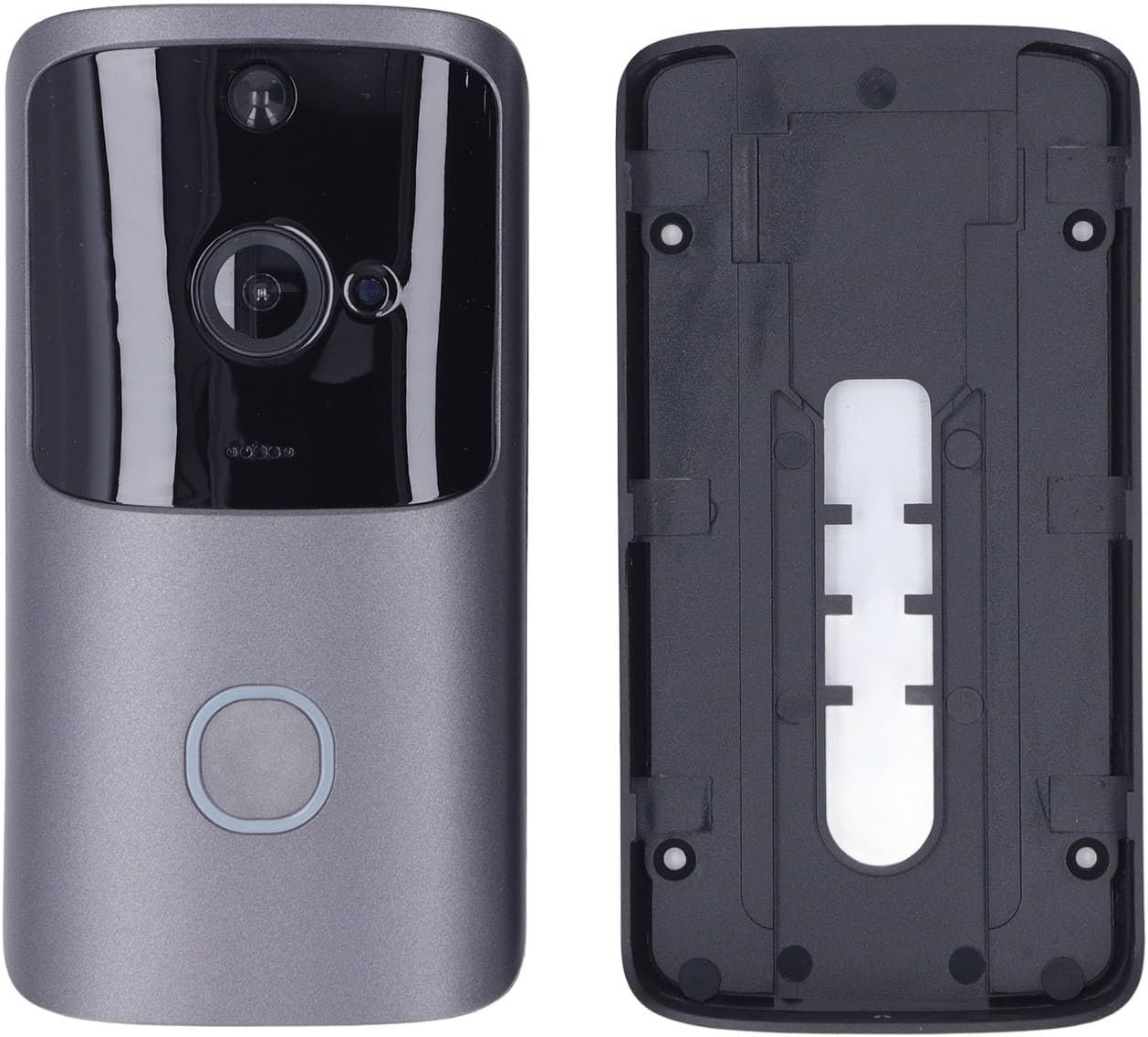
Image: The HURRISE Smart Wireless WiFi Visual Doorbell separated from its mounting backplate, illustrating the installation components.
5.3 App Installation and Pairing
- Download the dedicated mobile application from your smartphone's app store (e.g., App Store for iOS, Google Play Store for Android). Search for "HURRISE Doorbell" or refer to the QR code in the quick start guide (if provided).
- Open the app and create an account or log in.
- Follow the in-app instructions to add a new device. This typically involves pressing the doorbell button to put it into pairing mode and connecting it to your home Wi-Fi network (802.11b/g/n supported).
- Once paired, you will receive a confirmation in the app.
6. Operating Instructions
6.1 Basic Operation
- Answering a Call: When a visitor presses the doorbell button, your smartphone will receive a notification. Open the app to view live video and engage in two-way audio communication.
- Live View: You can access the live video feed from your doorbell at any time through the app, even without a visitor.

Image: The HURRISE Smart Wireless WiFi Visual Doorbell positioned next to a smartphone displaying a live video feed of a delivery person, demonstrating remote viewing capabilities.
6.2 Advanced Features
- Motion Detection (PIR): The doorbell features a Passive Infrared (PIR) sensor that detects movement. When motion is detected, you will receive an alert on your phone, and the doorbell can automatically record a short video clip (15 seconds per event).
- Night Vision: The integrated infrared lights enable clear video monitoring even in low-light or complete darkness.
- Two-Way Audio: Speak directly to visitors at your door and hear their responses through the doorbell's built-in microphone and speaker.
- Wake-up Modes: The doorbell can be activated by a button press, PIR motion detection, or actively woken up via your phone app. The wake-up time is approximately 600ms.
- Video Storage: The doorbell supports local storage via a memory card (8GB, 16GB, or 32GB, not included) for recorded video clips.
7. Maintenance
- Cleaning: Gently wipe the camera lens and doorbell surface with a soft, dry cloth. Avoid using abrasive cleaners or solvents.
- Battery Replacement: When the battery level is low, the app will notify you. Replace the three AA batteries promptly to ensure continuous operation.
- Firmware Updates: Periodically check the app for available firmware updates to ensure your doorbell has the latest features and security enhancements.
8. Troubleshooting
| Problem | Possible Cause | Solution |
|---|---|---|
| Doorbell not connecting to Wi-Fi | Incorrect Wi-Fi password; Weak Wi-Fi signal; Doorbell too far from router | Verify Wi-Fi password; Move doorbell closer to router; Ensure router is 2.4GHz compatible. |
| No notifications on phone | App notifications disabled; Phone in Do Not Disturb mode; App not running in background | Enable notifications for the doorbell app; Check phone settings; Ensure app has background data access. |
| Poor video quality | Weak Wi-Fi signal; Dirty camera lens | Improve Wi-Fi signal strength; Clean the camera lens. |
| Motion detection not working | PIR sensitivity set too low; Obstruction in detection area; Batteries low | Adjust PIR sensitivity in app settings; Clear any obstructions; Replace batteries. |
| Short battery life | Frequent motion detection events; High usage; Low-quality batteries | Reduce PIR sensitivity; Use high-quality alkaline batteries; Limit live view access. |
9. Specifications
| Feature | Specification |
|---|---|
| Resolution | 1280 x 720 (720p) |
| Diagonal View Angle | 166° |
| Infrared Light | 6 pieces, 850mm |
| Wi-Fi Support | 802.11b/g/n |
| Intercom | Two-way audio |
| Memory Card Support | 8GB, 16GB, 32GB (not included) |
| Power Supply | 3 x AA Batteries (not included) |
| Wake-up Time | Within 600ms |
| Wake-up Modes | Button press, PIR detection, Phone active |
| Power Consumption | Standby: 200uA, Operating: 170mA |
| Material | ABS |
| Special Features | Motion Detector, Night Vision |
10. Warranty and Support
HURRISE products are designed for reliability and performance. For warranty information or technical support, please refer to the documentation included with your purchase or contact your retailer. Keep your proof of purchase for warranty claims.
For further assistance, please visit the HURRISE brand store: HURRISE Store