
HIFIT HFT-UP-060
HIFIT Full Upholstered Smart LED Bed Frame Instruction Manual
Model: HFT-UP-060
1. Introduction
Thank you for choosing the HIFIT Full Upholstered Smart LED Bed Frame. This manual provides essential information for the safe assembly, operation, and maintenance of your new bed frame. Please read these instructions thoroughly before beginning assembly and retain them for future reference.
2. Safety Information
WARNING:
- Always follow the assembly instructions carefully to ensure stability and prevent injury.
- Do not exceed the maximum weight capacity of the bed frame (700 lbs for Full size).
- This product is not intended for use by children without adult supervision.
- Ensure all connections are secure before use.
3. Package Contents
Before assembly, verify that all components listed below are present and undamaged. If any parts are missing or damaged, please contact customer support.
- Smart LED Bed Frame with Headboard components
- Smart LED lights and controller
- Assembly kits (hardware and tools)
- Instruction Manual
4. Specifications
| Feature | Detail |
|---|---|
| Model Number | HFT-UP-060 |
| Size | Full |
| Product Dimensions | 78.7"L x 54.1"W x 46.9"H |
| Headboard Height (Adjustable) | 44.1" to 46.1" |
| Ground Clearance | 7.1 Inches |
| Weight Capacity | Up to 700 lbs |
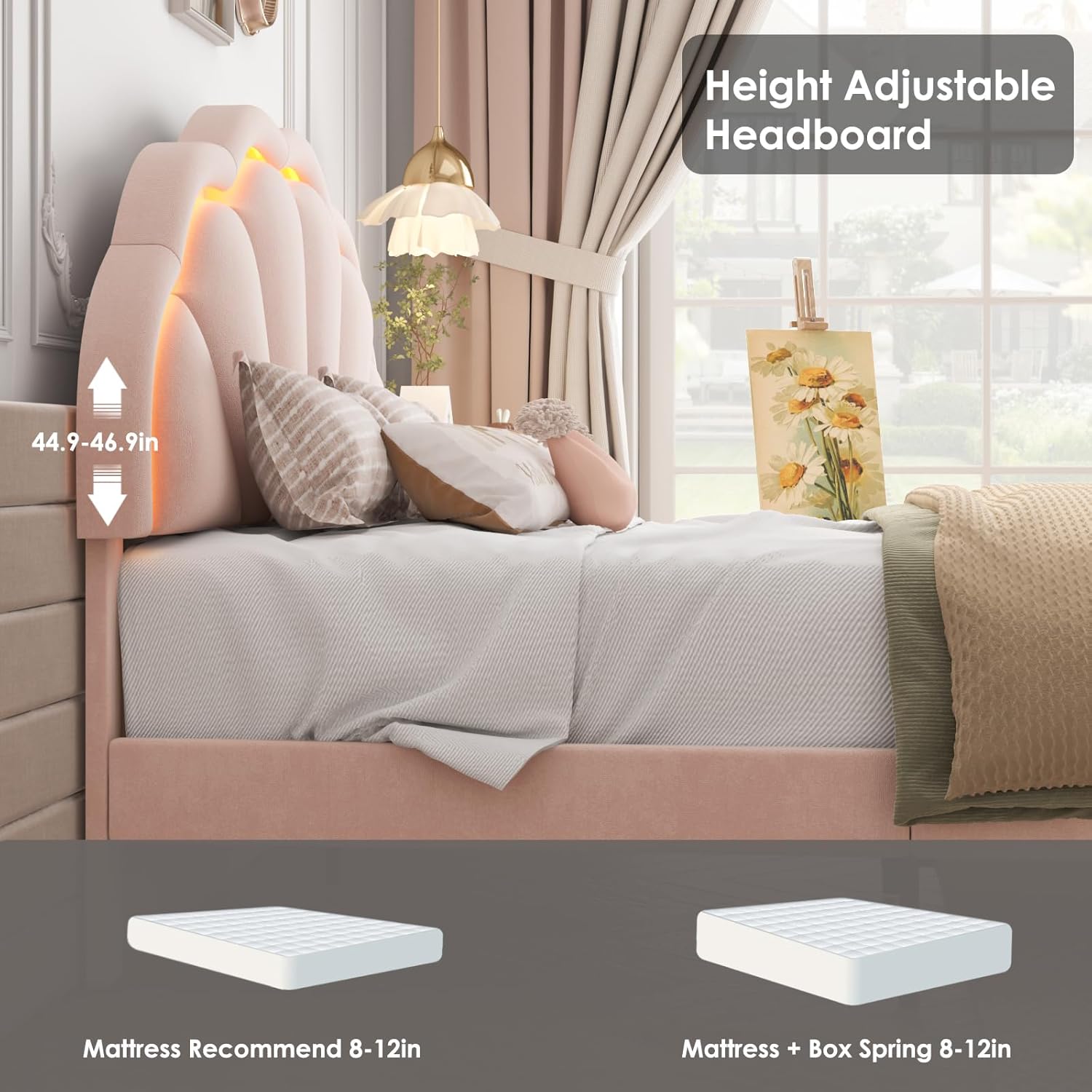
| Recommended Mattress Size | 10''-12'' (No Box Spring Needed) |
| Special Features | Adjustable Headboard, RGB LED Lighting, Remote Control, Squeak Resistant Design |
| Material | Upholstered (Velvet), Wood, Metal |
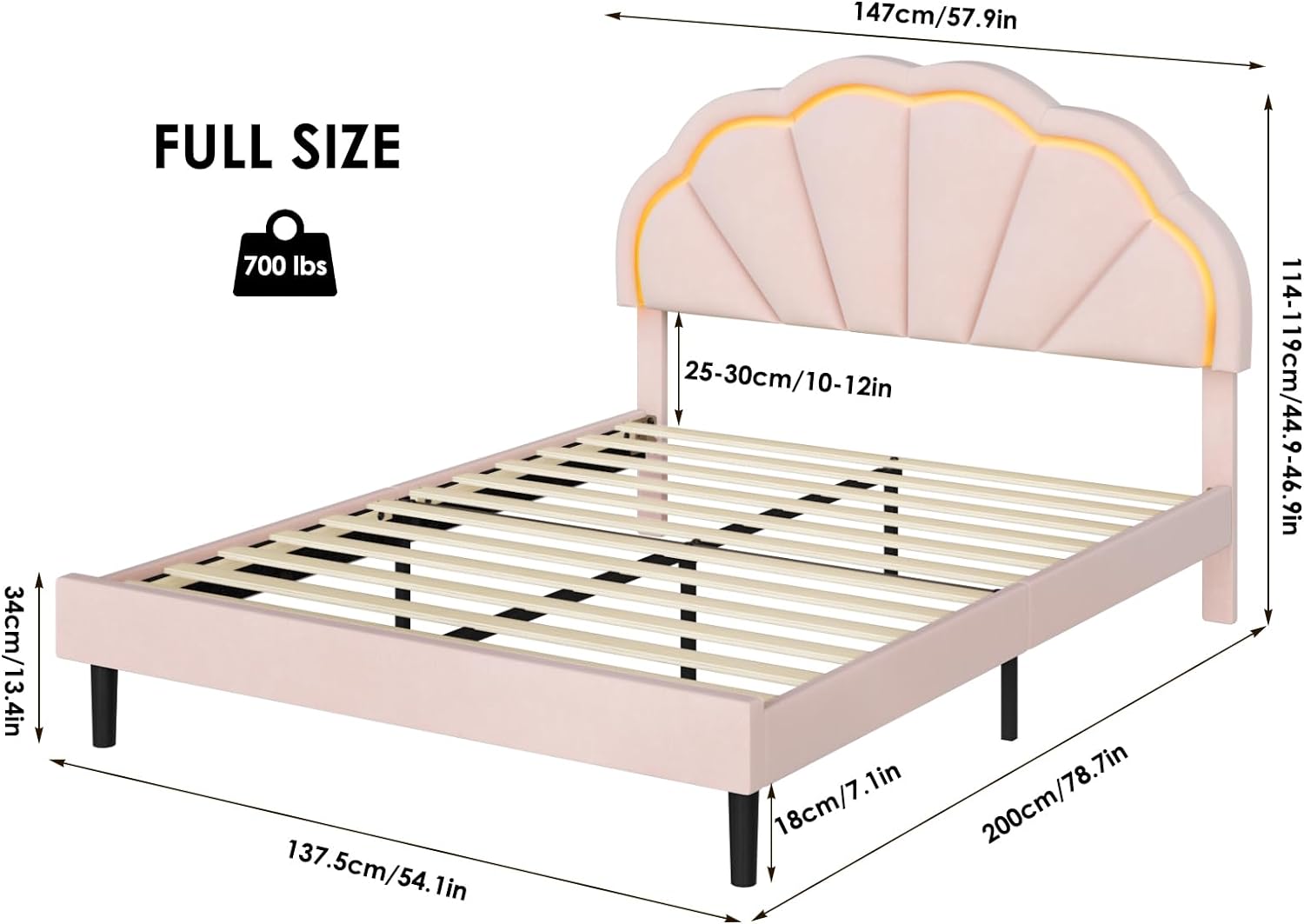
This image illustrates the key dimensions of the bed frame, including length, width, and adjustable headboard height, along with the recommended mattress thickness and weight capacity.
5. Assembly Instructions
Assembly is designed to be straightforward. Please follow the steps below carefully. It is recommended to assemble the bed frame with two people.
- Unpack Components: Lay out all parts on a clean, soft surface to prevent scratches. Verify all parts are present against the package contents list.
- Assemble the Frame: Connect the side rails to the headboard and footboard using the provided hardware. Ensure all bolts are tightened securely.
- Install Center Support: Attach the center support beam and legs to the frame for added stability.
- Place Slats: Position the wooden slats across the frame. The slats are designed with Velcro strips for easy and secure installation, reducing friction and noise.
Figure 2: Close-up of wooden slats with Velcro for easy installation and noise reduction. This image shows the wooden slats with integrated Velcro strips, which simplify installation and help prevent squeaking by securing the slats firmly to the frame.
- Adjust Headboard Height: The headboard height can be adjusted to accommodate different mattress thicknesses. Secure it at your desired level.

Figure 3: Illustration of the adjustable headboard, showing how its height can be customized. This image demonstrates the adjustable height feature of the headboard, allowing users to set it between 44.1 and 46.1 inches to best suit their mattress.
- Install LED Lights: Carefully attach the LED light strips to the designated areas on the headboard. Connect the lights to the controller and power source.
- Final Check: Ensure all connections are tight and the frame is stable before placing your mattress.

This image displays the complete bed frame structure, including the petal-inspired headboard and wooden slat support system, prior to mattress placement.
6. Operating Instructions (LED Lights)
The Smart LED Bed Frame features integrated RGB LED lighting with various control options.
6.1. Control Methods
- Remote Control: Use the included remote to power on/off, change colors, adjust brightness, and select preset light effects.
- Smartphone App: Download the dedicated app (available on Google Play and App Store) to access advanced features, including:
- Over 16 million color options
- 20+ preset light effects (flash, wave, etc.)
- Music Sync Mode: Lights flash with music rhythm.
- Microphone Mode: Lights react to ambient sounds.
- Timing Function: Schedule light on/off times.
This image displays the various ways to control the LED lights, highlighting the remote control and the smartphone application with its diverse features like multiple colors, timing, music, and microphone modes.

This image provides a closer look at the smartphone application, showcasing its capabilities for warm reading light, soothing sleep light, music sync for entertainment, and use as a practical nightlight.
6.2. Music Sync Mode
In Music Sync Mode, the LED lights will dynamically change color and intensity in response to the rhythm of music played in the room, creating an immersive audio-visual experience.

This image illustrates the dynamic effect of the LED lights responding to music, enhancing the ambiance of the room.
7. Maintenance
Proper care will extend the life and appearance of your bed frame.
- Cleaning: For general cleaning, wipe the upholstered surfaces with a dry cloth. For minor spills or marks, use a damp cloth and gently blot the area. Avoid harsh chemicals or abrasive cleaners.
- Frame Inspection: Periodically check all bolts and connections to ensure they remain tight. Retighten as necessary.
- LED Lights: Ensure the LED light strips are free from dust and debris. Do not attempt to repair or modify the LED system yourself.
8. Troubleshooting
If you encounter any issues with your HIFIT bed frame, please refer to the following common solutions:
- Squeaking Noises: Ensure all assembly bolts are securely tightened. The bed frame is designed with noise-free strips on the slats to minimize squeaking. If noise persists, re-check slat placement and connections.
- LED Lights Not Working:
- Check if the power adapter is securely plugged into both the wall outlet and the LED controller.
- Verify that the LED strips are properly connected to the controller.
- Replace the remote control battery if necessary.
- Ensure the smartphone app is updated and correctly paired via Bluetooth.
- Instability: Confirm that all legs are evenly placed on the floor and all frame connections are fully tightened.
9. Warranty and Support
HIFIT products are manufactured with quality and customer satisfaction in mind. For any questions, missing parts, or support needs, please contact HIFIT customer service. Our support team is available to assist you.
For further assistance, please visit the official HIFIT store: HIFIT Store on Amazon.
Related documentsHFT-UP-060

Ask a question about this manual
Ask about setup, troubleshooting, compatibility, parts, safety, or missing instructions. Manuals+ will review the question and use this page’s manual context to help answer it.