
Soundcore A3035
Contents
Soundcore Space One Active Noise Cancelling Headphones
Model: A3035
Brand: Soundcore by Anker
Introduction
The Soundcore Space One headphones are designed to provide an immersive audio experience with advanced active noise cancellation. Featuring 40mm customized dynamic drivers and LDAC support, these headphones deliver high-resolution wireless audio. They are crafted for comfort with an 8° floating-axis design and offer extended playtime for long journeys.
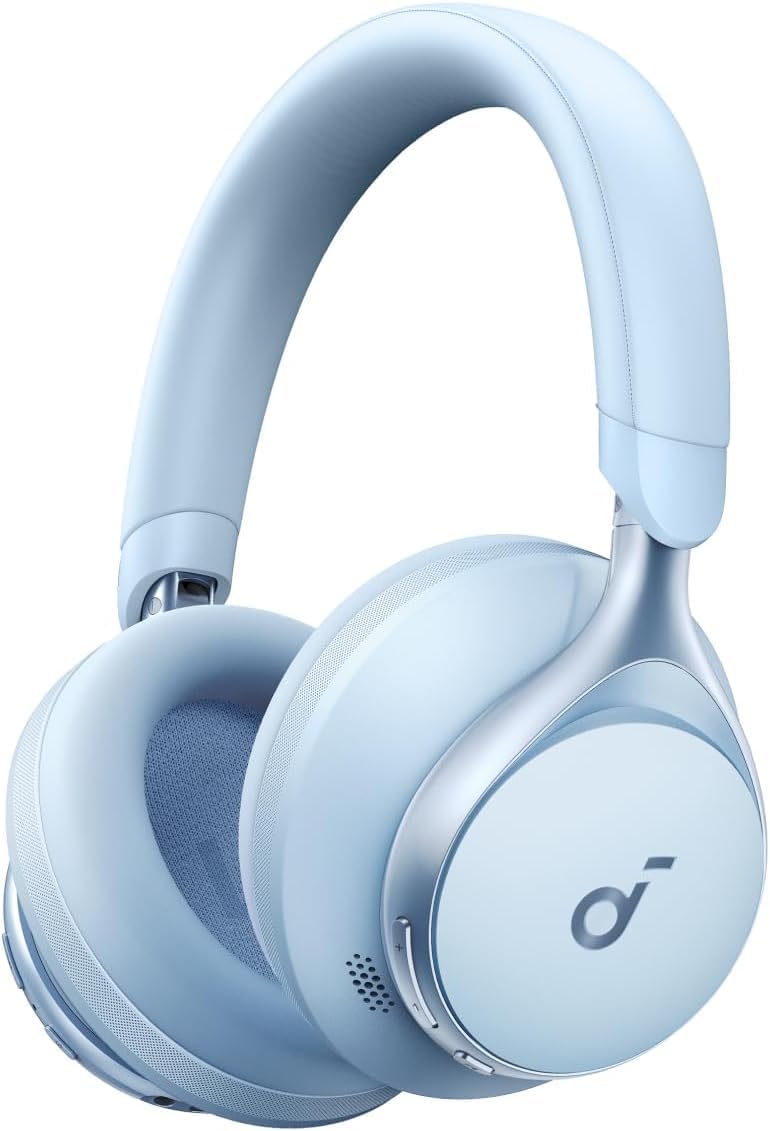
Image: Soundcore Space One headphones in Sky Blue, showcasing their sleek design.
What's in the Box
Upon unboxing your Soundcore Space One headphones, you will find the following components:
- Soundcore Space One Headphone x1
- Carry Pouch x1
- USB-C Cable x1
- AUX Cable x1

Image: All items included in the Soundcore Space One packaging: the headphones, a carry pouch, a USB-C charging cable, and an AUX audio cable.
Setup Guide
1. Charging Your Headphones
Before first use, fully charge your Soundcore Space One headphones. Use the provided USB-C cable to connect the headphones to a power source. The LED indicator will show charging status.
- A full charge provides approximately 40 hours of playtime with Active Noise Cancellation (ANC) on, and up to 55 hours with ANC off.
2. Powering On/Off
To power on the headphones, press and hold the Power button until the LED indicator lights up. To power off, press and hold the Power button again until the LED indicator turns off.
3. Bluetooth Pairing
To connect your Soundcore Space One headphones to a device via Bluetooth 5.3:
- Ensure the headphones are powered off.
- Press and hold the Power button for 3 seconds until the LED indicator flashes blue, indicating pairing mode.
- On your device (smartphone, tablet, computer), enable Bluetooth and search for "Soundcore Space One" in the list of available devices.
- Select "Soundcore Space One" to establish the connection. The LED will turn solid blue once connected.
Multipoint Connection: These headphones support connecting to two devices simultaneously. After connecting to the first device, put the headphones back into pairing mode and connect to the second device. The headphones will intelligently switch between the two connected devices.

Image: Illustration of the multipoint connection feature, showing the headphones simultaneously linked to a tablet and a smartphone.
4. Soundcore App Customization
Download the Soundcore app from your device's app store to unlock full customization options for your Space One headphones. The app allows you to:
- Adjust EQ settings and choose from various sound modes.
- Customize button controls.
- Update firmware.
- Utilize the HearID feature to create a personalized sound profile.

Image: Screenshots demonstrating the Soundcore app's interface for customizing audio settings, noise cancellation modes, and performing a hearing test.
Operating Your Headphones
Controls
The Soundcore Space One headphones feature intuitive controls for media playback, calls, and noise cancellation management. Refer to the physical buttons on the earcups for specific functions (e.g., volume up/down, play/pause, track skip, ANC mode toggle).
Active Noise Cancellation (ANC)
The Space One headphones feature adaptive noise cancellation that detects external sounds and sound leakage, automatically calibrating to deliver optimal noise reduction. This technology is designed to reduce noise by up to 98%, with 2X stronger voice reduction compared to previous models, making them ideal for noisy environments.

Image: A woman wearing the Soundcore Space One headphones on an airplane, illustrating the effectiveness of the noise cancellation feature in a travel setting.

Image: An exploded view diagram highlighting the internal components responsible for the upgraded noise cancelling structure of the Soundcore Space One headphones.
Hi-Res Wireless Audio with LDAC
Experience superior sound quality with Hi-Res Wireless Audio, supported by LDAC technology. The 40mm customized dynamic drivers deliver 3X more detail than standard Bluetooth codecs, ensuring a rich and detailed listening experience.

Image: A woman wearing Soundcore Space One headphones, illustrating the immersive experience of crisp, hi-res audio.
Comfortable Fit
The headphones are designed for prolonged wear with an 8° rotating ear cup design that conforms to the contours of any head, and a soft integrated headband that evenly distributes pressure.

Image: A detailed view of the Soundcore Space One ear cup, highlighting its 8-degree floating-axis design for a comfortable and adaptive fit.
Clear Calls
Multiple microphones are integrated to pinpoint and amplify your voice, ensuring clear calls in any setting.

Image: A woman wearing Soundcore Space One headphones, smiling while on a call, illustrating the enhanced call clarity feature.
Maintenance and Care
To ensure the longevity and optimal performance of your Soundcore Space One headphones, follow these care guidelines:
- Cleaning: Gently wipe the earcups and headband with a soft, dry cloth. Avoid using harsh chemicals or abrasive materials.
- Storage: When not in use, store the headphones in the provided carry pouch to protect them from dust, scratches, and minor impacts.
- Temperature: Avoid exposing the headphones to extreme temperatures (hot or cold) or high humidity.
- Water Resistance: While the headphones have a waterproof rating, avoid submerging them in water. Clean any moisture immediately.
Troubleshooting
If you encounter issues with your Soundcore Space One headphones, try the following solutions:
- Cannot Pair with Device:
- Ensure the headphones are in pairing mode (flashing blue LED).
- Turn off Bluetooth on other nearby devices to prevent interference.
- Clear the Bluetooth pairing history on your device and try pairing again.
- No Sound or Low Volume:
- Check the volume levels on both your headphones and the connected device.
- Ensure the headphones are properly connected via Bluetooth or AUX cable.
- Try playing audio from a different source or application.
- Noise Cancellation Not Effective:
- Ensure the ANC feature is activated.
- Adjust the fit of the earcups to ensure a proper seal around your ears.
- Use the Soundcore app to check ANC settings and modes.
- Charging Issues:
- Ensure the USB-C cable is securely connected to both the headphones and the power source.
- Try a different USB-C cable or power adapter.
For further assistance, refer to the Soundcore app or the official Soundcore support website.
Product Specifications
| Feature | Detail |
|---|---|
| Model Name | Space One |
| Model Number | A3035 |
| Noise Control | Active Noise Cancellation |
| Connectivity Technology | Wireless (Bluetooth 5.3) |
| Headphones Jack | 3.5 mm Jack |
| Audio Driver Type | Dynamic Driver |
| Audio Driver Size | 40 Millimeters |
| Battery Life (ANC On) | 40 Hours |
| Battery Life (ANC Off) | 55 Hours |
| Charging Time | Approx. 2 hours for full charge |
| Bluetooth Range | 10 Meters |
| Control Method | Touch / Media Control Buttons |
| Item Weight | 9.1 ounces (258 grams) |
| Product Dimensions | 6.38 x 3.62 x 7.32 inches |
| Material | Plastic |
| Water Resistance Level | Waterproof (Note: Avoid submersion) |
| Included Components | Headphones, Carry Pouch, USB-C Cable, AUX Cable |
Warranty and Support
Soundcore products typically come with a limited warranty. Please refer to the official Soundcore website or your purchase documentation for specific warranty terms and conditions.
For detailed user instructions and further support, you can download the official User Guide PDF:
You can also visit the Soundcore Store on Amazon for more product information and accessories.
Documents and downloads
Ask a question about this manual
Ask about setup, troubleshooting, compatibility, parts, safety, or missing instructions. Manuals+ will review the question and use this page’s manual context to help answer it.