
MEIHUA MH2023
MEIHUA Solar Spot Lights User Manual
Model: MH2023
1. Introduction
Thank you for choosing MEIHUA Solar Spot Lights. This product is designed to provide efficient and versatile outdoor lighting for your garden, pathway, yard, or trees. Featuring adjustable color temperature, multiple brightness levels, and convenient remote control, these IP66 waterproof spotlights are an ideal solution for enhancing your outdoor spaces.

Image: MEIHUA Solar Landscape Lights illuminating an outdoor area.
2. Product Features
- Remote Control: Easily select lighting modes, color temperature, and timing functions from up to 12m/39ft away.
- Adjustable Color Temperature: Choose between Warm Light (2700K), Warm White (4000K), and Cold Light (6500K), or steplessly adjust between 2700K-6500K.
- Multiple Brightness Levels: Three adjustable brightness settings: High (8 hours), Medium (12 hours), and Low (20 hours) of illumination.
- Two Lighting Modes: SMOOTH mode for cyclic color temperature changes and FLASH mode for single color strobe with adjustable speed.
- Energy Saving: Solar panels automatically charge during the day and lights turn on at night. Equipped with a 5000mAh battery capacity.
- Memory Function: Lights remember the last used settings for convenience.
- Timing Function: Set lights to turn off automatically after 2H, 4H, or 6H.
- IP66 Waterproof & Dust-proof: Designed to withstand various weather conditions year-round.
- Two Installation Methods: Can be installed on the ground or mounted on a wall.

Image: Key components and features of the MEIHUA Solar Spot Lights.
3. Package Contents
Please check the package to ensure all components are present:
- Solar Panel with Ground Stake
- LED Spotlights (4 units for 4-in-1 model)
- Remote Control
- Ground Stakes for Spotlights
- Wall Mounting Screws and Anchors
- User Manual
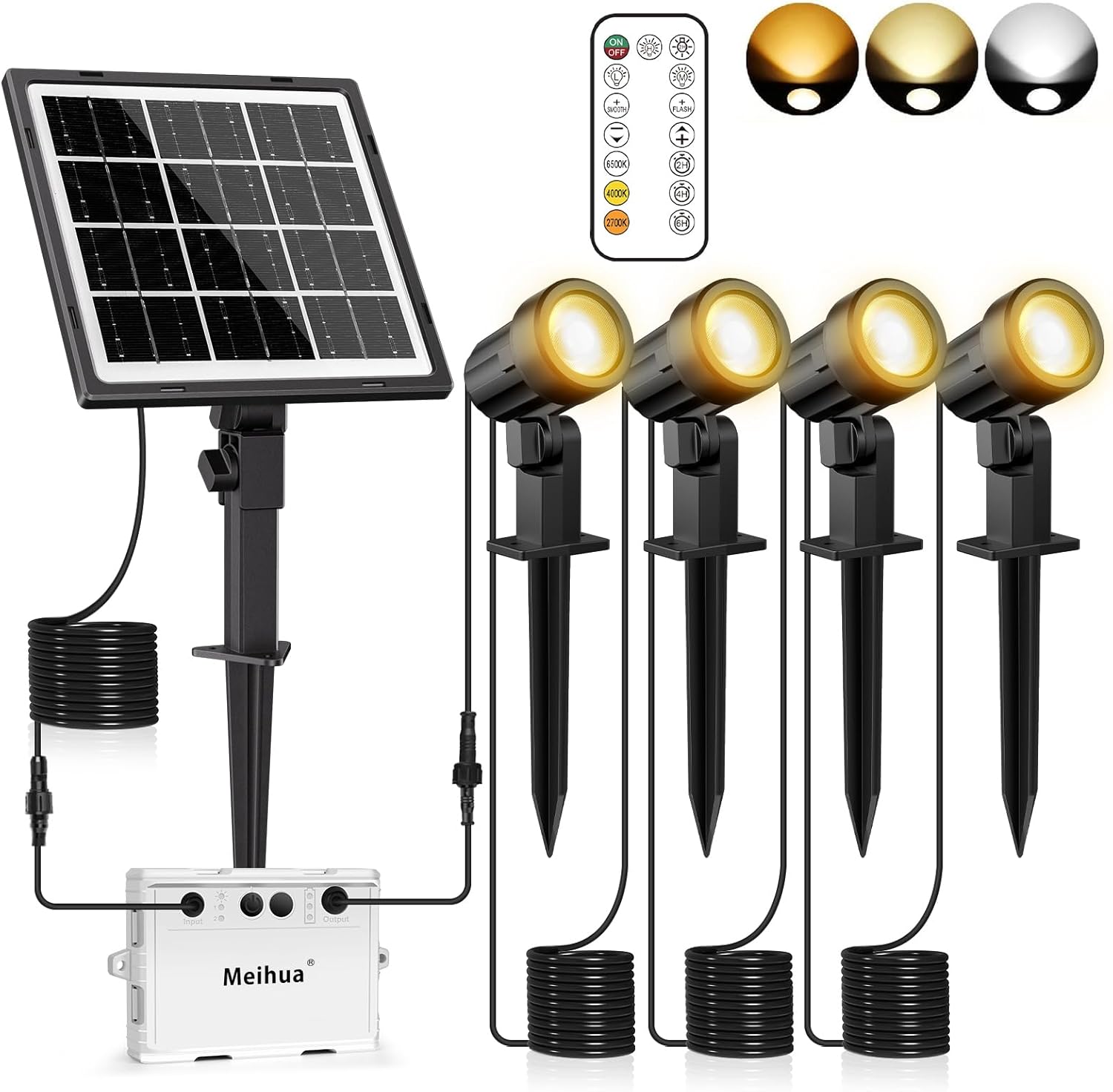
Image: Complete package contents of the MEIHUA Solar Spot Lights.
4. Setup and Installation
The MEIHUA Solar Spot Lights offer two primary installation methods: ground insertion and wall mounting.
4.1 Solar Panel Placement
It is crucial to install the solar panel in an unobstructed location that receives full, direct sunlight for at least 6-8 hours daily. This ensures optimal charging and maximum illumination time at night.

Image: Proper solar panel placement for optimal charging.
4.2 Ground Installation
- Attach the ground stake to the bottom of the solar panel and each spotlight.
- Insert the stakes firmly into soft ground in your desired locations.
- Adjust the angle of the solar panel to face the sun directly.
- Adjust the angle of the spotlights to illuminate the desired area.

Image: Ground installation method.
4.3 Wall Mounting
- Use the provided screws and anchors to mount the solar panel and spotlights to a wall or other solid surface.
- Ensure the solar panel is positioned to receive maximum sunlight.
- Adjust the angle of the spotlights to illuminate the desired area.

Image: Wall mounting method for the solar panel.
4.4 Connecting Components
Connect the solar panel to the control box, and then connect each spotlight to the control box using the provided cables. Ensure all connections are secure and the outdoor special connectors are properly sealed for IP66 waterproofing.

Image: Connection diagram and waterproof connector detail.
Video: Demonstration of solar charging and lights turning on automatically at night.
5. Operating Instructions
The MEIHUA Solar Spot Lights are operated using the included remote control.

Image: Remote control functions and light dimensions.
5.1 Power On/Off
- Press the ON/OFF button on the remote to manually turn the lights on or off.
- The lights will automatically turn on at dusk and off at dawn if left in auto mode.
5.2 Adjusting Brightness
Select from three brightness levels:
- High Brightness: Provides approximately 8 hours of illumination.
- Medium Brightness: Provides approximately 12 hours of illumination.
- Low Brightness: Provides approximately 20 hours of illumination.
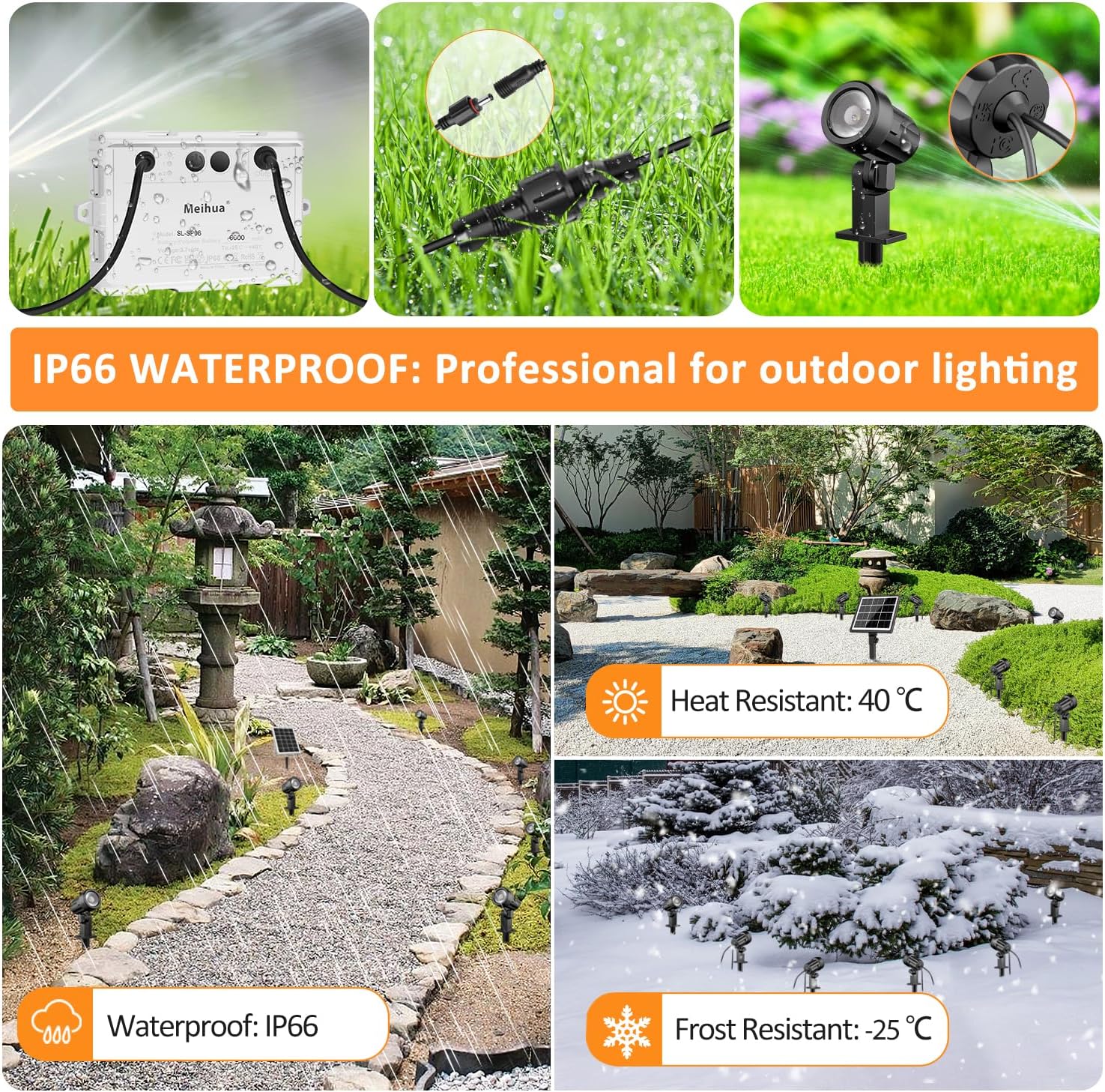
Image: Visual comparison of High, Medium, and Low light modes.
5.3 Adjusting Color Temperature
The lights offer adjustable color temperatures to suit your preference:
- Press the dedicated buttons for 2700K (Warm Light), 4000K (Natural White), or 6500K (Cold White) for quick selection.
- Use the +/- buttons next to the color temperature icon to steplessly adjust the color temperature between 2700K and 6500K.

Image: Different color temperature options and stepless adjustment.
5.4 Lighting Modes (SMOOTH & FLASH)
- SMOOTH Mode: Activates a cyclic color temperature change from 2700K to 6500K. Use the +/- buttons to adjust the speed of the transition.
- FLASH Mode: Activates a single color strobe effect. Use the +/- buttons to adjust the strobe speed.

Image: SMOOTH (cyclic color change) and FLASH (strobe) lighting modes.
5.5 Timing and Memory Functions
- Timing Function: Press the 2H, 4H, or 6H buttons to set the lights to automatically turn off after the selected duration from when they turn on at dusk.
- Memory Function: The lights will retain the last selected mode, brightness, and color temperature settings even after turning off and on again.

Image: Timed off and memory functions.
6. Maintenance
The MEIHUA Solar Spot Lights are designed for durability and minimal maintenance.
- Cleaning: Periodically wipe the solar panel with a soft, damp cloth to remove dust, dirt, or debris. A clean panel ensures efficient charging.
- Weather Resistance: The lights are IP66 waterproof and dust-proof, designed to withstand rain, snow, and varying temperatures (-25°C to 40°C). No special protection is needed for typical outdoor conditions.
- Connections: Ensure all cable connections remain secure and the waterproof seals are intact to prevent water ingress.

Image: IP66 Waterproof and temperature resistance features.
7. Troubleshooting
| Problem | Possible Cause | Solution |
|---|---|---|
| Lights do not turn on at night. | Solar panel not receiving enough sunlight. Battery charge is low. Switch is off. | Relocate solar panel to an area with direct sunlight for 6-8 hours daily. Allow 1-2 sunny days for full charge. Ensure the ON/OFF button on the remote or control box is activated. |
| Lights work for a short duration. | Insufficient solar charging. Selected brightness mode is too high for available charge. | Ensure solar panel is clean and receives full sunlight. Select a lower brightness mode (Medium or Low) for longer illumination. |
| Remote control not working. | Battery in remote is dead. Obstruction between remote and control box. | Replace the remote control battery. Ensure clear line of sight to the control box. |
| Lights flicker or behave erratically. | Loose connection. Water ingress in connections. | Check all cable connections and ensure they are secure and waterproof. If issue persists, contact customer support. |
8. Specifications
| Feature | Detail |
|---|---|
| Model Number | MH2023 |
| Power Source | Solar Powered |
| Battery Capacity | 5000mAh (Lithium Polymer) |
| Light Source | LED |
| Color Temperature | 2700K / 4000K / 6500K (Adjustable) |
| Brightness Modes | High (8h), Medium (12h), Low (20h) |
| Control Method | Remote Control |
| Water Resistance | IP66 Waterproof |
| Material | Acrylonitrile Butadiene Styrene (ABS) |
| Product Dimensions | 5.91"L x 3.54"W x 7.8"H (approximate) |
| Item Weight | 3.7 pounds |
9. Warranty and Support
MEIHUA products come with an extended warranty. For any questions, technical support, or warranty claims, please contact MEIHUA customer service through the retailer's platform or the official MEIHUA website. Please have your model number (MH2023) and purchase details ready when contacting support.
We are committed to providing reliable quality products and exceptional services.
Ask a question about this manual
Ask about setup, troubleshooting, compatibility, parts, safety, or missing instructions. Manuals+ will review the question and use this page’s manual context to help answer it.