
1. Product Overview
This document provides essential information and instructions for the Keylessbest OUCG8D-620M-A replacement key fob remote control. This device is designed to function as a remote keyless entry system for compatible Mitsubishi vehicles, offering convenience and security.
Video 1: Overview of the Keylessbest key fob. This video demonstrates the physical appearance and basic functions of the key fob.
2. Compatibility and Specifications
Ensure your vehicle is compatible with this replacement key fob before proceeding with installation or programming.
- Compatible Vehicles: 2006-2007 Mitsubishi Eclipse, 2006-2007 Mitsubishi Galant
- FCC ID: OUCG8D-620M-A
- Frequency: 313.8MHz
- Buttons: 4 (Lock, Unlock, Trunk, Panic)
- Key Blade: HU100 Blade (Uncut)
- Battery Type: 1 CR1616 battery (included)
- Transponder Chip: ID46
- Item Model Number: OUCG8D-620M-A
- Product Dimensions: 1.45 x 0.6 x 3.8 inches
- Item Weight: 0.95 ounces

Image 1: Key fob displaying compatible vehicle models and technical specifications.
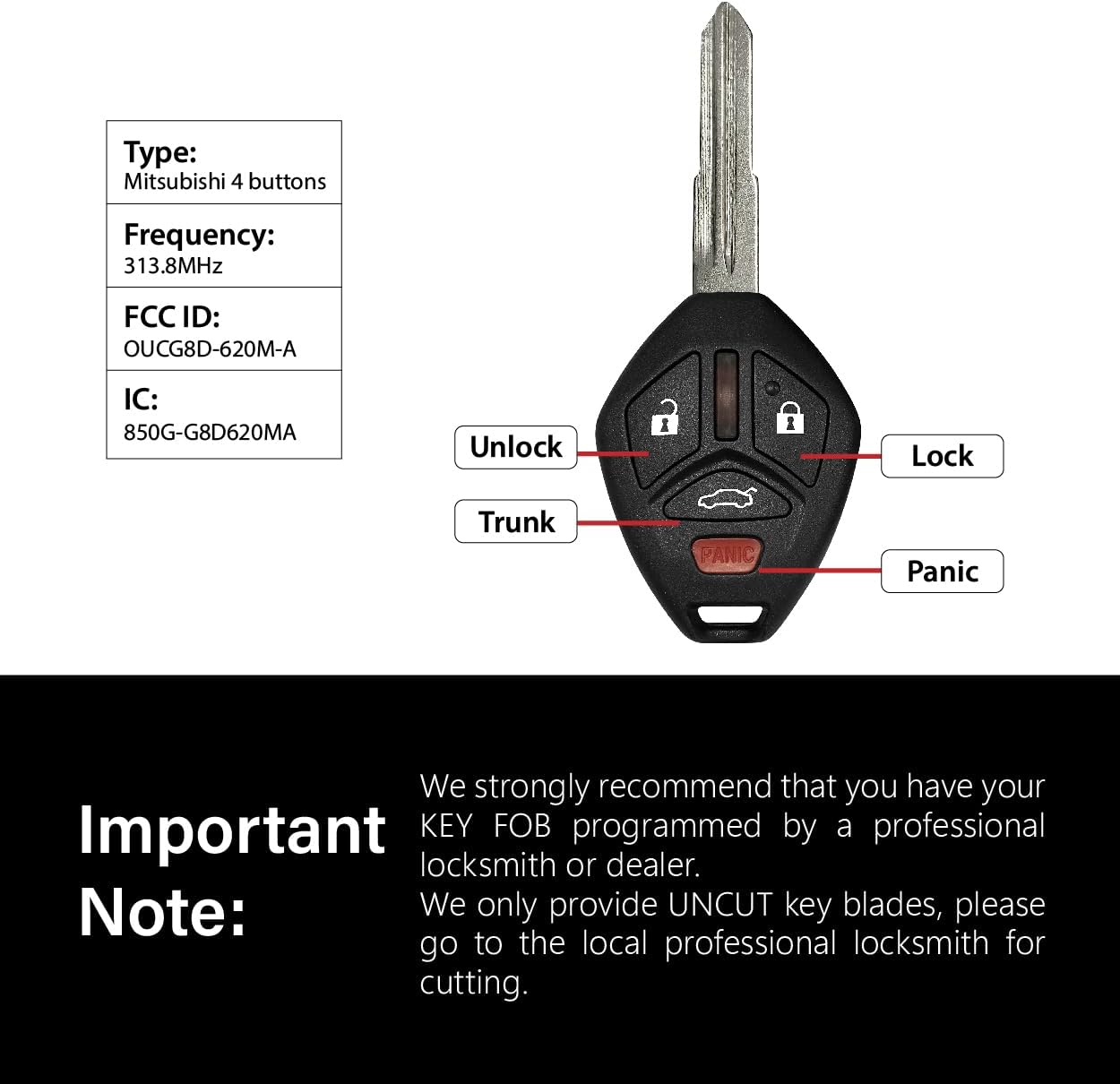
Image 2: Detailed view of the key fob buttons and their functions.

Image 3: Internal components of the key fob, highlighting the PCB, battery, and chip.

Image 4: Frequency detection and transponder chip identification for the key fob.
3. Package Contents
The package includes the following components:
- Key Fob Shell x 1
- PCB Board x 1
- Uncut Key Blade x 1
- Lithium Battery (CR1616) x 1
- Transponder Chip (ID46) x 1
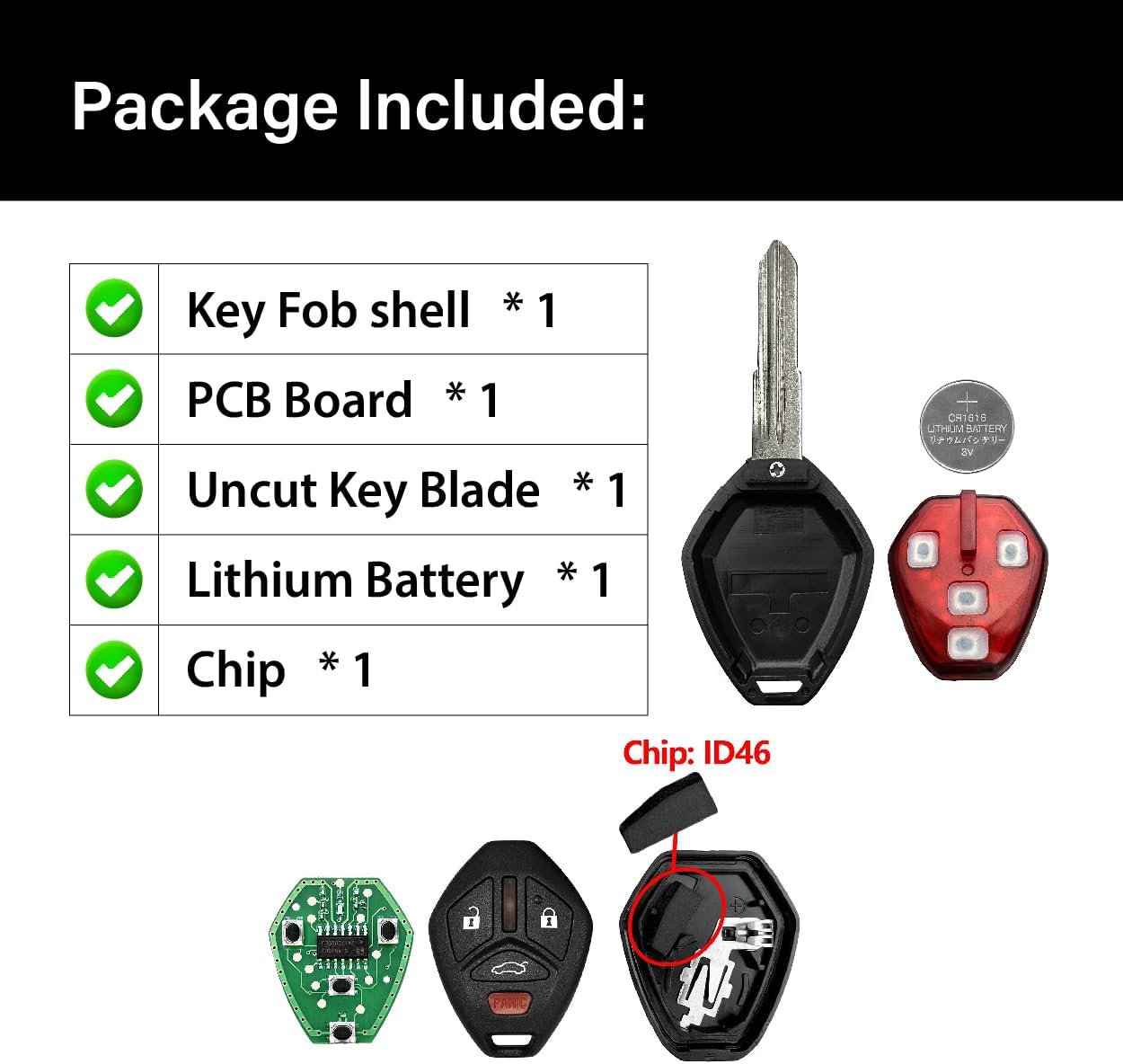
Image 5: Visual representation of all items included in the product package.
4. Setup and Programming
This key fob requires professional programming to function with your vehicle. It is not a self-programmable unit for all vehicles.
- Key Cutting: The included key blade is uncut. Take the key fob to a professional locksmith to have the blade cut to match your vehicle's ignition.
- Remote Programming: The remote functions (lock, unlock, trunk, panic) and the transponder chip (for engine start) must be programmed to your vehicle. This typically requires specialized equipment.
- Professional Assistance: It is strongly recommended to contact a local automotive locksmith or a Mitsubishi dealership for programming services. Confirm with them that this specific remote (FCC ID: OUCG8D-620M-A) can be programmed for your 2006-2007 Mitsubishi Eclipse or Galant before making a purchase or attempting programming.
Important Note: Attempting to program the key fob without the correct tools or knowledge may result in damage to the key fob or your vehicle's electronic system. Always consult with a professional.
5. Maintenance: Battery Replacement
The key fob uses one CR1616 lithium battery. If the remote functions become unreliable or stop working, the battery may need replacement.
- Open the Key Fob: Use a small flat-head screwdriver or a coin to carefully pry open the key fob case. Look for a small notch or slot along the edge.
- Remove the Old Battery: Gently remove the old CR1616 battery from its holder. Be careful not to damage the metal contacts.
- Install the New Battery: Insert a new CR1616 battery into the holder, ensuring the positive (+) side is facing the correct direction (usually indicated on the fob or circuit board).
- Close the Key Fob: Carefully snap the key fob case back together, ensuring all edges are aligned and the case is securely closed.
- Test the Key Fob: Press any button on the key fob to test if the new battery is working properly.
Video 2: Step-by-step guide on how to replace the battery in a Mitsubishi key fob. This video demonstrates opening the fob, removing the old battery, inserting a new one, and reassembling the unit.
6. Troubleshooting
- Key Fob Not Working After Programming:
- Verify that the key blade was cut correctly by a professional locksmith.
- Confirm that the remote and transponder chip were programmed correctly by a professional locksmith or dealership.
- Check the battery: Ensure the CR1616 battery is installed correctly with the positive (+) side facing up and is not depleted. Refer to the "Battery Replacement" section.
- Ensure your vehicle's battery is not low, as this can affect remote functionality.
- Key Fob Buttons Unresponsive:
- Replace the battery (CR1616).
- Ensure there is no physical damage to the buttons or the internal circuit board.
- If the issue persists, the key fob may need to be re-programmed or inspected by a professional.
- Vehicle Not Starting with New Key Fob:
- This indicates an issue with the transponder chip programming. The transponder chip is essential for disabling the vehicle's immobilizer system.
- Contact a professional locksmith or dealership to verify and correct the transponder chip programming.
7. Warranty and Support
Keylessbest products are manufactured to high standards. For any issues or support inquiries, please contact Keylessbest customer service through the retailer where the product was purchased.
Please retain your proof of purchase for warranty claims.