
1. Introduction
This manual provides essential information for the proper use and care of your Street Fighter EX2 Plus game for the PlayStation console. Street Fighter EX2 Plus is an enhanced version of the 3D fighting game, featuring new characters, modes, and gameplay improvements. Please read this manual thoroughly before playing to ensure optimal enjoyment and to understand all game features.

Figure 1: Front cover of the Street Fighter EX2 Plus game manual.
2. Setup
2.1 Package Contents
- Street Fighter EX2 Plus Game Disc (1)
- Instruction Manual (1)
2.2 System Requirements
- PlayStation console (NTSC U/C compatible)
- Standard PlayStation controller
- Television or monitor with appropriate video input
- Optional: PlayStation Memory Card (2 blocks required for saving game data)
2.3 Installation
- Ensure your PlayStation console is powered off.
- Gently open the disc tray of your PlayStation console.
- Hold the Street Fighter EX2 Plus game disc by its edges to avoid touching the data surface.
- Place the disc onto the console's spindle with the label side facing up.
- Close the disc tray.
- Connect your PlayStation console to your television or monitor and power supply.
- Insert a PlayStation controller into Controller Port 1.
- Power on your television/monitor and select the correct input channel.
- Power on your PlayStation console. The game should load automatically.

Figure 2: Street Fighter EX2 Plus game disc. Note the "Teen" rating and product code P01177-01 (0A).
3. Operating Instructions
3.1 Basic Controls
Refer to the in-game options menu for a detailed controller layout. Standard PlayStation controller buttons are used for movement, attacks, and special moves.
- Directional Pad: Character movement (forward, backward, jump, crouch).
- Punch Buttons: Light Punch (LP), Medium Punch (MP), Heavy Punch (HP).
- Kick Buttons: Light Kick (LK), Medium Kick (MK), Heavy Kick (HK).
- Shoulder Buttons: Combinations of punches/kicks or specific actions.
3.2 Game Modes
Street Fighter EX2 Plus offers various game modes, including Arcade, Versus, Training, and Survival. Select your desired mode from the main menu.
3.3 Special Moves and Super Combos
Each character possesses a unique set of special moves and powerful Super Combos. Executing these moves requires specific directional inputs and button presses. Practice in Training Mode to master your favorite character's techniques.
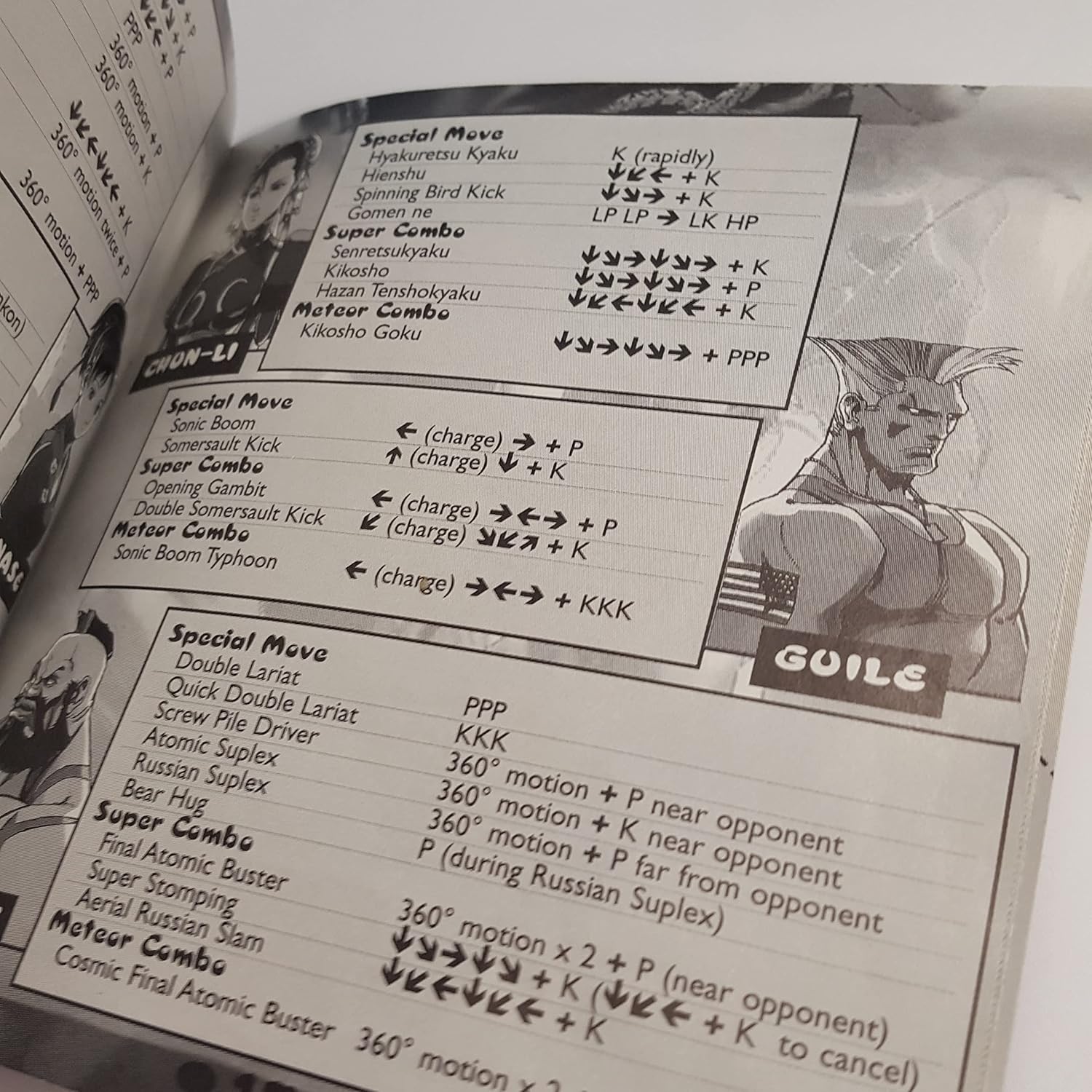
Figure 3: Example of character special move lists from the game manual, featuring Chun-Li and Guile.
3.4 Saving Game Data
To save game progress, such as high scores or custom settings, a PlayStation Memory Card with at least 2 blocks of free space is required. The game will prompt you to save at appropriate times.

Figure 4: Back of the game case highlighting game features and system requirements.
4. Maintenance
4.1 Disc Care
- Always hold the disc by its edges or by inserting a finger through the center hole.
- Store the disc in its original case when not in use to protect it from dust and scratches.
- Keep the disc away from direct sunlight, extreme temperatures, and high humidity.
- To clean the disc, gently wipe the data side with a soft, lint-free cloth from the center outwards. Do not use abrasive cleaners or solvents.
4.2 Console Care
Ensure your PlayStation console is kept in a clean, dust-free environment with adequate ventilation to prevent overheating and ensure proper disc reading.
5. Troubleshooting
5.1 Game Does Not Load
- Ensure the disc is clean and free of scratches. Refer to Section 4.1 for disc cleaning instructions.
- Verify the disc is inserted correctly into the PlayStation console with the label side up.
- Check that all cables (power, video) are securely connected to the console and television.
- Restart the PlayStation console.
5.2 Controller Not Responding
- Ensure the controller is firmly plugged into the correct port (Controller Port 1).
- Test the controller with another game or another controller with this game to isolate the issue.
5.3 Graphics or Sound Issues
- Check video and audio cable connections.
- Adjust television settings (brightness, contrast, volume).
- Ensure the disc is clean and undamaged.
6. Specifications
| Feature | Detail |
|---|---|
| Product Title | Street Fighter EX2 Plus (Renewed) |
| Platform | PlayStation |
| Manufacturer | Capcom |
| Players | 1-2 Players |
| Memory Card Required | 2 Blocks |
| Vibration Function | Compatible |
| ESRB Rating | Teen (Animated Violence, Animated Blood) |
| Product Dimensions | 5.6 x 4.9 x 0.4 inches |
| Item Weight | 3.2 ounces |
| Type of Item | DVD-ROM (CD-ROM for PlayStation) |
| ASIN | B0C6JZXY9S |
| UPC/GTIN | 657768472732 |
| Date First Available | May 29, 2023 |
7. Support & Warranty
7.1 Technical Support
For gameplay tips or technical assistance, you may contact Capcom's Hint Line (if still active) or refer to official Capcom support channels.
- Capcom Hint Line: 900-976-3343 (Note: This number may be outdated. Charges may apply.)
- ESRB Rating Information: Visit www.esrb.org or call 1-800-771-3772.
- Capcom Official Website: For general information and updates, visit www.capcom.com.

Figure 5: Capcom Edge insert, providing a link to Capcom's official website.
7.2 Product Warranty (Renewed Item)
This product is a "Renewed" item. Renewed products typically come with a limited warranty or guarantee provided by the seller or the Amazon Renewed program. Please refer to the specific terms and conditions of your purchase for details regarding returns, refunds, or replacements. The original manufacturer's warranty may not apply to renewed products.
For issues related to the "Renewed" status, contact the seller "RetroRefresh" or Amazon Renewed customer service.


