
1. Introduction
This manual provides detailed instructions for the setup, operation, maintenance, and troubleshooting of your KAMRUI GK3PRO Mini PC. This compact desktop computer features an Intel Celeron N5105 processor, 16GB RAM, and a 512GB SSD, designed for efficient home and business use, supporting 4K UHD and VESA mounting.
2. What's in the Box
Please verify that all items listed below are included in your package:
- 1 x KAMRUI GK3PRO Mini PC
- 1 x HDMI Cable
- 1 x VESA Mount with Screws
- 1 x Power Adapter
- 1 x User Manual (this document)
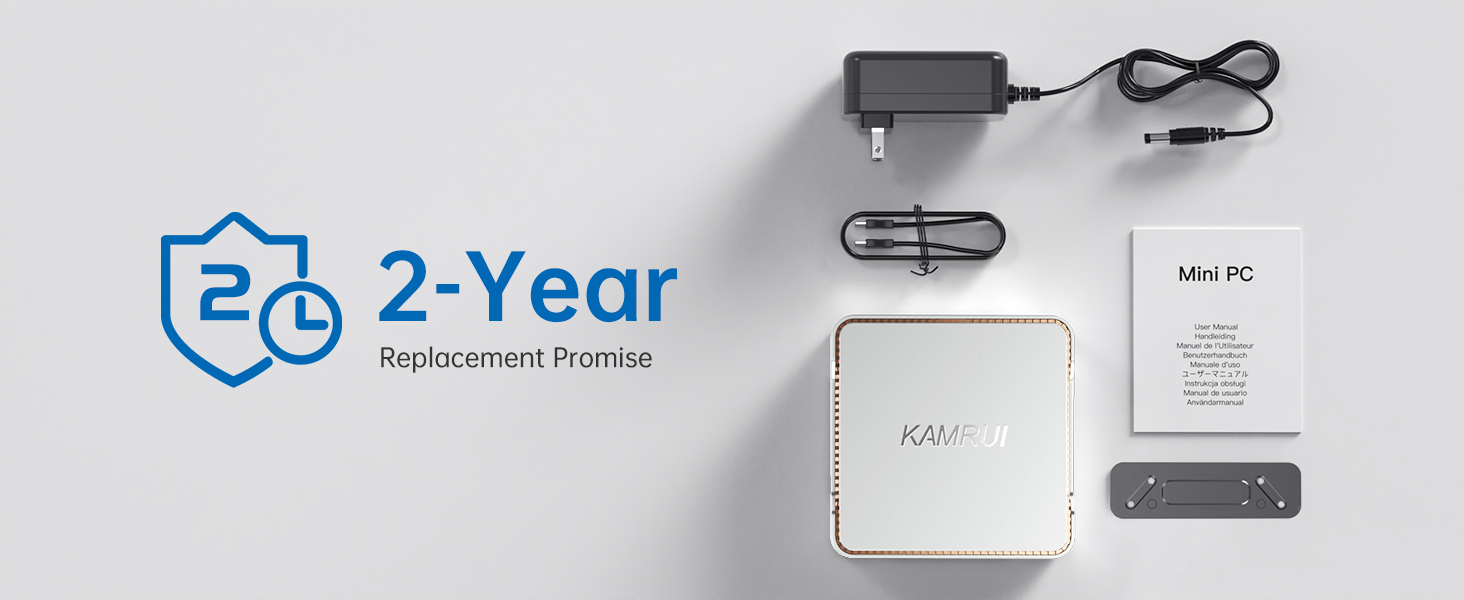
Image: Contents of the KAMRUI Mini PC package.
3. Setup Instructions
3.1 Initial Connection
- Connect to a Display: Use the provided HDMI cable to connect your Mini PC to a monitor or TV. The device supports up to three displays via its two HDMI ports and one VGA port.
- Connect Peripherals: Plug in your USB keyboard and mouse into the available USB ports. The Mini PC features 4 USB ports (3x USB 3.0, 1x USB 2.0).
- Power On: Connect the power adapter to the DC input port on the Mini PC, then plug it into a power outlet. Press the power button located on the front of the device.
- Operating System: Your KAMRUI GK3PRO Mini PC comes with Windows 11 pre-installed. Follow the on-screen instructions for initial Windows setup.

Image: Rear and side view of the Mini PC highlighting various ports for connectivity.
3.2 Expanding Storage (Optional)
The KAMRUI GK3PRO Mini PC supports storage expansion by adding a 2.5-inch SSD/HDD (not included) up to 2TB. Follow these steps:
- Power off the Mini PC and disconnect all cables.
- Carefully remove the bottom cover of the Mini PC.
- Connect your 2.5-inch SSD/HDD to the internal SATA connector.
- Secure the drive within the designated bay using screws.
- Replace the bottom cover.
Video: Instructions on how to install an extended 2.5-inch SSD into the KAMRUI Mini PC.
3.3 Multi-Monitor Setup
The Mini PC supports connecting up to three displays simultaneously. Use the available HDMI and VGA ports. To configure the display settings:
- Connect all desired monitors to the Mini PC.
- Press WIN + P on your keyboard to quickly open the projection menu.
- Select 'Extend' to use multiple monitors as an extended desktop, or 'Duplicate' to mirror the display across all screens.
Video: Demonstration of setting up a triple screen display with the KAMRUI Mini Computer.
4. Operating Instructions
4.1 Power On/Off
To power on, press the power button on the front panel. To power off, use the standard Windows shutdown procedure or press and hold the power button for a few seconds.
4.2 Network Connectivity
The Mini PC supports both wired and wireless network connections:
- Wired: Connect an Ethernet cable to the LAN port on the rear of the device.
- Wireless: The device features 2.4G/5G dual-band WiFi. Access network settings in Windows to connect to your preferred wireless network.
4.3 Bluetooth Connectivity
The Mini PC includes Bluetooth 4.2 for connecting wireless peripherals such as keyboards, mice, and speakers. Enable Bluetooth in Windows settings and pair your devices.
4.4 4K UHD Display
The KAMRUI GK3PRO supports 4K UHD (3840x2160) resolution at 60Hz, providing clear and vibrant visuals for web browsing, video playback, and other applications. Ensure your monitor and cables support 4K resolution for optimal experience.

Image: The Mini PC delivering a 4K display experience.
5. Maintenance
To ensure the longevity and optimal performance of your KAMRUI GK3PRO Mini PC, follow these maintenance guidelines:
- Keep Clean: Regularly clean the exterior of the Mini PC with a soft, dry cloth. Avoid using liquid cleaners directly on the device.
- Ensure Airflow: Do not block the ventilation openings on the device. Ensure it is placed in a well-ventilated area to prevent overheating.
- Software Updates: Keep your Windows operating system and drivers updated to ensure security and performance.
- Data Backup: Regularly back up important data to an external drive or cloud storage to prevent data loss.

Image: Illustration of the Mini PC's cooling system and energy efficiency.
6. Troubleshooting
If you encounter issues with your Mini PC, refer to the following common solutions:
- No Power: Ensure the power adapter is securely connected to both the Mini PC and a working power outlet. Try a different outlet if necessary.
- No Display: Check all HDMI/VGA cable connections. Ensure the monitor is powered on and set to the correct input source. Try connecting to a different display if possible.
- System Freezes/Unresponsive: If the system becomes unresponsive, press and hold the power button for 5-10 seconds to force a shutdown. Wait a few moments, then power it back on. Ensure all drivers and the operating system are up to date.
- No WiFi/Bluetooth: Check if WiFi and Bluetooth are enabled in Windows settings. If issues persist, try reinstalling the wireless drivers.
- Overheating: Ensure the Mini PC has adequate ventilation and is not placed in an enclosed space. Clean any dust from the vents. If the issue persists, contact support.
7. Specifications
| Feature | Detail |
|---|---|
| Brand | KAMRUI |
| Model Name | GK3PRO |
| CPU Model | Intel Celeron N5105 (Quad-Core, up to 2.9GHz) |
| Graphics Coprocessor | Intel UHD Graphics 600 |
| RAM Memory Installed | 16 GB DDR4 |
| Memory Storage Capacity | 512 GB M.2 2280 SSD (Expandable to 2TB with 2.5" SSD/HDD) |
| Operating System | Windows 11 Pro (also compatible with Linux, Windows 10) |
| Connectivity Technology | Ethernet, HDMI, LAN, USB |
| Wireless Connectivity | 2.4G/5G Dual Band WiFi, Bluetooth 4.2 |
| Video Output Interface | 2x HDMI, 1x VGA (Supports Triple Display, 4K UHD) |
| USB Ports | 4 (3x USB 3.0, 1x USB 2.0) |
| Item Dimensions | 5.2 x 5.24 x 1.81 inches |
| Power Consumption | 10 Watts |

Image: Overview of the KAMRUI Mini PC's compact design and core features.
8. Warranty and Support
8.1 Warranty Information
KAMRUI provides a 12-month warranty covering quality-related issues from the date of purchase. Please retain your proof of purchase for warranty claims.
8.2 Technical Support
KAMRUI offers lifetime technical support for its products. If you require assistance, please contact us through one of the following methods:
- Email: support@kamrui.com
- Phone (US): +1-833-670-1528 (Monday-Friday, 9am-5pm EST)
- Amazon Support: Log in to your Amazon account, navigate to 'Your Orders', and select 'Ask Product Question' for your purchase.

Image: KAMRUI brand logo.


