
LAUNCH LAUNCH X431 PRO ELITE
LAUNCH X431 PRO Elite OBD2 Scanner User Manual
Model: LAUNCH X431 PRO ELITE
Brand: LAUNCH
1. Introduction
The LAUNCH X431 PRO Elite is a professional, all-in-one automotive diagnostic scan tool designed for comprehensive vehicle analysis and maintenance. This 2025 upgraded model features optimized hardware for faster and more stable diagnoses, offering a wide range of functionalities including ECU coding, bi-directional control, and over 38 reset services. It supports advanced protocols like CANFD and DoIP, and includes FCA Autoauth for secure access to modern vehicle systems.

Image 1.1: The LAUNCH X431 PRO Elite diagnostic tablet, showcasing its robust design and user interface.
2. What's in the Box
Verify that all components are present upon unboxing:
- LAUNCH X431 PRO ELITE OBD2 Scanner Display Tablet x 1
- Diagnostic Cable x 1
- Type-A to Type-C USB Cable x 1
- Power Adaptor x 1
- Switching Adaptor x 2
- Multilingual Quick Start Guide x 1
- Manual x 1 (This document)
- Password Envelope x 1
- Packing List x 1
- Packing Suitcase x 1
3. Setup and Initial Configuration
3.1 Powering On and Network Connection
To begin, ensure the device is fully charged using the provided power adapter. Press and hold the power button to turn on the tablet. Upon first boot, you will be guided through the initial setup process, including language selection and Wi-Fi network configuration. A stable internet connection is crucial for software updates and online functions.

Image 3.1: Overview of the X431 PRO Elite's hardware features and multi-language support.
3.2 Software Updates
Regular software updates are essential to ensure optimal performance, expand vehicle coverage, and introduce new features. Connect the device to a stable Wi-Fi network and navigate to the "Software Update" section on the main menu. Follow the on-screen prompts to download and install available updates.
4. Operating the LAUNCH X431 PRO Elite
4.1 OE-Level All System Diagnostics
The X431 PRO Elite provides comprehensive diagnostic capabilities across all vehicle systems, including engine, transmission, airbag, ABS, body, brake, chassis, powertrain, fuel, and lights. This allows for reading/clearing diagnostic trouble codes (DTCs), viewing live data streams, freeze frame data, and performing actuation tests.

Image 4.1: Illustration of the comprehensive OE-Level All Systems Diagnostics and various service functions.
4.2 Bi-directional Control / Active Test
This function allows the diagnostic tool to send commands to vehicle ECUs to perform specific tests and functions, enabling technicians to quickly pinpoint faulty components. Examples include turning the fuel pump on/off, cycling the A/C clutch, and performing oil pressure control tests.

Image 4.2: Visual representation of bi-directional control capabilities and ECU coding options.
4.3 ECU Coding (Online/Offline)
The X431 PRO Elite supports advanced ECU coding for various vehicle brands (e.g., BMW, MINI, Citroen, Renault, Audi, VW, Benz). This allows for replacing/recoding new modules, flashing hidden functions (e.g., auto start-stop, folding mirrors), retrofitting new components (e.g., fog lights, TPMS), and modifying values for personalized settings.
4.4 Reset Services (38+)
The tool offers over 38 common reset and maintenance services, facilitating efficient vehicle servicing. These include, but are not limited to:
- ABS Bleeding
- Oil Reset
- SAS (Steering Angle Sensor) Reset
- Injector Coding
- BMS (Battery Management System) Reset
- EPB (Electronic Parking Brake) Reset
- Tyre Reset (TPMS)
- AFS (Adaptive Front-lighting System) Reset
- Language Change
- A/F (Air/Fuel) Reset
- Coolant Bleed
- Throttle Relearn
- Windows/Seats Calibration
- Transport Mode
- Adblue Reset
- NOx Sensor Reset
- Stop/Start Reset
4.5 FCA Autoauth Access
The LAUNCH X431 PRO Elite supports FCA Autoauth, providing authorized secure gateway access for Chrysler, Dodge, Jeep, and Fiat vehicles manufactured from 2017 onwards. This allows for full diagnostic and special function capabilities on these models.
Video 4.5.1: A demonstration of how to register and activate FCA Autoauth with a LAUNCH product, enabling full diagnostic access to compatible FCA vehicles.

Image 4.5: Visual guide for V.A.G Guided Functions and FCA Autoauth access.
4.6 Extended Module Support
The X431 PRO Elite can be expanded with various optional modules to enhance its capabilities, including Oscilloscope, Sensor Simulator, Multimeter, WiFi Printer, Endoscope, TPMS, ADAS, and Battery Tester modules.
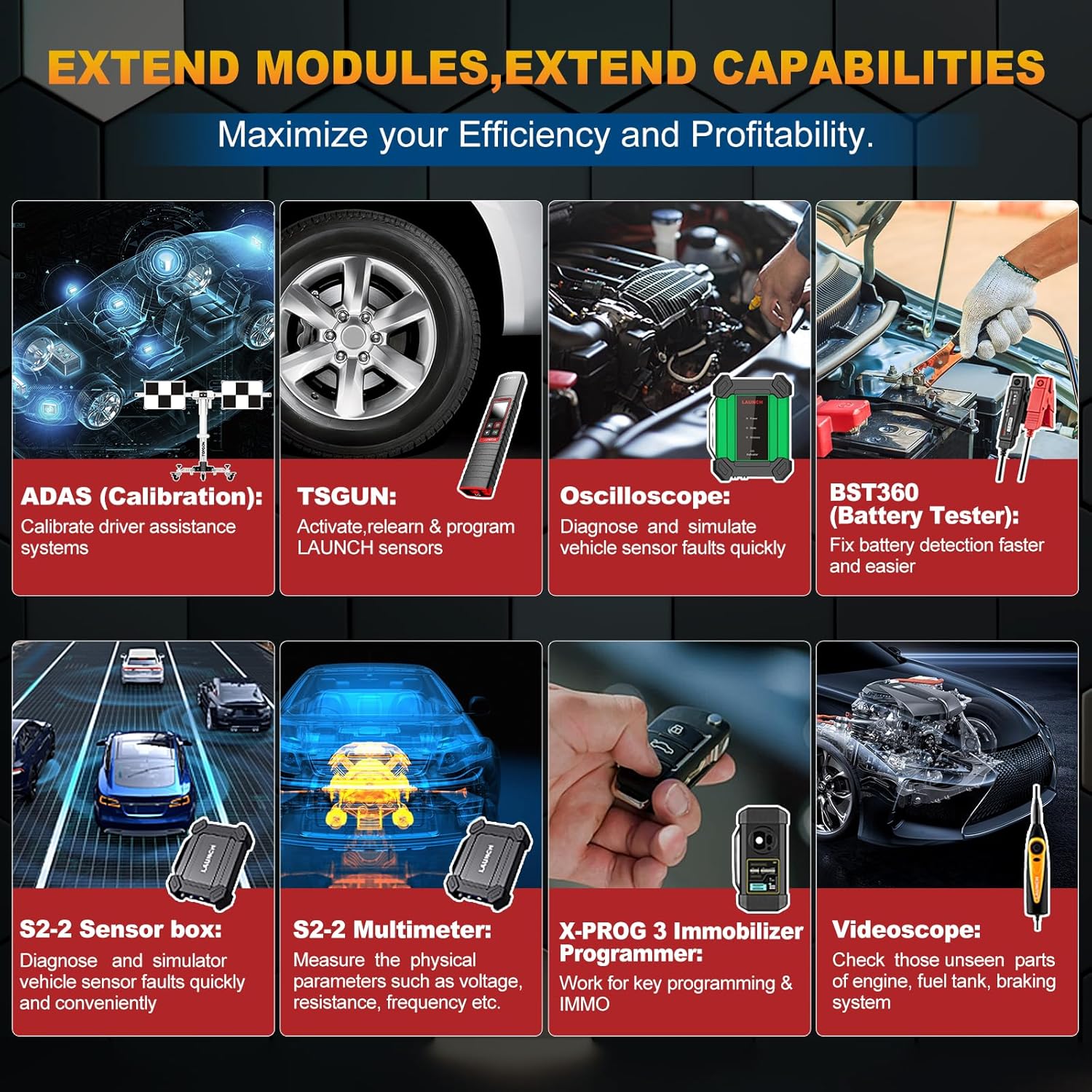
Image 4.6: Illustration of various extended modules that can be connected to the X431 PRO Elite to expand its diagnostic and testing functionalities.
5. Maintenance
5.1 Cleaning the Device
Regularly clean the display screen and exterior of the device with a soft, damp cloth. Avoid using abrasive cleaners or solvents that could damage the surface. Ensure all ports are free of dust and debris.
5.2 Battery Care
The device is equipped with a Lithium Ion battery. To prolong battery life, avoid extreme temperatures and do not allow the battery to fully discharge for extended periods. Charge the device regularly, even when not in use.
6. Troubleshooting
| Problem | Possible Cause | Solution |
|---|---|---|
| Device does not power on. | Low battery; Power adapter issue. | Charge the device for at least 30 minutes. Verify power adapter connection. |
| Unable to connect to vehicle. | Diagnostic cable not properly connected; Vehicle ignition off; Faulty OBD-II port. | Ensure diagnostic cable is securely connected to both the device and the vehicle's OBD-II port. Turn vehicle ignition to ON position. Check vehicle's OBD-II port for damage. |
| Software update fails. | Unstable Wi-Fi connection; Insufficient storage space. | Ensure a strong and stable Wi-Fi connection. Clear unnecessary files to free up storage space. Restart the device and try again. |
| FCA Autoauth login failed. | Incorrect credentials; No active Autoauth account; Network issue. | Verify username and password. Ensure your Autoauth account is active and has the necessary permissions. Check network connection. Refer to the Autoauth website for account management. |
7. Specifications
- Brand: LAUNCH
- Model: LAUNCH X431 PRO ELITE
- Operating System: Android 10.0
- Display Resolution: 1024x800 LCD Capacitive Touch Screen
- Automotive Fit Type: Universal Fit
- Item Weight: 7.93 pounds
- Product Dimensions: 13.77 x 13.46 x 6.18 inches
- Batteries: 1 Lithium Ion battery required (included)
- UPC: 884508007613
8. Warranty and Support
8.1 Software Updates
The LAUNCH X431 PRO Elite includes 2 years of free software updates from the date of purchase. Regular updates provide access to the latest vehicle models, diagnostic functions, and performance enhancements.
8.2 Technical Support
For technical assistance, please contact LAUNCH customer support. Online resources, including FAQs and troubleshooting guides, are also available to help resolve common issues.
For further information and support, visit the official LAUNCH store: LAUNCH Official Store
Related documentsLAUNCH X431 PRO ELITE


Ask a question about this manual
Ask about setup, troubleshooting, compatibility, parts, safety, or missing instructions. Manuals+ will review the question and use this page’s manual context to help answer it.