
Redshow DC1200
Redshow DC1200 Dazy Cloud 1200 Fog Machine User Manual
Model: DC1200
Brand: Redshow
1. Introduction
This manual provides essential information for the safe and efficient operation of your Redshow DC1200 Dazy Cloud 1200 Fog Machine. Please read it thoroughly before use and retain it for future reference.
Important Safety Information:
- Always connect the unit to a grounded power outlet.
- Do not operate the machine if the power cord is damaged.
- Use only approved fog fluid. Using other liquids may cause damage or health hazards.
- Keep out of reach of children.
- Ensure adequate ventilation around the machine.
- Do not block the fog output nozzle.
- Never open the housing while the machine is connected to power.
2. Package Contents
Verify that all items are present in the package:
- Redshow DC1200 Dazy Cloud 1200 Fog Machine
- Wireless Remote Control
- Power Cable
- User Manual (this document)

Image: The Redshow DC1200 Fog Machine shown with its included power cable and wireless remote control.
3. Product Overview
The Redshow DC1200 Dazy Cloud 1200 is a 1200-watt fog machine designed for various event settings. It features a large 3.5-liter fluid tank, wireless remote control, and DMX-512 compatibility for versatile operation.
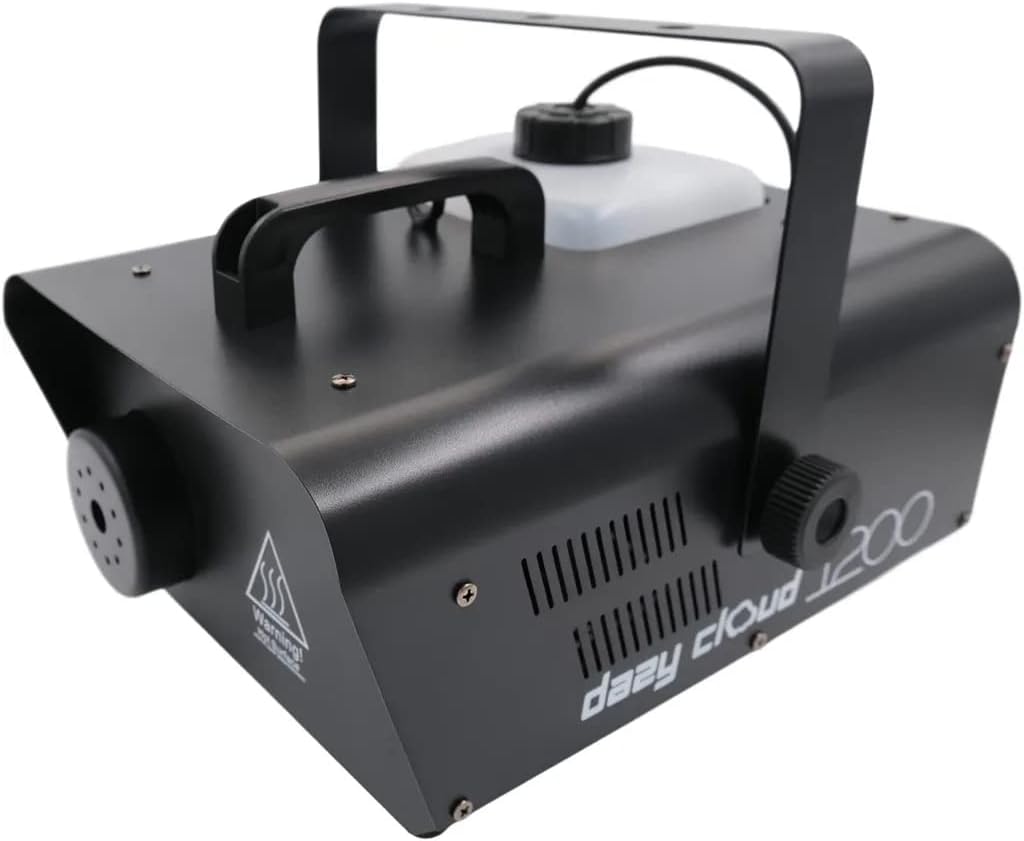
Image: Front-left view of the Redshow DC1200 Fog Machine, showing the fog output nozzle and a warning label.

Image: Rear-right view of the Redshow DC1200 Fog Machine, highlighting the control panel with power switch, DMX ports, and fluid level indicator.

Image: Close-up of the control panel on the Redshow DC1200 Fog Machine, showing the digital display, menu buttons, power switch, DMX In/Out, and power input.
4. Setup
- Placement: Place the fog machine on a flat, stable surface. Ensure there is adequate space around the machine for ventilation and to prevent obstruction of the fog output. Do not place it directly on carpet or other flammable materials.
- Fluid Tank: Unscrew the cap of the fluid tank and carefully pour approved fog fluid into the tank. Do not overfill; observe the MAX fill line. The tank capacity is 3.5 liters. Note: Fog fluid is not included and must be purchased separately.
- Power Connection: Connect the power cable to the machine's power input and then plug it into a grounded electrical outlet (230V, 50Hz).
- DMX Connection (Optional): If using DMX control, connect a DMX cable from your DMX controller to the DMX IN port on the fog machine. If linking multiple DMX devices, connect from DMX OUT to the next device's DMX IN.
- Wireless Remote: Ensure the wireless remote control has a working battery. The remote allows for convenient operation from a distance.
5. Operating Instructions
5.1 Initial Warm-up
- Turn the power switch to the "ON" position. The machine will begin its warm-up cycle.
- The indicator light will illuminate, and the digital display may show a heating status.
- Allow approximately 5-8 minutes for the machine to reach its operating temperature. The indicator light will change (e.g., turn green or stop flashing) when ready.
5.2 Manual Operation (Wireless Remote)

Image: The wireless remote control for the Redshow DC1200 Fog Machine, featuring two buttons labeled 'A' and 'B'.
- Once the machine is warmed up, press button 'A' on the wireless remote to activate fog output.
- Press button 'B' to stop fog output.
- The machine may require brief reheating periods between prolonged fog bursts.
5.3 DMX Operation
The DC1200 supports DMX-512 control, allowing integration into professional lighting setups. Refer to your DMX controller's manual for specific programming instructions.
- DMX Address Setting: Use the MENU, UP, and ENTER buttons on the machine's control panel to set the DMX starting address. Consult the DMX channel chart (if available in a separate DMX manual or product sheet) for specific channel assignments.
- Typically, one DMX channel controls the fog output intensity (0-255, where 0 is off and 255 is full output).
5.4 Adjusting Output Level
The machine features an adjustable output level. Use the control panel's MENU buttons to navigate to the output setting and adjust the fog volume as desired. This allows you to tailor the fog density to the size of your venue and desired effect.
6. Maintenance
Regular maintenance ensures the longevity and optimal performance of your fog machine.
- Fluid Tank Cleaning: Periodically empty and rinse the fluid tank with distilled water. Do not use tap water or harsh chemicals.
- Nozzle Cleaning: If the fog output appears weak or inconsistent, the nozzle may be partially clogged. Use a fog machine cleaning solution (available separately) or a mixture of distilled water and white vinegar (50/50 ratio) to run through the machine. Operate the machine with the cleaning solution for a few minutes, then rinse with distilled water.
- Exterior Cleaning: Wipe the exterior of the machine with a soft, dry cloth. Do not use abrasive cleaners or allow liquids to enter the internal components.
- Storage: When not in use for extended periods, ensure the fluid tank is empty and clean. Store the machine in a cool, dry place.
Caution: Never attempt to service internal components yourself. Refer all servicing to qualified personnel.
7. Troubleshooting
| Problem | Possible Cause | Solution |
|---|---|---|
| No fog output |
|
|
| Weak or inconsistent fog |
|
|
| Machine not turning on |
|
|
8. Specifications
| Feature | Detail |
|---|---|
| Model | DC1200 |
| Brand | Redshow |
| Power | 1200 Watts |
| Fluid Tank Capacity | 3.5 Liters |
| Control Modes | Wireless Remote, DMX-512 |
| Warm-up Time | Approx. 5-8 minutes |
| Material | Steel, Aluminum |
| Dimensions (Package) | 39.2 x 31 x 23.4 cm |
| Weight (Item) | 4.91 kg |
| Connector Type | XLR (for DMX) |
| Fuse | 6A/250V |
9. Warranty and Support
9.1 Warranty Information
This product is covered by a standard manufacturer's warranty. Please retain your proof of purchase for any warranty claims. The warranty typically covers defects in materials and workmanship under normal use. It does not cover damage caused by misuse, unauthorized modifications, or failure to follow instructions in this manual.
For specific warranty terms and duration, please refer to the documentation provided at the time of purchase or contact your retailer.
9.2 Customer Support
If you encounter any issues not covered in the troubleshooting section or require further assistance, please contact Redshow customer support or your authorized dealer. When contacting support, please have your product model (DC1200) and purchase information ready.
Contact information for Redshow can typically be found on their official website or on the product packaging.
Ask a question about this manual
Ask about setup, troubleshooting, compatibility, parts, safety, or missing instructions. Manuals+ will review the question and use this page’s manual context to help answer it.