
1. Important Safety Information
Please read all safety instructions carefully before using the AUKSKY Portable Car Tire Pump. Failure to follow these instructions may result in product damage, property damage, or personal injury.
- Initial Charge: Always charge the device fully before its first use.
- Children: This device is not a toy. Keep out of reach of children.
- Heat Generation: The pump generates heat during operation. If used continuously for over 10 minutes, allow it to cool down for a few minutes before resuming use.
- Flammable Materials: Do not operate the pump near flammable or combustible objects, such as at a gas station.
- Usage Limitations: This pump is designed for inflating car, bike, motor, and sports equipment tires. It is not suitable for high-pressure or large-volume applications like pools, inflatable canoes, or tires wider than 245mm (e.g., truck, van, or off-road vehicle tires).
2. Product Overview and Components
The AUKSKY Portable Car Tire Pump is a versatile inflation device equipped with a digital display and multiple accessories for various inflation needs.
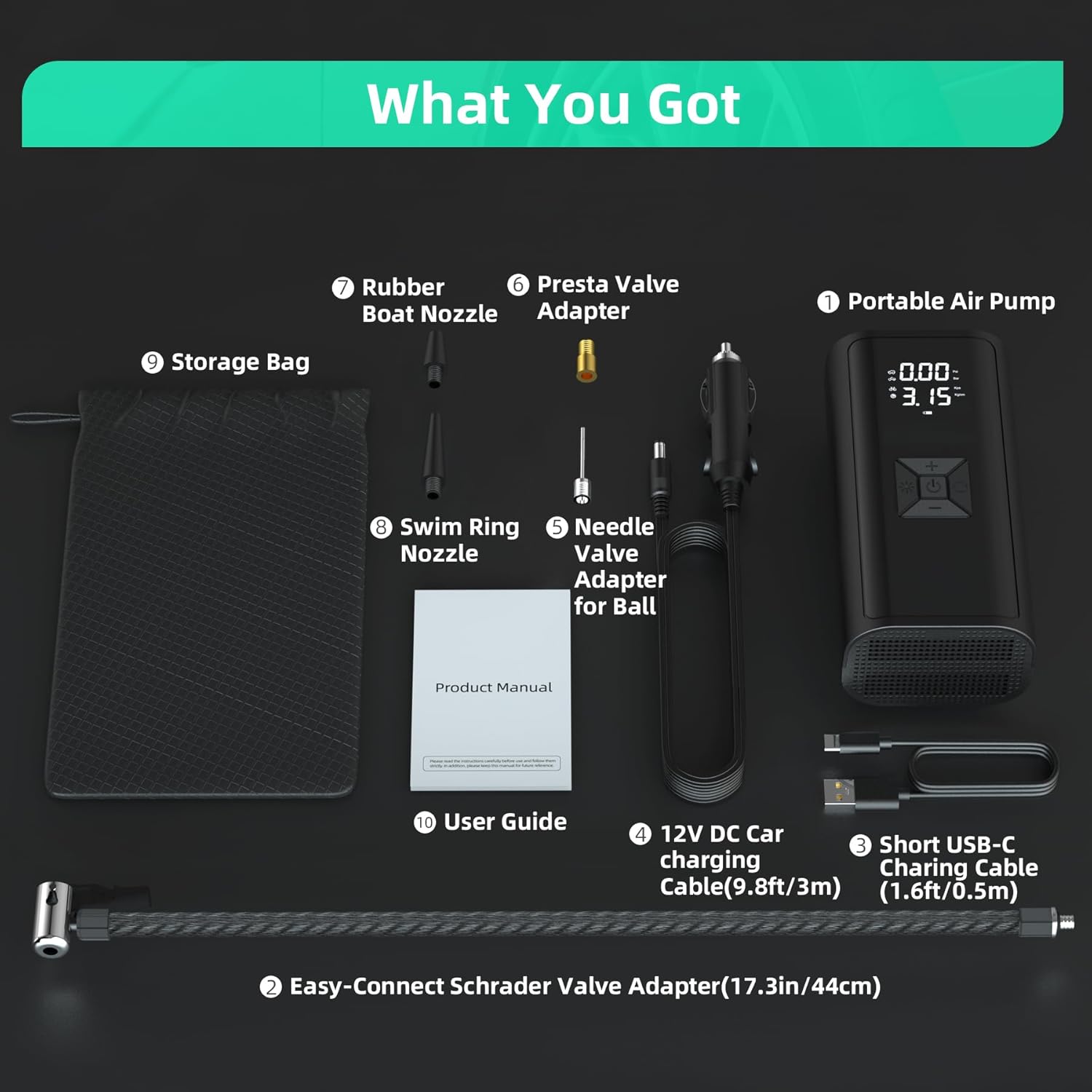
Image: All components included with the AUKSKY Portable Car Tire Pump.
Package Contents:
- Portable Air Pump
- Quick Connect Hose (17.32 inches / 44 cm)
- 12V DC Car Charging Cable (9.8 feet / 3 meters)
- Type-C Charging Cable (19.6 inches / 0.5 meters)
- Presta Valve Adapter
- Ball Needle Adapter
- Swimming Ring Nozzle
- Rubber Boat Nozzle
- Storage Bag
- User Manual
3. Setup
3.1 Initial Charging
Before first use, ensure the portable air pump is fully charged. Connect the provided Type-C cable to the pump and a suitable USB power adapter (not included), or use the 12V DC car charging cable to charge it in your vehicle.
3.2 Connecting the Air Hose
Attach the quick-connect air hose to the pump's air outlet. Ensure it is securely fastened to prevent air leakage. Select the appropriate adapter (Presta valve, ball needle, swimming ring nozzle, or rubber boat nozzle) for the item you intend to inflate and attach it to the other end of the hose.
4. Operating Instructions

Image: Step-by-step guide for basic operation.
4.1 Powering On/Off
- To turn on the device, press and hold the power button (center button) for 3 seconds.
- To turn off the device, press and hold the power button for 3 seconds again.
4.2 Selecting Inflation Mode and Units
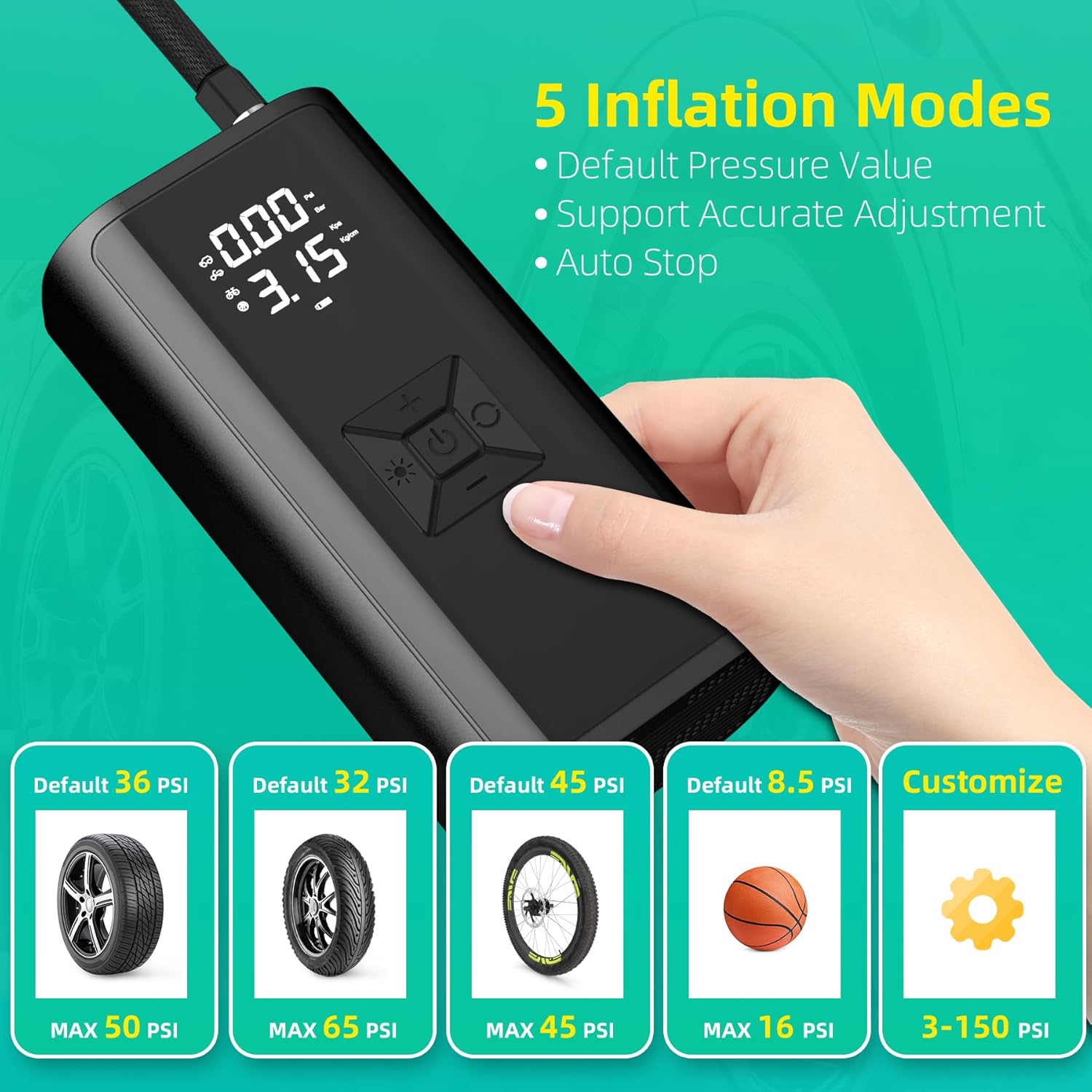
Image: Available inflation modes and their default pressure settings.
- After powering on, the double LCD digital screen will display the current pressure value and the preset value.
- Short press the 'Switch Mode' button (left button with a light icon) to cycle through the 5 inflatable scene modes: Car, Bike, Motorcycle, Ball, and Custom. Each mode has a default pressure value.
- To change the pressure unit (PSI, BAR, KPA, Kg/cm²), long press the 'Switch Mode' button for 4 times.
4.3 Setting Target Pressure
- Once a mode is selected, use the '+' and '-' buttons to increase or decrease the preset target pressure.
- For custom pressure settings up to 150 PSI, select the 'Custom' mode.
4.4 Starting and Stopping Inflation

Image: The auto shut-off feature for safe inflation.
- Connect the air hose to the item you wish to inflate. The screen will display the current pressure.
- Press the power button once to start inflation.
- The pump will automatically stop once the preset pressure is reached. You can also press the power button again to manually stop inflation at any time.
- Disconnect the air hose from the item and the pump.
4.5 Emergency Light Function

Image: Examples of the pump's integrated LED light functions.
The pump features a built-in LED light for various situations:
- White Light: Short press the light button (left button with a light icon) to turn on the white LED light for general illumination, useful during car breakdowns or as a night light.
- SOS Red Flashlight: Continue short pressing the light button to cycle through different light modes, including a red SOS flashing light for emergencies.
5. Maintenance
- Cleaning: Wipe the device with a soft, dry cloth. Do not use harsh chemicals or abrasive cleaners.
- Storage: Store the pump and its accessories in the provided storage bag in a cool, dry place, away from direct sunlight and extreme temperatures.
- Battery Care: For optimal battery life, charge the device regularly, even if not in frequent use. Avoid completely draining the battery for extended periods.
- Cooling: As mentioned in safety, allow the device to cool down after prolonged use (over 10 minutes) to prevent overheating.
6. Troubleshooting
If you encounter issues with your AUKSKY Portable Car Tire Pump, please refer to the following common solutions:
- Device Not Turning On: Ensure the battery is sufficiently charged. Connect the pump to a power source using the Type-C cable or 12V DC car charging cable.
- No Inflation/Slow Inflation:
- Check that the air hose and adapters are securely connected to both the pump and the item being inflated.
- Verify that the preset pressure is higher than the current pressure.
- Ensure the correct inflation mode is selected for the item.
- Inaccurate Pressure Reading: Ensure the air hose is properly connected and there are no leaks. The digital gauge provides real-time pressure monitoring.
- Overheating: If the pump feels excessively hot, stop operation immediately and allow it to cool down for at least 10-15 minutes before resuming.
- LED Display Hard to Read: In bright daylight, the LCD screen may be less visible. Try to use the device in a shaded area if possible.
If the problem persists after attempting these solutions, please contact customer support.
7. Specifications
| Feature | Specification |
|---|---|
| Brand | AUKSKY |
| Model Name | Portable Air Compressor (EG-216) |
| Maximum Operating Pressure | 150 PSI / 10.3 BAR |
| Power Source | Battery Powered (5400mAh Lithium Ion) / 12V DC Car Powered |
| Voltage | 12 Volts |
| Air Flow Capacity | 30 Liters Per Minute |
| Hose Length | 17.32 Inches (44 cm) |
| Product Dimensions (L x W x H) | 3.15" x 2.16" x 6.29" (8cm x 5.5cm x 16cm) |
| Item Weight | 16 ounces (1 pound) |
| Noise Level | 100 Decibels |
| Material | ABS |
| Special Features | Digital Screen, LED Light (White & Red SOS), Auto Shut-off |
8. Warranty and Support
8.1 Product Warranty
The AUKSKY Portable Car Tire Pump (Model EG-216) comes with a 1-year warranty from the date of purchase. This warranty covers manufacturing defects under normal use. It does not cover damage caused by misuse, accidents, unauthorized modifications, or improper maintenance.
8.2 Customer Support
For any questions, technical assistance, or warranty claims, please contact AUKSKY customer support through the retailer where you purchased the product or visit the official AUKSKY store page on Amazon: AUKSKY Store.