
SOGTICPS SY6048
SOGTICPS 60A MPPT Solar Charge Controller User Manual
Model: SY6048
1. Product Overview
The SOGTICPS SY6048 is a 60A MPPT solar charge controller designed for 12V, 24V, 36V, and 48V battery systems. It features an LCD display, dual USB 5V charging ports, and is compatible with various battery types including Seal, GEL, Flooded, and LifePO4. This controller integrates advanced MPPT technology for efficient solar energy utilization and includes multiple protection features to ensure safe operation of your solar system.

Figure 1: Front view of the SOGTICPS 60A MPPT Solar Charge Controller, showing the LCD display and control buttons.
2. Key Features
- Advanced MPPT Technology: Utilizes a maximum power point tracking algorithm for high efficiency (tracking efficiency not less than 99.5%).
- Automatic Voltage Recognition: Automatically detects 12V, 24V, 36V, and 48V battery systems.
- Multi-functional LCD Display: Backlit display shows operation data, working status, and clock.
- Multiple Operating Modes: Includes charging mode, light control mode, light control + time delay control mode, universal control mode, manual control mode, and timing control mode.
- Comprehensive Safety Protections: Features battery over-voltage, over-current, power failure, overcharge, deep discharge, reverse connection, and overheat temperature protection.
- Dual USB Ports: Provides 5V charging output.
- Battery Compatibility: Supports Seal, GEL, Flooded, and LifePO4 battery types.
3. Setup and Installation
Proper installation is crucial for the safe and efficient operation of your solar charge controller. Please follow these steps carefully.
3.1 Connection Sequence
Always connect components in the specified order to prevent damage to the controller or batteries.
- Connect the Battery: First, connect the battery to the controller. Ensure correct polarity (+ to + and - to -). The controller will automatically detect the battery voltage.
- Connect the Solar Panel: Next, connect the solar panel array to the controller. Ensure correct polarity.
- Connect the DC Load: Finally, connect your DC load to the controller's load terminals.
Disconnection Sequence: When disconnecting, reverse the order: 1) DC load, 2) Solar panel, 3) Battery.
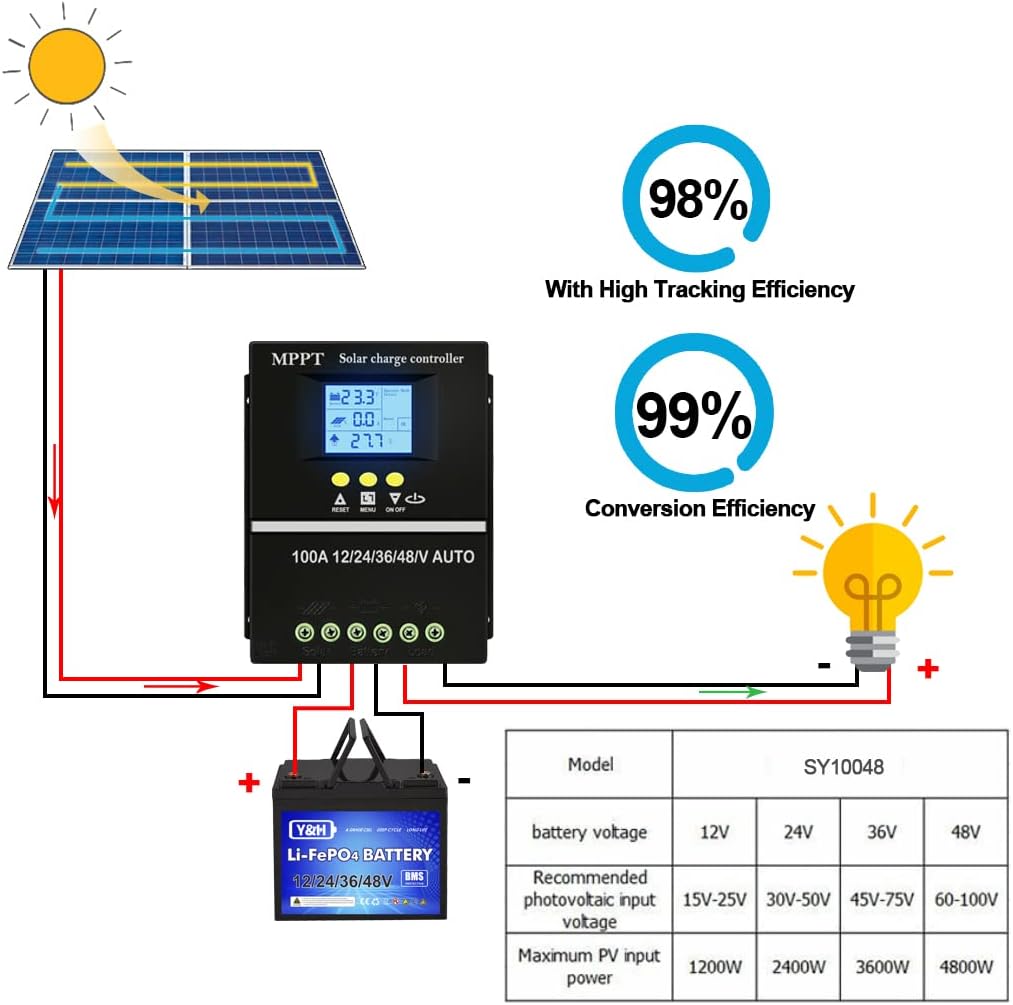
Figure 2: Diagram illustrating the correct connection sequence for the solar panel, controller, and battery. Note the high tracking and conversion efficiencies.
3.2 Mounting
Mount the controller in a cool, dry, and well-ventilated area, away from direct sunlight and heat sources. Ensure there is sufficient space around the controller for air circulation.
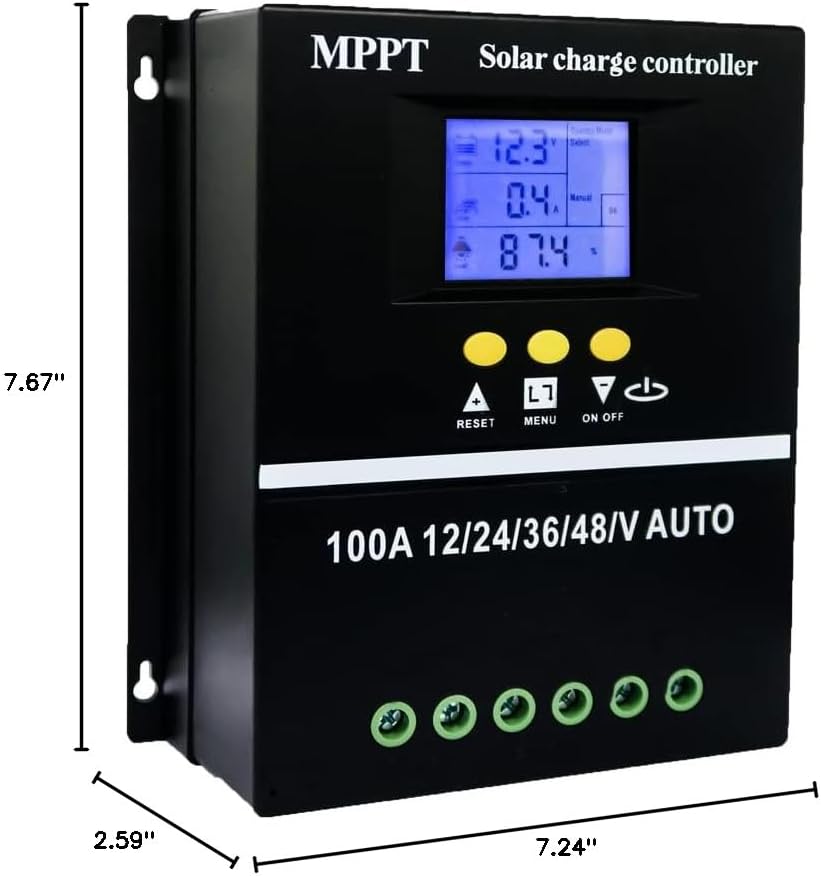
Figure 3: Dimensions of the solar charge controller, useful for planning installation space.
4. Operating Instructions
4.1 LCD Display Interface
The LCD provides real-time data and status information. Familiarize yourself with the display areas:
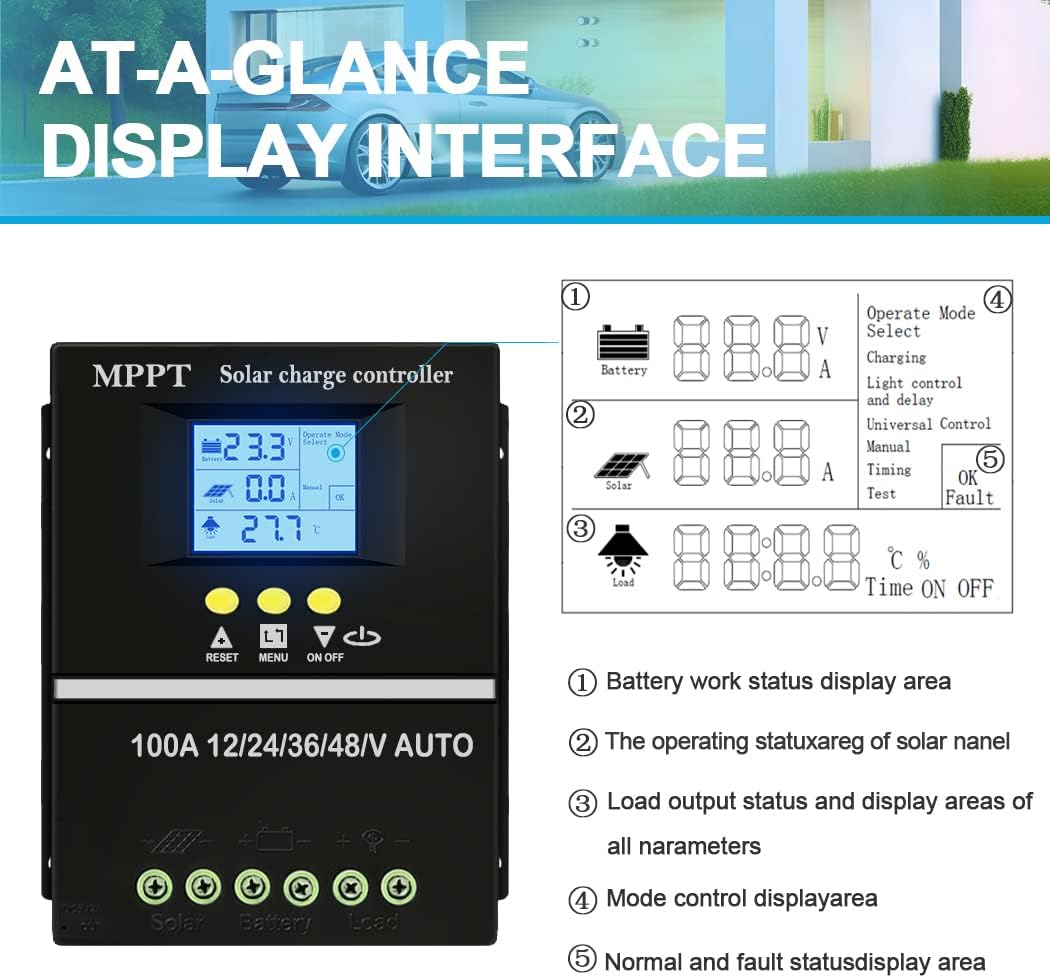
Figure 4: Detailed view of the LCD display interface, showing battery status, solar panel operation, load output, mode control, and fault status areas.
- Battery Work Status Display Area: Shows battery voltage and charging/discharging current.
- Operating Status of Solar Panel: Displays PV charging current.
- Load Output Status and Parameters: Shows load current, product working temperature, and delay time.
- Mode Control Display Area: Indicates the currently selected operating mode (e.g., Charging, Light control, Universal control, Manual, Timing, Test).
- Normal and Fault Status Display Area: Shows OK for normal operation or fault codes if an issue occurs.
4.2 Operating Modes
The controller supports various operating modes to suit different application needs:
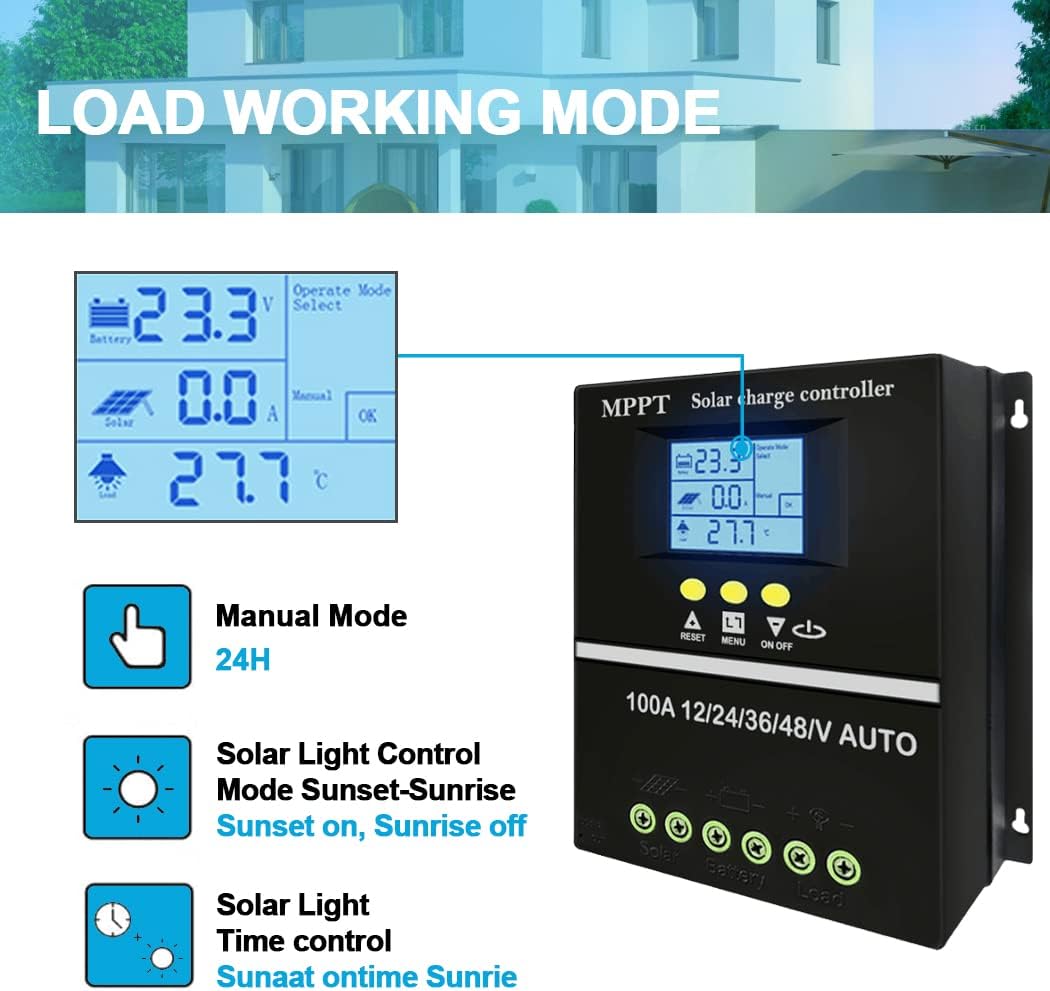
Figure 5: Illustration of the different load working modes available on the controller, including Manual, Solar Light Control (Sunset-Sunrise), and Solar Light Time Control.
- Charging Mode: Standard battery charging.
- Light Control Mode: Load turns on at sunset and off at sunrise.
- Light Control + Time Delay Control Mode: Load turns on at sunset and stays on for a set duration.
- Universal Control Mode: Load is always on.
- Manual Control Mode: Load can be manually turned on/off.
- Timing Control Mode: Load operates according to a set schedule.
Refer to the controller's buttons (RESET, MENU, ON/OFF) to navigate and select desired modes and parameters.
4.3 Battery Charging Stages
The controller employs a multi-stage charging algorithm for optimal battery health and longevity.

Figure 6: Visual representation of the four charging stages: Bulk Charge, Boost Charge, Float Charge, and Equalization Charge.
- Bulk Charge: Charges the battery at maximum current until voltage reaches the boost voltage.
- Boost Charge: Charges at a constant voltage for a set period to ensure full charge.
- Float Charge: Maintains the battery at a constant voltage to compensate for self-discharge.
- Equalization Charge: Periodically overcharges flooded batteries to balance cell voltages. (Applicable for Flooded batteries only).

Figure 7: The controller is compatible with Seal, GEL, Flooded, and Lithium (LiFePO4) battery types.
5. Maintenance
Regular maintenance ensures the longevity and optimal performance of your solar charge controller.
- Check Connections: Periodically inspect all wiring connections for tightness and corrosion. Loose connections can cause overheating and damage.
- Clean the Controller: Keep the controller clean and free from dust and debris. Use a dry cloth for cleaning. Do not use liquids.
- Ventilation: Ensure that the ventilation openings are not blocked to allow proper heat dissipation.
- Battery Inspection: Regularly check your batteries for signs of damage, swelling, or leakage. Ensure battery terminals are clean.
- Environmental Conditions: Ensure the controller is operating within its specified temperature and humidity ranges.
6. Troubleshooting
This section addresses common issues you might encounter with your solar charge controller.
| Problem | Possible Cause | Solution |
|---|---|---|
| Controller display is off or blank. | Battery not connected or low voltage; reverse polarity connection. | Ensure battery is connected first and has sufficient voltage. Check battery polarity. |
| No charging current from solar panels. | Solar panel not connected; insufficient sunlight; reverse polarity of solar panel. | Check solar panel connections and polarity. Ensure adequate sunlight. |
| Load not working. | Load overcurrent; battery low voltage protection; load short circuit; incorrect operating mode. | Reduce load. Charge battery. Check load wiring for short circuits. Verify operating mode settings. |
| Battery not fully charged. | Insufficient solar input; battery aging; incorrect battery type setting. | Increase solar panel capacity or exposure. Consider battery replacement. Verify battery type setting. |
If the problem persists, please contact customer support.
7. Specifications
| Parameter | Value |
|---|---|
| Brand | SOGTICPS |
| Model Number | SY6048 |
| Charging Port Type | USB (Dual 5V) |
| Package Dimensions | 8.27 x 7.99 x 2.95 inches |
| Item Weight | 1.3 pounds |
| Color | Black |
| Voltage (System) | 12V/24V/36V/48V Auto |
| Display Type | LCD |
| Max PV Input Voltage | 100V |
| Rated Charge Current | 60A |
| Battery Compatibility | Seal, GEL, Flooded, LifePO4 |
8. Warranty and Support
SOGTICPS offers a 1-year warranty for this product. For technical support or any inquiries, please feel free to contact our team. Our engineers are available to provide advice and solutions to any problems you may encounter.
For additional information, you may refer to the official User Guide (PDF).
Related Documents - SY6048
 |
SY-SLCD Solar Controller Instructions and Specifications Comprehensive instructions for the SY-SLCD solar controller, detailing its functions, operating modes, display indicators, and protection parameters for optimal use with solar power systems. |
 |
DROK 36V Digital Battery Capacity Monitor User Manual This document provides instructions and specifications for the DROK 36V Digital Battery Capacity Monitor. It covers features, installation, programming modes, and technical parameters for monitoring battery status. |
 |
Aideepen DC7-100V Digital Battery Indicator: Specifications and User Guide Detailed information on the Aideepen DC7-100V digital voltmeter and battery capacity tester. Covers product specifications, features, supported battery types (ternary lithium, lithium iron, lead-acid), voltage measurement range, operating current, dimensions, and comprehensive instructions for mode setting and button operation. |
 |
CW12V30A DC-DC Converter Installation and Wiring Guide Installation and wiring instructions for the CSTEOFPW CW12V30A DC-DC Converter, including input/output specifications and connection diagrams. |
 |
YOTTO OVER LAND Combusto Diesel Heater Instruction Manual Comprehensive instruction manual for the YOTTO OVER LAND Combusto Diesel Heater, covering operation, setup, troubleshooting, and safety guidelines for optimal performance and safety. |
Ask a question about this manual
Ask about setup, troubleshooting, compatibility, parts, safety, or missing instructions. Manuals+ will review the question and use this page’s manual context to help answer it.