
Introduction
This manual provides essential information for the safe and efficient operation, maintenance, and troubleshooting of your DEWALT DXGNP65E 6.5 kW Inverter Gasoline Generator. Please read this manual thoroughly before operating the generator and keep it for future reference. Proper use and maintenance will ensure optimal performance and longevity of your unit.
Safety Information
Always prioritize safety when operating the generator. Failure to follow safety instructions can result in serious injury or death.
- Carbon Monoxide Hazard: Never operate the generator indoors or in enclosed spaces. Exhaust contains carbon monoxide, a colorless, odorless, poisonous gas.
- Fire Hazard: Gasoline is highly flammable. Refuel in a well-ventilated area with the engine off and cool. Do not smoke near the generator.
- Electrical Shock Hazard: Do not operate the generator in wet conditions. Ensure proper grounding. Never connect the generator directly to a building's electrical system without an approved transfer switch.
- Hot Surfaces: The generator engine and muffler become very hot during operation and remain hot for a period after shutdown. Avoid contact.
- Children and Pets: Keep children and pets away from the generator, especially during operation.
Product Overview
The DEWALT DXGNP65E is a robust 6.5 kW inverter gasoline generator designed for reliable power supply. Familiarize yourself with its components before operation.
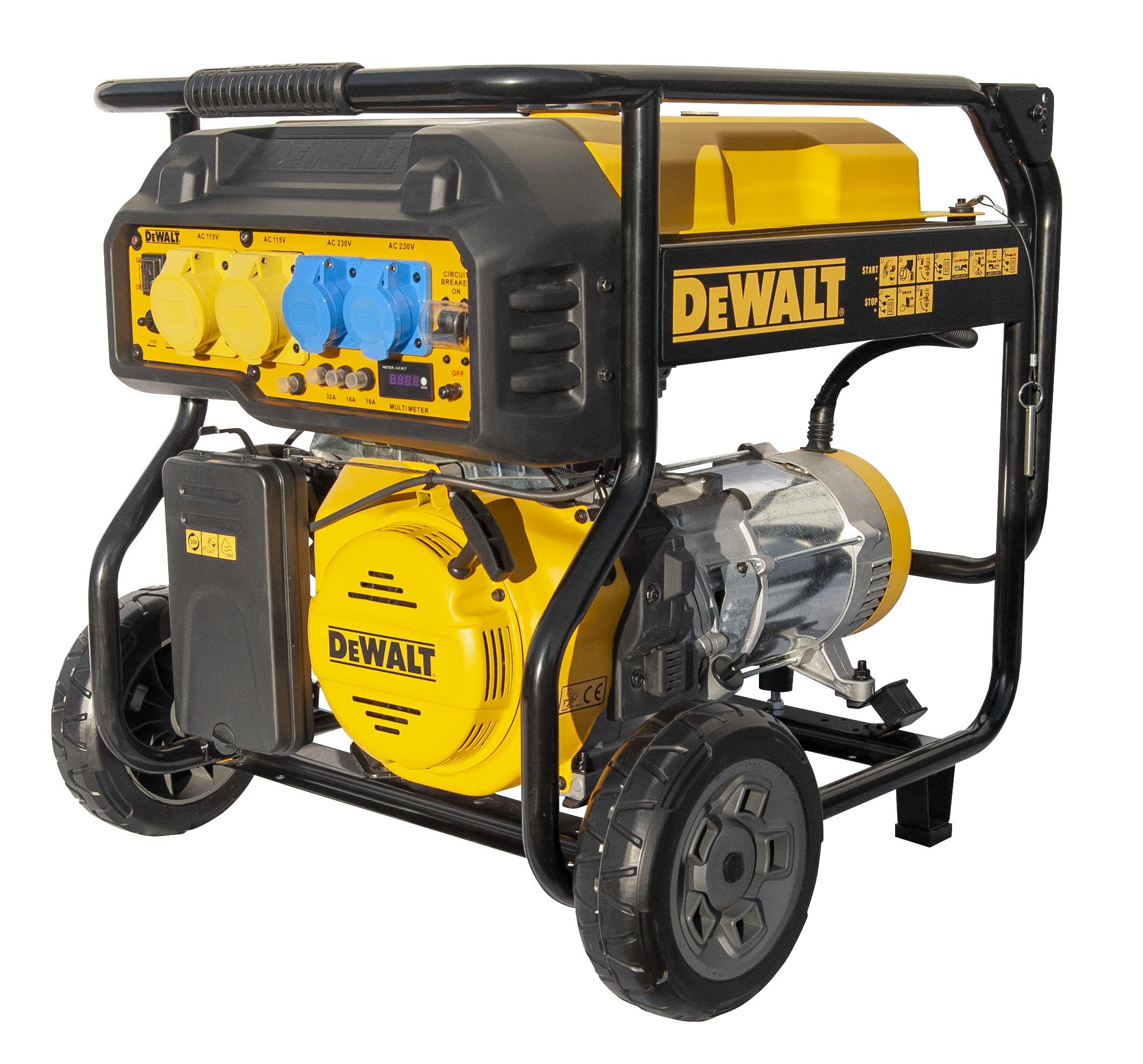
Figure 1: Overall view of the DEWALT DXGNP65E 6.5 kW Inverter Gasoline Generator. This image shows the complete unit with its sturdy frame, wheels, and handle for portability, highlighting the yellow and black color scheme typical of DEWALT tools.
Control Panel and Outlets
The control panel provides access to power outlets, switches, and indicators for monitoring the generator's status.

Figure 2: Close-up view of the generator's control panel. This image details the various yellow and blue power outlets, the ON/OFF switch, voltage selector (115V/230V), circuit breakers (32A, 16A), and the digital multimeter display.

Figure 3: Detailed view of the yellow power outlets on the control panel. These outlets are typically used for standard AC power connections, protected by their respective circuit breakers.

Figure 4: Close-up of a blue CEE type power outlet on the generator's control panel. This type of outlet is commonly used for higher power applications or industrial connections, featuring a protective cover.
Dimensions

Figure 5: Diagram illustrating the physical dimensions of the DEWALT DXGNP65E generator. The image shows measurements for length (50.39 cm), width (27.79 cm), and height (50.19 cm), providing a clear understanding of its size.
Setup
1. Unpacking
Carefully remove the generator from its packaging. Inspect for any shipping damage. Ensure all components listed in the packing list are present.
2. Adding Engine Oil
The generator is shipped without engine oil. Before first use, add the recommended type and amount of oil. Refer to the engine manual for specific oil type and capacity. Do not overfill.
- Place the generator on a level surface.
- Locate the oil fill cap/dipstick.
- Remove the cap and slowly pour the recommended oil into the engine.
- Check the oil level using the dipstick; it should be at the upper limit mark.
- Securely replace the oil fill cap.
3. Adding Fuel
Use fresh, unleaded gasoline with an octane rating of 87 or higher. Do not use E85 or mixed fuels.
- Ensure the generator is off and cool.
- Move the generator to a well-ventilated outdoor area.
- Unscrew the fuel cap.
- Carefully pour gasoline into the fuel tank, avoiding overfilling. Leave space for fuel expansion.
- Securely replace the fuel cap. Wipe up any spilled fuel immediately.
4. Grounding the Generator
Proper grounding is crucial for safety. Consult local electrical codes for specific requirements.
- Connect a heavy-gauge copper wire from the generator's grounding terminal to a suitable ground source, such as a ground rod driven into the earth.
Operating Instructions
1. Starting the Generator
- Ensure all electrical loads are disconnected from the generator.
- Turn the fuel valve to the "ON" position.
- Move the choke lever to the "CHOKE" position (for cold starts).
- Turn the engine switch to the "ON" position.
- Pull the recoil starter handle firmly and smoothly until the engine starts.
- Once the engine starts, gradually move the choke lever to the "RUN" position.
- Allow the generator to warm up for a few minutes before connecting loads.
2. Connecting Electrical Loads
Connect appliances and tools one at a time, starting with the highest wattage items. Do not exceed the generator's rated wattage.
- Ensure the generator is running stably.
- Plug your appliances into the appropriate outlets on the control panel.
- Monitor the digital multimeter for voltage and frequency readings.
3. Stopping the Generator
- Disconnect all electrical loads from the generator.
- Allow the generator to run for a few minutes without load to cool down.
- Turn the engine switch to the "OFF" position.
- Turn the fuel valve to the "OFF" position.
Maintenance
Regular maintenance is essential for the safe and efficient operation of your generator. Always perform maintenance with the engine off and cool.
- Check Engine Oil: Check oil level before each use. Change oil after the first 20 hours of operation, then every 50-100 hours or annually.
- Clean Air Filter: Inspect the air filter every 50 hours or more frequently in dusty conditions. Clean or replace as needed.
- Check Spark Plug: Inspect the spark plug every 100 hours. Clean or replace if fouled or worn.
- Fuel System: If storing for more than 30 days, drain the fuel tank and carburetor, or use a fuel stabilizer.
- General Cleaning: Keep the generator clean and free of debris.
Troubleshooting
| Problem | Possible Cause | Solution |
|---|---|---|
| Engine does not start | No fuel; Low oil level; Choke not set correctly; Spark plug issue; Engine switch OFF | Add fuel; Add oil; Adjust choke; Inspect/replace spark plug; Turn engine switch ON |
| No power output | Circuit breaker tripped; Overload; Loose connections | Reset circuit breaker; Reduce load; Check connections |
| Engine runs rough | Stale fuel; Clogged air filter; Dirty spark plug | Drain and refill with fresh fuel; Clean/replace air filter; Clean/replace spark plug |
Specifications
| Feature | Detail |
|---|---|
| Model Number | DXGNP65E |
| Brand | DEWALT |
| Power Output | 6500 Watts |
| Voltage | 230 Volts |
| Dimensions (L x W x H) | 50 x 50 x 28 cm |
| Weight | 85 Kilograms |
| Material | Polyester (likely referring to a component, not the entire generator body) |
| Color | Black |
| Country of Origin | United States of America |
Warranty and Support
For warranty information and technical support, please refer to the documentation included with your purchase or visit the official DEWALT website. Keep your proof of purchase for warranty claims.
For further assistance, contact DEWALT customer service through their official channels.


