
HELLER 2000W Upright Fan Heater
Heller 2000W Upright Fan Heater User Manual
Model: 2000W Upright Fan Heater
1. Important Safety Instructions
Please read these instructions carefully before using the appliance and retain them for future reference. Failure to follow these instructions may result in electric shock, fire, or serious injury.
- Always ensure the voltage on the rating label corresponds to the mains voltage in your home.
- Do not cover the heater. Covering the heater can cause overheating and fire.
- This appliance is for indoor use only. Do not use outdoors or in damp environments.
- Keep the heater away from water and other liquids. Do not immerse the appliance in water.
- Do not operate the heater with a damaged cord or plug, or after the appliance malfunctions or has been damaged in any manner.
- Keep children and pets away from the heater, especially when it is in operation.
- Always unplug the heater when not in use, before cleaning, or before moving it.
- Ensure the heater is placed on a stable, flat, heat-resistant surface.
- Do not use the heater near flammable materials such as curtains, furniture, or paper. Maintain a minimum distance of 1 meter from all sides.
- Do not use this heater in the immediate surroundings of a bath, a shower or a swimming pool.
- This appliance is not intended for use by persons (including children) with reduced physical, sensory or mental capabilities, or lack of experience and knowledge, unless they have been given supervision or instruction concerning use of the appliance by a person responsible for their safety.
2. Product Overview
The Heller 2000W Upright Fan Heater is a compact and efficient portable heating solution designed for smaller rooms. It features two heat settings, an adjustable thermostat, and multiple safety mechanisms for reliable operation.
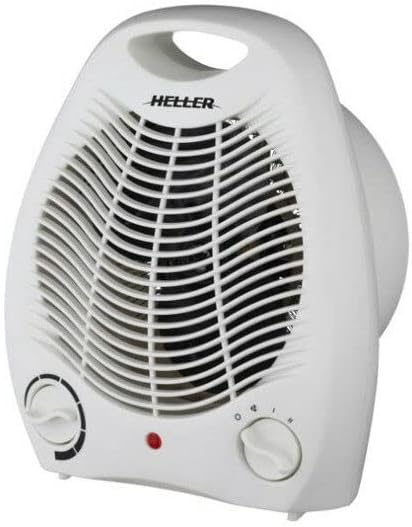
Figure 2.1: Front view of the Heller 2000W Upright Fan Heater, showing the fan grille, control knobs, and carry handle.
Key Features:
- 2 Heat Settings: Offers 1000W (Low) and 2000W (High) power options.
- Adjustable Thermostat: Allows precise control over room temperature.
- Fan Assisted: Ensures efficient heat distribution.
- Automatic Thermal Cut-out: Automatically shuts off if the unit overheats.
- Overheat Protection: Additional safety measure to prevent excessive temperatures.
- Built-in Safety Thermal Fuse: Provides an extra layer of protection against overheating.
- Safety Tip-over Switch: Automatically turns off the heater if it is accidentally knocked over.
- Portable Carry Handle: Integrated handle for easy transportation.
3. Setup
- Unpacking: Carefully remove the heater from its packaging. Retain the packaging for storage or disposal.
- Placement: Place the heater on a firm, level, and stable surface. Ensure it is at least 1 meter away from walls, furniture, curtains, and other flammable materials. Do not place it directly under a power outlet.
- Power Connection: Ensure the heater is switched off (both knobs set to '0' or 'OFF'). Plug the power cord into a suitable 220-240V AC, 50Hz power outlet. Do not use extension cords unless absolutely necessary, and ensure any extension cord used is rated for the heater's power consumption.
4. Operating Instructions
- Power On: Plug the heater into a power outlet.
- Select Heat Setting:
- Turn the Function Control Knob (usually on the right) to your desired setting:
- • Fan Only: For air circulation without heat.
- • I (1000W): Low heat setting.
- • II (2000W): High heat setting.
- Turn the Function Control Knob (usually on the right) to your desired setting:
- Adjust Thermostat:
- Turn the Thermostat Control Knob (usually on the left) clockwise to the maximum setting. Once the room reaches your desired temperature, slowly turn the thermostat knob counter-clockwise until the heater switches off. The heater will now cycle on and off to maintain this temperature.
- Power Off: To turn off the heater, turn the Function Control Knob to the '0' (OFF) position. Unplug the heater from the power outlet when not in use.
Safety Features:
- Tip-Over Switch: If the heater is accidentally knocked over, the built-in safety switch will automatically turn the unit off. Stand the heater upright on a stable surface to resume operation.
- Overheat Protection: In the event of overheating (e.g., due to blocked air inlets/outlets or covering), the heater will automatically shut down. If this occurs, unplug the heater, allow it to cool down for at least 10 minutes, remove any obstructions, and then plug it back in. If the issue persists, contact customer support.
5. Maintenance and Cleaning
Regular cleaning and maintenance will help ensure the longevity and efficient operation of your heater.
- Before Cleaning: Always unplug the heater from the power outlet and allow it to cool down completely before cleaning.
- Exterior Cleaning: Wipe the exterior surfaces of the heater with a soft, damp cloth. Do not use abrasive cleaners, waxes, or polishes as these may damage the finish.
- Air Inlets/Outlets: Use a vacuum cleaner with a brush attachment to gently remove dust and lint from the air inlets and outlets. Ensure these areas are clear of obstructions for proper airflow.
- Storage: If storing the heater for an extended period, clean it thoroughly and store it in its original packaging or a suitable dust-free environment. Do not wrap the power cord tightly around the heater.
- Do Not Disassemble: Do not attempt to disassemble or repair the heater yourself. This will void the warranty and could be dangerous.
6. Troubleshooting
| Problem | Possible Cause | Solution |
|---|---|---|
| Heater does not turn on. |
|
|
| Heater turns off unexpectedly. |
|
|
| No heat, but fan is running. |
|
|
7. Specifications
| Model: | 2000W Upright Fan Heater |
| Brand: | HELLER |
| Power Supply: | 220-240V AC, 50Hz |
| Power Output: | 1000W / 2000W |
| Dimensions (HxWxD): | 25 cm x 20 cm x 14 cm |
| Weight: | 2 kg |
| Heating Method: | Forced Air |
| Safety Features: | Automatic Thermal Cut-out, Overheat Protection, Built-in Safety Thermal Fuse, Safety Tip-over Switch |
| Colour: | White |
| Included Components: | User Manual |

Figure 7.1: Dimensions of the Heller 2000W Upright Fan Heater (Height: 25cm, Width: 20cm, Depth: 14cm).
8. Warranty and Support
This Heller 2000W Upright Fan Heater comes with a 12-month Manufacturer's Warranty from the date of purchase.
This warranty covers defects in materials and workmanship under normal use. It does not cover damage resulting from misuse, neglect, accident, alteration, or unauthorized repair.
To make a warranty claim or for technical support, please contact your retailer or the manufacturer directly. Please retain your proof of purchase (receipt) as it will be required for any warranty service.
For further assistance or inquiries, please refer to the contact information provided by your point of purchase or the official Heller website.
Related documents2000W Upright Fan Heater


Ask a question about this manual
Ask about setup, troubleshooting, compatibility, parts, safety, or missing instructions. Manuals+ will review the question and use this page’s manual context to help answer it.