
Introduction
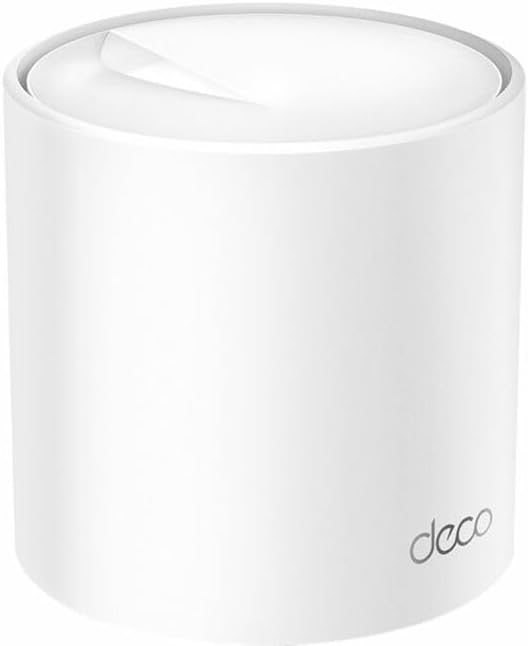
This manual provides detailed instructions for setting up, operating, maintaining, and troubleshooting your TP-Link Deco X50 Wi-Fi 6 Mesh Router. Please read this guide carefully to ensure optimal performance and a seamless whole-home Wi-Fi experience.
Package Contents
Verify that your package contains the following items:
- TP-Link Deco X50 Unit(s)
- Power Adapter(s)
- Ethernet Cable
- Quick Installation Guide
Setup
Follow these steps to set up your TP-Link Deco X50 Mesh Wi-Fi System:
- Download the Deco App: Search for 'TP-Link Deco' in the App Store or Google Play, or scan the QR code in the Quick Installation Guide.
- Prepare Your Modem: Power off your modem and remove its backup battery if it has one.
- Connect the First Deco Unit: Connect one end of the Ethernet cable to your modem's LAN port and the other end to any Ethernet port on your Deco unit.
- Power On: Power on your modem, then power on the Deco unit. Wait for the Deco unit's LED to pulse blue.
- Configure via App: Open the Deco app, log in or sign up for a TP-Link ID, and follow the on-screen instructions to set up your Deco network.
- Add More Deco Units: If you have multiple Deco units, place them in desired locations and add them to your network using the Deco app.
Operating Your Deco X50 System
The Deco X50 system creates a unified Wi-Fi network for your entire home, ensuring seamless roaming and strong signal coverage.
Key Features:
- AX3000 Dual-Band Wi-Fi: Provides speeds up to 2402 Mbps on the 5 GHz band and 574 Mbps on the 2.4 GHz band, supporting Wi-Fi 6 (802.11ax) for faster and more efficient connections.
- Mesh Technology: Automatically connects your devices to the fastest Deco unit as you move around your home, ensuring uninterrupted streaming and browsing.
- PoE Supported: Power over Ethernet (PoE) simplifies network deployment by allowing power and data to be transmitted over a single Ethernet cable.
- Deco App Control: Manage your network, set up parental controls, prioritize devices, and monitor network activity directly from the intuitive Deco app.
- Multiple Installation Options: The Deco X50 can be placed on a tabletop or installed on a ceiling or wall using adaptive accessories (sold separately).
Maintenance
To ensure the longevity and optimal performance of your Deco X50 system, consider the following maintenance tips:
- Firmware Updates: Regularly check for and install firmware updates via the Deco app. Updates often include performance improvements, security patches, and new features.
- Optimal Placement: Ensure Deco units are placed in open areas, away from large metal objects, thick walls, and interference sources like microwaves or cordless phones.
- Cleaning: Gently clean the exterior of the Deco units with a soft, dry cloth. Avoid using liquid cleaners or abrasive materials.
- Restarting: Periodically restarting your Deco units and modem can help resolve minor network issues and improve performance.
Troubleshooting
If you encounter issues with your Deco X50 system, try the following solutions:
- No Internet Connection:
- Check if your modem is working correctly.
- Ensure all Ethernet cables are securely connected.
- Restart your modem and the main Deco unit.
- Slow Wi-Fi Speed:
- Verify the placement of your Deco units for optimal coverage.
- Check for any background downloads or bandwidth-intensive applications.
- Use the Deco app to run a network optimization test.
- Deco Unit LED is Red: A solid red LED indicates a problem with the internet connection. Refer to the 'No Internet Connection' steps above.
- Cannot Connect to Deco Wi-Fi:
- Ensure you are selecting the correct Wi-Fi network name (SSID) and entering the correct password.
- Try restarting the Deco unit.
For further assistance, please visit the official TP-Link support website or contact their customer service.
Specifications
| Feature | Detail |
|---|---|
| Brand | TP-Link |
| Model Name | AX5000 Whole Home Mesh Wi-Fi 6 System |
| Product Dimensions | 4.49 x 4.33 x 4.49 inches |
| ASIN | B0C6C5SPZN |
| Special Feature | WPS |
| Frequency Band Class | Dual-Band |
| Wireless Communication Standard | 802.11g (compatible with a/b/g/n/ac/ax) |
| Compatible Devices | Tablet (and other Wi-Fi enabled devices) |
| Recommended Uses For Product | Home |
| Connectivity Technology | Ethernet, Wi-Fi |
| Color | White |
| Antenna Type | Internal |
Warranty and Support
TP-Link products come with a limited warranty. For detailed warranty information, technical support, and product registration, please visit the official TP-Link website at www.tp-link.com/support.
Legal Disclaimer: This product may contain chemicals known to the State of California to cause cancer and birth defects or other reproductive harm, as per Proposition 65.


