
Redragon M908
Redragon M908 Impact RGB LED MMO Gaming Mouse User Manual
Model: M908 | Brand: Redragon
1. Introduction
Thank you for choosing the Redragon M908 Impact RGB LED MMO Gaming Mouse. This high-precision optical gaming mouse is engineered for optimal performance in gaming and daily tasks, featuring extensive customization options and an ergonomic design for extended comfort. This manual provides detailed instructions to help you set up, operate, maintain, and troubleshoot your new gaming mouse.

Figure 1.1: The Redragon M908 Impact RGB LED MMO Gaming Mouse, showcasing its white finish and illuminated elements.
2. Package Contents
Please verify that all items are present in the package:
- 1 x Redragon M908 Gaming Mouse
- 1 x User Manual
3. Setup Guide
3.1 Connecting the Mouse
- Locate an available USB port on your computer.
- Plug the USB connector of the Redragon M908 mouse into the USB port.
- Your operating system should automatically detect and install the necessary drivers.
3.2 Software Installation (Optional but Recommended)
To unlock the full customization potential of your Redragon M908 mouse, including DPI adjustment, macro programming, and RGB lighting control, it is recommended to install the official Redragon software.
- Visit the official Redragon website (www.redragonzone.com) to download the latest software for the M908 model.
- Follow the on-screen instructions to complete the installation.
- Once installed, launch the software to configure your mouse settings.
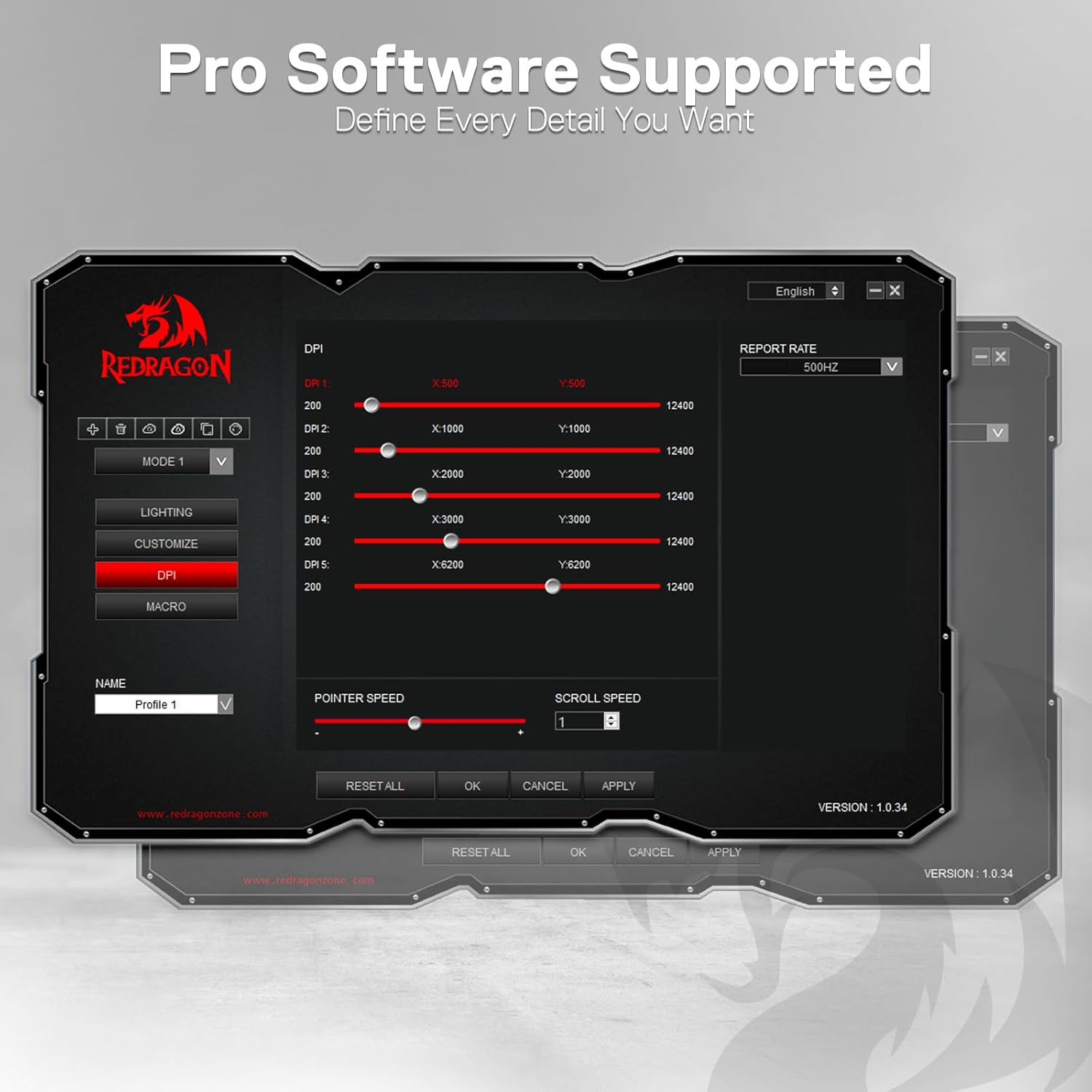
Figure 3.1: Screenshot of the Redragon M908 professional software interface, allowing detailed customization.
4. Key Features
The Redragon M908 Impact mouse is equipped with advanced features designed to enhance your gaming experience:
- High-Precision Optical Sensor: Features a Pixart PAW3327 sensor with up to 12,400 DPI, adjustable in 5 levels (500/1000/2000/3000/6200 DPI) directly on the mouse, and fine-tuned via software from 200 to 12,400 DPI.
- Programmable Buttons: A total of 18 programmable buttons, including 12 MMO side buttons, allow for extensive macro shortcuts and custom assignments.
- RGB Backlighting: Offers 16.8 million RGB LED color options with various lighting modes. The LED backlight can be disabled if preferred.
- Weight Tuning System: Includes an 8-piece weight tuning set (8 x 2.4g weights) to customize the mouse's feel and balance.
- Ergonomic Design: Crafted for comfort during prolonged gaming sessions, providing a secure and comfortable grip.
- Durable Construction: Features durable smooth TEFLON feet pads and a 6ft braided-fiber cable with a gold-plated USB connector for enhanced longevity.

Figure 4.1: Overview of the Redragon M908's key features, including its optical sensor, macro buttons, DPI levels, and ergonomic design.

Figure 4.2: Illustration of the mouse's PRO Optical Sensor capabilities, showing DPI sensitivity, IPS tracking speed, and G-acceleration.

Figure 4.3: The Redragon M908 mouse, emphasizing its 12 side hotkeys designed for MMO gamers.

Figure 4.4: The underside of the Redragon M908 mouse, showing the compartment for the 8 x 2.4g adjustable weights.
5. Operating Instructions
5.1 DPI Adjustment
The M908 mouse features a dedicated DPI button (usually located behind the scroll wheel) to cycle through preset DPI levels. The default levels are 500, 1000, 2000, 3000, and 6200 DPI. You can customize these levels and add more granular control using the Redragon software.
5.2 Button Programming and Macros
All 18 buttons on the M908 mouse are programmable. Use the Redragon software to:
- Assign single key functions.
- Create complex macros for gaming or productivity tasks.
- Set up 5 memory profiles, each with a dedicated light color for quick identification.
5.3 RGB Lighting Control
The M908 offers dynamic RGB backlighting. You can control the lighting effects and colors through the Redragon software. Additionally, there is a physical switch on the bottom of the mouse to toggle the lights on or off.

Figure 5.1: The Redragon M908 mouse showcasing its dynamic and vibrant RGB backlight.
5.4 Weight Adjustment
To adjust the mouse's weight, open the compartment on the underside of the mouse. Insert or remove the 2.4g weights as desired to achieve your preferred balance and feel.
6. Maintenance and Care
To ensure the longevity and optimal performance of your Redragon M908 mouse, follow these maintenance guidelines:
- Cleaning: Use a soft, dry cloth to wipe the surface of the mouse. For stubborn dirt, a slightly damp cloth can be used, but ensure no moisture enters the mouse. Avoid harsh chemicals or abrasive cleaners.
- Sensor Care: Keep the optical sensor on the bottom of the mouse clean and free from dust or debris to ensure accurate tracking.
- Cable Management: Avoid sharp bends or excessive pulling on the braided cable to prevent damage.
- Storage: When not in use, store the mouse in a clean, dry environment away from extreme temperatures.
7. Troubleshooting
If you encounter issues with your Redragon M908 mouse, refer to the following common problems and solutions:
| Problem | Possible Cause | Solution |
|---|---|---|
| Mouse not responding | Loose USB connection, faulty USB port, driver issue. | Try plugging the mouse into a different USB port. Restart your computer. Check Device Manager for driver issues. |
| Inaccurate tracking or cursor jumps | Dirty optical sensor, unsuitable mouse pad surface. | Clean the optical sensor on the bottom of the mouse. Use a clean, uniform mouse pad. |
| RGB lighting not working or inconsistent | Lighting disabled, software settings, physical switch. | Check the physical LED switch on the bottom of the mouse. Ensure lighting is enabled in the Redragon software. Update software if necessary. Note that not all LEDs may be fully programmable depending on the specific lighting mode. |
| Buttons not programmable via software | Software permissions, outdated software. | Run the Redragon software as an administrator. Ensure you have the latest version of the software installed from the official website. |
8. Specifications
| Feature | Detail |
|---|---|
| Model Number | M908 |
| Connectivity Technology | USB Wired |
| Movement Detection Technology | Optical (Pixart PAW3327 Sensor) |
| DPI Range | 200 - 12,400 DPI (5 adjustable levels: 500/1000/2000/3000/6200 DPI) |
| Polling Rate | 1000 Hz |
| Acceleration | 30G |
| Programmable Buttons | 18 (including 12 MMO side buttons) |
| Memory Profiles | 5 |
| RGB Backlight | 16.8 Million Colors (can be disabled) |
| Weight Tuning System | 8 x 2.4g weights included |
| Product Dimensions | 5.12 x 3.94 x 1.57 inches |
| Item Weight | 6.2 ounces |
| Compatibility | Windows 2000/ME/XP/03/VISTA/7/8/10 (for programmable features), Mac OS (for normal use) |

Figure 8.1: Dimensions of the Redragon M908 Impact Gaming Mouse.
9. Warranty and Support
Redragon products are designed for durability and performance. For information regarding warranty coverage, technical support, or to access additional resources such as driver updates and FAQs, please visit the official Redragon website:
You may also find helpful information and community support through the Redragon brand store on Amazon or other authorized retailers.
Related documentsM908


Ask a question about this manual
Ask about setup, troubleshooting, compatibility, parts, safety, or missing instructions. Manuals+ will review the question and use this page’s manual context to help answer it.