1. Introduction
This manual provides detailed instructions for the installation, operation, and maintenance of your Pawfly Internal Aquarium Filter, model AP-300L. This submersible power filter is designed to provide mechanical and biological filtration, water circulation, and oxygenation for aquariums ranging from 3 to 10 gallons.
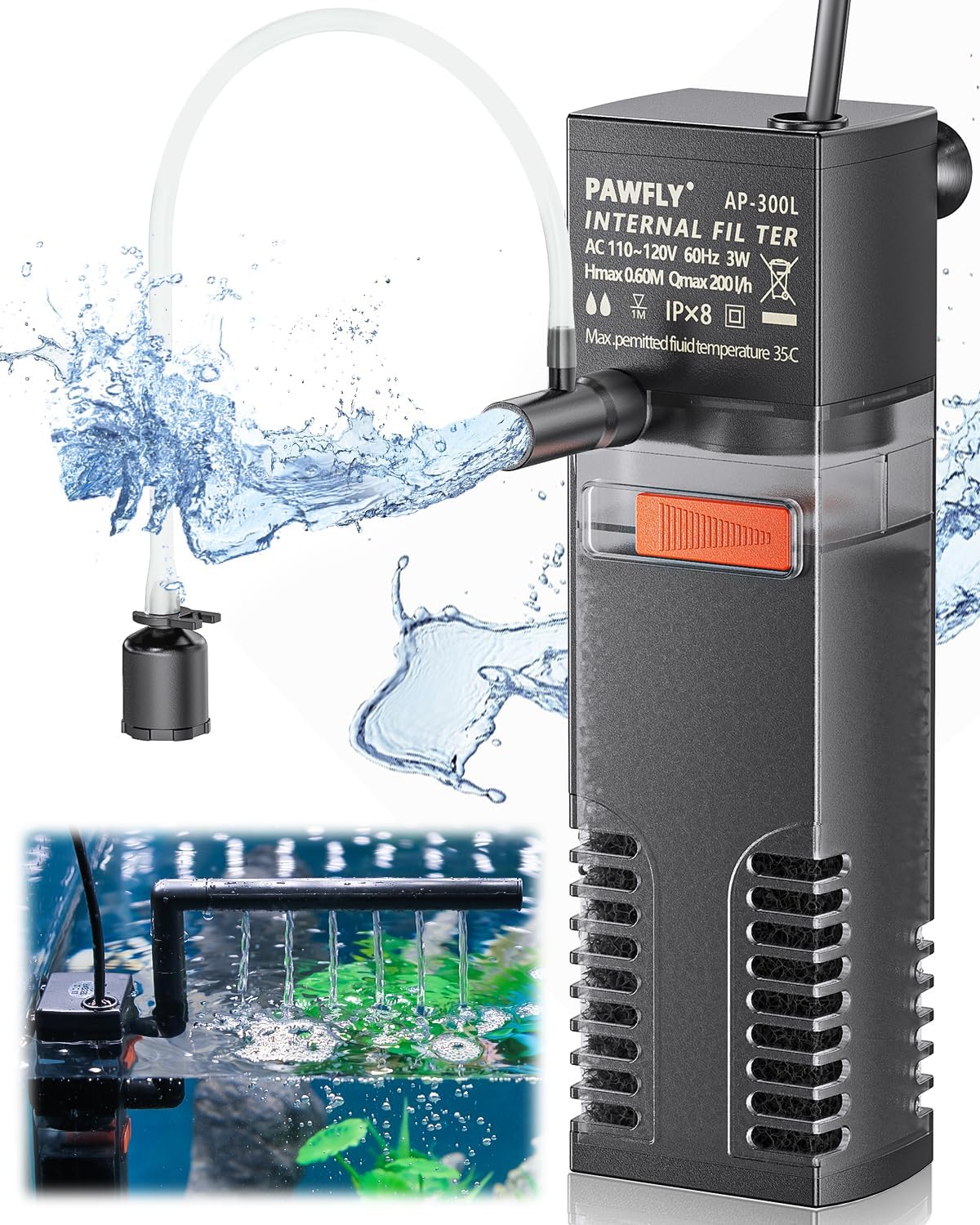
Image 1: Pawfly Internal Aquarium Filter AP-300L, showing its compact design and water output options.
2. Product Components
The Pawfly Internal Aquarium Filter AP-300L includes the following parts:
- Filter Unit (Pump Body, Filter Box, Bio Sponge, Filter Box Cover)
- Water Spraying Pipe
- Water Drenching Pipe
- Air Intake Valve with Tubing
- Suction Cups
- Cleaning Brush

Image 2: Diagram illustrating the main components of the Pawfly Internal Aquarium Filter, including the water pump, filter box, bio sponge, and filter box cover.
3. Setup Instructions
- Assemble the Filter: Ensure all components are securely attached. The bio sponge should be placed inside the filter box.
- Choose Water Outlet:
- For Water Spraying Pipe: Attach the spraying pipe to the pump outlet. Ensure the entire filter unit is completely submerged in water during operation.
- For Water Drenching Pipe: Attach the drenching pipe to the pump outlet. This pipe can be raised above the water surface to enhance oxygenation. It can be rotated 360 degrees for directional flow.

Image 3: Illustration of the water spraying pipe (submerged) and water drenching pipe (above water for oxygenation).
- Install Air Intake Valve (Optional for Oxygenation):
- Connect one end of the clear airline tubing to the air inlet on the filter.
- Link the other end of the tubing to the air intake valve.
- Position the air intake valve outside the aquarium.
- Note: The air intake valve only functions with the water spraying pipe. It does not work with the drenching pipe.

Image 4: Step-by-step guide for connecting the air intake valve for oxygen supply.
- Mount the Filter: Use the strong suction cups to securely attach the filter to the inside wall of your aquarium. Ensure it is fully submerged if using the spraying pipe.
4. Operating Instructions
- Power On: Once the filter is correctly installed and submerged (if applicable), plug the power cord into a suitable electrical outlet.
- Adjust Water Flow: Locate the knob on the filter unit. Slide this knob to adjust the water flow rate according to your aquarium's needs and the preferences of your aquatic inhabitants.
- Oxygenation: If you have installed the air intake valve with the spraying pipe, air bubbles will be produced, increasing oxygen solubility in the water.

Image 5: The Pawfly filter operating in an aquarium, demonstrating filtration, oxygenation, and circulation.
5. Maintenance
Regular maintenance ensures optimal performance and longevity of your filter.
- Sponge Cleaning:
- Unplug the filter from the power outlet.
- Carefully detach the filter from the aquarium wall.
- Separate the pump from the filter box.
- Remove the bottom cover of the filter box to access and remove the bio sponge.
- Rinse the sponge every 2-4 weeks. Important: Only wash the sponge with aquarium water to preserve beneficial bacteria. Avoid using tap water, as chlorine can kill these bacteria.
Image 6: Visual guide for detaching the filter and cleaning the bio sponge.
- Pump Cleaning:
- After separating the pump from the filter box, remove the impeller cover.
- Carefully remove the impeller and clean it thoroughly with a small brush (a cleaning brush is included).
- Clean the impeller housing to remove any debris or buildup.
- Reassemble the pump and filter components.
- Filter Box Cleaning: Use the provided small brush to clean the interior of the filter box.
6. Troubleshooting
| Problem | Possible Cause | Solution |
|---|---|---|
| Filter not running / No water flow |
|
|
| Weak water flow |
|
|
| Excessive noise |
|
|
| Poor water clarity |
|
|
7. Specifications
| Feature | Detail |
|---|---|
| Model | AP-300L |
| Recommended Tank Size | 3-10 Gallons |
| Max Flow Rate | 55 GPH (200 L/h) |
| Power Consumption | 3 W |
| Max Lift Height | 2 ft (0.6 m) |
| Voltage | AC 110-120V |
| Frequency | 60 Hz |
| Noise Level | < 30 dB |
| Dimensions (W x H) | 1.4" x 4.9" (approximate) |
| Ingress Protection (IP) Rating | IPX8 (Submersible) |

Image 7: Detailed specifications and pump diagram for the Pawfly Internal Aquarium Filter.
8. Warranty and Support
For warranty information or technical support, please refer to the product packaging or contact Pawfly customer service directly. Keep your purchase receipt for warranty claims.
You can often find contact information on the official Pawfly website or through the retailer where the product was purchased.


