
eKids B52
eKids The Little Mermaid Bluetooth Headphones User Manual
Model: B52
Introduction
Thank you for purchasing the eKids The Little Mermaid Bluetooth Headphones. These headphones are designed to provide a safe and enjoyable audio experience for children, featuring volume reduction for hearing protection, a comfortable fit, and both wireless Bluetooth and wired connectivity options. This manual will guide you through the setup, operation, and maintenance of your new headphones.
What's in the Box
- eKids The Little Mermaid Bluetooth Headphones
- USB Charging Cable
- 3.5mm Audio Cable
Product Overview
Familiarize yourself with the different parts of your headphones:

Image: Front view of the eKids The Little Mermaid Bluetooth Headphones, showcasing the purple and teal design with Little Mermaid graphics on the earcups.

Image: Side view of the headphones, highlighting the control buttons and ports on the earcup.

Image: Diagram illustrating key features such as adjustable headband, foldable design, pivoting ear cushions, line-in port, charging port, and iconic details.
Video: An official product video demonstrating the features and usage of the eKids The Little Mermaid Wireless Headphones, including Bluetooth connectivity, included cables, adjustable fit, built-in microphone, and foldable design for travel.
Setup
1. Charging the Headphones
Before first use, fully charge the headphones. Connect the small end of the included USB charging cable to the charging port on the headphone earcup and the larger end to a USB power source (e.g., computer USB port, USB wall adapter). The LED indicator will show charging status.
- Charging Time: Approximately 2-3 hours for a full charge.
- Battery Life: Up to 37 hours of continuous Bluetooth playtime.
2. Bluetooth Pairing
- Ensure the headphones are turned off.
- Press and hold the Power/Bluetooth button on the headphone earcup until the LED indicator flashes blue and red, indicating pairing mode.
- On your device (smartphone, tablet, computer), go to the Bluetooth settings and turn on Bluetooth.
- Search for "eKids B52" or similar in the list of available devices and select it to connect.
- Once successfully paired, the LED indicator will turn solid blue.
3. Wired Connection (Optional)
You can use the headphones with the included 3.5mm audio cable when Bluetooth is not available or the battery is low.
- Plug one end of the 3.5mm audio cable into the Aux-in port on the headphone earcup.
- Plug the other end into the audio jack of your device.
- The headphones will automatically switch to wired mode.
Operating Instructions
Power On/Off
- Power On: Press and hold the Power/Bluetooth button until the LED indicator lights up.
- Power Off: Press and hold the Power/Bluetooth button until the LED indicator turns off.
Music Playback
- Play/Pause: Press the Play/Pause button once.
- Next Track: Press and hold the Volume Up button.
- Previous Track: Press and hold the Volume Down button.
Volume Control
The headphones feature a volume-reduced design for safe listening levels. Adjust the volume using the dedicated Volume Up (+) and Volume Down (-) buttons on the earcup.
- Increase Volume: Press the Volume Up (+) button.
- Decrease Volume: Press the Volume Down (-) button.
Call Functions (with Built-in Microphone)
- Answer/End Call: Press the Play/Pause button once during an incoming call.
- Reject Call: Press and hold the Play/Pause button for 2 seconds during an incoming call.
Maintenance
- Cleaning: Wipe the headphones with a soft, dry cloth. Do not use abrasive cleaners or solvents.
- Storage: When not in use, store the headphones in a cool, dry place. The foldable design allows for compact storage.
- Battery Care: To prolong battery life, avoid fully discharging the battery frequently. Charge regularly, even if not used for extended periods.
- Water Resistance: These headphones are not water resistant. Avoid exposure to liquids.
Troubleshooting
| Problem | Possible Cause | Solution |
|---|---|---|
| Headphones do not turn on. | Battery is depleted. | Charge the headphones using the provided USB cable. |
| Cannot pair via Bluetooth. | Headphones not in pairing mode; device Bluetooth off; too far from device. | Ensure headphones are in pairing mode (flashing blue/red LED). Turn on Bluetooth on your device. Move headphones closer to the device (within 30 feet). Forget device on your phone and re-pair. |
| No sound in Bluetooth mode. | Volume too low; not connected; incorrect audio output selected on device. | Increase headphone and device volume. Ensure headphones are connected. Check device audio output settings. |
| No sound in wired mode. | Audio cable not fully inserted; faulty cable; device audio issue. | Ensure 3.5mm cable is fully inserted into both headphone and device. Try a different 3.5mm cable. Test with another audio device. |
Specifications
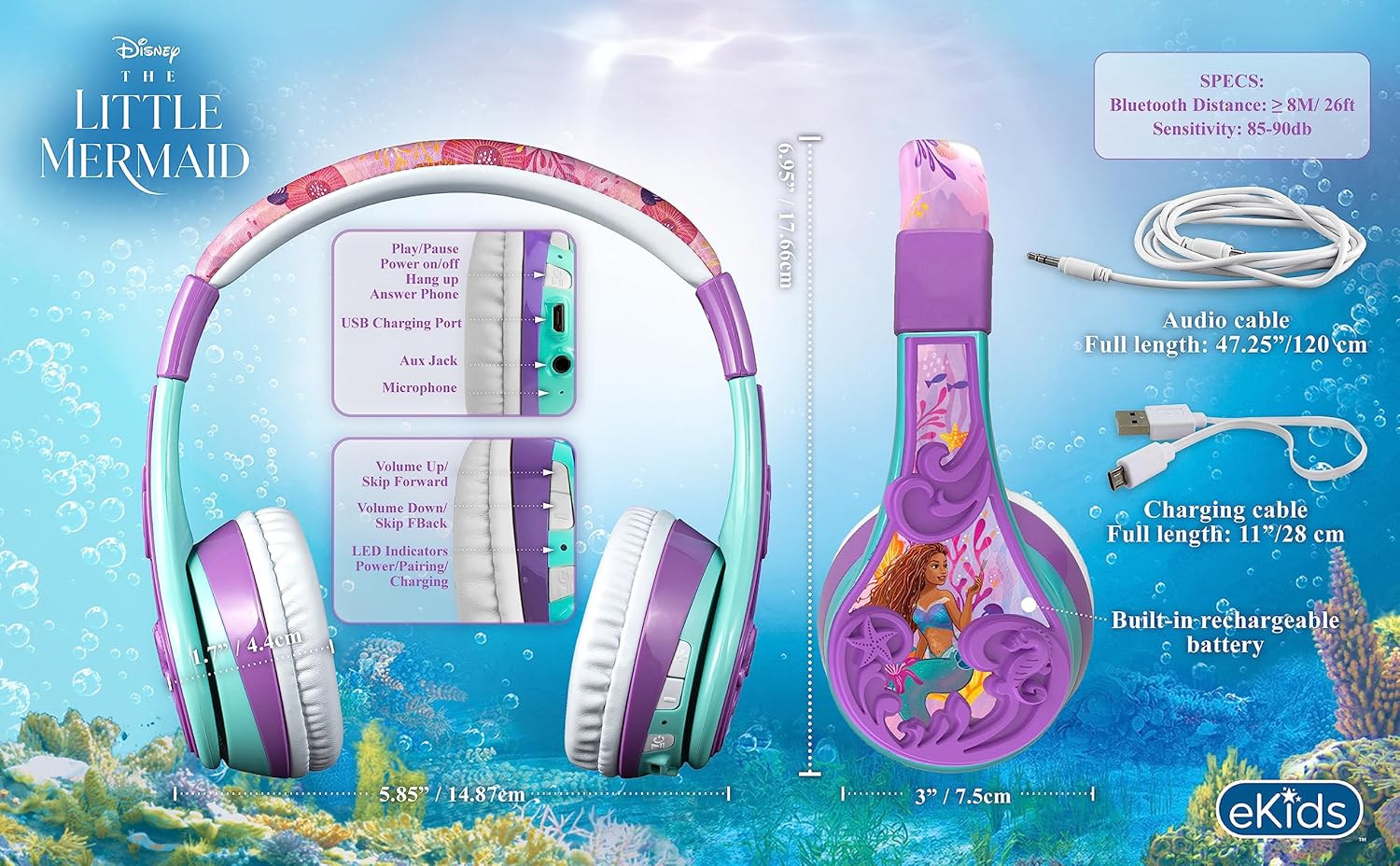
Image: Detailed diagram showing headphone dimensions, control button functions, and technical specifications like Bluetooth distance, sensitivity, and battery life.
| Feature | Detail |
|---|---|
| Model Name | B52 |
| Connectivity Technology | Wireless (Bluetooth), Wired (3.5mm Jack) |
| Wireless Communication Technology | Bluetooth |
| Battery Life | Up to 37 Hours |
| Microphone | Built-in |
| Ear Placement | Over Ear |
| Material | Plastic |
| Item Weight | 8.8 ounces (0.25 Kilograms) |
| Frequency Range | 20 Hz - 20,000 Hz |
| Water Resistance Level | Not Water Resistant |
Warranty and Support
eKids products are designed for quality and durability. For warranty information or technical support, please refer to the contact details provided on the product packaging or visit the official eKids website. Keep your purchase receipt for warranty claims.
You can also find additional support and product information on the eKids Brand Store on Amazon.
Related documentsB52


Ask a question about this manual
Ask about setup, troubleshooting, compatibility, parts, safety, or missing instructions. Manuals+ will review the question and use this page’s manual context to help answer it.