
1. Introduction
Thank you for choosing the Extralink PIORUN 1000W Pure Sine Wave UPS Inverter. This device is designed to provide reliable emergency power and stable voltage for sensitive electronic equipment, heating systems, servers, and medical devices. This manual provides essential information for safe installation, operation, maintenance, and troubleshooting.
2. Safety Information
Please read all safety instructions carefully before operating the device. Failure to follow these instructions may result in electric shock, fire, or serious injury.
- Electrical Safety: Ensure all connections are secure and correctly polarized. Do not operate the unit in wet conditions or near flammable materials.
- Battery Safety: Use only compatible 24V batteries (AGM, Gel, LiFePO4). Connect batteries with correct polarity. Batteries can produce explosive gases; ensure adequate ventilation.
- Ventilation: Do not block ventilation openings. Ensure sufficient airflow around the unit to prevent overheating.
- Servicing: Do not attempt to open or service the unit yourself. Refer all servicing to qualified personnel.
- Children: Keep the device out of reach of children.
3. Product Overview
The Extralink PIORUN 1000W UPS Inverter combines four essential functions in one compact unit: an Uninterruptible Power Supply (UPS), a Pure Sine Wave Inverter, an Automatic Battery Charger, and an Automatic Voltage Regulator (AVR).

Figure 1: The Extralink PIORUN UPS Inverter highlighting its core functionalities: UPS for emergency power, Inverter for DC to AC conversion, Automatic Battery Charger, and Automatic Voltage Regulation (AVR).
Key Features:
- 1000W Pure Sine Wave Output: Provides clean and stable power, suitable for sensitive electronics.
- Fast Switching Time: Less than 10ms switching time ensures seamless transition to battery power during outages.
- Real-time LCD Display: Shows input/output voltage, battery level, and load status at a glance.
- External Battery Compatibility: Supports 24V AGM, Gel, and LiFePO4 batteries (not included) for extended runtime.
- Active Cooling & Intelligent Battery Management: Protects against overheating and prolongs battery life.
- Comprehensive Protection: Includes overvoltage, undervoltage, overload, and short-circuit protection.
- Compact and Robust Design: Durable metal/ABS housing with compact dimensions (290×255×120 mm).
Comparison with Standard Offline UPS:
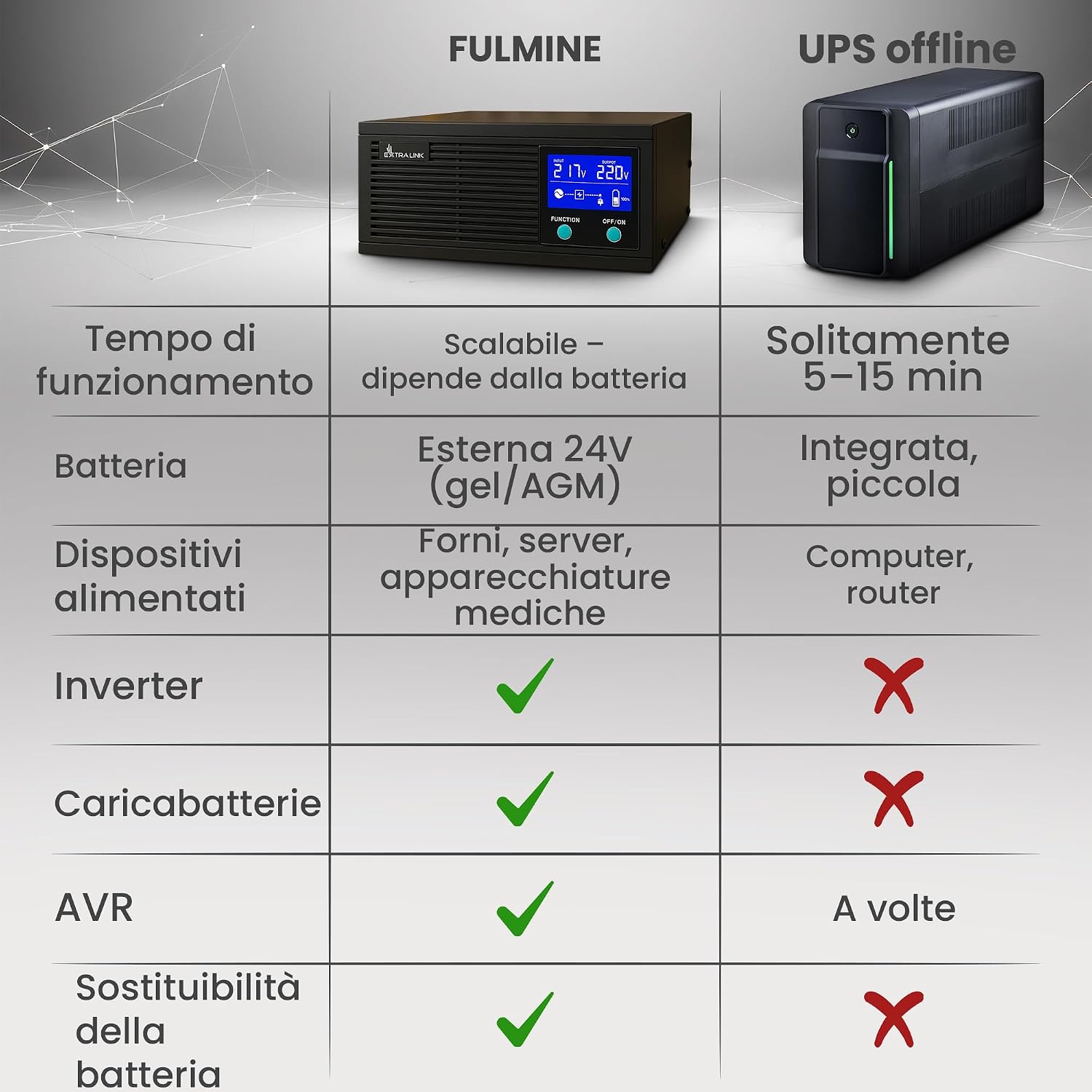
Figure 2: A comparison table illustrating the advantages of the Extralink PIORUN UPS over a typical offline UPS, focusing on runtime, battery type, supported devices, and integrated features.
The Extralink PIORUN UPS offers superior performance and versatility compared to standard offline UPS units, particularly for critical applications requiring longer backup times and pure sine wave output.
4. Setup
Follow these steps to set up your Extralink PIORUN UPS Inverter:
- Unpacking: Carefully remove the unit from its packaging and inspect for any damage.
- Placement: Place the UPS on a stable, flat surface in a well-ventilated area, away from direct sunlight, heat sources, and moisture. Ensure adequate space around the unit for airflow.
- Battery Connection: Connect your external 24V battery (AGM, Gel, or LiFePO4) to the DC input terminals on the UPS. Ensure correct polarity: red cable to positive (+), black cable to negative (-). Warning: Incorrect polarity can damage the unit and battery.
- AC Input Connection: Plug the UPS's AC input cable into a grounded 230V AC wall outlet.
- Device Connection: Connect your devices (e.g., heating system, server, medical equipment) to the AC output socket(s) on the UPS.

Figure 3: Example setup showing the Extralink PIORUN UPS providing emergency power to a heating system, connected to an external 24V battery.
5. Operating Instructions
Turning On/Off:
- To Turn On: Press and hold the 'ON/OFF' button for a few seconds until the LCD screen illuminates and the unit powers on.
- To Turn Off: Press and hold the 'ON/OFF' button for a few seconds until the LCD screen turns off and the unit powers down.
Understanding the LCD Display:
The LCD provides real-time status information. Use the 'FUNCTION' button to cycle through different display modes if available.

Figure 4: The LCD display showing real-time input voltage (INPUT AC), output voltage (OUTPUT AC), battery charge level, and connected load percentage.
- Input Voltage: Displays the incoming AC voltage from the grid.
- Output Voltage: Displays the outgoing AC voltage supplied to your devices.
- Battery Level: Indicates the current charge level of the connected 24V battery.
- Load Indicator: Shows the percentage of the UPS's capacity currently being used by connected devices.
Automatic Voltage Regulation (AVR):
The AVR function automatically stabilizes the output voltage to your connected devices, protecting them from fluctuations in the main power supply. This operates continuously when the unit is connected to AC power.
Battery Charging:
When the UPS is connected to AC power and an external battery, it will automatically charge the battery. The LCD will indicate the charging status. Ensure the battery is compatible and correctly connected for optimal charging.
6. Maintenance
Regular maintenance ensures the longevity and optimal performance of your UPS Inverter.
- Cleaning: Keep the unit clean and free from dust. Use a dry, soft cloth to wipe the exterior. Do not use liquid cleaners or solvents.
- Ventilation: Periodically check that the ventilation openings are not obstructed.
- Battery Care: If using lead-acid batteries, ensure they are kept charged. For LiFePO4 batteries, follow manufacturer guidelines for optimal lifespan. Avoid deep discharges where possible.
- Storage: If storing the unit for an extended period, ensure the battery is fully charged and disconnect it from the UPS. Store in a cool, dry place.
7. Troubleshooting
If you encounter issues with your UPS Inverter, refer to the following common problems and solutions:
| Problem | Possible Cause | Solution |
|---|---|---|
| UPS does not turn on | No AC input power; Battery not connected or discharged; Unit fault. | Check AC power source; Ensure battery is connected and charged; Contact support if problem persists. |
| No output power | Overload; Short circuit; Battery discharged; Unit fault. | Reduce connected load; Check for short circuits in connected devices; Charge battery; Contact support. |
| Battery not charging | AC input not connected; Battery faulty; Incorrect battery connection. | Ensure AC input is connected; Check battery condition; Verify battery polarity. |
| Overheating warning | Blocked ventilation; Excessive load; High ambient temperature. | Clear ventilation openings; Reduce load; Move unit to a cooler environment. |
If the problem persists after attempting these solutions, please contact Extralink customer support.
8. Specifications
Technical specifications for the Extralink PIORUN 1000W UPS Inverter:

Figure 5: Physical dimensions and weight of the Extralink PIORUN 1000W UPS Inverter.
| Feature | Specification |
|---|---|
| Brand | EXTRALINK |
| Model Name | PIORUN 1000W |
| Wattage | 1000 Watts |
| Peak Power | 1500 Watts |
| Input Voltage (DC) | 24 Volts |
| Output Voltage (AC) | 230 Volts |
| Output Waveform | Pure Sine Wave |
| Switching Time | < 10ms |
| Power Source | Battery Powered (External 24V) |
| Recommended Use | Heating systems, servers, medical devices, IT infrastructure |
| Number of Outlets | 1 |
| Dimensions (L×W×H) | 290 × 255 × 120 mm |
| Weight | 8.26 kg |
| Color | Black |
| Certifications | CE, RoHS |
9. Warranty and Support
Warranty:
The Extralink PIORUN 1000W UPS Inverter comes with a 24-month warranty from the date of purchase. This warranty covers manufacturing defects and malfunctions under normal use. It does not cover damage caused by misuse, accidents, unauthorized modifications, or improper installation.
Customer Support:
For technical assistance, warranty claims, or any questions regarding your Extralink PIORUN UPS Inverter, please contact Extralink customer support through your retailer or the official Extralink website. Please have your product model and purchase date available when contacting support.
10. Applications
The Extralink PIORUN UPS Inverter is a versatile power solution suitable for various critical applications:

Figure 6: Diverse applications of the Extralink PIORUN UPS, including heating, IT, medical, and security systems.
- Heating Systems and Pumps: Ensures continuous operation of essential heating equipment during power outages.
- IT Networks and Infrastructure: Provides stable power for servers, routers, and other critical network devices.
- Medical Devices: Ideal for sensitive medical equipment requiring uninterrupted and clean power.
- Security Systems and Emergency Lighting: Maintains functionality of security cameras, alarms, and emergency lighting.


