
1. Introduction
The EXTRALINK Piorun 1500 VA/1200 W Pure Sine Wave UPS Inverter is designed to provide reliable backup power and protect sensitive electronic equipment from power interruptions and fluctuations. This device features a pure sine wave output, ensuring compatibility with a wide range of appliances, including computers, servers, and medical equipment. It operates as an Uninterruptible Power Supply (UPS), offering seamless transition to battery power during outages and protecting against overloads, overvoltages, and short circuits. This manual provides essential information for the safe and efficient installation, operation, and maintenance of your UPS inverter.
2. Safety Instructions
Please read and understand all safety instructions before installing or operating the UPS inverter. Failure to follow these instructions may result in electric shock, fire, or serious injury.
- Electrical Safety: Ensure all connections are secure and correctly polarized. Do not open the UPS casing; there are no user-serviceable parts inside. Refer all servicing to qualified personnel.
- Battery Safety: Connect the UPS to a 24 VDC battery system only. Incorrect voltage can damage the unit and pose a fire hazard. Ensure proper battery polarity (+ to + and - to -). Batteries can produce explosive gases; ensure adequate ventilation when charging.
- Placement: Install the UPS in a well-ventilated area, away from direct sunlight, heat sources, and moisture. Maintain clear space around the unit for proper airflow.
- Overload Protection: Do not overload the UPS beyond its rated capacity (1200 W). Overloading can cause damage to the unit and connected devices.
- Emergency Disconnect: Know the location of the AC input circuit breaker and battery disconnect switch to quickly cut power in an emergency.
3. Package Contents
Upon unpacking, please verify that all items are present and undamaged. If any items are missing or damaged, contact your retailer immediately.
- EXTRALINK Piorun 1500 VA/1200 W Pure Sine Wave UPS Inverter Unit
- User Manual (this document)
- Battery connection cables (if included)
- AC power cord
Note: The exact contents may vary. Refer to your product packaging for a complete and accurate list.
4. Product Overview
Familiarize yourself with the components of your EXTRALINK Piorun UPS Inverter.
Front Panel

Image: Front view of the EXTRALINK Piorun UPS Inverter, showing the LCD display and control buttons.
- LCD Display: Provides real-time information on voltages, battery charge level, and load level. Features a backlight for optimal readability.
- FUNCTION Button: Used to navigate through display modes or settings.
- ON/OFF Button: Powers the unit on or off.
Rear Panel and Side Ventilation

Image: Rear view of the EXTRALINK Piorun UPS Inverter, illustrating the various connection ports for AC input, battery, and output.

Image: Side view of the EXTRALINK Piorun UPS Inverter, highlighting the ventilation grilles for heat dissipation.
- AC Input: Port for connecting the main power supply.
- Battery Terminals: Connections for the external 24 VDC battery bank. Ensure correct polarity.
- AC Output: Outlet(s) for connecting your electronic devices.
- Ventilation Grilles: Located on the sides and rear to ensure proper cooling of the internal components.
5. Setup
Follow these steps to set up your UPS inverter correctly.
- Unpacking and Inspection: Carefully remove the UPS from its packaging. Inspect the unit for any physical damage.
- Placement: Choose a dry, well-ventilated, and stable location for the UPS. Ensure there is sufficient space around the unit for airflow and access to connections. Avoid placing it near flammable materials or in direct sunlight.
- Battery Connection:
- Ensure the UPS is turned OFF and disconnected from AC power.
- Connect the positive (+) terminal of your 24 VDC battery bank to the positive (+) battery terminal on the UPS.
- Connect the negative (-) terminal of your 24 VDC battery bank to the negative (-) battery terminal on the UPS.
- Important: Double-check polarity before proceeding. Incorrect connection can cause severe damage.
- AC Input Connection: Plug the provided AC power cord into the AC input port on the UPS, then plug the other end into a grounded wall outlet.
- Load Connection: Plug your electronic devices (e.g., computer, sensitive appliances) into the AC output outlets on the rear of the UPS. Ensure the total power consumption of connected devices does not exceed 1200 W.
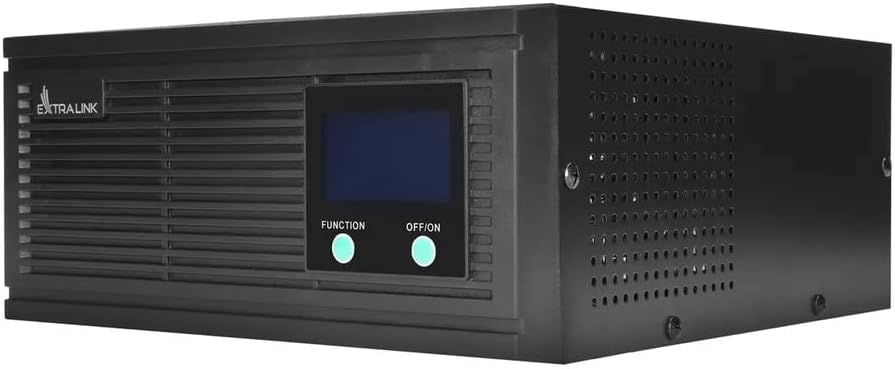
Image: Angled view of the EXTRALINK Piorun UPS Inverter, illustrating the battery and AC input/output connections.
6. Operating Instructions
Once properly set up, operating your UPS inverter is straightforward.
Powering On/Off
- To Power On: Press and hold the ON/OFF button for a few seconds until the LCD display illuminates and the unit beeps.
- To Power Off: Press and hold the ON/OFF button for a few seconds until the LCD display turns off and the unit beeps.
LCD Display
The LCD display provides critical operational status. Use the FUNCTION button to cycle through different display modes.
- Input Voltage: Shows the incoming AC voltage from the utility grid.
- Output Voltage: Displays the AC voltage supplied to your connected devices.
- Battery Voltage: Indicates the current voltage of the connected battery bank.
- Battery Charge Level: Shows the estimated remaining battery capacity.
- Load Level: Displays the percentage of the UPS's capacity currently being used by connected devices.
- Operating Mode: Indicates whether the unit is operating in AC mode (utility power) or DC/Battery mode (backup power).
UPS Mode Operation
The UPS automatically detects power outages and switches to battery power to provide uninterrupted power to your connected devices. When utility power is restored, the UPS will automatically switch back to AC power and begin recharging the battery.
- Automatic Transfer: The transfer time from AC to battery mode is designed to be fast enough to prevent most electronic devices from shutting down.
- Battery Charging: The integrated charger will automatically charge the connected 24 VDC battery when AC power is available.
Protection Features
The EXTRALINK Piorun UPS Inverter includes multiple protection mechanisms:
- Overload Protection: If the connected load exceeds the UPS's capacity, an alarm will sound, and the unit may shut down to prevent damage.
- Overvoltage/Undervoltage Protection: Protects connected devices from harmful voltage fluctuations.
- Short-Circuit Protection: Automatically shuts down the unit in case of a short circuit at the output.
- Battery Over-Discharge Protection: Prevents the battery from being discharged too deeply, which can shorten its lifespan.
7. Maintenance
Regular maintenance ensures the longevity and optimal performance of your UPS inverter.
- Cleaning: Keep the UPS unit clean and free from dust. Use a dry cloth to wipe the exterior. Do not use liquid cleaners or solvents. Ensure ventilation openings are not blocked.
- Battery Inspection: Periodically check battery terminals for corrosion and ensure connections are tight. If using lead-acid batteries, ensure they are properly maintained according to their manufacturer's guidelines.
- Environmental Conditions: Ensure the operating environment remains within the recommended temperature and humidity ranges. Extreme conditions can affect performance and lifespan.
- Battery Replacement: Batteries have a limited lifespan. If the battery backup time significantly decreases, consider replacing the battery bank. Consult a qualified technician for battery replacement.
8. Troubleshooting
This section addresses common issues you might encounter. For problems not listed here, contact customer support.
| Problem | Possible Cause | Solution |
|---|---|---|
| UPS does not turn on | No AC input power; Battery not connected or low; ON/OFF button not pressed long enough. | Check AC power cord connection and wall outlet; Ensure battery is connected with correct polarity and charged; Press and hold ON/OFF button for 3-5 seconds. |
| Short backup time | Battery capacity too small; Battery old or faulty; Overload. | Ensure battery capacity matches load requirements; Test or replace battery; Reduce connected load. |
| Continuous beeping | Overload; Low battery; Fault condition. | Reduce connected load; Allow battery to charge; Check LCD for error codes and refer to manual or support. |
| No output power | UPS in fault mode; Output circuit breaker tripped; Overload. | Check LCD for error messages; Reset output circuit breaker (if applicable); Reduce load and restart UPS. |
Note: If the problem persists after attempting these solutions, please contact EXTRALINK customer support.
9. Specifications
Technical specifications for the EXTRALINK Piorun 1500 VA/1200 W Pure Sine Wave UPS Inverter.
| Feature | Value |
|---|---|
| Brand | EXTRALINK |
| Model Name | Piorun 1500 VA/1200 W |
| Power (Watts) | 1200 Watts |
| UPS Power (Volt-Ampere) | 1500 VA |
| Input Voltage (DC) | 24 Volts (DC) |
| Output Voltage (AC) | 230 Volts (AC) |
| Output Waveform | Pure Sine Wave |
| Frequency | 50 Hz |
| Total Number of Outlets | 1 |
| Display Type | LCD |
| Color | Black |
| Recommended Use | Laptop |
| Power Source | Battery |
| Certifications | CE |
10. Warranty and Support
EXTRALINK stands behind the quality of its products.
- Warranty: This product comes with a 36-month warranty from the date of purchase. Please retain your proof of purchase for warranty claims. The warranty covers defects in materials and workmanship under normal use. It does not cover damage caused by misuse, accidents, unauthorized modifications, or improper installation.
- Customer Support: For technical assistance, troubleshooting, or warranty inquiries, please contact your retailer or visit the official EXTRALINK website for support contact information.