
ALONEFIRE SV84
ALONEFIRE SV84 365nm UV Flashlight Instruction Manual
Model: SV84 | Brand: ALONEFIRE
Product Overview
The ALONEFIRE SV84 is a powerful 365nm UV flashlight designed for a wide range of professional and personal uses. Featuring a 45W USB-C rechargeable design and a specialized black UV filter lens, it provides pure and powerful ultraviolet light for various detection and curing applications. Its robust aluminum alloy shell ensures durability and efficient heat dissipation.
What's Included
- 365nm High Power UV Flashlight
- 4 x Rechargeable Batteries
- USB Charging Cable
- UV Protective Glasses
Product Features
High-Quality 365nm UV LED
This UV light flashlight utilizes 4x4-core high-quality 365nm UV LEDs as its light source, delivering an impressive 45W power consumption and 8000mW luminous power. This makes it a professional-grade black light suitable for specialized applications.

Image: The ALONEFIRE SV84 UV flashlight, showing its sleek design, included USB-C charging cable, and UV protective glasses.
Black UV Filter Lens
Equipped with a hard toughened black filter optical lens, this Woods lamp effectively filters out ambient light from the environment. This process ensures that the emitted ultraviolet light is purer and more powerful, enhancing detection accuracy.

Image: A diagram illustrating the function of the black UV filter lens, which purifies the UV light by blocking unwanted ambient light.
Quality Aluminum Alloy Shell
The body case of the black light flashlight is constructed from high-quality aluminum alloy. This material significantly enhances its heat dissipation performance, which in turn extends the lifespan of the lamp beads and contributes to the overall reliability and durability of the blacklight.

Image: The ALONEFIRE SV84 UV flashlight in use, highlighting its ability to detect pet urine on a carpet, demonstrating its practical application.
USB-C Rechargeable
This UV light features a convenient USB-C charging port, allowing for easy and reversible plug insertion. A charging indicator keeps you informed of the power status, ensuring a safer charging process. Four high-capacity rechargeable batteries are included with the flashlight.
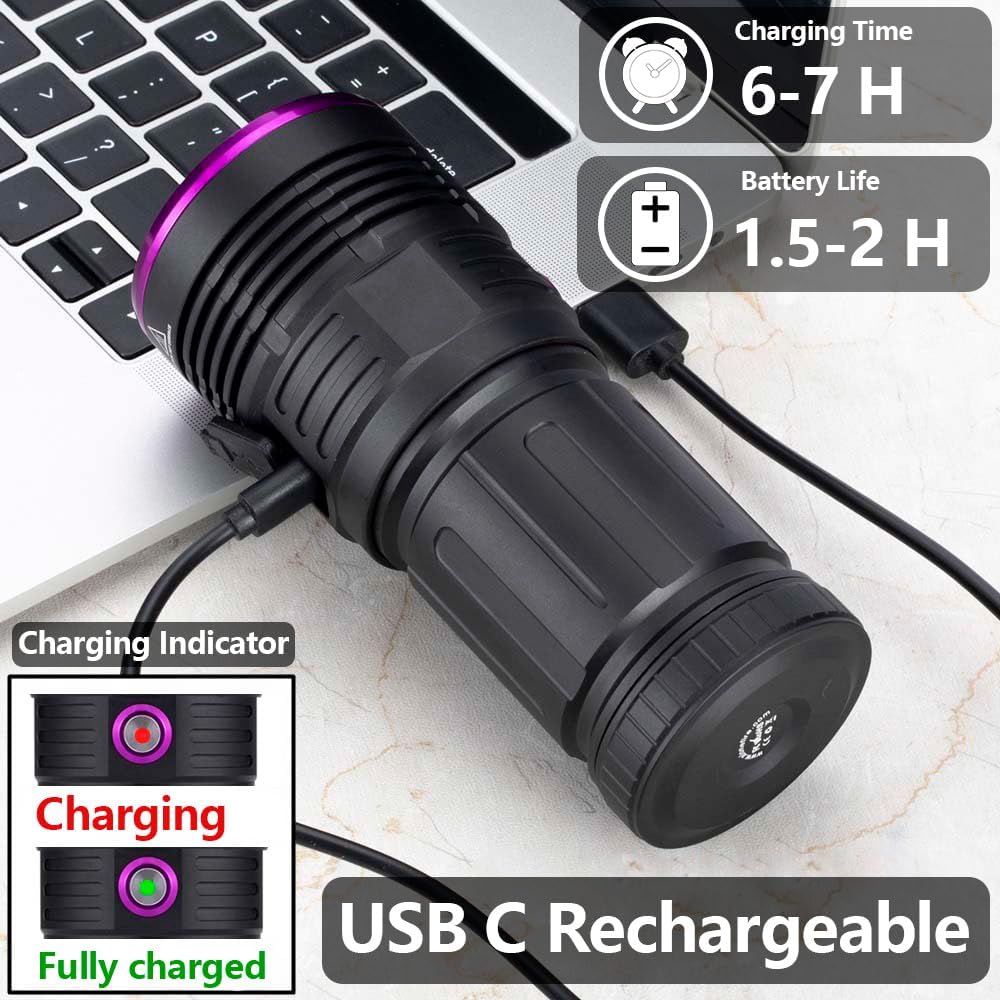
Image: The ALONEFIRE SV84 UV flashlight being charged via its USB-C port, with an indicator showing the charging status.
UV Protective Glasses Included
Given the powerful output of the 365nm UV flashlight, it is crucial to avoid shining it directly into your eyes. UV protective glasses are provided, featuring darker lenses and enhanced UV protection, and their use is highly recommended during operation.

Image: The ALONEFIRE SV84 UV flashlight, its USB-C charging cable, and the included UV protective glasses, emphasizing the complete package.
Wide Range of Uses
The blacklight flashlight is powerful and long-lasting, making it suitable for detecting fluorescent substances not visible to the naked eye. Applications include pet urine checking, cat ringworm detection, currency authentication, scorpion detection, mineral detection, and bed bug detection. It is also highly effective for curing resins and glues.
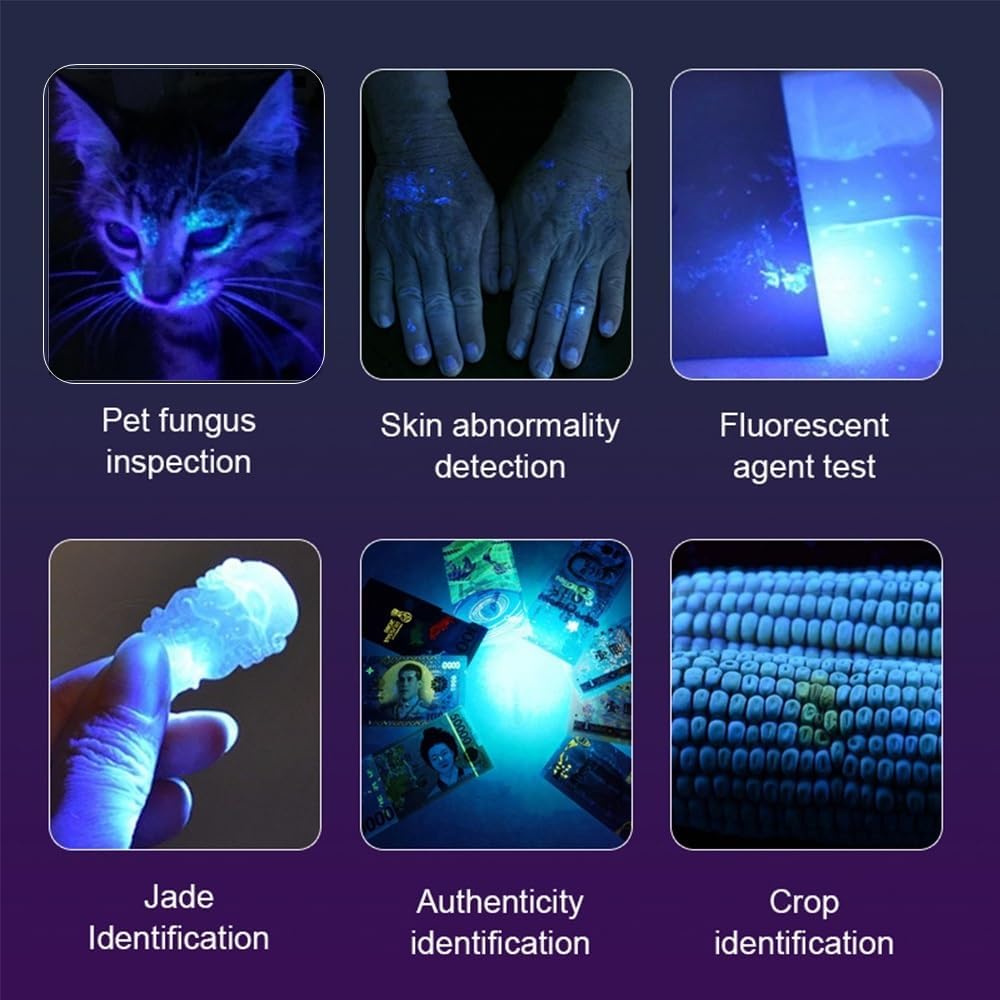
Image: Examples of the flashlight's diverse applications, including pet fungus inspection, skin abnormality detection, fluorescent agent testing, jade identification, currency authenticity verification, and crop identification.
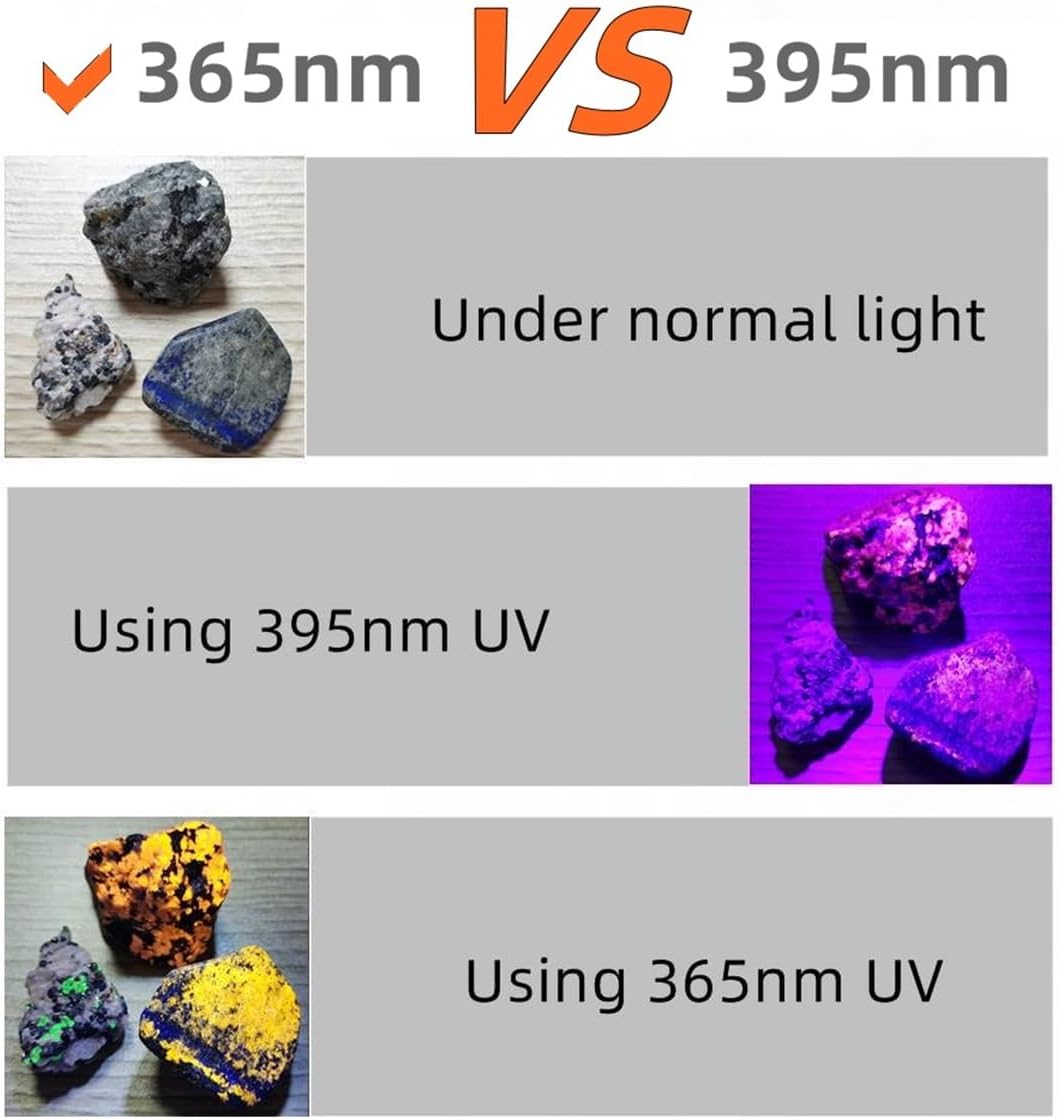
Image: A visual comparison demonstrating the superior performance of 365nm UV light over 395nm for mineral detection, showing clearer fluorescence.
Video: An official product video demonstrating the ALONEFIRE SV84 365nm UV Flashlight's features and various applications, including its charging interface, UV light output, and effectiveness in detecting fluorescent substances like automotive leaks, bathroom stains, minerals, and currency.
Setup Guide
- Unpack Components: Carefully remove the flashlight, batteries, USB charging cable, and UV protective glasses from the packaging.
- Insert Batteries: Unscrew the tail cap of the flashlight. Insert the four included rechargeable batteries according to the polarity indicators inside the battery compartment. Ensure they are correctly oriented.
- Initial Charge: Before first use, fully charge the batteries. Connect the USB-C charging cable to the flashlight's charging port (located under a protective cover near the head) and plug the other end into a compatible USB power source (e.g., wall adapter, computer USB port). The charging indicator light will show the charging status. Charging typically takes 6-7 hours for a full charge.
- Wear Protective Glasses: Always wear the provided UV protective glasses before operating the flashlight to protect your eyes from intense UV radiation.
Operating Instructions
- Power On/Off: Press the power button located on the side of the flashlight to turn it on. Press again to turn it off.
- Mode Selection: The flashlight typically operates in two modes: high power and low power. A single click from the OFF position activates high power. Another click while ON cycles to low power. A third click turns the flashlight OFF.
- Detection Use: For best results when detecting fluorescent substances (e.g., pet urine, scorpions, minerals), use the flashlight in a dimly lit or dark environment. The 365nm UV light will cause fluorescent materials to glow brightly.
- Curing Use: When curing resins or glues, ensure the area is well-ventilated. Position the flashlight to evenly illuminate the material to be cured. Curing times will vary depending on the material and its thickness.
- Battery Level Indicator: Observe the charging indicator light. It will typically show red when charging and green when fully charged.
Maintenance
- Cleaning: Wipe the flashlight body with a soft, dry cloth. For the lens, use a lens cleaning cloth and solution if necessary. Avoid abrasive materials that could scratch the lens or finish.
- Battery Care: To prolong battery life, avoid fully discharging the batteries frequently. Recharge them regularly. If storing the flashlight for an extended period, remove the batteries.
- Storage: Store the flashlight in a cool, dry place away from direct sunlight and extreme temperatures.
- Water Resistance: The flashlight is waterproof, but avoid prolonged submersion or exposure to high-pressure water jets. Ensure the USB-C port cover is securely closed when not charging.
Troubleshooting
| Problem | Possible Cause | Solution |
|---|---|---|
| Flashlight does not turn on. | Low or dead batteries; improperly inserted batteries; loose connections. | Charge batteries fully. Ensure batteries are inserted with correct polarity. Tighten tail cap and head. |
| UV light appears dim or weak. | Low battery charge; dirty lens; strong ambient light. | Recharge batteries. Clean the lens. Use in a darker environment. |
| Flashlight gets warm during use. | Normal operation for high-power UV light; extended use. | This is normal. The aluminum alloy body is designed for heat dissipation. If it becomes excessively hot, turn off and allow to cool. |
| Charging indicator not working. | Cable not properly connected; faulty cable/charger; fully charged. | Ensure USB-C cable is fully inserted. Try a different USB power source or cable. If batteries are full, indicator may not light up. |
Specifications
| Feature | Detail |
|---|---|
| Brand | ALONEFIRE |
| Model Number | SV84 |
| Light Source Type | 365nm UV |
| Light Source Wattage | 45 Watts |
| Luminous Power | 8000mW (estimated from description) |
| Material | Anodized Aluminum |
| Power Source | Battery Powered |
| Battery Type | Lithium Ion (4 PCS included) |
| Charging Interface | USB-C |
| Charging Time | 6-7 Hours (approx.) |
| Battery Life / Runtime | 1.5-2 Hours (approx.) / 2 hours |
| Water Resistance Level | Waterproof |
| Item Weight | 1.52 pounds (0.69 Kilograms) |
| Special Features | High Power, Non Slip Grip, Rechargeable |
Warranty and Support
The ALONEFIRE SV84 UV Flashlight comes with a Limited Warranty. For specific warranty terms and conditions, please refer to the documentation included with your purchase or contact ALONEFIRE customer support.
For technical assistance, troubleshooting, or any product-related inquiries, please visit the official ALONEFIRE store or contact their customer service department. Contact information can typically be found on the product packaging or the brand's official website.
You can also visit the ALONEFIRE Store on Amazon for more information and support resources.
Related documentsSV84


Ask a question about this manual
Ask about setup, troubleshooting, compatibility, parts, safety, or missing instructions. Manuals+ will review the question and use this page’s manual context to help answer it.