
1. Introduction
The Shutao STC-3028 is a microcomputer intelligent digital display thermostat designed for precise control of both temperature and humidity. This unit features a dual digital display, allowing simultaneous monitoring of measured temperature/humidity and set temperature/humidity values. It is capable of connecting to refrigeration/heating and humidifier/dehumidifier equipment, making it suitable for various applications such as incubators, seafood machines, and cooling water systems. The controller supports temperature and humidity calibration and comes with an integrated sensor for convenient use.
Key features include:
- Dual display for measured and set temperature/humidity.
- Independent control for heating/cooling and humidifying/dehumidifying functions.
- Integrated sensor for accurate readings.
- Supports temperature and humidity calibration.
- Clear digital display for easy readability.
2. Setup and Wiring
Proper wiring is essential for the safe and correct operation of the STC-3028 controller. Refer to the wiring diagram below for connection details. This model operates on a 12V AC input.

Figure 2.1: Wiring Diagram for STC-3028 Controller. This diagram illustrates the connections for power supply, humidity sensor, and relay outputs for temperature and humidity control.

Figure 2.2: Detailed view of the wiring label on the STC-3028, showing pin assignments for power, sensor, and relay outputs.
Wiring Instructions:
- Power Supply (Pins 1 & 2): Connect your 12V AC power source to these terminals. Ensure correct polarity if applicable, though the diagram indicates AC. For DC 12V, typically pin 1 is positive and pin 2 is negative.
- Humidity Sensor (Pins 3, 4, 5): Connect the integrated humidity sensor to these pins. The sensor cable typically has a specific connector that matches the port.
- Temperature Control Output (Pins 6 & 7): These are the relay contacts for temperature control (10A/240VAC). Connect your heating or cooling device to these terminals.
- Humidity Control Output (Pins 8 & 9): These are the relay contacts for humidity control (10A/240VAC). Connect your humidifier or dehumidifier device to these terminals.
Important Notes:
- Strictly distinguish the interface of the relay, sensor, and power connections to prevent damage.
- Maintain a proper distance between the sensor down-lead and power wires to avoid interference.
- Ensure all connections are secure before applying power.
3. Operating Instructions
The STC-3028 controller allows you to set desired temperature and humidity ranges for automatic control.
Setting Startup Temperature/Humidity:
- Press the "Up" button (for temperature) or the "Up" button (for humidity) once to display the current startup temperature or humidity setting.
- Long press the respective "Up" button for approximately 3 seconds until the displayed value flashes.
- Use the "Up" and "Down" buttons to adjust the desired startup temperature or humidity.
- The setting will automatically save after a few seconds of inactivity.
Setting Stop Temperature/Humidity:
- Press the "Down" button (for temperature) or the "Down" button (for humidity) once to display the current stop temperature or humidity setting.
- Long press the respective "Down" button for approximately 3 seconds until the displayed value flashes.
- Use the "Up" and "Down" buttons to adjust the desired stop temperature or humidity.
- The setting will automatically save after a few seconds of inactivity.
Temperature and Humidity Calibration:
To calibrate the temperature or humidity readings:
- For temperature calibration: Press the "Up" (temperature) and "Down" (temperature) buttons simultaneously. Adjust the offset using the Up/Down buttons.
- For humidity calibration: Press the "Up" (humidity) and "Down" (humidity) buttons simultaneously. Adjust the offset using the Up/Down buttons.
It is recommended to use a professional and trusted external sensor for accurate calibration.
4. Maintenance
To ensure the longevity and accurate performance of your STC-3028 controller, follow these maintenance guidelines:
- Cleaning: Regularly wipe the display and casing with a soft, dry cloth. Avoid using abrasive cleaners or solvents.
- Sensor Care: Keep the integrated sensor clean and free from dust, debris, or moisture buildup, as this can affect reading accuracy. Do not immerse the sensor in liquids.
- Environmental Conditions: Operate the controller within its specified temperature and humidity ranges. Avoid exposing it to extreme conditions, direct sunlight, or corrosive environments.
- Connections: Periodically check all wiring connections to ensure they remain secure and free from corrosion.
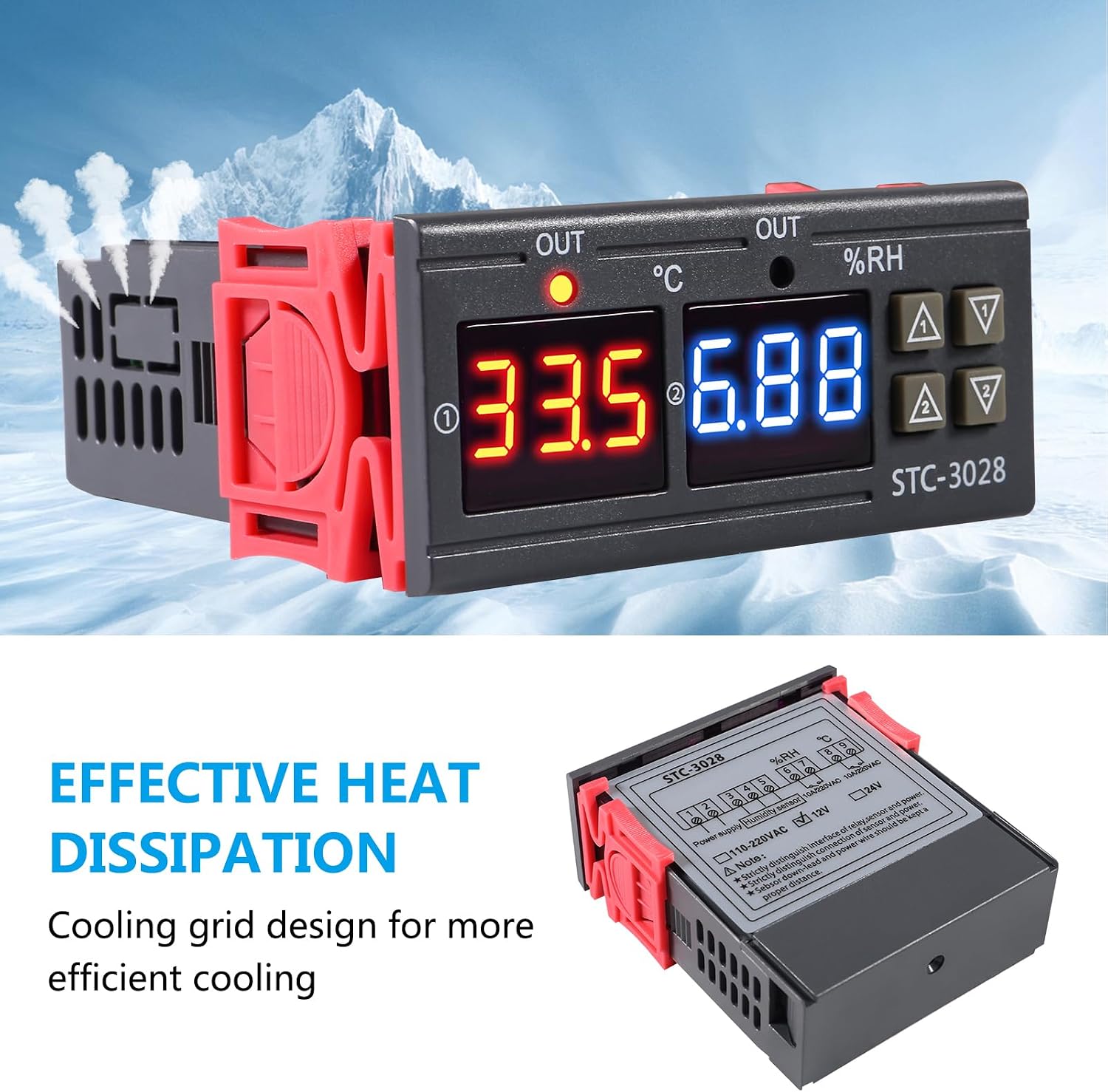
Figure 4.1: The STC-3028 controller features a cooling grid design for effective heat dissipation, contributing to its operational stability.
5. Troubleshooting
If you encounter issues with your STC-3028 controller, refer to the following common problems and solutions:
| Problem | Possible Cause | Solution |
|---|---|---|
| Display shows "LLL" or "HHH" | Sensor error, disconnected sensor, or reading outside range. | Check sensor connection. Ensure the sensor is within the operating temperature/humidity range. Replace sensor if faulty. |
| Relay fails to switch (stuck ON/OFF) | Faulty relay, incorrect wiring, or power overload. | Verify wiring connections. Ensure connected load does not exceed 10A/240VAC. If problem persists, the relay may be faulty and require replacement or professional repair. |
| Inaccurate temperature/humidity readings | Sensor dirty, sensor damaged, or calibration needed. | Clean the sensor. Perform calibration as described in Section 3. If readings remain inaccurate, the sensor may be damaged. |
| Controller does not power on | No power supply, incorrect voltage, or faulty unit. | Check power connections and ensure 12V AC is supplied. Verify power source is functional. |
6. Specifications
Detailed technical specifications for the Shutao STC-3028 12V Temperature and Humidity Controller:

Figure 6.1: Dimensions of the STC-3028 controller, showing approximate measurements in millimeters and inches.
- Model: STC-3028
- Input Voltage: 12V AC
- Measuring Temperature Range: -50°C to +110°C
- Measuring Humidity Range: 00%RH to +100%RH
- Temperature Accuracy: ±1°C
- Humidity Accuracy: ±0.1%RH
- Relay Output Contact Capacity: 10A/240VAC (for both temperature and humidity control)
- Display Type: Digital
- Material: Plastic
- Item Weight: Approximately 0.48 ounces (0.03 lbs)
- Approximate Dimensions (L x W x H): 85mm (3.34in) x 75mm (2.95in) x 27mm (1.06in)
- Item Model Number: 13442ST-1
- UPC: 687117717115
7. Warranty and Support
Information regarding product warranty and customer support is not provided within this manual. Please refer to the product packaging, purchase documentation, or contact the retailer or manufacturer directly for details on warranty coverage and technical assistance.