
Fafrees F20 MAX
Fafrees F20 MAX Electric Folding Fat-Tire Bicycle
Instruction Manual
1. Introduction
Welcome to the Fafrees F20 MAX Electric Folding Fat-Tire Bicycle instruction manual. This guide provides essential information for the safe assembly, operation, maintenance, and troubleshooting of your new e-bike. Please read this manual thoroughly before your first ride to ensure optimal performance and safety.
The Fafrees F20 MAX is designed for versatile riding, featuring a powerful brushless motor, a high-capacity 48V 22.5Ah Samsung battery, and fat tires for various terrains. Its foldable design offers convenient storage and transport.

Figure 1: Fafrees F20 MAX Electric Folding Fat-Tire Bicycle.
2. Safety Information
Your safety is paramount. Always adhere to local traffic laws and regulations. Wearing a helmet is strongly recommended. Perform a pre-ride check before each use.
- Always wear a certified helmet.
- Ensure brakes are functioning correctly before each ride.
- Check tire pressure regularly.
- Be aware of your surroundings and ride defensively.
- Do not ride under the influence of alcohol or drugs.
- Avoid riding in extreme weather conditions.
Battery Safety
The F20 MAX is equipped with a powerful Samsung battery. Proper handling and charging are crucial for longevity and safety.
- Only use the original charger provided with the e-bike.
- Do not expose the battery to extreme temperatures or direct sunlight.
- Do not disassemble, puncture, or damage the battery.
- Charge the battery in a well-ventilated area, away from flammable materials.
- Unplug the charger once the battery is fully charged.

Figure 2: High-capacity 48V 22.5Ah Samsung battery with safety features.
3. Assembly and Setup
Your Fafrees F20 MAX comes partially assembled. Follow these steps to complete the setup. A detailed video guide is also available below.
Assembly Steps:
- Unboxing and Parts Check: Carefully open the packaging and remove all components. Verify that all parts listed in the packing list are present and undamaged.
- Handlebar Installation: Insert the handlebar stem into the fork tube and secure it using the quick-release lever and bolts. Ensure it is aligned and tightened properly for safe steering.
- Saddle Installation: Insert the seat post with the saddle into the frame's seat tube. Adjust the height to your comfort and secure it with the quick-release clamp. Ensure the minimum insertion mark is not visible.
- Pedal Installation: Identify the left (L) and right (R) pedals. The left pedal screws counter-clockwise, and the right pedal screws clockwise. Tighten them securely with a wrench.
- Headlight Adjustment: Position the headlight for optimal visibility and secure it with the provided tools.
- Front Shelf Installation: Attach the front shelf to the designated mounting points on the frame using the provided screws and tools.
- Rear Seat Footrest Installation: Install the rear footrests on the rear axle or frame, ensuring they are securely fastened for passenger safety (if applicable).
- Display Adjustment: Adjust the angle of the LCD display on the handlebar for clear visibility while riding.
- Bell Adjustment: Position the bell on the handlebar within easy reach and secure it.
- Power-On Test: Insert the key into the battery lock and turn it to the 'ON' position. Press the power button on the display to turn on the e-bike. Verify that the display illuminates and shows battery level and speed. Test the lights, bell, and motor functions (push mode and pure electric mode).
Official Assembly Video Guide:
Video 1: Step-by-step installation guide for the Fafrees F20 MAX E-Bike.
4. Operating Instructions
Familiarize yourself with the controls and riding modes of your Fafrees F20 MAX for a smooth and enjoyable experience.
- Power On/Off: Turn the key to the 'ON' position on the battery, then press and hold the power button on the LCD display to turn the system on or off.
- LCD Display: The display shows speed, battery level, PAS (Pedal Assist System) level, and trip distance. Use the '+' and '-' buttons to adjust the PAS level (0-3).
- Riding Modes:
- Human Mode: Ride like a traditional bicycle without electric assistance.
- Assisted Mode (PAS): The motor provides assistance as you pedal. Adjust the level of assistance using the '+' and '-' buttons on the display.
- Pure Power Mode: Use the throttle to engage the motor without pedaling. This mode provides full electric power.
- Gear Shifting: Use the 7-speed Shimano gear shifter to select appropriate gears for different terrains and speeds.
- Braking: The e-bike is equipped with mechanical disc brakes. Apply both front and rear brakes smoothly and simultaneously for effective stopping.
- Walk Assist Mode: Long press the '-' button on the display to activate the 6km/h walk assist mode, useful when pushing the bike uphill or through crowded areas.
- Cruise Control: The e-bike features a cruise control function for consistent speed on flat terrain.

Figure 3: Illustration of the three riding modes: Manpower, Electric, and PAS.
5. Maintenance
Regular maintenance ensures the longevity and safe operation of your Fafrees F20 MAX E-Bike.
- Cleaning: Clean the bike regularly with a damp cloth. Avoid high-pressure washing directly on electrical components.
- Battery Care: Store the battery in a cool, dry place. If storing for extended periods, charge it to 50-70% every 2-3 months.
- Tires: Check tire pressure before each ride. The recommended pressure for 20*4.0 inch fat tires is typically between 5-30 PSI, depending on terrain and rider weight.
- Brakes: Inspect brake pads for wear and ensure brake levers are responsive. Adjust or replace as needed.
- Chain: Keep the chain clean and lubricated to prevent rust and ensure smooth gear changes.
- Fasteners: Periodically check all bolts, nuts, and quick releases to ensure they are securely tightened.
6. Troubleshooting
This section addresses common issues you might encounter with your Fafrees F20 MAX E-Bike.
- E-Bike Not Powering On:
- Ensure the battery key is turned to the 'ON' position.
- Check if the battery is properly seated and charged.
- Inspect all electrical connections for looseness or damage.
- Motor Not Assisting:
- Verify that the PAS level on the display is set above '0'.
- Check if the brake levers are fully released, as some systems cut motor power when brakes are applied.
- Ensure the battery has sufficient charge.
- Brakes Squealing or Ineffective:
- Clean brake rotors and pads.
- Check for worn brake pads and replace if necessary.
- Ensure brake cables are properly tensioned.
- Unusual Noises:
- Inspect the chain for dryness or debris; lubricate if needed.
- Check for loose components or spokes.
For persistent issues or complex repairs, it is recommended to contact Fafrees customer support or a certified e-bike technician. Provide a detailed description of the problem, along with any relevant photos or videos, will help expedite the support process.
7. Specifications
| Feature | Detail |
|---|---|
| Brand | Fafrees |
| Model | F20 MAX |
| Battery | 48V 22.5Ah / 1080Wh Samsung Battery |
| Charging Time | 11-13 hours |
| Motor Location | Rear Drive |
| Max Torque | 54 N.m |
| Display Type | LCD Display |
| PAS Levels | 0-3 |
| Gears | 7-Speed |
| Brake Type | Mechanical Disc Brakes |
| Tire Size | 20*4.0 inches |
| Unfolded Size | 171*62*125 CM |
| Folded Size | 95*50*75 CM |
| Net Weight | 31 KG |
| Load Capacity | 150 KG |
| Frame Material | Aluminum Alloy |
| Max Range (Assisted) | 140-160 KM |
| Max Range (Pure Power) | 100-120 KM |
| Max Climbability | 25° |
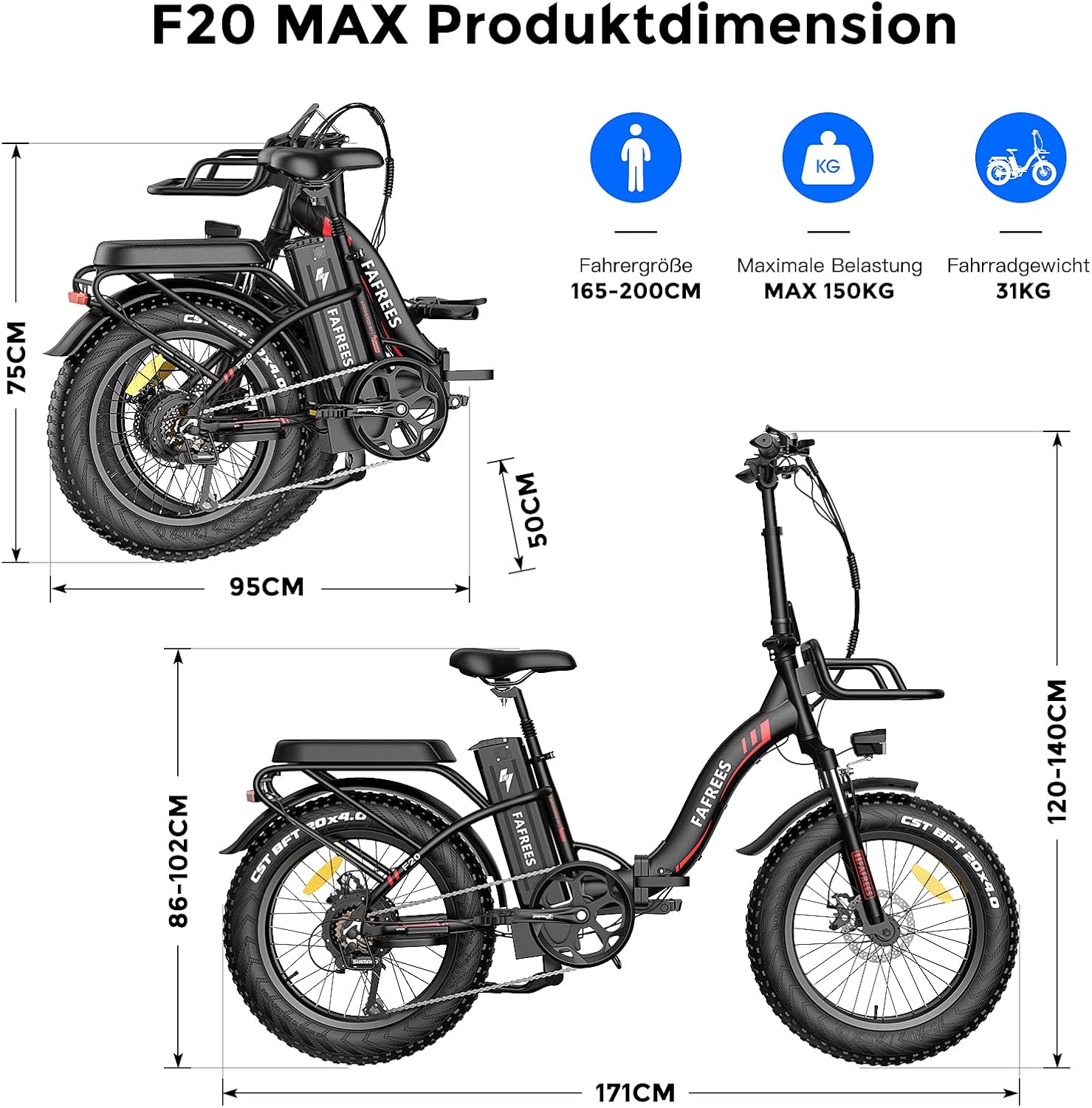
Figure 4: Detailed dimensions of the Fafrees F20 MAX in both unfolded and folded states.
8. Warranty and Support
Fafrees provides a warranty for its products. Please refer to the warranty card included with your purchase for specific terms and conditions. For any technical issues, questions, or support needs, please contact Fafrees customer service.
When contacting support, please have your product model (F20 MAX) and purchase details readily available. Providing a clear description of the issue, along with any relevant photos or videos, will help expedite the support process.
You can find more information and contact details on the official Fafrees website or through your point of purchase.
Ask a question about this manual
Ask about setup, troubleshooting, compatibility, parts, safety, or missing instructions. Manuals+ will review the question and use this page’s manual context to help answer it.