
THOMSON THVC234W
THOMSON Robot Tech Connect User Manual
Model: THVC234W
1. Introduction
Welcome to the user manual for your new THOMSON Robot Tech Connect robotic vacuum cleaner. This manual provides essential information for the safe and efficient operation, maintenance, and troubleshooting of your device. Please read this manual thoroughly before using the product and retain it for future reference.
2. Safety Instructions
To reduce the risk of injury or damage, always observe basic safety precautions when using your robotic vacuum cleaner.
- Read all instructions before use.
- Do not operate the robot in wet environments or on wet surfaces.
- Keep hair, loose clothing, fingers, and all parts of the body away from openings and moving parts.
- Do not pick up anything that is burning or smoking, such as cigarettes, matches, or hot ashes.
- Do not use without dust bin and/or filters in place.
- Ensure the charging base is placed against a wall on a level surface.
- Unplug the robot from the charging base before cleaning or performing maintenance.
- This appliance is not intended for use by persons (including children) with reduced physical, sensory or mental capabilities, or lack of experience and knowledge, unless they have been given supervision or instruction concerning use of the appliance by a person responsible for their safety.
3. Product Overview
The THOMSON Robot Tech Connect is an autonomous robotic vacuum cleaner designed to efficiently clean various floor surfaces. It features anti-fall sensors for safe operation.
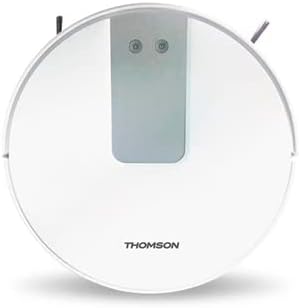
Figure 3.1: THOMSON Robot Tech Connect - Top View. This image displays the circular, white robotic vacuum cleaner from above, highlighting its sleek design and the central control interface.
Package Contents:
- THOMSON Robot Tech Connect Robotic Vacuum Cleaner
- Charging Base
- Power Adapter
- Side Brushes (2 pairs)
- HEPA Filter (pre-installed)
- Cleaning Tool
- User Manual
4. Setup
4.1 Charging Base Placement
Place the charging base against a wall in an open, uncluttered area. Ensure there is at least 0.5 meters (1.6 feet) of clear space on either side of the base and 1.5 meters (4.9 feet) in front of it. Plug the power adapter into the charging base and then into a wall outlet.
4.2 Initial Charging
Before first use, fully charge the robot. Place the robot onto the charging base, ensuring the charging contacts align. The indicator light on the robot will show charging status. A full charge typically takes 4-5 hours.
4.3 Installing Side Brushes
Turn the robot over. Align the side brushes with the square posts on the bottom of the robot and press down until they click into place. Ensure the 'L' and 'R' markings on the brushes match the corresponding markings on the robot.
5. Operating Instructions
5.1 Powering On/Off
To power on, press and hold the power button on the robot for 3 seconds until the indicator light illuminates. To power off, press and hold the power button again for 3 seconds.
5.2 Cleaning Modes
The robot offers several cleaning modes:
- Auto Clean: The robot automatically navigates and cleans the entire floor area. Press the power button once to start Auto Clean.
- Spot Clean: For concentrated cleaning of a small area. Place the robot in the center of the desired area and press the spot clean button (if available, or refer to app instructions).
- Edge Clean: The robot cleans along walls and furniture edges. Activate via the mobile application.
5.3 Using the Mobile Application
The THOMSON Robot Tech Connect can be controlled via a smartphone application. Download the "THOMSON Connect" app from your device's app store. Follow the in-app instructions to connect your robot to your Wi-Fi network. The app allows for remote control, scheduling, mode selection, and monitoring of cleaning status.
6. Maintenance
Regular maintenance ensures optimal performance and extends the lifespan of your robotic vacuum cleaner.
6.1 Emptying the Dust Bin
Press the dust bin release button, remove the dust bin, and empty its contents into a trash can. It is recommended to empty the dust bin after each use.
6.2 Cleaning Filters
Remove the filter from the dust bin. Tap the filter gently to remove dust. Do not wash the HEPA filter with water. Replace the filter every 3-6 months depending on usage.
6.3 Cleaning Side Brushes
Regularly check side brushes for tangled hair or debris. Pull them off their posts and use the cleaning tool or scissors to remove any obstructions. Reinstall them securely.
6.4 Cleaning Sensors and Charging Contacts
Wipe the anti-fall sensors (located on the bottom of the robot) and the charging contacts (on the robot and charging base) with a clean, dry cloth. This prevents accumulation of dust that could affect performance.
7. Troubleshooting
If your robot encounters an issue, refer to the following table for common problems and solutions.
| Problem | Possible Cause | Solution |
|---|---|---|
| Robot does not turn on. | Low battery or not charged. | Place the robot on the charging base and ensure it is fully charged. |
| Robot does not charge. | Charging contacts are dirty or misaligned. | Clean the charging contacts on both the robot and the base with a dry cloth. Ensure proper alignment. |
| Robot gets stuck frequently. | Obstacles on the floor or tangled brushes. | Clear the area of loose cables, small objects. Clean side brushes and main brush. |
| Poor cleaning performance. | Full dust bin or dirty filters/brushes. | Empty the dust bin. Clean or replace filters. Clean side brushes and main brush. |
| Robot falls down stairs. | Anti-fall sensors are dirty. | Clean the anti-fall sensors on the bottom of the robot with a dry cloth. |
8. Specifications
| Feature | Detail |
|---|---|
| Model Number | THVC234W |
| Brand | THOMSON |
| Color | White |
| Item Weight | 5.2 kg |
| Voltage | 14.8 Volts AC |
| Battery Life | 135 Minutes |
| Battery Cell Composition | Lithium-ion |
| Special Features | Anti-fall sensors |
| Controller Type | App Control |
| Filter Type | Cartridge |
| Surface Recommendation | All surfaces |
9. Warranty and Support
THOMSON products are manufactured to the highest quality standards. For information regarding warranty coverage, please refer to the warranty card included with your product or visit the official THOMSON website.
For technical support, troubleshooting assistance, or spare parts, please contact THOMSON customer service. Contact details can typically be found on the product packaging or the official brand website.
Note: Specifications and design are subject to change without notice for product improvement.
Related documentsTHVC234W


Ask a question about this manual
Ask about setup, troubleshooting, compatibility, parts, safety, or missing instructions. Manuals+ will review the question and use this page’s manual context to help answer it.