
Introduction
This manual provides essential information for the safe and effective operation, maintenance, and troubleshooting of your Silvergear Luchtreiniger Pro air purifier. This device is designed to improve indoor air quality by filtering out allergens, fine dust, and other airborne particles, utilizing an H13 HEPA filter, ionizer, and UV-C lamp.

Silvergear Luchtreiniger Pro air purifier, shown with its H13 HEPA filter and a smartphone displaying the companion app interface.
Safety Instructions
Please read all safety instructions carefully before using the appliance. Failure to follow these instructions may result in electric shock, fire, or injury.
- Ensure the power supply voltage matches the rating label on the appliance.
- Do not operate the appliance with a damaged cord or plug.
- Keep the appliance away from water or other liquids. Do not immerse the unit.
- Do not block air inlets or outlets. Maintain adequate clearance around the unit.
- Unplug the appliance before cleaning, maintenance, or moving.
- Do not use the appliance in environments with flammable or explosive gases.
- This appliance is not intended for use by persons (including children) with reduced physical, sensory, or mental capabilities, or lack of experience and knowledge, unless they have been given supervision or instruction concerning use of the appliance by a person responsible for their safety.
- Children should be supervised to ensure that they do not play with the appliance.
What's in the Box
Upon unpacking, please verify that all components are present:
- 1x Silvergear Luchtreiniger Pro Unit
- 1x H13 HEPA Filter (pre-installed or separate)
- 1x User Manual

Contents of the Silvergear Luchtreiniger Pro package: air purifier unit, H13 HEPA filter, and user manual.
Setup Guide
1. Unpacking
Carefully remove the air purifier and all accessories from the packaging. Retain packaging for future storage or transport.
2. Filter Installation
The H13 HEPA filter may come pre-installed or require installation. If separate, remove the base cover of the air purifier, insert the filter, and secure the cover. Ensure the filter is correctly oriented.
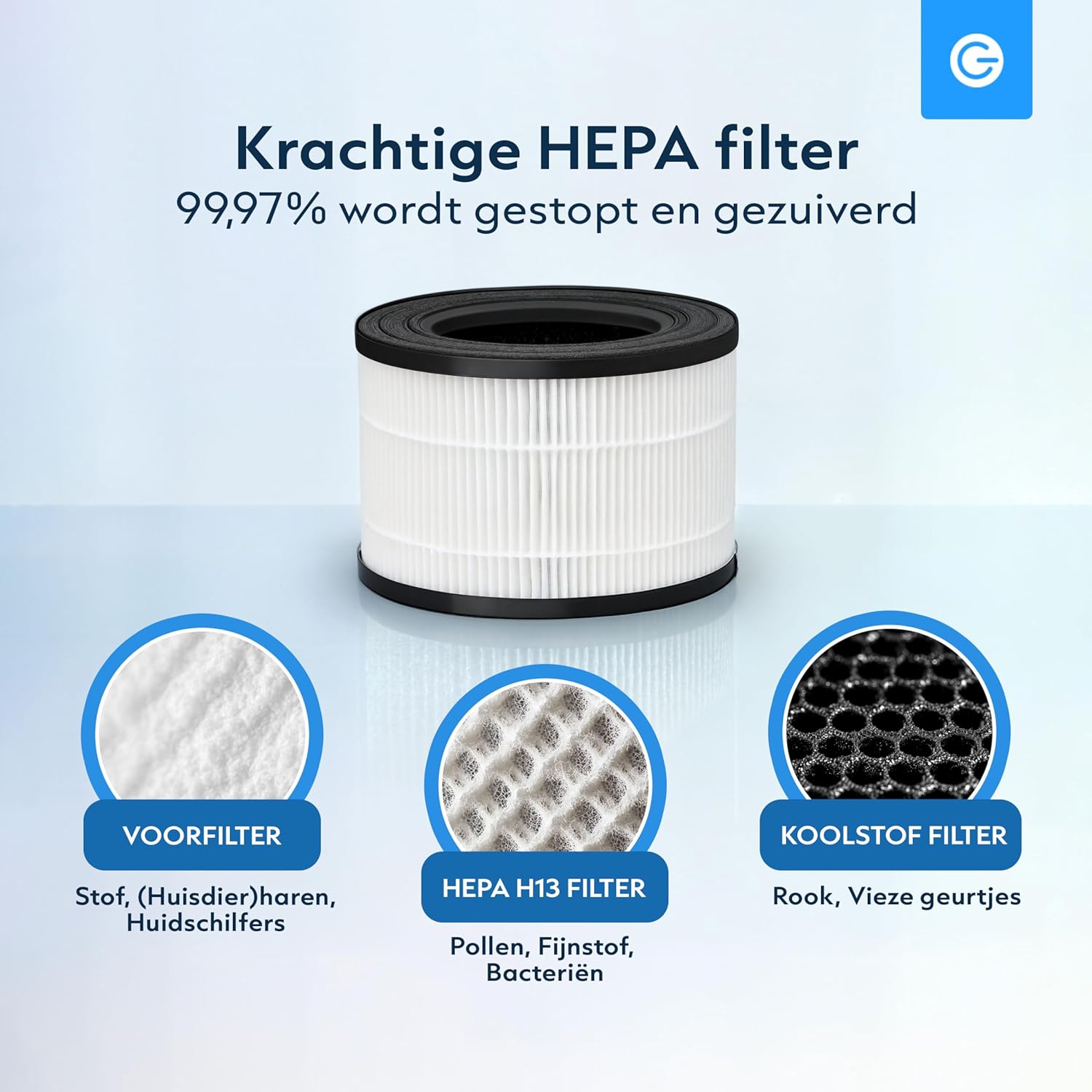
The multi-layer filter system includes a pre-filter for large particles, an H13 HEPA filter for fine particles, and an activated carbon filter for odors.
3. Power Connection
Place the air purifier on a flat, stable surface. Plug the power cord into a suitable electrical outlet.
4. App Connection (Optional)
For smart control features, download the Silvergear app from your smartphone's app store. Follow the in-app instructions to pair your device. This allows for remote control and real-time air quality monitoring.

The Silvergear app provides remote control and air quality insights.
Operating Your Air Purifier
Control Panel Overview
The control panel is located on the top of the unit. Refer to the diagram below for button functions.

Control panel functions: UV-C Mode, Filter Reset, Timer, Sleep Mode, Fan Speed, and Power On/Off.
Power On/Off
Press the Power button to turn the unit on or off.
Fan Speed Adjustment
Press the Speed button to cycle through 4 fan speeds (1, 2, 3, Auto). The Auto mode adjusts speed based on detected air quality.

The air purifier features 4 fan speeds, including an automatic mode.
Timer Function
Press the Timer button to set the operating time for 2, 4, or 8 hours. The unit will automatically shut off after the selected duration.
UV-C Mode
Press the UV button to activate or deactivate the UV-C disinfection lamp. The UV-C lamp helps eliminate bacteria and viruses.

The integrated UV-C lamp provides additional air disinfection.
Sleep Mode
Press the Sleep button to enter sleep mode. In this mode, the fan operates at its lowest speed, and indicator lights dim for quiet operation during rest periods.

Sleep mode ensures quiet operation and dimmed lights for an undisturbed environment.
Air Quality Indicator
The air purifier features an automatic sensor that indicates air quality through color changes:
- Blue: Very Good Air Quality
- Green: Good Air Quality
- Yellow: Moderate Air Quality
- Red: Poor Air Quality

The air quality sensor provides real-time feedback via color-coded lights.
App Control
Utilize the Silvergear app for full control over all functions, including power, fan speed, timer, UV-C mode, and to monitor air quality remotely.

The air purifier draws in dirty air from the bottom and releases clean, purified air from the top.
Maintenance
Filter Replacement
The H13 HEPA filter has a limited lifespan and needs regular replacement to maintain optimal performance. The filter replacement indicator light will illuminate when it's time to change the filter. After replacing the filter, press and hold the Filter Reset button for 3 seconds to reset the filter timer.
Replacement filters can be purchased from authorized Silvergear retailers.
Cleaning the Unit
Wipe the exterior of the air purifier with a soft, dry cloth. Do not use abrasive cleaners or solvents. Ensure the unit is unplugged before cleaning.
Troubleshooting
| Problem | Possible Cause | Solution |
|---|---|---|
| Unit does not turn on | No power supply Power cord not properly connected | Check power outlet Ensure power cord is securely plugged in |
| Weak airflow | Filter is dirty or clogged Air inlets/outlets blocked | Replace the filter Clear any obstructions |
| Unusual noise | Filter not installed correctly Foreign object inside unit | Reinstall filter properly Unplug and check for foreign objects (if safe to do so) |
| Air quality indicator always red/yellow | High pollution in environment Sensor dirty | Allow unit to run longer Clean the air quality sensor (refer to maintenance section) |
| App cannot connect to device | Wi-Fi issues Incorrect pairing process | Ensure stable 2.4GHz Wi-Fi connection Repeat app pairing steps carefully |
Product Specifications
| Feature | Detail |
|---|---|
| Model Number | 3445 |
| Dimensions (L x W x H) | 21 x 21 x 33 cm |
| Weight | 100 g |
| Filter Type | H13 HEPA Filter with Pre-filter and Activated Carbon |
| Additional Features | UV-C Lamp, Ionizer, Smart App Control, 4 Fan Speeds, Timer (2/4/8h), Sleep Mode, Air Quality Sensor |
| Color | White |
| Manufacturer | Karsten International |
Warranty and Customer Support
For warranty information, technical support, or service inquiries, please contact your retailer or the manufacturer directly. Keep your proof of purchase for warranty claims.
