
1. Introduction
The BITFUNX RetroScaler2x HDMI Adapter is designed to connect your classic N64, SNES, SFC, or NGC (GameCube) consoles to modern HD and 4K televisions. Many contemporary displays lack the older composite or S-video inputs that retro consoles utilize. This adapter converts the analog video signal from your console into a digital HDMI signal, allowing for a clearer and more compatible display on modern screens. It supports 1080P output and features plug-and-play functionality for ease of use.
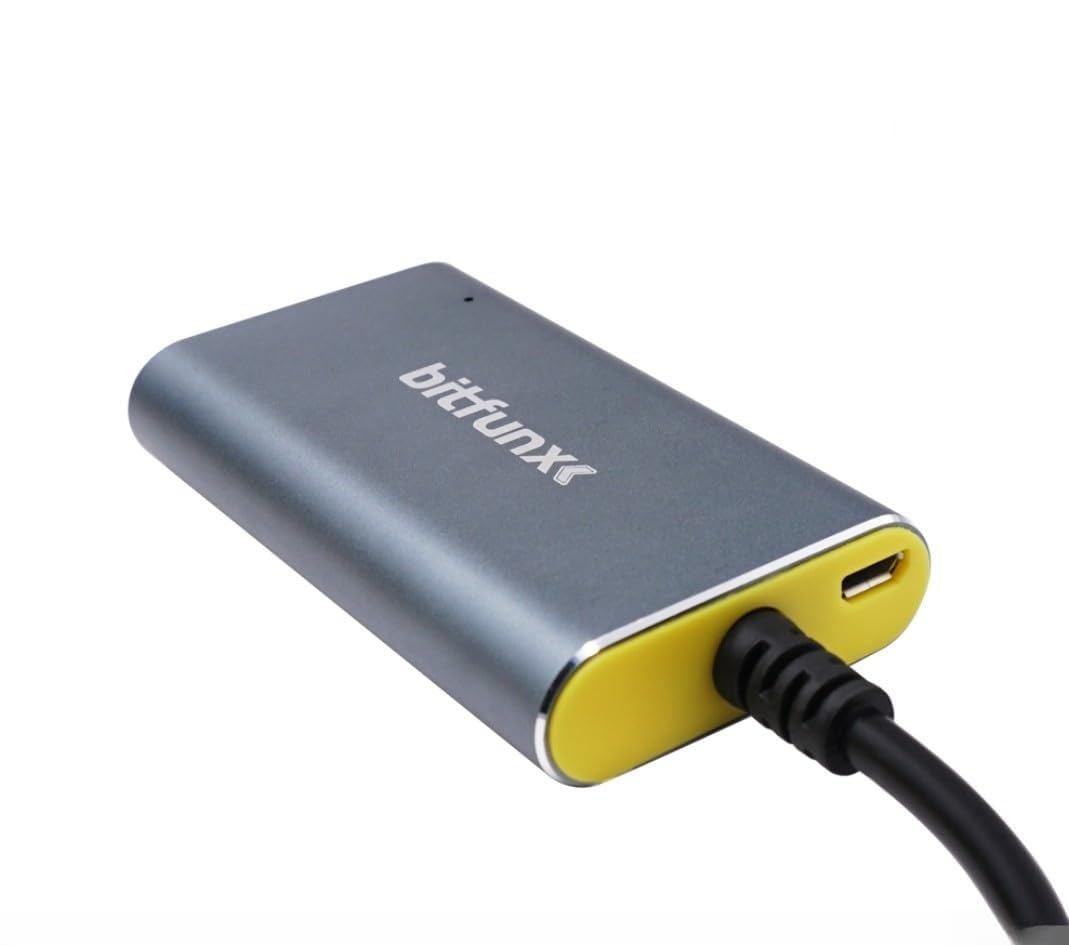
Figure 1: The BITFUNX RetroScaler2x HDMI Adapter. This image shows the compact design of the adapter, typically featuring input ports for retro consoles and an HDMI output port for modern televisions.
2. Setup Instructions
Follow these steps to connect your BITFUNX RetroScaler2x HDMI Adapter:
- Connect the Adapter to your Console: Plug the multi-out connector of the RetroScaler2x adapter into the corresponding video output port on your N64, SNES, SFC, or NGC console. Ensure a secure connection.
- Connect to your Television: Insert one end of an HDMI cable (not included) into the HDMI output port on the RetroScaler2x adapter. Connect the other end of the HDMI cable to an available HDMI input port on your television or monitor.
- Provide Power: Connect the supplied USB power cable to the micro USB port on the adapter. Plug the other end of the USB cable into a 5V USB power source (e.g., a USB port on your TV, a wall adapter, or a power bank). The adapter requires 5 Volts of input power.
- Power On and Select Input: Turn on your retro console and your television. Using your TV's remote control, select the HDMI input source that corresponds to the port where you connected the adapter.
- Adjust Aspect Ratio (if applicable): The adapter supports 16:9 and 4:3 aspect ratio switching. Locate the physical switch on the adapter and set it to your preferred aspect ratio.
- Select AV/S-Video Signal (if applicable): The adapter also supports switching between AV (composite) and S-video signals. Use the physical switch on the adapter to select the appropriate input signal type for your console and cable.
The adapter is designed for plug-and-play operation, meaning it should function immediately after proper connection and power supply.
3. Operating Instructions
The BITFUNX RetroScaler2x HDMI Adapter provides advanced signal processing for enhanced video quality.
3.1 LED Indicator Modes
The LED indicator on the adapter displays different colors to represent the active video mode:
- Green: S-video input, 2x line doubling enabled, and smoothing filter ON.
- Red: S-video input, 2x line doubling enabled, and smoothing filter OFF.
- Blue: Composite input, 2x line doubling enabled, and smoothing filter ON.
- Yellow: Composite input, 2x line doubling enabled, and smoothing filter OFF.
Use the physical switches on the adapter to toggle between S-video and Composite input, and to enable or disable smoothing and line doubling as desired.
3.2 Supported Video Modes
- Input Video Modes: Supports S-video and Composite signals with resolutions including 240p, 288p, 480i, 576i, 480p, and 576p.
- Output Video Mode: Pure digital HDMI video and audio output.
- Compatibility: Compatible with PAL60. Note that not all PAL consoles support S-video signals.
The adapter provides pixel-perfect processing without noticeable lag, delivering exceptional precision, colors, and resolution.
4. Maintenance
To ensure the longevity and optimal performance of your BITFUNX RetroScaler2x HDMI Adapter, please follow these maintenance guidelines:
- Cleaning: Use a soft, dry cloth to gently wipe the adapter. Do not use liquid cleaners, solvents, or abrasive materials, as these can damage the device.
- Storage: Store the adapter in a cool, dry place away from direct sunlight and extreme temperatures.
- Handling: Handle the adapter with care. Avoid dropping it or subjecting it to strong impacts. Do not pull on the cables forcefully.
- Ventilation: Ensure the adapter has adequate ventilation during operation. While it may warm up slightly, excessive heat can affect performance.
5. Troubleshooting
If you encounter issues with your BITFUNX RetroScaler2x HDMI Adapter, please refer to the following common problems and solutions:
- No Signal / Black Screen:
- Ensure all cables (console to adapter, HDMI, USB power) are securely connected.
- Verify that your television is set to the correct HDMI input source.
- Check if the adapter is receiving power (the LED indicator should be lit).
- Try a different HDMI cable or HDMI port on your TV.
- Some consoles may have a slight delay before displaying video; wait a few seconds after powering on.
- Poor Picture Quality / Fuzzy Image:
- Ensure the correct input signal (S-video or Composite) is selected via the switch on the adapter.
- Experiment with the smoothing filter (ON/OFF) using the adapter's switch to see which setting provides better results for your specific game or console.
- Verify that your console's video output settings are appropriate.
- Firmware Update: The adapter supports firmware upgrades via its micro USB port. If you experience persistent issues or sub-optimal performance, visit the official BITFUNX website to download the latest firmware and update tool. Updating the firmware can resolve many compatibility and performance issues.
- Incorrect Aspect Ratio:
- Use the 16:9/4:3 aspect ratio switch on the adapter to select your desired display format.
- Check your TV's aspect ratio settings, as some TVs may override or interfere with the adapter's setting.
- Device Feels Warm:
- It is normal for the adapter to generate some heat during operation. Ensure it is placed in a well-ventilated area and not covered.
6. Specifications
| Brand | BITFUNX |
| Model Number | RetroScaler2x |
| Compatible Devices | N64, SNES, SFC, NGC Consoles, Television |
| Specific Product Uses | Video Game Console |
| Connector Type | HDMI |
| Dimensions (L x W x H) | 28 x 110 x 63 mm |
| Item Weight | 110 Grams |
| Number of Ports | 1 (HDMI Output) |
| Input Voltage | 5 Volts |
7. Warranty Information
The BITFUNX RetroScaler2x HDMI Adapter comes with a Lifetime Warranty. This warranty covers defects in materials and workmanship under normal use. Please retain your proof of purchase for warranty claims. The warranty does not cover damage caused by misuse, accident, unauthorized modification, or improper installation.
8. Customer Support
For technical support, troubleshooting assistance, or any questions regarding your BITFUNX RetroScaler2x HDMI Adapter, please contact BITFUNX customer service. Refer to the product packaging or the official BITFUNX website for the most current contact information.


