
Introduction
This manual provides detailed instructions for the installation, operation, and maintenance of your Hikity H-C79DEA3396 1 Din Car Stereo. This unit features a retractable 7-inch touchscreen, wireless Apple CarPlay, wireless Android Auto, Bluetooth 5.1, FM radio, and support for a rearview camera. Please read this manual thoroughly before use to ensure proper functionality and safety.
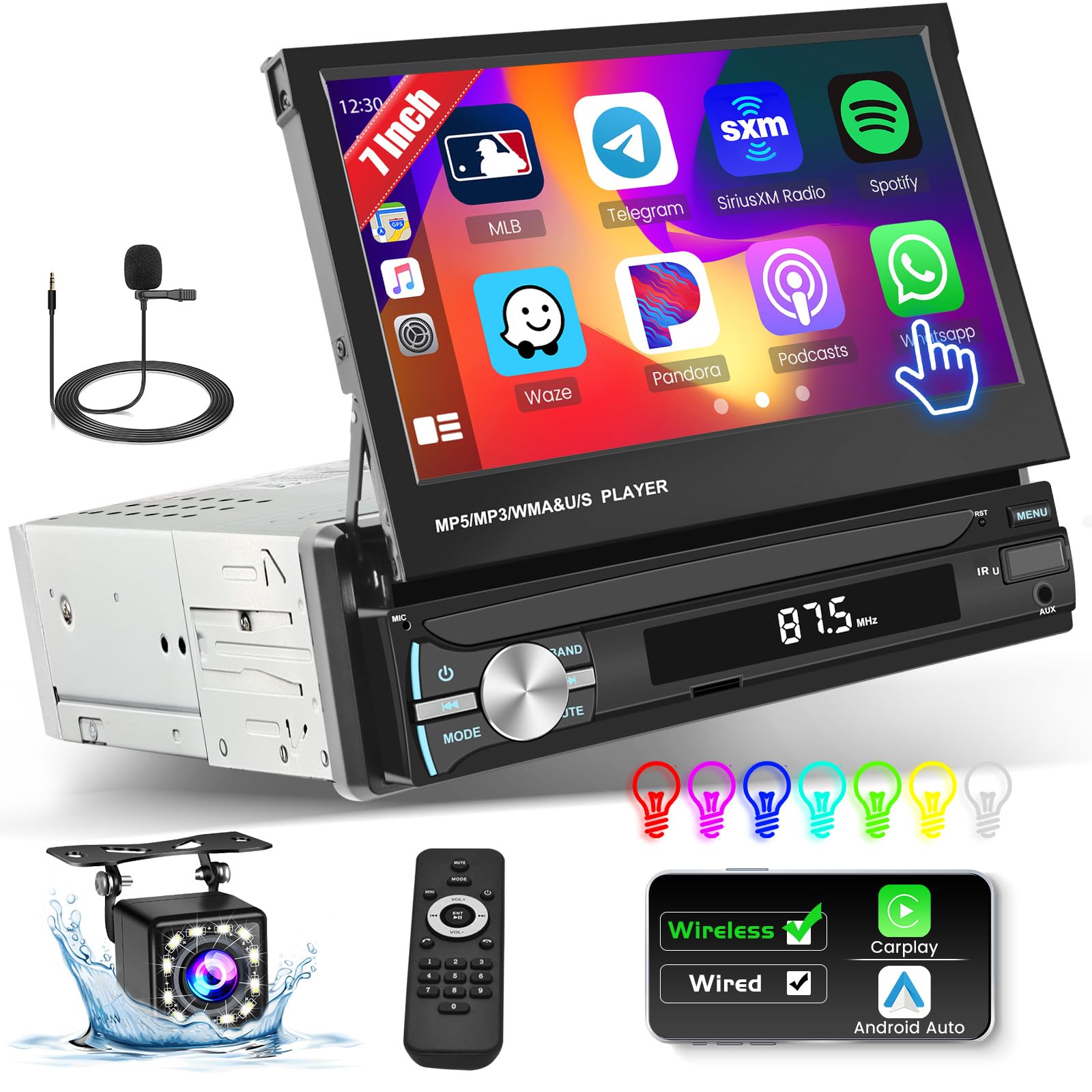
Image: Hikity H-C79DEA3396 1 Din Car Stereo with its 7-inch retractable touchscreen extended.
Package Contents
Please check the package contents upon unboxing:
- 1 x Hikity 1 Din Car Stereo (H-C79DEA3396)
- 1 x Power Cable
- 1 x Remote Control
- 1 x Horn Cable
- 1 x Accessories Set
- 1 x User Manual
- 1 x External Microphone
Setup and Installation
Proper installation is crucial for optimal performance. It is recommended to have this unit installed by a professional car audio technician.
Wiring Diagram
Refer to the following diagram for correct wiring connections. Ensure all connections are secure before powering on the unit.

Image: Detailed wiring diagram for the car stereo, including power, ground, speaker outputs, and camera input.
- Power Connection: Connect the red wire to the positive (+) terminal of your car battery and the black wire to the negative (-) terminal or a suitable ground point.
- Speaker Connections: Connect the speaker wires according to the diagram, ensuring correct polarity for each speaker.
- Rearview Camera (Optional): If installing a rearview camera (not included), connect its video output to the designated video input on the stereo and its power to the reverse light circuit.
- Antenna: Connect your car's FM/AM antenna to the radio antenna input.
- External Microphone: Plug the external microphone into the dedicated microphone input for improved call quality.
Screen Retraction
The 7-inch touchscreen is manually retractable. Gently pull or push the screen to extend or retract it. The screen supports a 95-degree flip angle for optimal viewing.

Image: Illustration of the manual screen retraction and adjustable viewing angle.
Operating Instructions
Power On/Off
Press the power button (usually marked with PWR or a power symbol) to turn the unit on or off. A short press may mute/unmute, while a long press typically powers the unit off.
Wireless Apple CarPlay / Android Auto
This unit supports wireless Apple CarPlay and Android Auto for seamless smartphone integration. No USB cable is required for the primary connection.
- Ensure Bluetooth is enabled on your smartphone.
- On the car stereo, navigate to the CarPlay or Android Auto interface.
- Search for the car stereo's Bluetooth name (e.g., "CAR BT") on your phone and pair.
- Confirm the pairing on both devices. Once connected, your phone's interface will appear on the stereo screen, allowing access to navigation, calls, messages, and music.

Image: The car stereo display showing both Apple CarPlay and Android Auto interfaces, demonstrating voice commands and connectivity options.
Mirror Link (Wired Connection)
The unit supports wired Mirror Link functionality for iOS and Android phones. This allows you to display your phone's screen on the car stereo. Note: This feature may not be compatible with all Samsung and Huawei phone models.
- Connect your smartphone to the stereo's USB port using an original USB cable.
- Follow the on-screen prompts on both your phone and the stereo to establish the connection.

Image: Visual guide for connecting iOS and Android devices via USB for Mirror Link functionality.
Bluetooth 5.1
The integrated Bluetooth 5.1 module enables hands-free calling, Bluetooth music streaming, and phonebook synchronization.
- Pairing: Go to the Bluetooth menu on the stereo, enable Bluetooth on your phone, and search for "CAR BT" to pair.
- Hands-Free Calls: Once paired, you can make and receive calls directly through the stereo.
- Music Streaming: Play audio from your phone wirelessly through the car's speakers.

Image: The car stereo display showing Bluetooth connection status and music playback, alongside the FM radio interface.
FM Radio Receiver
The stable FM radio allows you to listen to real-time traffic, news broadcasts, weather forecasts, and music. The unit supports 18 preset stations.
- Tuning: Use the touch controls or physical buttons to scan for stations or manually tune to a specific frequency.
- Preset Stations: Save your favorite stations to the preset memory for quick access.
Audio Playback (AUX/USB)
The unit supports multiple playback modes including AUX and USB.
- USB Input: Connect a USB drive to the front USB port to play audio files (MP3/WMA/WAV/APE/FLAC) or charge your phone.
- AUX Input: Connect external audio devices via the 3.5mm AUX input.

Image: Visual representation of EQ settings, steering wheel control buttons, remote control, and the USB charging/playback port.
Time Setting
To adjust the time displayed on the panel, press and hold the CLK key. Use the appropriate controls to set the correct time.
Steering Wheel Control (SWC)
The car stereo supports original car steering wheel control functions. After proper wiring and configuration, you can control the radio using your steering wheel buttons.
EQ Settings
Multiple EQ sound options are available to customize your audio experience. Access the EQ settings through the sound menu on the touchscreen.
Color Backlight Settings
The 7-inch HD flip-out touch screen radio features multi-color button backlighting. You can customize the backlight color through the display settings menu.
Maintenance
- Cleaning the Screen: Use a soft, lint-free cloth to clean the touchscreen. Do not use abrasive cleaners or solvents.
- General Cleaning: Keep the unit free from dust and debris. Use a soft, dry cloth for cleaning the main body.
- Retractable Screen Care: When not in use, retract the screen to protect it from dust and damage. Avoid forcing the screen during retraction or extension.
- Temperature: Operate the unit within the specified temperature range (-20℃ to 70℃) to prevent damage.
Troubleshooting
If you encounter issues with your car stereo, refer to the following common problems and solutions:
| Problem | Possible Cause | Solution |
|---|---|---|
| No power | Incorrect wiring; Blown fuse; Loose connection | Check power and ground connections; Inspect and replace fuse if necessary; Ensure all wires are securely connected. |
| No sound | Speaker wires disconnected; Volume too low; Mute function active; Incorrect audio source | Check speaker wiring; Increase volume; Deactivate mute; Select correct audio source (FM, AUX, USB, Bluetooth). |
| Bluetooth connection issues | Bluetooth not enabled; Device not discoverable; Interference | Ensure Bluetooth is on for both devices; Make sure the stereo is in pairing mode; Try re-pairing the devices; Move away from other wireless devices. |
| Screen remains dark when reversing (with camera) | Camera not connected; Reverse trigger wire not connected; Manual camera selection required | Verify camera and video input connections; Ensure the reverse trigger wire is correctly connected to the car's reverse light; Some units may require manual selection of the camera input. |
| Humming or static noise from speakers | Ground loop issue; Poor wiring; Electrical interference | Check ground connections for cleanliness and security; Ensure all wiring is properly insulated; Consider installing a ground loop isolator. |
| Screen not retracting/extending smoothly | Obstruction; Mechanical issue | Check for any physical obstructions; Do not force the screen; If the issue persists, contact support. |
Specifications
| Feature | Detail |
|---|---|
| Model Number | H-C79DEA3396 |
| Screen Size | 7 inches |
| Screen Resolution | 800*480 |
| System | F133 |
| Bluetooth Version | 5.1 |
| Radio Band | FM/AM (FM Frequency: 87.5-108 MHz) |
| Output Power | 60 Watts |
| Working Temperature | -20℃ to 70℃ |
| Audio Formats | MP3/WMA/WAV/APE/FLAC |
| Video Formats | RM/RMVB/AVI/MP4/MKV/3GP |
| Image Formats | JPEG/PNG/BMP/GIF/TIFF |
| Connectivity | Bluetooth, USB Type A, 3.5mm Jack |
| Control Type | Remote Control, Steering Wheel Control, Touch |
| Special Features | Android Auto, Apple CarPlay, FM Tuner, Touchscreen, Retractable Screen |
| Dimensions (D x W x H) | 18.1 x 18 x 58 cm (approximate, based on product description) |
| Weight | 1550 Grams |
Warranty Information
This Hikity car stereo comes with a 2-year warranty from the date of purchase. This warranty covers manufacturing defects and malfunctions under normal use. It does not cover damage caused by improper installation, misuse, accidents, or unauthorized modifications. Please retain your proof of purchase for warranty claims.
Customer Support
For further assistance, technical support, or warranty inquiries, please contact Hikity customer service through the retailer where you purchased the product or visit the official Hikity website for contact information.