
1. Introduction
This manual provides essential information for the safe and efficient operation of your Nespresso Vertuo Pop+ Deluxe Coffee and Espresso Maker. Please read all instructions carefully before first use and keep this manual for future reference.
The Nespresso Vertuo Pop+ Deluxe machine is designed to brew a variety of coffee and espresso sizes using Nespresso Vertuo capsules. Its compact design and one-touch operation make it convenient for daily use.
2. Safety Instructions
- Read all instructions before using the appliance.
- Do not immerse the appliance, power cord, or plug in water or other liquids.
- Keep the appliance out of reach of children.
- Unplug the machine from the outlet when not in use and before cleaning.
- Do not operate any appliance with a damaged cord or plug, or after the appliance malfunctions or has been damaged in any manner.
- Use only Nespresso Vertuo capsules with this machine.
- Do not open the brewing head during operation.
3. Package Contents
Verify that all components are present in the packaging:
- Nespresso Vertuo Pop+ Deluxe Coffee and Espresso Maker
- Removable Water Tank
- Drip Tray and Grid
- Used Capsule Container
- Complimentary Tasting Pack of Vertuo Coffees (assortment may vary)
- Instruction Manual

Image: The Nespresso Vertuo Pop+ Deluxe machine, removable water tank, drip tray, used capsule container, a variety pack of Nespresso Vertuo capsules, and the instruction manual.
4. Machine Overview
Familiarize yourself with the main components of your Vertuo Pop+ Deluxe machine:
- Brewing Head: Contains the capsule holder and brewing mechanism.
- One-Touch Button: Initiates the brewing process.
- Water Tank: Removable, 1.1 liter (37.2 fl oz) capacity, located on the side.
- Used Capsule Container: Automatically collects used capsules.
- Adjustable Drip Tray: Accommodates various cup sizes.

Image: Front view of the Nespresso Vertuo Pop+ Deluxe machine highlighting its large water tank, capability for 6 cup sizes, and one-touch operation.
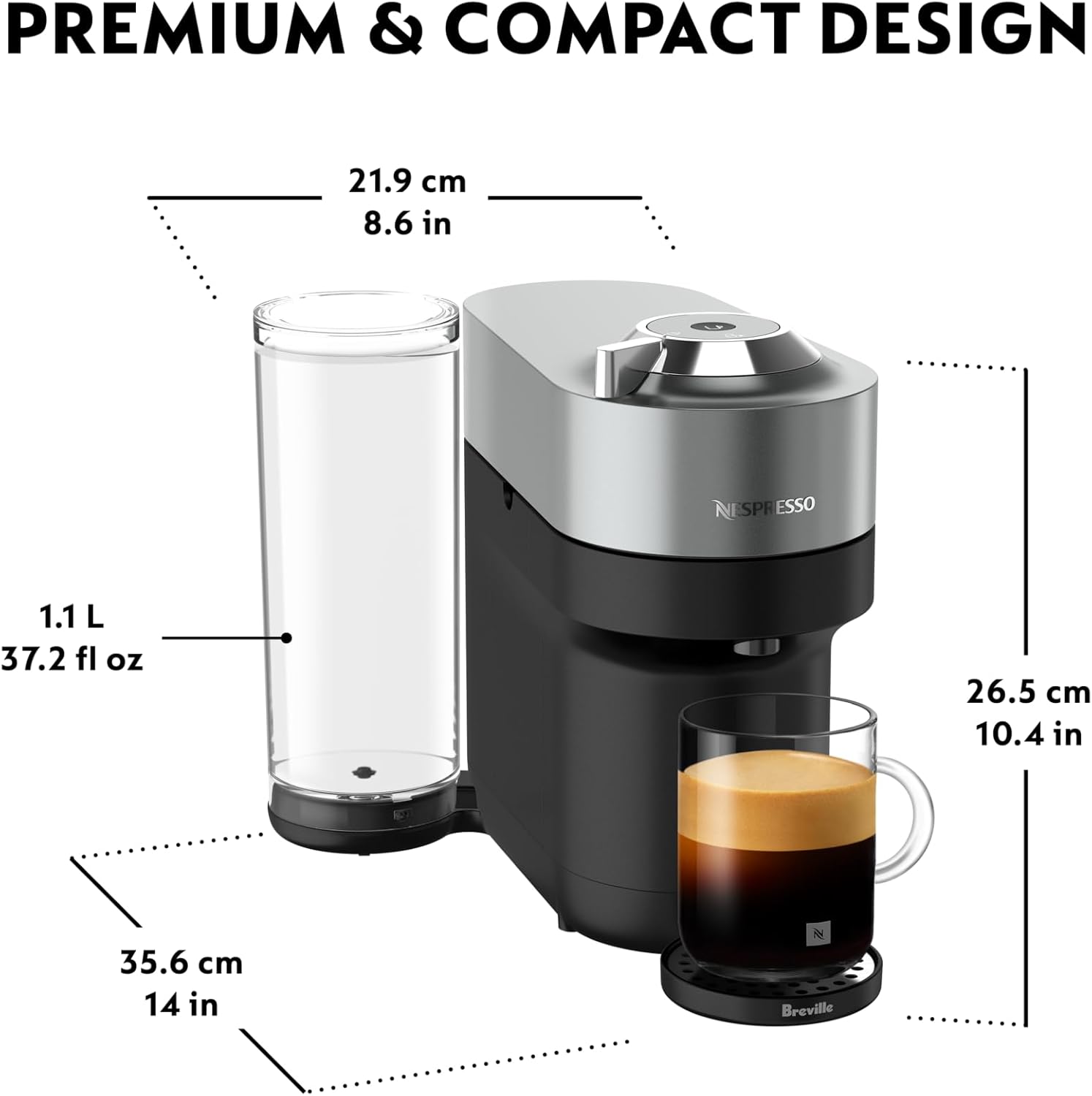
Image: Side view of the Nespresso Vertuo Pop+ Deluxe machine with dimensions: 14 inches (D), 8.6 inches (W), 10.4 inches (H), and a 1.1 liter (37.2 fl oz) water tank.
5. Setup
5.1 First Use and Rinsing
- Remove all packaging and protective films.
- Rinse the water tank, drip tray, and cup support with fresh drinking water.
- Fill the water tank with fresh drinking water and place it back on the machine.
- Place a container (at least 0.5 L) under the coffee outlet.
- Plug the machine into a grounded power outlet. The button will blink white.
- Press the button once. The machine will start rinsing, and water will flow from the coffee outlet. This process may take a few minutes.
- The button will stop blinking and glow steady white when rinsing is complete and the machine is ready.
5.2 Filling the Water Tank
- Remove the water tank from the machine.
- Fill it with fresh, cold drinking water up to the 'MAX' level indicator.
- Place the water tank back onto the machine securely.
5.3 Powering On
- Ensure the machine is plugged into a grounded power outlet.
- Press the button on top of the machine. It will blink white during heating (approximately 30 seconds) and then glow steady white when ready for use.
6. Operation
6.1 Inserting a Capsule
- Lift the lever to open the brewing head.
- Insert a Nespresso Vertuo capsule with the dome side down.
- Close the brewing head by pushing the lever down firmly until it clicks into place.
6.2 Brewing Coffee or Espresso
- Ensure the machine is powered on and the button is steady white.
- Place your desired cup under the coffee outlet.
- Press the button once. The machine will automatically recognize the capsule and brew the optimal coffee or espresso size.
- The button will blink during brewing and return to steady white when complete.

Image: Illustration of various coffee and espresso sizes brewed by the Nespresso Vertuo Pop+ Deluxe, including 12 oz, 8 oz, 5 oz coffees, and Double Espresso, Single Espresso.
6.3 Adjustable Drip Tray
The drip tray can be adjusted to two different heights or removed entirely to accommodate various cup and mug sizes, from small espresso cups to tall travel mugs.
7. Maintenance
7.1 Cleaning the Machine
- Daily Cleaning: Wipe the machine exterior with a damp cloth. Clean the drip tray and cup support with warm soapy water.
- Water Tank: Wash the water tank regularly with warm soapy water and rinse thoroughly.
- Brewing Head: Perform a rinsing cycle (without a capsule) periodically to clean the brewing unit.
7.2 Emptying the Used Capsule Container
- The machine automatically ejects used capsules into the container.
- Empty the container regularly, especially when the machine indicates it is full or before extended periods of non-use.
7.3 Descaling
Descaling is crucial for maintaining machine performance and coffee quality. The machine will indicate when descaling is needed (refer to the full Nespresso user manual for specific light indicators and descaling procedure). Use only Nespresso descaling kits.
7.4 Recycling Capsules
Nespresso capsules are fully recyclable. Participate in Nespresso's free recycling program to return your used aluminum capsules.

Image: A cross-section of a Nespresso capsule revealing freshly roasted ground coffee, emphasizing the hermetic seal.

Image: A person demonstrating the recycling process by placing used Nespresso capsules into a dedicated recycling bag.
8. Troubleshooting
| Problem | Possible Cause | Solution |
|---|---|---|
| No coffee flow | Water tank empty; machine not heated; brewing head not closed; descaling needed. | Fill water tank; wait for steady white light; close brewing head firmly; perform descaling. |
| Coffee is cold | Machine not preheated; cold cup. | Wait for machine to heat up; preheat cup with hot water. |
| Water leaking | Water tank not correctly positioned; brewing head not closed. | Ensure water tank is seated properly; close brewing head firmly. |
| Button blinking rapidly | Error or descaling required. | Refer to the full user manual for specific error codes or perform descaling. |
For more detailed troubleshooting, please consult the comprehensive user manual provided with your machine or visit the official Nespresso support website.
9. Specifications
| Feature | Detail |
|---|---|
| Brand | Nespresso |
| Model Name | Nespresso Vertuo POP+ Deluxe |
| Model Number | BNV125TTN1BUC1 |
| Color | Titan |
| Capacity | 1.1 liters (37.2 fl oz) |
| Product Dimensions (D x W x H) | 14" x 8.6" x 10.4" |
| Item Weight | 3.7 kg |
| Wattage | 1500 watts |
| Voltage | 120 volts AC |
| Operation Mode | Fully Automatic |
| Coffee Input Type | Nespresso Vertuo capsules |
| Special Feature | Removable Water Tank |
| Material | Aluminum |
| Exterior Finish | Metallic |
10. Warranty and Support
Your Nespresso Vertuo Pop+ Deluxe machine comes with a manufacturer's warranty. Please refer to the warranty card included in your package for specific terms and conditions, including coverage duration and claim procedures.
For technical assistance, troubleshooting, or to order Nespresso capsules and accessories, please visit the official Nespresso website or contact Nespresso Customer Service. Contact information can be found on the Nespresso website or in the full user manual.
Online Resources:
- Visit the Nespresso Store on Amazon for product information and accessories.
- Explore the Official Nespresso Website for support, capsule ordering, and recycling program details.