
GENMAX GM4600iAEDC
GENMAX GM4600iAEDC Dual Fuel Inverter Generator User Manual
Model: GM4600iAEDC | Brand: GENMAX
Your reliable power source for camping, outdoor activities, and home backup.
1. Introduction
The GENMAX GM4600iAEDC Dual Fuel Inverter Generator is designed to provide clean, reliable power for a variety of applications, from sensitive electronics to essential home appliances. Its compact and quiet design makes it ideal for both recreational and emergency use.
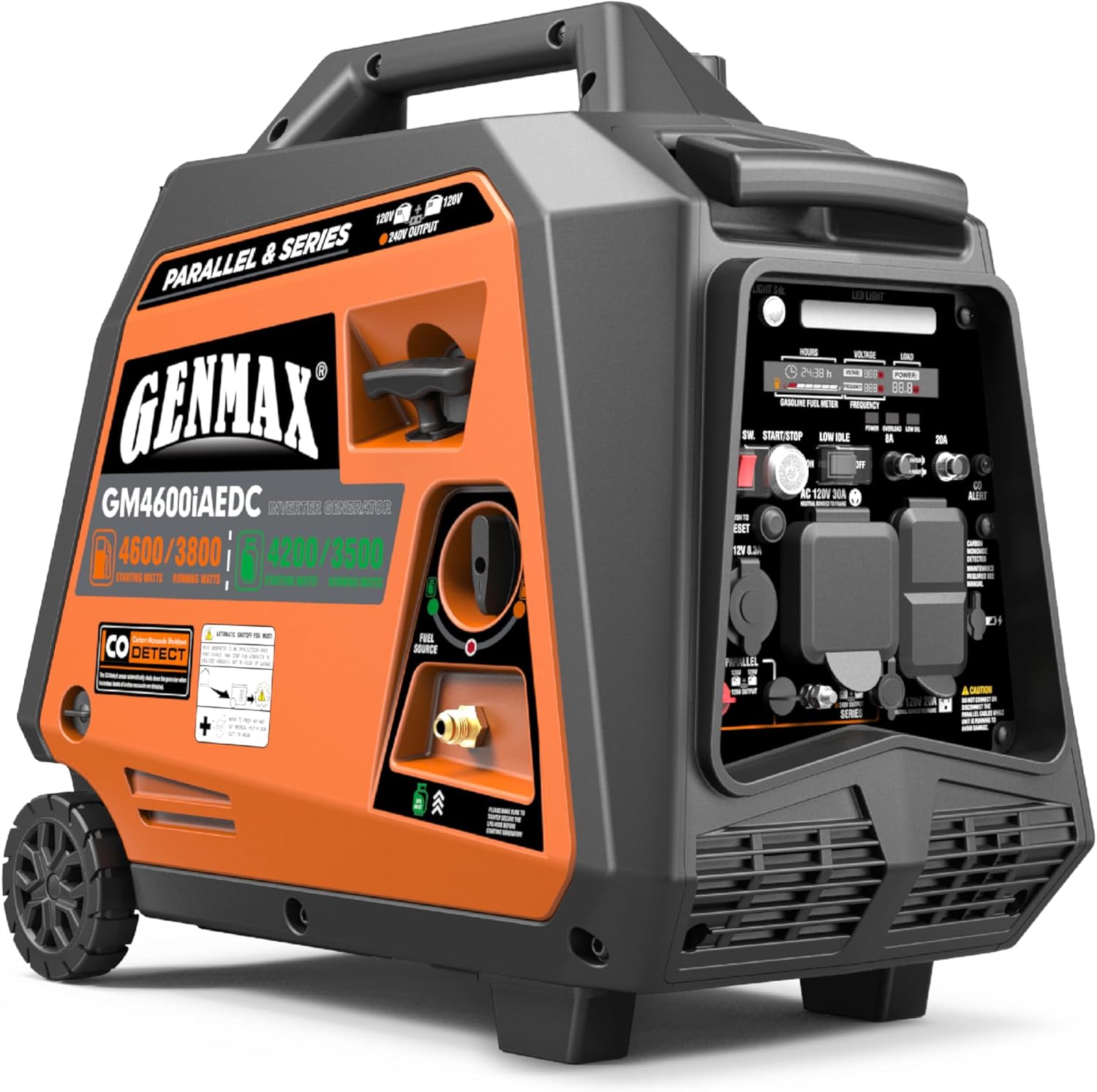
Image: GENMAX GM4600iAEDC Dual Fuel Inverter Generator, showcasing its compact design and control panel.
Key Features:
- Dual Fuel Capability: Operates on both gasoline and propane for versatile power options.
- Clean Power Output: Produces less than 3% Total Harmonic Distortion (THD), safe for sensitive electronics.
- Ultra-Quiet Operation: Fully enclosed design significantly reduces noise levels.
- Electric & Remote Start: Easy starting with a push button or remote key fob.
- CO Alert System: Automatically shuts down the generator if unsafe carbon monoxide levels are detected.
- Digital Control Panel: Provides real-time information on hours run, voltage, and load.
- Portable Design: Lightweight with telescopic handle and wheels for easy transport.
- Parallel & Series Connection Ready: Allows for combining two units for increased power output (requires separate kit).
Video: GM4600iAEDC Product Overview. This video provides a comprehensive look at the generator's features and capabilities, including its 240V readiness.
2. What's in the Box
Upon unboxing your GENMAX GM4600iAEDC generator, please verify that all the following components are included:
- GENMAX GM4600iAEDC Generator Unit
- Cigarette Lighter to USB-C&A Adapter (1)
- Spark Plug Socket Wrench (1)
- Dual-Purpose Screwdriver (1)
- Funnel (1)
- Remote Control Key (1)
- User Manual (1)
- LPG Hose (1)

Image: Visual representation of all items included in the GENMAX GM4600iAEDC generator package, along with dimensions.
3. Setup
Before operating your generator, proper setup is crucial for safety and optimal performance.
3.1 Adding Engine Oil
The generator is shipped without engine oil. You must add the appropriate amount of 4-stroke engine oil before first use.
- Place the generator on a level surface.
- Locate the oil fill cap/dipstick on the side of the engine.
- Unscrew the oil fill cap/dipstick and clean it.
- Using the provided funnel, slowly add 4-stroke engine oil (e.g., SAE 10W-30) until the oil level reaches the upper mark on the dipstick. Do not overfill.
- Reinsert and tighten the oil fill cap/dipstick.
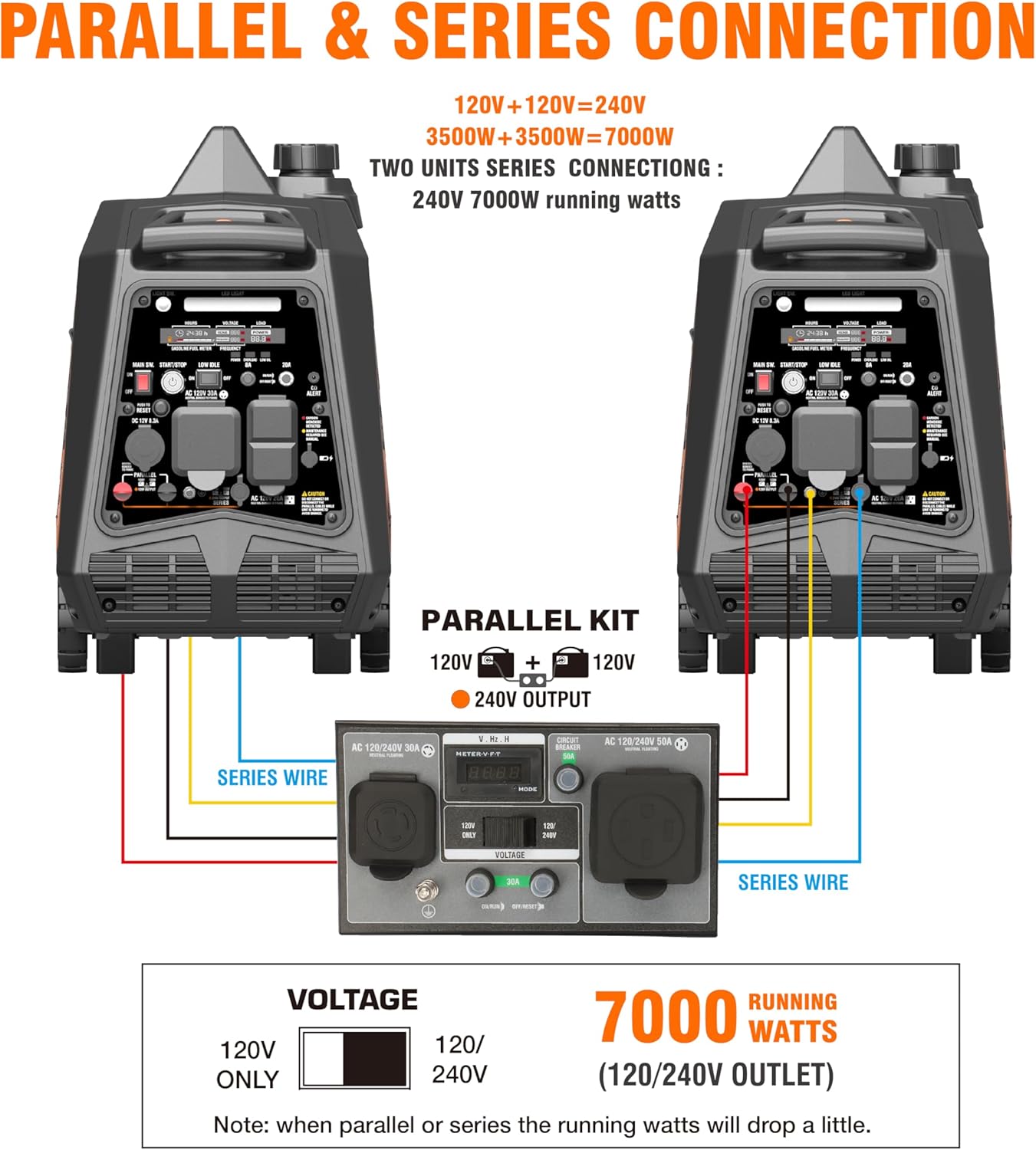
Image: Illustration of the magnetic oil dipstick, highlighting its ability to absorb impurities for engine longevity.
3.2 Adding Fuel (Gasoline)
Use fresh, unleaded gasoline with an octane rating of 87# or 89#.
- Ensure the generator is turned off and cool.
- Remove the fuel tank cap.
- Slowly pour gasoline into the fuel tank, being careful not to exceed the red line of the fuel filter.
- Securely replace the fuel tank cap.
3.3 Connecting LPG Tank (Propane)
For propane operation, connect an LPG tank using the provided hose.
- Ensure the LPG tank valve is in the fully closed position.
- Connect one end of the LPG hose to the LPG tank.
- Connect the other end of the LPG hose to the LPG inlet on the generator. Tighten securely.
- Once connected, slowly open the LPG tank valve to allow propane to flow to the generator.

Image: The GENMAX dual fuel generator operating with a propane tank in an outdoor environment.
3.4 Connecting the Battery
The generator's electric start feature requires the battery to be connected.
- Locate the battery compartment, usually behind a removable side panel.
- Remove the dust cover from the battery cables.
- Connect the positive (+) battery cable (red) to the positive (+) terminal on the battery.
- Connect the negative (-) battery cable (black) to the negative (-) terminal on the battery.
- Ensure connections are secure.
4. Operation
4.1 Control Panel Overview
Familiarize yourself with the generator's control panel for efficient operation.

Image: Detailed view of the GENMAX GM4600iAEDC control panel, highlighting the digital display, outlets, and various switches.
- Digital Display: Shows hours run, voltage output, load, and fuel level.
- Main Switch: Controls the overall power to the generator.
- Start/Stop Button: Used for electric starting and stopping the engine.
- Low Idle Switch: Engages Eco-mode for fuel efficiency and quieter operation.
- Circuit Breakers: Protects the generator from overload.
- Outlets: Includes 120V AC, 30A RV ready, and DC 12V outlets.
- CO Alert: Indicator for carbon monoxide detection.
4.2 Starting the Generator
Choose your preferred starting method:
- Preparation: Ensure the generator has sufficient oil and fuel (gasoline or propane).
- Fuel Source Selection: Turn the fuel source knob to the desired fuel type (Gasoline or LPG).
- Main Switch: Turn the Main Switch to "ON".
- Low Idle Switch: Ensure the Low Idle Switch is in the "OFF" position for easier starting.
- Starting Method:
- Electric Start: Press and hold the "Start/Stop" button for 1-3 seconds until the engine starts.
- Remote Start: Push and hold the "ON" button on the remote start key fob for one second.
- Recoil Start: Firmly grasp and pull the recoil handle slowly until you feel resistance, then let it retract and pull swiftly.
- Warm-up: After starting, allow the generator to run for 1-2 minutes for preheating. In cold conditions, extend preheating to 3-5 minutes.
Video: GM4600iAEDC Dual Fuel Inverter Generator Operation. This video demonstrates the various starting procedures and operational aspects of the generator.
4.3 Stopping the Generator
- Turn off and unplug all connected electrical loads.
- Press the "Start/Stop" button to turn off the generator.
- If not used for more than 48 hours, turn off the Main Switch.
4.4 Parallel & Series Connection
Two 120V GENMAX generators can be combined into a 240V generator using a dedicated series parallel box (sold separately) to double the power output.

Image: Diagram illustrating how two GENMAX generators can be connected in parallel or series for increased power output.
Video: GM6000SPK Kit - How to change a small inverter to be 240V ready. This video demonstrates the process of connecting generators for parallel or series operation.
5. Maintenance
Regular maintenance ensures the longevity and reliable performance of your generator.
5.1 Engine Oil Change
Change the engine oil after the first 20 hours of operation, then every 100 hours or annually, whichever comes first.
- Ensure the engine is warm but not hot.
- Place an oil pan under the engine's oil drain bolt.
- Unscrew the oil drain bolt and the oil fill cap/dipstick to allow oil to drain completely.
- Once drained, replace and tighten the oil drain bolt.
- Refill with the appropriate amount of new 4-stroke engine oil (refer to Section 3.1).
5.2 Air Filter Cleaning
Clean the air filter every 50 hours or more frequently in dusty conditions.
- Remove the air cleaner cover.
- Take out the foam filter element.
- Wash the filter element in warm, soapy water. Rinse thoroughly.
- Squeeze out excess water and allow it to air dry completely.
- Apply a few drops of engine oil to the foam filter element and squeeze off excess oil. The foam cleaner element should be wet, but there should be no oil dripping.
- Reinstall the sponge filter element and air cleaner cover.
5.3 Spark Plug Inspection/Replacement
Inspect the spark plug every 100 hours or annually. Replace if necessary.
- Remove the spark plug maintenance cover and spark plug cap.
- Use the provided spark plug socket wrench to remove the spark plug.
- Inspect the spark plug for wear, carbon buildup, or damage. Clean if necessary.
- Check the spark plug gap (should be 0.7-0.8mm). Adjust if needed.
- Install the new or cleaned spark plug and tighten with the sleeve.
- Replace the spark plug cap and maintenance cover.
6. Troubleshooting
This section provides solutions to common issues you might encounter with your generator.
| Problem | Possible Cause | Solution |
|---|---|---|
| Engine will not start | No fuel / Incorrect fuel type selected | Add fuel or switch to correct fuel source. |
| Engine will not start | Low engine oil level | Add engine oil to the correct level. |
| Engine will not start | Spark plug fouled or damaged | Clean or replace the spark plug. |
| No power output | Circuit breaker tripped | Reset the circuit breaker. Reduce load. |
| No power output | Overload condition | Reduce the total electrical load. |
| CO Alert light on | High carbon monoxide levels detected | Move generator to an open, well-ventilated area. Allow to cool before restarting. |
7. Specifications
| Specification | Value |
|---|---|
| Model Name | GM4600iAEDC |
| Brand | GENMAX |
| Starting Wattage (Gasoline) | 4600 Watts |
| Running Wattage (Gasoline) | 3800 Watts |
| Fuel Type | Dual Fuel (Gasoline/Propane) |
| Engine Type | 159cc 4-Stroke OHV |
| Voltage | 120 Volts (240V Ready with Parallel Kit) |
| Frequency | 60 Hz |
| Item Weight | 58.4 Pounds |
| Product Dimensions (L x W x H) | 20.9"L x 12.2"W x 19.7"H |
| Tank Volume | 1.6 Gallons |
| UPC | 742332650880 |
8. Long-Term Storage
Properly preparing your generator for storage will prevent fuel-related issues and ensure it's ready for use when needed.
- Fuel Drainage:
- For gasoline, add a fuel stabilizer to the tank and run the engine for a few minutes to circulate it, or drain all gasoline from the fuel tank and carburetor.
- For propane, simply close the LPG tank valve and disconnect the hose.
- Engine Oil: Change the engine oil (refer to Section 5.1).
- Spark Plug: Remove the spark plug and pour a tablespoon of engine oil into the cylinder. Rotate the engine a few times to distribute the oil, then reinstall the spark plug.
- Battery Disconnection: Disconnect the battery cables to prevent power loss during storage.
- Cleaning: Clean the exterior of the generator.
- Storage Location: Store the generator in a clean, dry, and well-ventilated area, away from direct sunlight and extreme temperatures.
9. Warranty and Support
GENMAX stands behind its products with comprehensive warranty and support services.
- Warranty: Includes a 1-year warranty.
- Technical Support: FREE lifetime technical support from experts.
For assistance, please refer to the contact information provided in your user manual or visit the official GENMAX website.
Related documentsGM4600iAEDC


Ask a question about this manual
Ask about setup, troubleshooting, compatibility, parts, safety, or missing instructions. Manuals+ will review the question and use this page’s manual context to help answer it.