
Introduction
This manual provides detailed instructions for the setup, operation, and maintenance of the DWEII Digital FM Receiver Module. This module incorporates advanced Digital Signal Processing (DSP) and Phase-Locked Loop (PLL) technology to ensure stable performance and high-quality audio reception.

Image: Two DWEII Digital FM Receiver Modules. Each module features a green circuit board, an LCD screen displaying "87.0 MHz", and two rotary knobs for frequency and volume control. The modules are shown from an angled top-down perspective.
Key Features
- Advanced DSP & PLL Technology: Ensures stable performance and clear audio.
- LCD Display: Provides intuitive and accurate frequency information with low power consumption.
- Digital Control: Offers convenient operation and enhanced durability.
- Memory Function: Retains the last set frequency and volume settings after power cycling.
- Versatile Audio Input: Supports line, USB, and microphone channels.
- Integrated Amplifier: On-board 2x3W stereo audio amplifier for direct speaker connection.
Setup
Follow these steps to correctly set up your DWEII Digital FM Receiver Module.
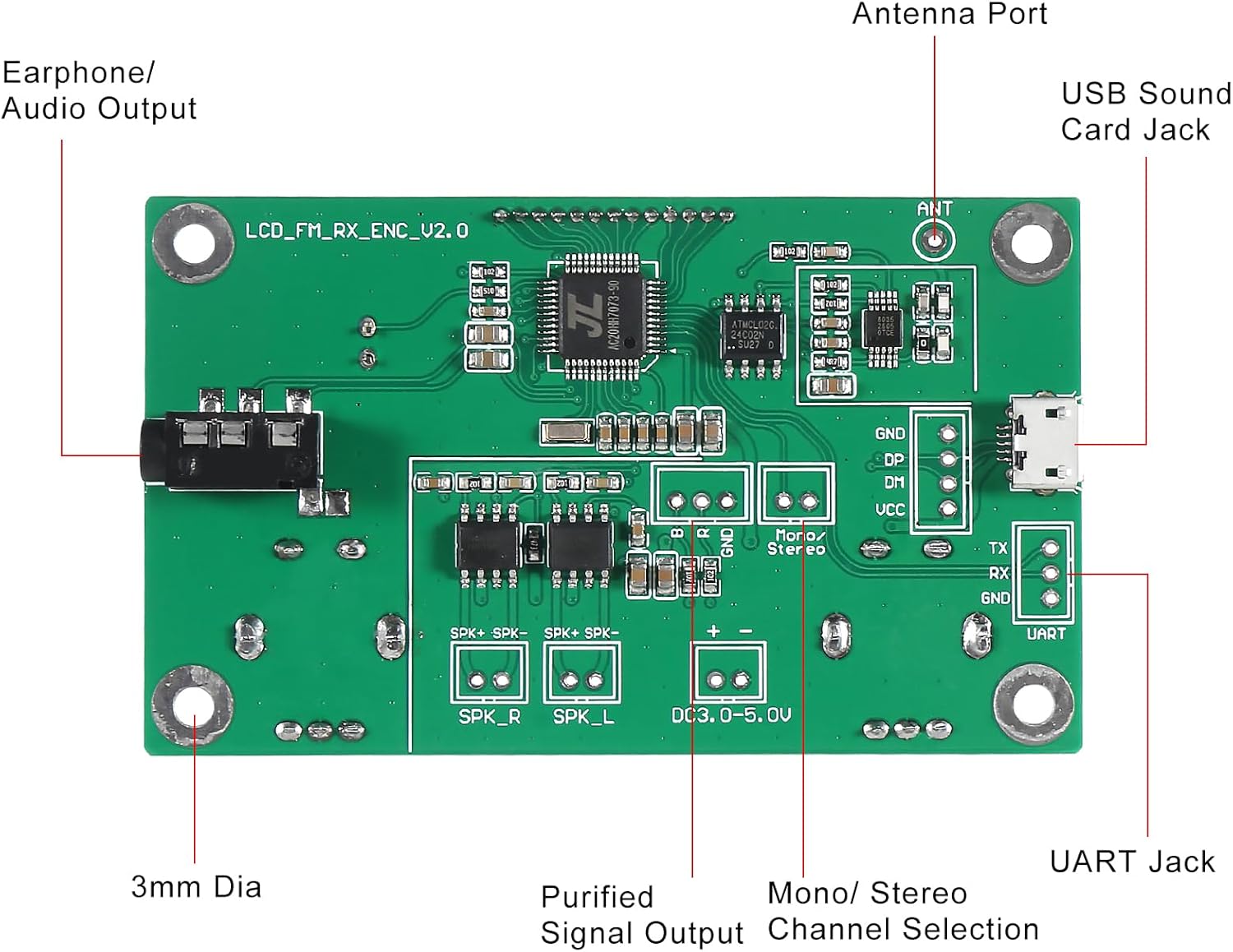
Image: Detailed labeled diagram of the DWEII Digital FM Receiver Module. Key components identified include the Antenna Port, USB Sound Card Jack, Earphone/Audio Output, UART Jack, Purified Signal Output, Mono/Stereo Channel Selection, and 3mm Diameter mounting holes.
- Power Connection: Connect a DC power supply within the range of 3.0V to 5.0V to the designated power input terminals (DC 3.0-5.0V). Ensure correct polarity.
- Antenna Connection: Attach a 75 cm bar antenna to the Antenna Port (ANT) for optimal FM reception. A solder hole is provided for antenna connection.
- Audio Output:
- For headphones or external audio systems, connect to the Earphone/Audio Output jack.
- For direct speaker connection, utilize the SPK_R and SPK_L terminals. The module includes an on-board 2x3W stereo audio amplifier.
- USB Audio Input (Optional): Connect the module to a computer via the USB Sound Card Jack to use it for USB PC audio broadcasting.
- UART Connection (Optional): The UART Jack (TX, RX, GND) is available for advanced control or data communication.
- Channel Selection: Use the Mono/Stereo Channel Selection jumper or switch if available, to select between mono and stereo output modes.
Operating Instructions
Once the module is powered and connected, you can begin operation.
- Power On: Apply power to the module. The LCD display will illuminate, showing the current frequency. The module will recall the last set frequency and volume.
- Frequency Adjustment:
- Rotate the "FRE" (Frequency) knob to change the FM frequency.
- A short press of the frequency adjustment key (if applicable) will adjust the frequency by 0.1 MHz per step.
- A long press of the frequency adjustment key (if applicable) will adjust the frequency by 1.0 MHz per step.
- Volume Adjustment:
- Rotate the "VOL" (Volume) knob to adjust the audio output level.
- The module supports 16-level digital volume control.
- USB PC Audio Broadcasting: If connected to a computer via USB, the module can function as a USB sound card for audio broadcasting. Refer to your computer's audio settings to select the module as an output device.
- Input Channel Selection: The module supports line, USB, and microphone input channels. The specific method for switching between these inputs may vary based on the module's design (e.g., jumpers, buttons, or automatic detection).

Image: A collage showing the DWEII Digital FM Receiver Module integrated into different custom enclosures and setups, demonstrating its versatility in DIY audio projects. Examples include a module mounted in a speaker box, connected to a power bank, and housed in a wooden casing.
Maintenance
The DWEII Digital FM Receiver Module is designed for durability and requires minimal maintenance.
- Cleaning: Use a dry, soft cloth to gently clean the module. Avoid using liquids or abrasive cleaners.
- Storage: Store the module in a dry, dust-free environment when not in use.
- Handling: Handle the circuit board with care to avoid damaging components or solder joints. Avoid static discharge.
Troubleshooting
If you encounter issues with your DWEII Digital FM Receiver Module, consider the following common solutions:
- No Power:
- Verify that the power supply voltage is within the 3.0V-5.0V range.
- Check all power connections for secure contact and correct polarity.
- Poor Reception/Static:
- Ensure the antenna is properly connected and extended to its full 75 cm length.
- Relocate the module to an area with better FM signal strength.
- Check for nearby electronic devices that might be causing interference.
- No Audio Output:
- Confirm that headphones or speakers are correctly connected to the appropriate output terminals.
- Adjust the volume knob to an audible level.
- If using speakers, ensure they are compatible with the module's 2x3W amplifier output.
- Incorrect Frequency Display:
- Recalibrate the frequency using the "FRE" knob.
If problems persist, consult the manufacturer's support resources.
Specifications

Image: A table detailing the technical specifications of the DWEII Digital FM Receiver Module, including voltage range, current, output power, frequency response, receiving frequency range, equivalent noise, and channel type.
| Parameter | Value |
|---|---|
| Power Supply Voltage | DC 3.0V - 5.0V |
| Operating Current | 35mA |
| Output Power | 500mW (drive headphones), 3Wx2 (drive speakers) |
| Equivalent Noise | ≥30dB |
| Modulation Mode | Standard FM |
| Adaptive Antenna | 75 cm bar antenna |
| Transmission/Receiving Frequency Range | 76.0 MHz - 108.0 MHz (Campus broadcast: 76.0 MHz - 87.0 MHz) |
| Frequency Response Range | 50 Hz - 18 KHz |
| Sound Track | Line/USB channel (Stereo); Mic channel (Single channel) |
| Frequency Adjustment Stepping | 0.1 MHz/step (short press), 1.0 MHz/step (long press) |
| Dimensions | 75 x 45 x 30 mm (2.95 x 1.77 x 1.18 inches) |
| Weight | Approx. 2.29 ounces (0.07 kg) |
| Model Number | DWEII-2P |
Warranty and Support
DWEII products are manufactured with quality and reliability in mind. For specific warranty information, please refer to the documentation provided with your purchase or contact DWEII customer support directly.
If you require technical assistance or have questions not covered in this manual, please reach out to the manufacturer or your retailer for support.