
ANDTE DE305
ANDTE 305 Pint Commercial Dehumidifier Instruction Manual
Model: DE305
1. Introduction
Thank you for choosing the ANDTE 305 Pint Commercial Dehumidifier. This powerful unit is engineered for high-efficiency moisture removal in large commercial and industrial spaces, basements, and during water damage restoration. With its robust design and intelligent features, it provides reliable and continuous dehumidification to maintain optimal humidity levels and prevent issues like mold and mildew.

Overview of the ANDTE Commercial Dehumidifier's capabilities, including moisture removal rates and coverage area.

The dehumidifier is designed for large area dehumidification, maximizing drying performance in spaces up to 9,000 sq.ft.
2. Safety Information
Please read all safety instructions carefully before operating the dehumidifier. Failure to comply with these instructions may result in electric shock, fire, or serious injury.
- Ensure the unit is connected to a NEMA 5-20 receptacle (20 Amps, 125 Volts) to meet commercial and industrial electrical codes and safety standards.
- Do not operate the unit with a damaged cord or plug.
- Keep the unit away from water and other liquids.
- Do not block air inlets or outlets.
- This appliance uses R32 refrigerant. Servicing should only be performed by trained service personnel.
- Dispose of the product in accordance with federal or local regulations.

Important note regarding the required NEMA 5-20 receptacle for proper operation.
3. Package Contents
Verify that all items are present in the package:
- ANDTE Commercial Dehumidifier Unit
- Drain Hose
- User Manual
4. Setup
Follow these steps for initial setup:
- Unpacking: Carefully remove the dehumidifier from its packaging. Inspect for any shipping damage.
- Placement: Place the unit on a stable, level surface in the desired area. Ensure there is adequate space around the unit for proper airflow (at least 12 inches from walls or obstructions).
- Drainage Setup: This unit supports both pump drainage and auto gravity drainage.
- Pump Drainage: Connect the drain hose to the pump outlet. The built-in pump can lift water up to 16.5 ft, allowing for flexible drainage options.
- Auto Gravity Drainage: Connect the provided 6.56 ft drain hose to the gravity drain outlet. Ensure the hose is sloped downwards to a suitable drain point (e.g., floor drain, sink) for continuous drainage.
- Power Connection: Plug the dehumidifier into a dedicated 20 Amp, 125 Volt NEMA 5-20 receptacle.

Drainage options: built-in pump for elevated drainage or gravity drainage with the included hose.
5. Operating Instructions
The dehumidifier features an intuitive control panel for easy operation.

The intelligent control panel offers simple operation with features like continuous dehumidification, memory starting, auto defrost, and auto drain.
Control Panel Functions:
- Power Button: Turns the unit ON/OFF.
- Humidity Setting: Use the Up/Down arrows to set your desired humidity level (10% - 98% RH). The unit will operate to maintain this level.
- Timer Function: Set the unit to automatically turn ON or OFF after a specified period (1-24 hours).
- Continuous Mode: For continuous operation, select the continuous dehumidification mode. This is ideal for rapid drying.
- Auto Defrost: The unit features an automatic defrost cycle. If frost is detected on the coils, the compressor will temporarily shut down while the fan continues to run, melting the frost. Dehumidification resumes automatically once defrosting is complete.

The auto defrost function ensures efficient operation by preventing coil freezing.
Special Features:
- Memory Starting: In case of a power outage, the unit will automatically restart with the previously set humidity and operation mode once power is restored.
- Low Noise Operation: Designed to operate efficiently with noise levels at or below 54dB.
6. Maintenance
Regular maintenance ensures optimal performance and longevity of your dehumidifier.
- Filter Cleaning: The unit is equipped with a removable filter that protects internal components from dust and particles. Clean the filter regularly (e.g., monthly, or more frequently in dusty environments) by rinsing it with water and allowing it to air dry completely before reinserting.
- Exterior Cleaning: Wipe the exterior of the unit with a soft, damp cloth. Do not use harsh chemicals or abrasive cleaners.
- Storage: If storing the unit for an extended period, ensure it is clean and dry. Disconnect the power cord and drain any remaining water from the unit and hose.
7. Troubleshooting
Refer to this section for common issues and their solutions.
| Problem | Possible Cause | Solution |
|---|---|---|
| Unit does not turn on | No power; Power cord not securely plugged in; Circuit breaker tripped. | Ensure unit is plugged into a 20A outlet; Check power cord connection; Reset circuit breaker. |
| No or low dehumidification | Air filter clogged; Humidity setting too high; Room temperature too low; Unit size too small for area. | Clean air filter; Lower humidity setting; Ensure operating temperature is within 41-104℉ (5-40℃); Verify unit capacity matches room size. |
| Unit runs continuously | Humidity setting is lower than ambient humidity; Continuous mode is active. | Increase humidity setting or switch off continuous mode if not needed. |
| Water leakage | Drain hose is kinked or blocked; Drain hose not properly connected. | Check and clear drain hose; Ensure secure connection of drain hose. |
| Frost on coils | Operating in low temperatures. | Auto defrost will activate. Allow the cycle to complete. |
8. Specifications
| Feature | Detail |
|---|---|
| Brand | ANDTE |
| Model Name | DE305 |
| Moisture Removal (95℉, 90%RH) | 305 Pints/Day (38 Gallons/Day) |
| Moisture Removal (AHAM) | 130 Pints/Day (80℉, 60%RH) |
| Coverage Area | Up to 9000 Square Feet |
| Air Flow Capacity | 417 Cubic Feet Per Minute (CFM) |
| Power Source | 120V~60Hz |
| Rated Power | 1700 Watts |
| Rated Current | 15 Amps |
| Product Dimensions (D x W x H) | 19"D x 22"W x 31"H |
| Item Weight | 96 Pounds |
| Working Temperature Range | 41-104℉ (5-40℃) |
| Humidity Setting Range | 10% - 98% (±1%) |
| Refrigerant | R32 |
| Special Features | Auto Defrost, Auto Restart, Continuous Operation, Timer |
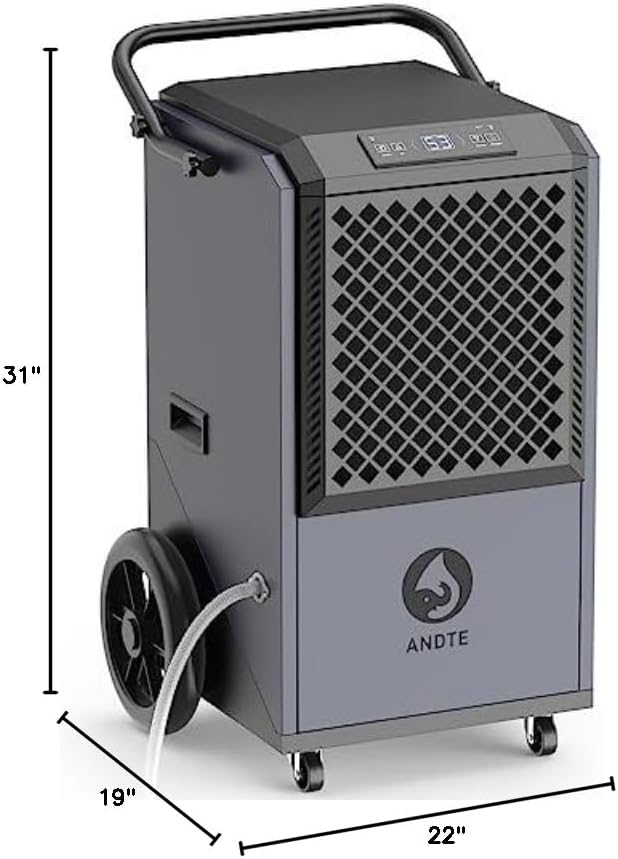
Physical dimensions of the dehumidifier.

Comprehensive technical specifications for the dehumidifier.
9. Warranty and Support
ANDTE is committed to providing reliable quality products and services. We believe in quality and after-sales service.

Detailed policy of warranty services for the ANDTE dehumidifier.
Warranty Coverage:
- Refrigeration System: 5 Years (Compressor, Condenser, Evaporator - excluding labor and refrigerant).
- Electronic Components: 3 Years (Display screen, Mainboard, Signal cable - excluding labor).
- Consumable Accessories: 1 Year (Drain hose, Filter, Handle, Screws - excluding labor).
- Overall Units: 1 Year for functional failure, defect, or inferior workmanship.
- Overall Units: 30 Days for nonfunctional problems.
Warranty coverage starts from the next day of delivery. For issues beyond the time limit, paid services may be provided.
Customer Support:
If you have any questions or require support, please do not hesitate to contact us. We aim to reply within 12 hours and assist you in resolving any problems.
Contact Information:
- Email: service@andte.com
- Website: www.andte.com
Related documentsDE305


Ask a question about this manual
Ask about setup, troubleshooting, compatibility, parts, safety, or missing instructions. Manuals+ will review the question and use this page’s manual context to help answer it.