
hoogo HH502
hoogo H5 Cordless Handheld Vacuum Cleaner Instruction Manual
Model: HH502
Introduction
Thank you for choosing the hoogo H5 Cordless Handheld Vacuum Cleaner. This manual provides essential information for the safe and efficient operation, maintenance, and troubleshooting of your device. Please read it thoroughly before first use and retain it for future reference.
Important Safety Instructions
To reduce the risk of fire, electric shock, or injury, observe the following safety precautions:
- Do not use outdoors or on wet surfaces.
- Do not allow to be used as a toy. Close attention is necessary when used by or near children.
- Use only as described in this manual. Use only manufacturer's recommended attachments.
- Do not use with a damaged cord or plug. If appliance is not working as it should, has been dropped, damaged, left outdoors, or dropped into water, return it to a service center.
- Do not pull or carry by cord, use cord as a handle, close a door on cord, or pull cord around sharp edges or corners. Do not run appliance over cord. Keep cord away from heated surfaces.
- Do not unplug by pulling on cord. To unplug, grasp the plug, not the cord.
- Do not handle plug or appliance with wet hands.
- Do not put any object into openings. Do not use with any opening blocked; keep free of dust, lint, hair, and anything that may reduce air flow.
- Keep hair, loose clothing, fingers, and all parts of body away from openings and moving parts.
- Do not pick up anything that is burning or smoking, such as cigarettes, matches, or hot ashes.
- Do not use to pick up flammable or combustible liquids, such as gasoline, or use in areas where they may be present.
- Do not pick up toxic material (e.g., chlorine bleach, ammonia cleaner, drain cleaner).
- Do not use without dust cup and/or filters in place.
- Exercise extra care when cleaning on stairs.
- Prevent unintentional starting. Ensure the switch is in the off-position before connecting to battery pack, picking up or carrying the appliance.
- Recharge only with the charger specified by the manufacturer.
Package Contents
Verify that all items are present and in good condition upon unpacking:
- hoogo H5 Cordless Handheld Vacuum Cleaner
- 18V Charger
- Wall/Table Charging Station
- Motorized Upholstery and Mite Nozzle
- 2-in-1 Crevice and Furniture Nozzle
- 1 Replacement EPA 12 Filter

Image: The hoogo H5 handheld vacuum cleaner shown with its various attachments, including the charging station, crevice tool, and motorized brush.
Product Overview
The hoogo H5 is a compact and powerful cordless handheld vacuum cleaner designed for quick and efficient cleaning tasks. It features a high-performance digital motor and a versatile set of accessories.

Image: A close-up view of the hoogo H5 cordless handheld vacuum cleaner, highlighting its sleek design and main body.
Key Components:
- Main Unit: Contains the motor, battery, and dustbin.
- Dustbin: Transparent, detachable container for collected debris.
- EPA 12 Filter: Located inside the dustbin, filters fine particles.
- Power Button: Activates and deactivates the vacuum.
- Mode Selector: Switches between Eco and Power modes.
- Charging Port: For connecting the charger.
Setup
1. Initial Charging
- Connect the 18V charger to the charging station.
- Place the hoogo H5 vacuum cleaner onto the charging station.
- Plug the charger into a power outlet. The charging indicator light will illuminate.
- Allow approximately 4.5 hours for a full charge before first use.
2. Assembling Attachments
Attachments can be easily clicked onto the main unit's suction opening.
- Motorized Upholstery and Mite Nozzle: Ideal for deep cleaning fabrics and removing pet hair or dust mites from cushions and mattresses.
- 2-in-1 Crevice and Furniture Nozzle: Use the narrow crevice tool for tight spaces and corners. Slide the brush attachment forward for cleaning delicate surfaces like furniture.

Image: The hoogo H5 vacuum cleaner demonstrating the use of its 2-in-1 crevice and furniture nozzle for versatile cleaning.
Operating Instructions
1. Powering On/Off
- Press the power button once to turn on the vacuum cleaner.
- Press the power button again to turn off the vacuum cleaner.
2. Selecting Power Mode
The hoogo H5 offers two power modes:
- Eco Mode: For lighter cleaning tasks and extended battery runtime (up to 30 minutes).
- Power Mode: For maximum suction power to tackle stubborn dirt.
Press the mode selector button to switch between Eco and Power modes.

Image: A hand operating the hoogo H5, showing the power mode selection button and an indicator for up to 30 minutes of runtime.
3. Using Attachments
- Motorized Upholstery and Mite Nozzle: Attach this nozzle for effective cleaning of sofas, car seats, and pet beds. The motorized brush helps dislodge embedded dirt and hair.
- 2-in-1 Crevice and Furniture Nozzle: Use the narrow end for reaching into tight gaps, corners, and along edges. Extend the brush for dusting delicate surfaces like shelves, keyboards, or car interiors.

Image: The hoogo H5 vacuum cleaner being used with the motorized upholstery nozzle to clean a cushion.

Image: The hoogo H5 vacuum cleaner effectively picking up crumbs from a surface, demonstrating its 120W digital motor performance.
Maintenance
Regular maintenance ensures optimal performance and extends the lifespan of your hoogo H5 vacuum cleaner.
1. Emptying the Dustbin
- Ensure the vacuum cleaner is turned off.
- Press the dustbin release button and detach the dustbin from the main unit.
- Hold the dustbin over a trash receptacle.
- Open the dustbin flap to empty the contents.
- Reattach the dustbin securely to the main unit.
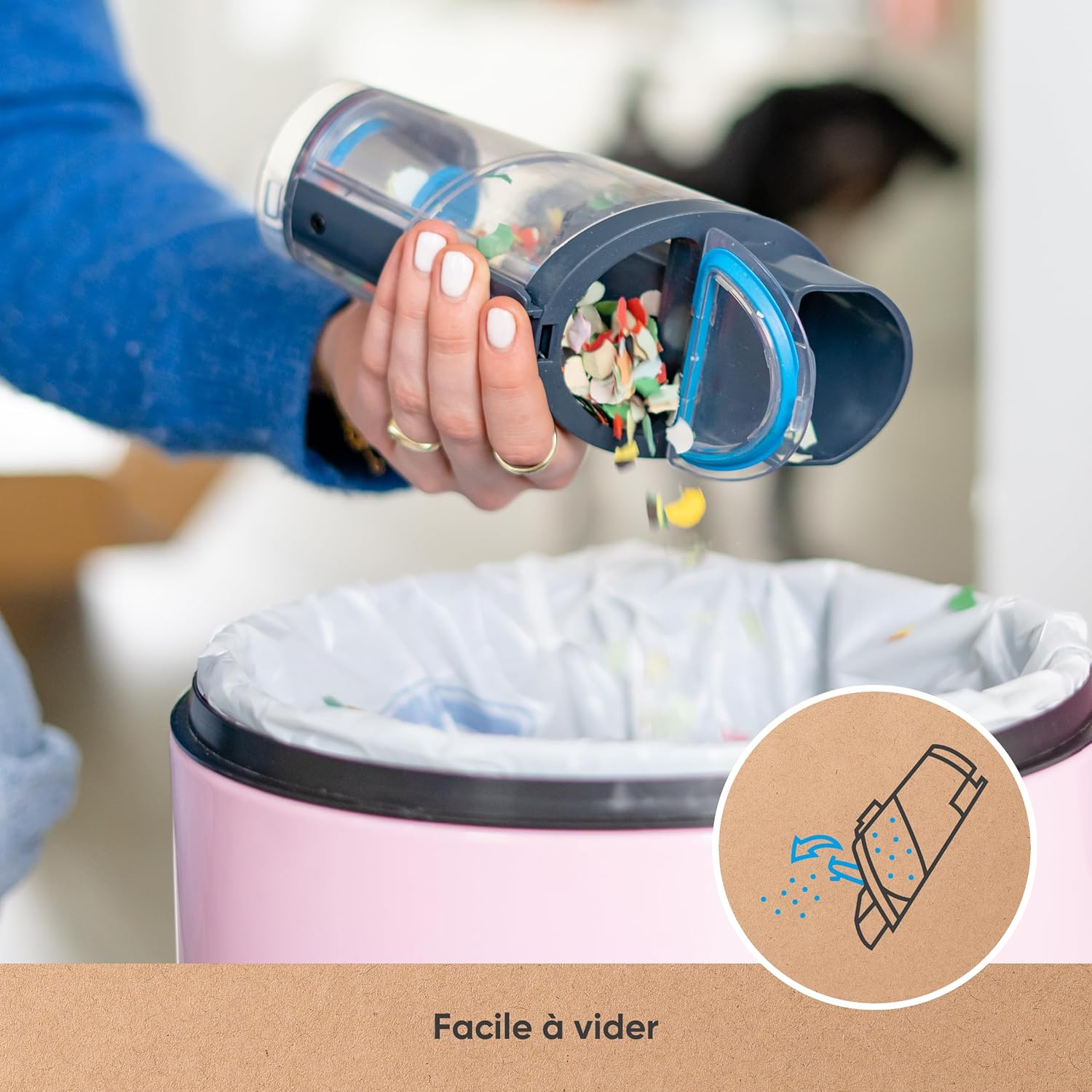
Image: A hand demonstrating how to easily empty the dustbin of the hoogo H5 vacuum cleaner into a waste bin.

Image: The hoogo H5 vacuum cleaner's dustbin, highlighting its 300ml capacity.
2. Cleaning the EPA 12 Filter
The EPA 12 filter captures 99.5% of fine particles and should be cleaned regularly to maintain suction power.
- Remove the dustbin as described above.
- Carefully remove the EPA 12 filter from the dustbin.
- Tap the filter gently over a trash can to dislodge dust.
- If heavily soiled, rinse the filter under cold running water. Ensure it is completely dry before reinserting. Do not use detergents.
- Reinsert the dry filter into the dustbin and reattach the dustbin to the vacuum cleaner.
3. Cleaning Attachments
Wipe attachments with a damp cloth as needed. Ensure they are dry before storage or reuse.
Troubleshooting
| Problem | Possible Cause | Solution |
|---|---|---|
| Vacuum does not turn on. | Battery is depleted. | Charge the vacuum cleaner fully. |
| Reduced suction power. | Dustbin is full or filter is clogged. | Empty the dustbin and clean the EPA 12 filter. |
| Vacuum stops unexpectedly. | Battery is low or blockage in nozzle/hose. | Recharge the battery. Check for and remove any blockages. |
| Motorized nozzle not spinning. | Brush roll is jammed or attachment not properly connected. | Turn off the vacuum and clear any obstructions from the brush roll. Ensure the nozzle is securely attached. |
Specifications
| Brand | hoogo |
| Model Number | HH502 |
| Power | 120 Watts |
| Voltage | 14.8 Volts |
| Battery | 14.8V / 2000 mAh Lithium-ion |
| Runtime | Up to 30 minutes (Eco mode) |
| Charging Time | Max. 4.5 hours |
| Dustbin Capacity | 300 Milliliters |
| Filter Type | EPA 12 (99.5% filtration) |
| Weight | 700 Grams |
| Dimensions (Package) | 62.79 x 17 x 11.2 cm |
Warranty and Support
The hoogo H5 Cordless Handheld Vacuum Cleaner comes with a 10-year warranty for the digital motor. Additionally, hoogo guarantees 10 years of spare parts availability for this model.
For technical assistance, warranty claims, or to order spare parts, please contact hoogo customer support through their official website or the retailer where the product was purchased.
Related documentsHH502


Ask a question about this manual
Ask about setup, troubleshooting, compatibility, parts, safety, or missing instructions. Manuals+ will review the question and use this page’s manual context to help answer it.