
1. Introduction and Overview
The DIHOOL Adjustable Voltage Protector DHOV3-110V is an advanced electrical protection device designed to safeguard your valuable appliances and electrical systems from various power anomalies. It provides comprehensive protection against overvoltage, undervoltage, and overcurrent conditions, ensuring the stability and longevity of your connected equipment. This device features customizable settings and an intelligent automatic recovery function for seamless operation.

Image: Overview of the DIHOOL Voltage Protector's capabilities.
2. Safety Information
Your safety is paramount. The DIHOOL Voltage Protector is constructed with a high-quality, fire-resistant polycarbonate material to minimize fire risks. Always adhere to local electrical codes and safety standards during installation and operation. It is recommended that installation be performed by a qualified electrician to ensure proper wiring and functionality. Do not attempt to open or modify the device.

Image: Device casing made from flame-retardant material for enhanced safety.
3. Product Features
- 12 Customizable Presets: Precisely adjust overvoltage (140-300V), undervoltage (70-200V), and overcurrent (1-63A) settings, along with other parameters, using the intuitive interface.
- Maximum Safety: The device's casing is made from high-quality, fire-resistant polycarbonate material, rigorously tested to prevent fire hazards.
- All-in-One Protection: Provides comprehensive protection against overcurrent, overvoltage, and undervoltage, automatically disconnecting power to prevent damage.
- Smart Automatic Recovery: Automatically restores electricity supply once power conditions stabilize and return to safe, normal levels, requiring no manual intervention.
- Universal DIN Rail Mounting: Features a quick-fix design for easy installation on standard 35mm DIN rails, ideal for electrical panels and industrial control cabinets.
- Wide Application: Protects a broad range of equipment, including industrial motors, home lighting systems, gaming PCs, and kitchen appliances from sudden power surges and fluctuations.

Image: Key features of the DIHOOL Smart Circuit Breaker.

Image: Comparison of Smart Circuit Breaker features versus a standard Circuit Breaker.
4. Package Contents
Upon opening the package, please verify that all components are present and undamaged:
- DIHOOL Adjustable Voltage Protector Unit
- 4 Terminal Connectors
- DIN Rail (80mm)
- Mounting Screws
- User Manual (this document)

Image: Contents included in the product package.
5. Specifications
Refer to the table below for detailed technical parameters and default settings of the DIHOOL Adjustable Voltage Protector.
| Parameter | Value |
|---|---|
| Rated Supply Voltage | AC 110-240V |
| Voltage Setting Range (U) | AC 70-300V |
| Current Setting Range (A) | 1-63A |
| Rated Frequency | 50/60Hz |
| Voltage Error Range | ±5V |
| U And <U Trip Delay | 0.1-60.0s |
| Delay Setting Range | 1s - 600s |
| Rated Insulation Voltage | 400V |
| Output Contact | 1 NO |
| Electrical Life | 10000 |
| Protection Degree | IP20 |
| Pollution Degree | 3 |
| Altitude | ≤2000m |
| Operating Temperature | -50°C ~ +55°C at 40°C ≤ 50% |
| Humidity | ≤50% |
| Storage Temperature | -30°C ~ +70°C |
| Power Consumption | ≤2W |
| Connection Method | Up Input - Down Output |
Note: The voltage protector is an electronic product with a built-in capacitor. It needs to be powered on within 1 year; otherwise, it is easy to be damaged.
| Technical Parameter | Setting Range | Step | Default |
|---|---|---|---|
| Power-on Delay Time | 1-600s | A01 | 5s |
| Overvoltage Trip Value | 140-300V | A02 | 260V |
| Overvoltage Recovery Value | 135-295V | A03 | 255V |
| Overvoltage Recovery Time | 1-600s | A04 | 30s |
| Overvoltage Tripping Time | 0.1-60.0s | A05 | 1.0s |
| Undervoltage Trip Value | 70-200V | A06 | 90V |
| Undervoltage Recovery Value | 75-215V | A07 | 95V |
| Undervoltage Recovery Time | 1-600s | A08 | 30s |
| Undervoltage Tripping Time | 0.1-60.0s | A09 | 1.0s |
| Overcurrent Trip Value | 1-63A | A10 | 63.0A |
| Overcurrent Recovery Time | 1-600s | A11 | 30s |
| Overcurrent Tripping Time | 0.1-60.0s | A12 | 1.0s |
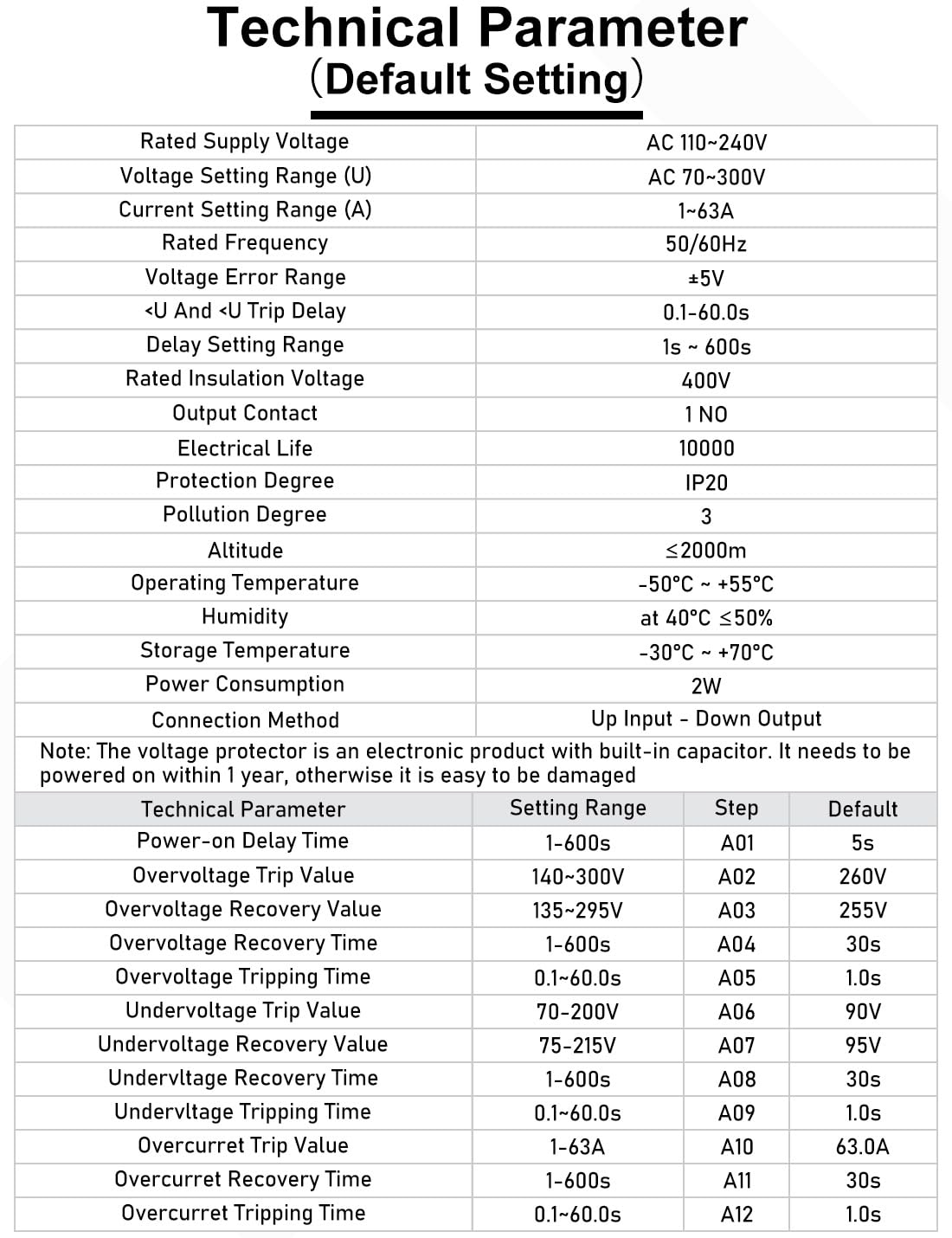
Image: Technical parameters and default settings table.

Image: Device dimensions and key default settings.
6. Setup and Installation
The DIHOOL Voltage Protector is designed for easy installation on standard 35mm DIN rails. Ensure the main power supply is disconnected before beginning installation.
6.1 Mounting
- Locate a suitable position on a standard 35mm DIN rail within your electrical panel or control cabinet.
- Align the device with the DIN rail.
- Press the device firmly onto the rail until it clicks into place, ensuring it is securely fastened. The quick-fix design allows for easy attachment and removal.

Image: DIN rail mounting procedure.
6.2 Wiring
- Ensure the main power supply is OFF.
- Connect the incoming power lines (Line and Neutral) to the 'IN' terminals at the top of the device.
- Connect the outgoing load lines (Line and Neutral) to the 'OUT' terminals at the bottom of the device.
- Ensure all connections are tight and secure to prevent loose contacts and overheating.
The connection method is 'Up Input - Down Output'.

Image: Quick wiring connections for the device.
7. Operating Instructions
The device features an intuitive interface with 'SET', 'Up', and 'Down' buttons for parameter adjustment and an LED display for real-time monitoring.

Image: LED display screen showing real-time voltage and current.
7.1 Initial Power-on
Upon initial power-on, the smart circuit breaker supports 120V/240V. The default overvoltage setting is 260V and undervoltage is 90V.
7.2 Function Setting Instructions
To adjust parameters, follow these steps:
- Press and hold the SET button for 3 seconds to enter the setting mode. The display will show the current parameter (e.g., Power-on Delay Time).
- Use the Up (▲) and Down (▼) buttons to adjust the value of the displayed parameter.
- Press the SET button briefly to cycle through the different adjustable parameters (A01 to A12).
- After adjusting all desired parameters, press and hold the SET button again for 3 seconds to save the settings and exit the setting mode. The display will show 'SAVE' or similar confirmation.

Image: Step-by-step guide for function settings.
Important Note:
- For 110V/120V circuits: Adjust overvoltage parameters A02 and A03 to 140V and 135V respectively.
- For 230V/240V circuits: Adjust undervoltage parameters A06 and A07 to 220V and 225V respectively.
- Parameters are user-adjustable as needed to suit specific requirements.
8. Maintenance
The DIHOOL Adjustable Voltage Protector is designed for minimal maintenance. To ensure optimal performance and longevity:
- Keep the device clean and free from dust and debris. Use a dry, soft cloth for cleaning.
- Periodically check the wiring connections to ensure they remain tight and secure.
- Do not use abrasive cleaners or solvents on the device.
- Do not attempt to open the casing or repair the device yourself. This may void the warranty and pose a safety risk.
9. Troubleshooting
This section provides guidance for common issues you might encounter.
9.1 Device Not Powering On
- Check the incoming power supply to ensure it is active.
- Verify all wiring connections are correct and secure.
- Ensure the device has been powered on within one year of purchase, as prolonged unpowered storage can affect internal components.
9.2 Frequent Tripping
- Review your set overvoltage, undervoltage, and overcurrent parameters. They might be set too sensitively for your electrical environment.
- Check the connected load for any faults or excessive current draw.
- Monitor the incoming voltage and current for frequent fluctuations that might be triggering the protection.
9.3 Automatic Recovery Failure
- Ensure the power conditions (voltage and current) have returned to within the safe, set parameters. The device will only recover once stable conditions are detected.
- Check the recovery time setting (e.g., Overvoltage Recovery Time, Undervoltage Recovery Time, Overcurrent Recovery Time) to ensure it is not set to an excessively long duration.
If issues persist after performing these checks, please contact customer support or consult a qualified electrician.
10. Warranty and Support
For detailed warranty information, including coverage period and terms, please refer to the documentation provided with your purchase or contact the seller directly. DIHOOL is committed to providing reliable products and customer satisfaction.
For technical assistance, product inquiries, or support, please reach out to DIHOOL customer service through the contact information provided on the product packaging or the official DIHOOL website.