
Behringer FOUR LFO
Behringer Four LFO 4-channel LFO Eurorack Module
User Manual
1. Introduction
The Behringer Four LFO is a versatile 4-channel Low Frequency Oscillator Eurorack module designed for modular synthesis systems. It provides a wide range of modulation possibilities with user-assignable waveforms and various operational modes, making it an essential tool for creating dynamic and evolving soundscapes.
Key features include:
- 14HP 4-channel LFO Module with 4 Creative Modes
- User-assignable Waveforms
- Reset/Sync Modes
- Zoom Mode
- CV (Control Voltage) capabilities
2. Important Safety Instructions
Always follow basic safety precautions when using electrical products to reduce the risk of fire, electric shock, and injury to persons.
- Read these instructions.
- Keep these instructions.
- Heed all warnings.
- Follow all instructions.
- Do not use this apparatus near water.
- Clean only with dry cloth.
- Do not block any ventilation openings. Install in accordance with the manufacturer’s instructions.
- Do not install near any heat sources such as radiators, heat registers, stoves, or other apparatus (including amplifiers) that produce heat.
- Do not defeat the safety purpose of the polarized or grounding-type plug. A polarized plug has two blades with one wider than the other. A grounding type plug has two blades and a third grounding prong. The wide blade or the third prong are provided for your safety. If the provided plug does not fit into your outlet, consult an electrician for replacement of the obsolete outlet.
- Protect the power cord from being walked on or pinched particularly at plugs, convenience receptacles, and the point where they exit from the apparatus.
- Only use attachments/accessories specified by the manufacturer.
- Use only with the cart, stand, tripod, bracket, or table specified by the manufacturer, or sold with the apparatus. When a cart is used, use caution when moving the cart/apparatus combination to avoid injury from tip-over.
- Unplug this apparatus during lightning storms or when unused for long periods of time.
- Refer all servicing to qualified service personnel. Servicing is required when the apparatus has been damaged in any way, such as power-supply cord or plug is damaged, liquid has been spilled or objects have fallen into the apparatus, the apparatus has been exposed to rain or moisture, does not operate normally, or has been dropped.
2.1 FCC Compliance Information
This equipment has been tested and found to comply with the limits for a Class B digital device, pursuant to part 15 of the FCC Rules. These limits are designed to provide reasonable protection against harmful interference in a residential installation. This equipment generates, uses and can radiate radio frequency energy and, if not installed and used in accordance with the instructions, may cause harmful interference to radio communications. However, there is no guarantee that interference will not occur in a particular installation.

Figure 2.1: FCC Compliance and WEEE Directive Information. This image details the Federal Communications Commission compliance statement and the WEEE (Waste Electrical and Electronic Equipment) directive symbol, indicating proper disposal of the product.
If this equipment does cause harmful interference to radio or television reception, which can be determined by turning the equipment off and on, the user is encouraged to try to correct the interference by one or more of the following measures:
- Reorient or relocate the receiving antenna.
- Increase the separation between the equipment and receiver.
- Connect the equipment into an outlet on a circuit different from that to which the receiver is connected.
- Consult the dealer or an experienced radio/TV technician for help.
This equipment complies with Part 15 of the FCC rules. Operation is subject to the following two conditions:
- This device may not cause harmful interference, and
- This device must accept any interference received, including interference that may cause undesired operation.
Important Information: Changes or modifications to the equipment not expressly approved by Music Tribe can void the user's authority to use the equipment.
3. Setup and Installation
The Behringer Four LFO is a Eurorack module and requires a compatible Eurorack case with a power supply. Ensure your Eurorack case provides sufficient power for the module.
3.1 Physical Installation
- Power Off: Before installing, ensure your Eurorack case's power supply is completely turned off.
- Connect Ribbon Cable: Connect the included ribbon cable to the module's power header. Ensure the red stripe on the ribbon cable aligns with the -12V pin on both the module and your Eurorack power bus board. Incorrect connection can damage the module.
- Mount Module: Carefully align the module with the rail nuts in your Eurorack case. Use the provided screws to secure the module firmly to the rails. Do not overtighten.
- Power On: Once securely mounted and connected, you can power on your Eurorack case.
3.2 Connectivity
The Four LFO module features various jacks for integration into your modular system:
- RESET/SYNC Jacks: These inputs allow external signals to reset or synchronize the LFOs.
- SINE Jacks: Output for the sine waveform of each LFO.
- ASSIGN Jacks: Assignable outputs for various waveforms or modes, depending on the module's settings.
- SQUARE Jacks: Output for the square waveform of each LFO.

Figure 3.1: Front panel of the Behringer Four LFO module, showing all controls and jacks.
4. Operation
The Four LFO module offers four independent LFO channels, each with dedicated controls and outputs. Understanding the different modes and controls is key to unlocking its full potential.
4.1 Controls Overview
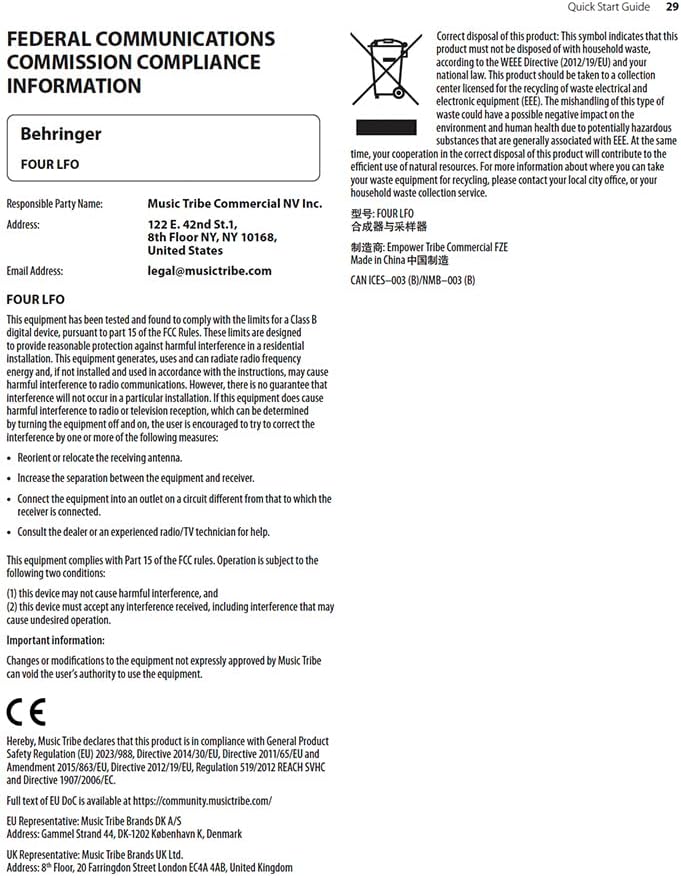
Figure 4.1: Close-up view of the Behringer Four LFO's control section, highlighting the sliders and switches.
- Hz Slider: Controls the frequency of the LFOs. The range can be adjusted from very slow (0.01 Hz) to audio rates (100 Hz).
- Φ (Phase) Slider: Adjusts the phase relationship between the LFOs, particularly relevant in certain modes.
- DIV (Divide) Slider: Sets the division factor for LFO frequencies in divide modes.
- MODE Switch: Selects the operational mode of the LFOs.
- FREE Button: Toggles between free-running and synchronized operation.
- ASSIGN Switch: Configures the function of the ASSIGN outputs.
4.2 Operational Modes
The MODE switch allows you to select between four distinct operational modes, each offering unique modulation capabilities:
- FREQ (Frequency) Mode: In this mode, each of the four LFOs operates independently, and their frequencies are controlled by the Hz slider. This is ideal for general-purpose modulation where individual control over each LFO's speed is desired.
- QUAD Mode: This mode links the four LFOs, allowing for complex polyrhythmic or synchronized modulation. The exact behavior depends on the phase and divide settings.
- FRQ-PH-DIV (Frequency-Phase-Divide) Mode: This mode offers advanced control where the frequency, phase, and division of the LFOs are interconnected, enabling intricate rhythmic and evolving patterns.
- PHASE Mode: Focuses on phase relationships between the LFOs. The Φ slider becomes central to shaping the modulation.
- DIVIDE Mode: In this mode, the frequencies of LFOs 2, 3, and 4 are divisions of the frequency of LFO 1, as set by the DIV slider. This is excellent for creating harmonically related or synchronized LFO patterns.
4.3 Synchronization and Reset
The Four LFO module can be synchronized to external clock signals or reset manually:
- RESET/SYNC Inputs: Patch a gate or trigger signal into these jacks to reset or synchronize the corresponding LFO. This is crucial for keeping LFOs in time with sequencers or drum machines.
- FREE Button: Pressing the FREE button toggles between free-running LFO operation and synchronized operation. When synchronized, the LFOs will restart or sync to an incoming signal.
5. Maintenance
Proper care and maintenance will ensure the longevity and optimal performance of your Behringer Four LFO module.
- Cleaning: Use a soft, dry cloth to clean the module's surface. Do not use abrasive cleaners, solvents, or waxes, as these can damage the finish and controls.
- Environment: Keep the module in a dry environment, away from direct sunlight, extreme temperatures, and excessive dust.
- Connections: Periodically check all patch cable connections for secure fit. Avoid excessive force when inserting or removing cables.
- Storage: If storing the module for an extended period, ensure it is disconnected from power and stored in a protective case or anti-static bag.
6. Troubleshooting
If you encounter issues with your Behringer Four LFO module, refer to the following common problems and solutions:
| Problem | Possible Cause | Solution |
|---|---|---|
| No LFO output | Module not powered; incorrect power cable connection; output jack not connected. | Ensure Eurorack case is powered on. Verify ribbon cable orientation (red stripe to -12V). Connect a patch cable from a SINE, ASSIGN, or SQUARE output to an audio or CV input. |
| LFOs not synchronizing | Incorrect RESET/SYNC input; FREE button engaged (free-running mode). | Ensure a proper gate or trigger signal is patched to the RESET/SYNC input. Press the FREE button to disengage free-running mode and enable synchronization. |
| Unexpected LFO behavior | Incorrect MODE selection; conflicting CV input. | Check the MODE switch setting and ensure it matches your desired operation. Disconnect any CV inputs to isolate the issue. |
| Module not recognized by software (if applicable) | USB connection issue; driver not installed. | Ensure USB cable is securely connected. Install necessary drivers if required by your operating system or software (e.g., VCV Rack). |
If the problem persists after attempting these solutions, please contact Behringer customer support or refer to the official Behringer website for further assistance.
7. Specifications
| Feature | Detail |
|---|---|
| Model Name | FOUR LFO |
| Brand | Behringer |
| Item Weight | 9.6 ounces (approx. 272 grams) |
| Product Dimensions | 6.95 x 4.1 x 3.05 inches (approx. 17.65 x 10.41 x 7.75 cm) |
| Power Source | DC power supply (Eurorack standard) |
| Connector Type | USB Type B (for potential future firmware updates or specific software integration) |
| Supported Software | VCV Rack or Modular (implies compatibility with virtual modular environments) |
| Color | Black |
| Manufacturer | Behringer |
| ASIN | B0C5TQQFSP |
| UPC | 787790557753 |
8. Warranty and Support
For detailed warranty information and technical support, please visit the official Behringer website or contact Music Tribe Commercial NV Inc., the manufacturer's representative.
- Official Website: music.tribe.com
- Email Support: legal@musictribe.com
- Manufacturer: Music Tribe Commercial NV Inc.
- Address: 122 E 42nd St.1, 8th Floor, NY NY 10168, United States
Please retain your proof of purchase for any warranty claims.
Related documentsFOUR LFO


Ask a question about this manual
Ask about setup, troubleshooting, compatibility, parts, safety, or missing instructions. Manuals+ will review the question and use this page’s manual context to help answer it.