
1. Introduction
This manual provides detailed instructions for the safe and effective operation of your UKing 6X18W RGBWA+UV LED Par Light. This versatile lighting fixture features a built-in rechargeable battery, wireless DMX control, and APP control, making it suitable for various events and installations. Please read this manual thoroughly before use and retain it for future reference.
2. What's in the Box
- LED Par Light with integrated battery
- Remote control
- DMX cable
- Power cable
- User Manual
3. Product Features
- Integrated 9600 mAh Battery: Provides wireless operation for up to 4 hours at full brightness or 26 hours in monochrome mode.
- 6x18W RGBWA+UV LEDs: Each LED is a 6-in-1 (Red, Green, Blue, White, Amber + Ultraviolet) unit, offering a wide spectrum of colors and effects with a lifespan of 100,000 hours.
- APP Control Functionality: Connects to a dedicated mobile application (iOS and Android compatible) for convenient control and multi-function settings via Wi-Fi.
- Multiple Control Modes: Supports 2.4 GHz Wireless DMX512, Master/Slave, Automatic, Sound Activation, Infrared Remote Control, and Mobile APP Control.
- Color Effects: Static color, jump, color combination, tone, color fading, strobe, auto-play, and master-slave modes for dynamic lighting displays.
4. Setup Guide
Follow these steps to set up your LED Par Light:
- Unpacking: Carefully remove all components from the packaging. Inspect the light for any signs of damage.
- Charging: Before first use, fully charge the integrated battery using the provided power cable. The charging indicator will show the status.
- Placement: Position the light on a stable surface using its integrated stand, or mount it on a truss using appropriate clamps (not included). Ensure adequate ventilation around the unit.
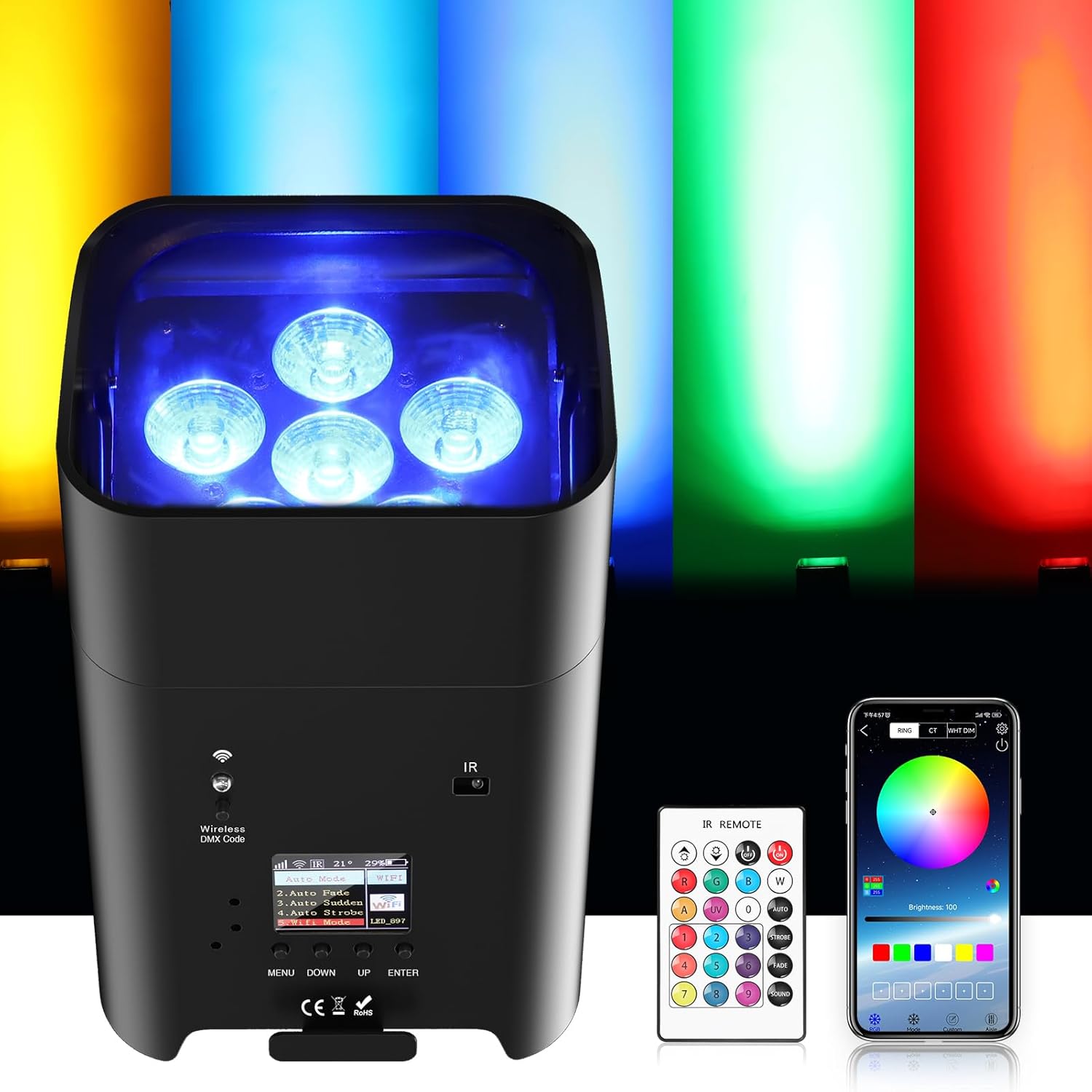
Figure 4.1: The UKing LED Par Light displaying various colors.

Figure 4.2: Versatile placement options for the LED Par Light.
5. Operating Modes
5.1. APP Control (Wi-Fi Mode)
The LED Par Light can be controlled wirelessly via a dedicated mobile application. This offers a user-friendly interface for advanced customization.
- Download the APP: Scan the QR code located on the light's back panel or refer to the manual for the APP download link. The APP is named "LEDLAMP".
- Activate Wi-Fi Mode on Light: Navigate through the light's menu using the 'MENU', 'DOWN', 'UP', and 'ENTER' buttons. Select "Wi-Fi Mode" from the options. The light will broadcast its own Wi-Fi network (e.g., LED_897).
- Connect Phone to Light's Wi-Fi: On your smartphone, go to Wi-Fi settings and connect to the network broadcasted by the light.
- Open the APP: Launch the "LEDLAMP" application. The app should automatically detect and connect to the light, allowing you to control colors, modes, and other settings.

Figure 5.1: APP operation interface for color and mode selection.
Video 5.1: Demonstration of connecting the LED Par Light to the mobile APP via Wi-Fi and controlling its lighting effects. This video illustrates scanning the QR code, setting the light to Wi-Fi mode, connecting a smartphone to the light's Wi-Fi network, and using the APP to change colors and modes.
5.2. Automatic Mode
The light features several built-in automatic programs for dynamic lighting effects without external control. Access these modes via the light's display menu under "Shows".
- Auto Color: Cycles through various colors.
- Auto Fade: Smooth transitions between colors.
- Auto Sudden: Abrupt changes between colors.
- Auto Strobe: Flashing light effect.
Video 5.2: Demonstration of the LED Par Light operating in various automatic modes, including color cycling, fading, sudden changes, and strobe effects. The video shows how to select these modes from the light's onboard display.
5.3. Remote Control Mode
Use the included infrared remote control to quickly change colors, modes, and other basic settings.
Video 5.3: Demonstration of controlling the LED Par Light using the infrared remote control. This video highlights changing colors and activating different lighting effects with the remote.
5.4. Sound-Activated Mode
In sound-activated mode, the light reacts to ambient sound or music, changing patterns and colors in sync with the audio. This mode is also accessible via the "Shows" menu.
Video 5.4: Demonstration of the LED Par Light in sound-activated mode, reacting to music with dynamic color changes and patterns. The video shows the light responding to audio input.
5.5. DMX512 Control
For professional setups, the light supports DMX512 control, allowing integration into larger lighting systems. Connect DMX IN/OUT ports to a DMX controller.

Figure 5.2: Power and DMX signal interface details.
6. Maintenance
- Cleaning: Regularly clean the lens and housing with a soft, dry cloth. Do not use abrasive cleaners or solvents.
- Storage: When not in use, store the light in a cool, dry place away from direct sunlight and extreme temperatures.
- Battery Care: For optimal battery life, avoid fully discharging the battery frequently. Recharge the unit periodically if stored for extended periods.
- Inspection: Periodically check cables and connections for wear or damage.
7. Troubleshooting
- Light not turning on: Ensure the battery is charged or the unit is connected to a power source. Check the power switch.
- Remote control not working: Check the remote control battery (CR2032). Ensure there are no obstructions between the remote and the light's IR receiver.
- APP connection issues: Ensure the light is in Wi-Fi mode and your phone is connected to the light's specific Wi-Fi network. If issues persist, try restarting both the light and your phone, and ensure the APP is updated. Some users have reported initial difficulties with Wi-Fi connection; ensure you follow the steps precisely.
- No DMX signal: Verify DMX cable connections and ensure the DMX controller is functioning correctly. Check the DMX address settings on the light.
8. Specifications
| Feature | Specification |
|---|---|
| Product Dimensions (L x W x H) | 20 x 16 x 20 cm |
| Weight | 2.9 Kilograms |
| Model Number | ZQ0 |
| Material | Aluminum, Polyvinyl Chloride (PVC) |
| Power Source | Battery Powered |
| Voltage | 250 Volts |
| Wattage | 108 Watts |
| Light Source Type | Light Emitting Diode (LED) |
| LED Configuration | 6x18W RGBWA+UV (6-in-1) |
| Battery Type | Lithium-Manganese Dioxide (1 CR2032 included for remote) |
| Battery Capacity | 9600 mAh (integrated) |
| Battery Duration (Full Brightness) | Approx. 4 hours |
| Battery Duration (Monochrome) | Approx. 26 hours |
| Control Modes | Wireless DMX512, Master/Slave, Auto, Sound-activated, IR Remote, Mobile APP (iOS/Android) |
| Lamp Life | 60,000 - 100,000 hours |

Figure 8.1: Product dimensions and detailed specifications.
9. Warranty and Support
Your UKing LED Par Light comes with a standard manufacturer's warranty. Please refer to the warranty card included in your packaging for specific terms and conditions. For technical support, troubleshooting assistance, or warranty claims, please contact U`King customer service through the retailer where you purchased the product or visit the official U`King website.