
Renimer ST01A
Renimer Wireless Earbuds User Manual
Model: ST01A
Introduction
Thank you for choosing Renimer Wireless Earbuds. These earbuds are designed to provide a superior audio experience with advanced Bluetooth 5.3 technology, professional sound engineering, and effective noise cancellation. This manual will guide you through the setup, operation, and maintenance of your new earbuds.

Image: Renimer Wireless Earbuds in their charging case, displaying battery levels on an LED screen.
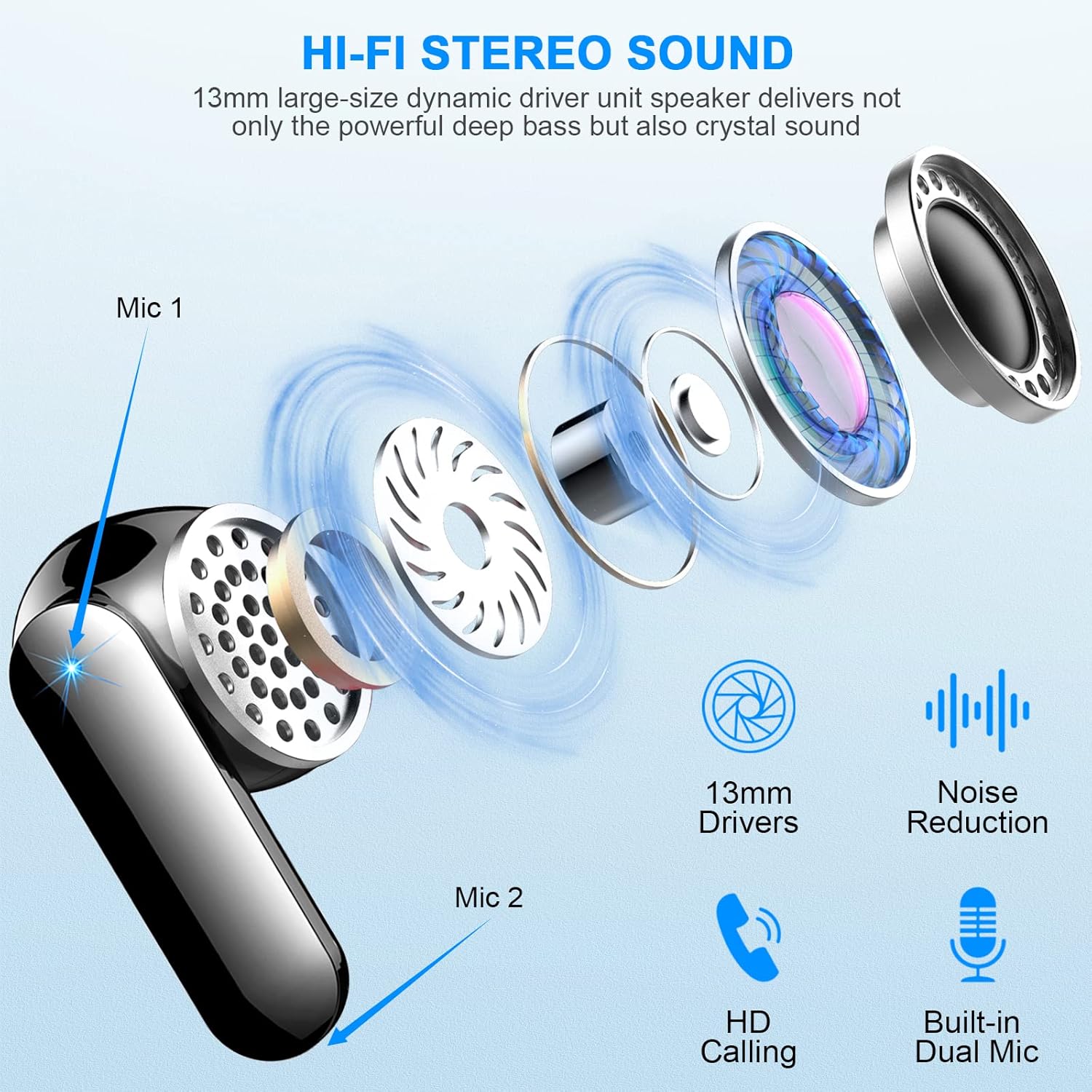
Image: An exploded diagram showcasing the internal components of the Renimer earbud, emphasizing its 13mm drivers, noise reduction capabilities, and dual microphones for high-definition calls.

Image: The Renimer earbuds displayed alongside various mobile phones, tablets, and laptops, illustrating their broad compatibility with Android, iOS, and Windows operating systems.
Setup
1. Charging the Earbuds and Case
Before first use, fully charge the charging case and earbuds.
- Place the earbuds into the charging case. Ensure they are correctly seated.
- Connect the Type-C charging cable (included) to the charging port on the case and the other end to a USB power source.
- The LED power display on the case will show the charging status. A full charge for the case takes approximately 1 hour.
- The earbuds will charge automatically when placed in the case. They provide up to 6 hours of playtime on a single charge. The charging case provides an additional 5 charges, totaling 36 hours of battery life.

Image: The charging case with an LED digital power display, showing battery levels for both earbuds and the case, along with battery life details.
2. Pairing with Your Device (One-Step Pairing)
The Renimer Wireless Earbuds feature one-step pairing for convenience.
- Open the charging case. The earbuds will automatically power on and enter pairing mode.
- On your device (smartphone, tablet, computer), enable Bluetooth.
- Search for "ST01A" in the list of available Bluetooth devices and select it to connect.
- Once connected, the earbuds will automatically pair with your device each time you open the charging case.

Image: Diagram illustrating the one-step pairing process, showing the earbuds automatically connecting to a phone's Bluetooth settings when the case is opened.
Note: If the earbuds do not connect automatically, ensure Bluetooth is enabled on your device and the earbuds are charged.
Operating Instructions
Touch Controls
The Renimer Wireless Earbuds feature smart touch sensors for easy control of music, calls, and voice assistant.
| Action | Function |
|---|---|
| Tap L/R earbud 1 time | Play/Pause music, Answer Call |
| Tap L/R earbud 2 times | Volume Adjustment (e.g., Left for Volume Down, Right for Volume Up) |
| Tap L/R earbud 3 times | Voice Assistant |
| Long press L/R earbud (approx. 2 seconds) | Reject Call / Hang Up |
| Long press L/R earbud (approx. 2 seconds) during music | Previous/Next Track (e.g., Left for Previous, Right for Next) |

Image: A visual guide to the smart touch controls on the earbuds, detailing single, double, triple taps, and long presses for various functions.
Call Functions
- Answer/End Call: Tap either earbud once.
- Reject Call: Long press either earbud for approximately 2 seconds.
- The earbuds feature 4 ENC noise-cancelling microphones for clear calls.

Image: Renimer earbuds shown with water droplets, signifying their IP7 waterproof rating and highlighting their capability for HD clear calls with built-in microphones.
Wearing the Earbuds
For optimal sound quality and comfort, ensure the earbuds are properly seated in your ear canal. The ergonomic design provides a secure fit, even during intense movement.

Image: A three-step visual guide demonstrating how to properly insert and secure the ergonomic semi-in-ear earbuds for a comfortable and stable fit.
Maintenance
Cleaning
- Regularly clean the earbuds and charging case to ensure optimal performance.
- Use a soft, dry, lint-free cloth to wipe the surfaces.
- For the charging contacts on both the earbuds and the case, use a cotton swab lightly dampened with rubbing alcohol to remove any dirt or debris. Ensure contacts are dry before charging.
- Do not use abrasive cleaners or immerse the earbuds or case in water.

Image: A diagram highlighting the charging contacts on both the earbuds and inside the charging case, indicating where to clean if charging issues occur.
Storage
When not in use, store the earbuds in their charging case to protect them and keep them charged. Store in a cool, dry place away from extreme temperatures.
Troubleshooting
| Issue | Possible Cause / Solution |
|---|---|
| Earbuds not charging |
|
| Only one earbud has sound / Earbuds not pairing with each other |
|
| Earbuds not connecting to device |
|
| Poor sound quality / Intermittent connection |
|

Image: A visual troubleshooting guide addressing common issues like charging problems and one-earbud sound, with solutions including cleaning contacts and resetting the earbuds.
Specifications
| Feature | Detail |
|---|---|
| Model Number | ST01A |
| Bluetooth Version | 5.3 |
| Connectivity Technology | Wireless (Bluetooth) |
| Ear Placement | In Ear |
| Noise Cancellation | ENC (Environmental Noise Cancellation) with 4 Mics |
| Waterproof Rating | IP7 |
| Battery Life (Earbuds) | Up to 6 hours (single charge) |
| Total Playtime (with Case) | Up to 36 hours |
| Charging Time (Earbuds) | Approx. 1 hour (fast charge) |
| Charging Port | Type-C USB |
| Package Dimensions | 8.6 x 7.8 x 3.9 cm |
| Item Weight | 80 g |

Image: A visual representation of the enhanced Bluetooth 5.3 chip, highlighting faster transfer speed, lower power consumption, lower latency, and more stable connection compared to older versions.
Warranty and Support
Renimer products are designed for durability and performance. For warranty information and customer support, please refer to the contact details provided with your purchase or visit the official Renimer website.
If you encounter any issues not covered in this manual, please contact Renimer customer service for assistance.

Image: Contents of the Renimer earbud package, including the charging case with earbuds, user guide, and USB-C charging cable.
Related documentsST01A

Ask a question about this manual
Ask about setup, troubleshooting, compatibility, parts, safety, or missing instructions. Manuals+ will review the question and use this page’s manual context to help answer it.