
NEEWER QPRO-N
NEEWER QPRO-N TTL Wireless Flash Trigger User Manual
Brand: NEEWER | Model: QPRO-N
Product Overview
The NEEWER QPRO-N TTL Wireless Flash Trigger is an advanced device designed for professional photographers, offering comprehensive control over flash units. It supports TTL automatic flash, flash exposure compensation (FEC), 1/8000s high-speed sync (HSS), stroboscopic flash, manual flash, magnification function, group modeling lamp control, group zooming, single point triggering, and simultaneous output value adjustment for multiple groups. This trigger is compatible with a wide range of Nikon cameras and NEEWER Q system flashes, providing a stable and interference-free wireless connection.

Image: The NEEWER QPRO-N TTL Wireless Flash Trigger, showcasing its large screen and controls, mounted on a Nikon camera hotshoe.
Setup
1. Battery Installation
The QPRO-N requires two AA batteries for operation. Locate the battery compartment on the device, insert the batteries according to the polarity indicators, and close the compartment securely.
2. Mounting on Camera
The flash trigger features a metal hotshoe for quick and secure attachment to your camera. Slide the QPRO-N onto the camera's hotshoe until it clicks into place. Use the hotshoe lock mechanism to secure the trigger firmly.
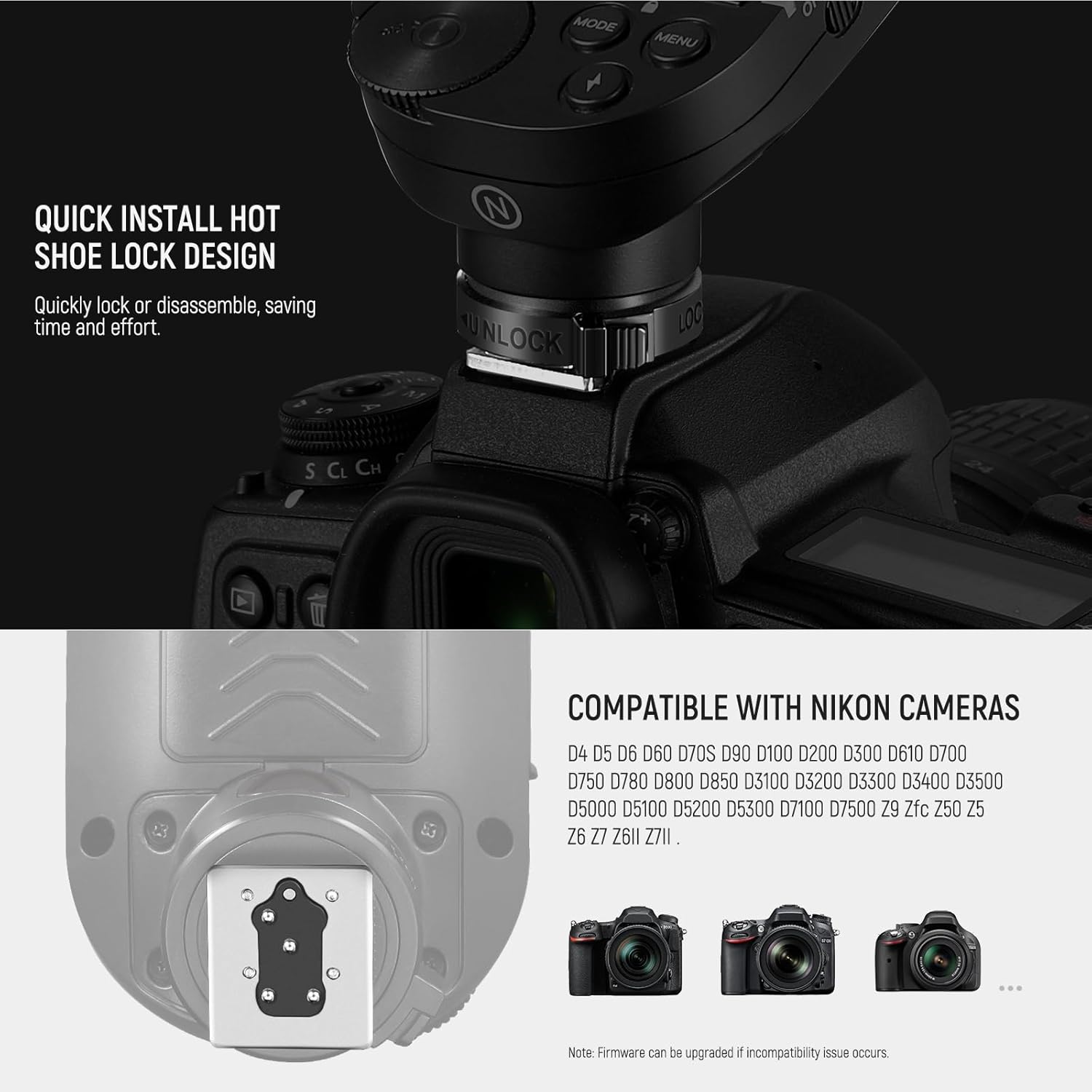
Image: Detail of the quick install hot shoe lock design, illustrating how to quickly secure or disassemble the trigger from the camera.
3. Powering On
Locate the power switch on the side of the QPRO-N and slide it to the "ON" position. The LCD screen will illuminate, indicating the device is ready for use.
Operating Instructions
1. Understanding the Interface
The QPRO-N features a large LCD screen, five group buttons (A-E), four function buttons, and a scrolling wheel for intuitive operation.
- Group Buttons (A-E): Press to select a group. Double-click to expand the view of a single group's settings.
- Function Buttons: Defined by the user interface, typically for mode selection, sync, and other settings. Short press for immediate action, long press for 3 seconds to lock.
- Scrolling Wheel: Turn clockwise for positive adjustments (+), counter-clockwise for negative adjustments (-).
- MENU Button: Short press to access the menu.
- RST Button: Reset button.
- Test Button: Manually trigger a test flash.

Image: A detailed diagram illustrating the various buttons, dial, and screen elements of the QPRO-N trigger.

Image: Demonstrates the user-friendly interface, screen magnification function for detailed group settings, and the memory function that saves settings automatically.
2. Wireless Q System Operation
The QPRO-N is equipped with a built-in 2.4G wireless Q system, allowing it to wirelessly trigger compatible NEEWER Q4, Q3, Z1-N, Z760-N, NW420-N, NW655-N, S101-300W/400W PRO flashes. For other flashes without a built-in Q system, a NEEWER QR receiver and a 2.5mm sync cord (sold separately) can be used.
- Group Control: Control up to 5 groups of flashes (A, B, C, D, E).
- Channels & IDs: Utilize 32 channels and 01-99 ID settings to prevent signal interference. Ensure all units (trigger and flashes) are set to the same channel and ID for proper communication.

Image: An illustration of the NEEWER QPRO-N trigger wirelessly controlling various NEEWER Q system studio lights and speedlites.

Image: Demonstrates the wireless control of multiple light groups (A-E) using the QPRO-N, highlighting the 5 groups, 32 channels, and 99 wireless IDs for stable triggering.

Image: Four examples of triggering: wireless synchronous triggering of NEEWER flashes, wireless synchronous triggering of Nikon hotshoe flashes (with QR receiver), using 2.5mm sync interface for non-Q system flashes, and triggering camera shutter wirelessly.
3. Flash Modes and Functions
The QPRO-N supports a variety of flash modes and functions:
- TTL Automatic Flash: Through-The-Lens automatic flash for accurate exposure.
- Manual Flash (M): Manually set flash power output.
- Stroboscopic Flash (Multi): Fire a series of rapid flashes.
- Flash Exposure Compensation (FEC): Adjust flash output relative to the camera's metered exposure.
- 1/8000s High Speed Sync (HSS): Allows for faster shutter speeds than the camera's native sync speed, ideal for freezing motion or overpowering ambient light.
- Magnification Function: Double-click a group button to enlarge its settings on the screen for easier viewing.
- Group Modeling Lamp Control: Control the modeling lamps of connected flashes by group.
- Group Zooming: Adjust the zoom of compatible flashes by group.
- Single Point Triggering: Enter C.Fn SHOOT via the MENU button to enable single point triggering for fast continuous shooting. Note: This mode only triggers flash under M/Multi Mode and is not for parameter adjustment.
- Autofocus Assist Light: Automatically illuminates in dim light to aid camera focusing.

Image: An infographic highlighting the professional flash modes supported by the QPRO-N, including HSS, TTL/M/Multi, 9 custom functions, exposure compensation, zoom group, and front/rear curtain synchronization.
Maintenance
To ensure the longevity and optimal performance of your NEEWER QPRO-N TTL Wireless Flash Trigger, follow these maintenance guidelines:
- Cleaning: Use a soft, dry cloth to clean the exterior of the trigger. For the LCD screen, use a microfiber cloth. Avoid using liquid cleaners or solvents.
- Storage: When not in use for extended periods, remove the AA batteries to prevent leakage. Store the trigger in a cool, dry place away from direct sunlight and extreme temperatures.
- Firmware Updates: Periodically check the NEEWER official website for firmware updates. Updates can improve compatibility, add new features, or resolve known issues. The trigger features a USB Type-C firmware upgrade port.

Image: A side view of the QPRO-N, highlighting the USB Type-C firmware upgrade port and the 2.5mm sync jack.
Troubleshooting
If you encounter issues with your NEEWER QPRO-N, consider the following common solutions:
- Flash Not Triggering in TTL/HSS: Ensure that the "Single Contact Mode" (C.Fn SHOOT) is disabled. This mode is intended for continuous shooting in M/Multi mode and will prevent TTL and High Speed Sync functionality.
- Connectivity Issues: Verify that the flash trigger and all connected flash units are set to the same group, channel, and ID settings. Interference from other 2.4G devices can sometimes occur; try changing the channel.
- Incompatibility with Camera Model: While the QPRO-N is broadly compatible with Nikon cameras, specific models (e.g., D810) may have known issues. Check for available firmware upgrades from NEEWER to address compatibility problems.
- Screen Not Responding/Freezing: Try turning the unit off and then on again. If the issue persists, remove and reinsert the batteries.
- Autofocus Assist Beam Not Working: Ensure the autofocus assist beam switch on the side of the trigger is in the "ON" position.

Image: A visual guide to disabling the single contact mode "SHOOT" function in the QPRO-N's custom settings, crucial for proper TTL and High Speed Sync operation.
Specifications
| Feature | Detail |
|---|---|
| Model Number | QPRO-N |
| Brand | NEEWER |
| Item Weight | 5.3 ounces |
| Package Dimensions | 5.16 x 3.39 x 2.6 inches |
| Batteries Required | 2 AA batteries |
| Connectivity Technology | Wireless (2.4G Q System), Wired (2.5mm sync jack) |
| Compatible Mountings | Nikon hotshoe |
| Flash Modes Supported | TTL, Manual, Multi (Stroboscopic), HSS (1/8000s) |
| Wireless Groups | 5 (A, B, C, D, E) |
| Wireless Channels | 32 |
| Wireless IDs | 01-99 |
| Firmware Upgrade Port | USB Type-C |
What's in the Box
- Upgraded QPRO-N Wireless Flash Trigger
Compatibility
The NEEWER QPRO-N TTL Wireless Flash Trigger is compatible with a wide range of Nikon camera models, including but not limited to:
- Nikon D4, D5, D6, D60, D70S, D90, D100, D200, D300, D610, D700, D750, D780, D800, D810 (Note: Not compatible with D810), D850
- Nikon D3100, D3200, D3300, D3400, D3500, D5000, D5100, D5200, D5300
- Nikon D7100, D7500
- Nikon Z9, Zfc, Z50, Z5, Z6, Z7, Z6II, Z7II
Firmware upgrades may be available to address specific compatibility issues with certain camera models.

Image: Illustrates various Nikon camera bodies compatible with the QPRO-N trigger.
Warranty and Support
Specific warranty details for the NEEWER QPRO-N TTL Wireless Flash Trigger are typically provided with the product packaging or can be found on the official NEEWER website. For technical support, troubleshooting assistance beyond this manual, or warranty claims, please refer to the contact information provided by NEEWER at the time of purchase or visit their official support channels online.
Related documentsQPRO-N

Ask a question about this manual
Ask about setup, troubleshooting, compatibility, parts, safety, or missing instructions. Manuals+ will review the question and use this page’s manual context to help answer it.