
1. Introduction
Thank you for choosing the BOBOPAI USB Rechargeable Light Bulb. This versatile LED bulb is designed for convenience and portability, offering a reliable lighting solution for various indoor and outdoor scenarios. With its built-in 2600mAh battery, remote control, touch control, dimming, and timer functions, it provides flexible illumination without the need for constant power outlets.
2. What's in the Box
- 1 x USB Rechargeable Light Bulb
- 1 x Remote Control
- 1 x USB Charging Wire
- 1 x Hook

Image: Contents of the BOBOPAI USB Rechargeable Light Bulb package.
3. Key Features
- USB Rechargeable: Eliminates the need for constant battery replacement, offering convenient USB-C charging.
- Large Capacity Battery: Equipped with a 2600mAh battery for long-lasting and stable power supply (6-24 hours depending on brightness).
- Remote Control: Easily turn the bulb on/off and adjust brightness (10%-100%) from a distance. One remote can control multiple bulbs.
- Touch Control: Simple touch switch for on/off and press-and-hold for brightness adjustment directly on the lamp body.
- Memory Function: Remembers your last brightness setting for convenience.
- Timing Function: Set the light to automatically turn off after 15, 30, or 60 minutes.
- Detachable Hook Design: Allows for easy hanging in various locations, saving space.
- Wide Application: Compatible with most E26/E27 lamps and fixtures, suitable for indoor, outdoor, camping, and emergency use.
4. Setup
4.1 Initial Charging
Before first use, fully charge the light bulb. Connect the provided USB charging wire to the bulb's USB-C port and a compatible USB power source (e.g., wall adapter, computer, power bank). The red indicator light will be on during charging, and the blue light will illuminate when fully charged.
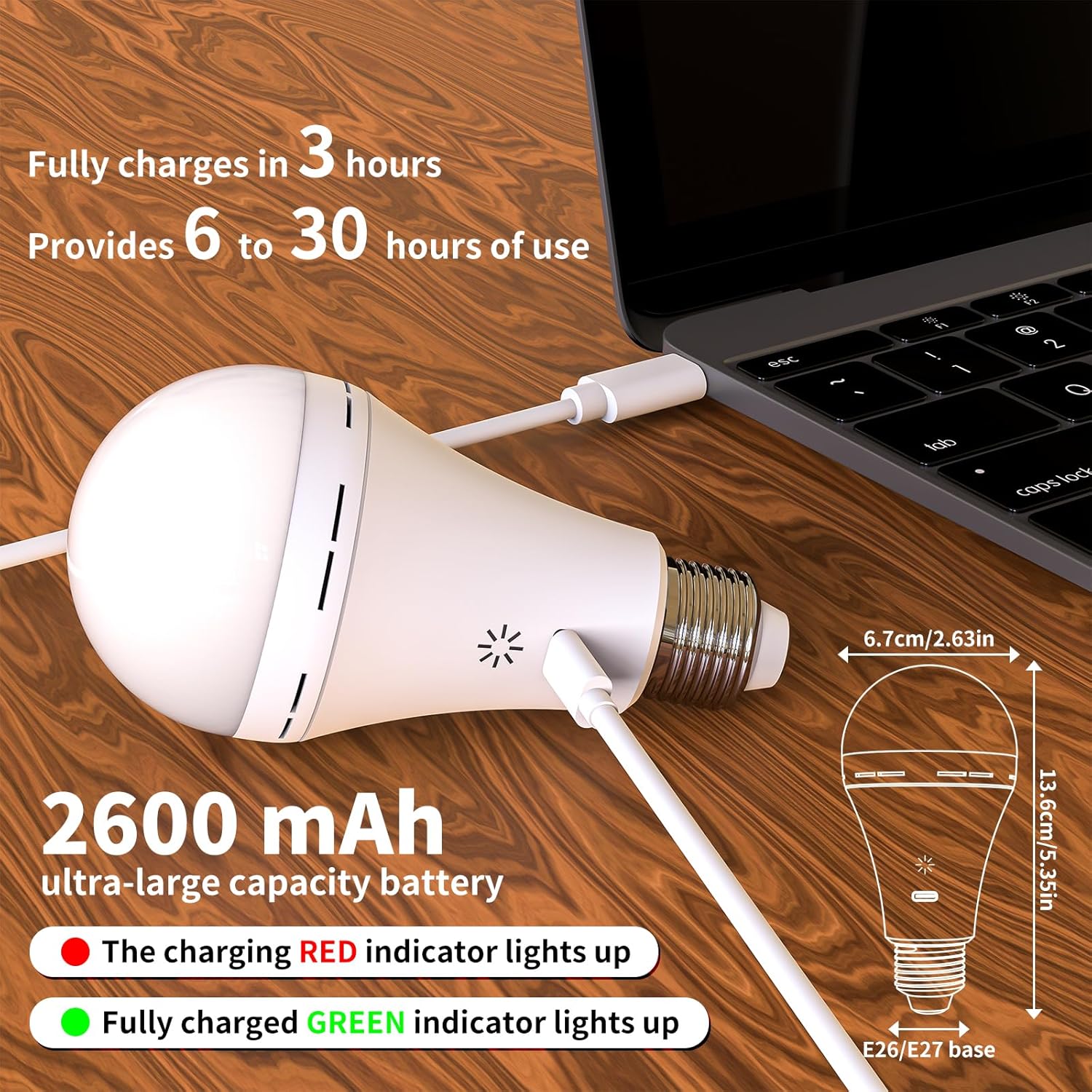
Image: The light bulb being charged via USB-C, illustrating battery capacity and charging indicators.
4.2 Remote Control Setup
The remote control typically comes with a battery installed, often with a plastic tab to prevent discharge. Remove this tab before use. If the remote does not respond, check or replace the battery (CR2025 coin cell).
4.3 Attaching the Hook
To use the bulb as a hanging light, screw the provided hook base onto the E26/E27 base of the light bulb until secure. The hook can then be used to hang the bulb from various fixtures or surfaces.

Image: The light bulb with the detachable hook attached, demonstrating its use for hanging.
4.4 Installation into Fixtures
The bulb is compatible with standard E26/E27 sockets. Simply screw the bulb into any compatible lamp or light fixture. Ensure the fixture is turned off before installation.

Image: Examples of various light fixtures where the bulb can be installed.
5. Operating Instructions
5.1 Power On/Off
- Touch Control: Lightly touch the switch area on the lamp body to turn the bulb on or off.
- Remote Control: Press the 'ON' or 'OFF' button on the remote control.
5.2 Adjusting Brightness
- Touch Control: Press and hold the switch area on the lamp body to cycle through brightness levels. Release when the desired brightness is reached.
- Remote Control: Use the brightness adjustment buttons (e.g., sun icon with up/down arrows or percentage indicators) on the remote to increase or decrease brightness from 10% to 100%.

Image: Demonstrating both touch and remote control for the light bulb.

Image: Visual representation of the bulb's dimming range.
5.3 Timing Function
Use the timer buttons on the remote control to set the bulb to automatically turn off after a specified duration:
- 15 minutes
- 30 minutes
- 60 minutes
5.4 Memory Function
The bulb will automatically remember the last brightness setting used when it is turned off and on again, whether by touch or remote control.
5.5 Product Demonstration Video
Video: A demonstration of the BOBOPAI USB Rechargeable Light Bulb's features, including unboxing, touch control, remote control, hook attachment, and charging indication.
6. Maintenance
- Cleaning: Wipe the bulb and remote control with a soft, dry cloth. Do not use abrasive cleaners or immerse in water.
- Battery Care: To prolong battery life, avoid fully discharging the bulb frequently. Recharge it when the light output becomes noticeably dim. If storing for an extended period, charge the bulb every 3-6 months.
- Storage: Store the bulb in a cool, dry place away from direct sunlight and extreme temperatures.
7. Troubleshooting
| Problem | Possible Cause | Solution |
|---|---|---|
| Bulb does not turn on. | Battery is depleted. | Charge the bulb fully. |
| Remote control battery is dead or tab not removed. | Remove plastic tab from remote battery compartment or replace battery. | |
| Bulb is not screwed in properly (if using a fixture). | Ensure the bulb is securely screwed into the E26/E27 socket. | |
| Short battery life. | Bulb used at highest brightness setting. | Lower brightness setting for extended use. |
| Battery not fully charged. | Ensure the bulb is fully charged until the blue indicator light appears. | |
| Remote control not responding. | Obstruction between remote and bulb. | Ensure clear line of sight between remote and bulb. |
| Remote control battery is low or dead. | Replace the remote control battery. |
8. Specifications
| Specification | Value |
|---|---|
| Brand | BOBOPAI |
| Model Name | LED Bulbs |
| Item Model Number | 4037258538--64809399 |
| Light Type | LED |
| Wattage | 8 watts (7 Watts Light Source) |
| Incandescent Equivalent Wattage | 60 Watts |
| Bulb Shape Size | A21 |
| Bulb Base | E26 |
| Brightness | 800 Lumen |
| Color Temperature | 3000 Kelvin |
| Power Source | Battery Powered (1 Lithium Ion battery included) |
| Battery Capacity | 2600mAh |
| Connectivity Technology | USB |
| Control Method | Remote, Touch |
| Indoor/Outdoor Usage | Indoor, Outdoor |
| Product Dimensions | 2.63"W x 5.35"H |
| Item Weight | 5.3 ounces |
| Average Life | 30000 Hours (approx. 10 Years) |
9. Warranty & Support
BOBOPAI offers a one-year free replacement service for this product. We are committed to 100% customer satisfaction. If you have any questions, concerns, or require assistance with your USB Rechargeable Light Bulb, please do not hesitate to contact our customer service team. We are happy to help resolve any issues you may encounter.
For more information and support, please visit the official BOBOPAI store: BOBOPAI Store
